Discussion Forum: Thread 375129

 Author: shupLiak View Messages Posted By shupLiak
 Posted: Jan 18, 2026 10:00
 Subject: Inventory Change Request for Set 60204-1
 Viewed: 32 times
 Topic: Inventories Requests (Entry)
 Status:Open
 Report:
Cancel Message
Cancel
Reply to Message
Reply
BrickLink
ID Card

shupLiak (7)

Location:  Slovakia, Bratislavský Kraj
Member Since Contact Type Status
Jan 6, 2017 Contact Member Seller
Buying Privileges - OKSelling Privileges - Revoked
Store Closed Store: Kocky, kocky, kocky
Please make changes to the following inventory:
 
Set No: 60204  Name: City Hospital
* 
60204-1 (Inv) City Hospital
808 Parts, 13 Minifigures, 2018
Sets: Town: City: Hospital

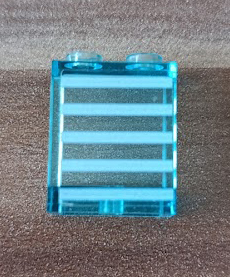
* Add 4 Part 87552 Trans-Light Blue Panel 1 x 2 x 2 with Side Supports - Hollow Studs (Counterpart)
* Change {1 to 2} Part Red 3009pb246 Brick 1 x 6 with White 'AMBULANCE' and 2 Blue EMT Star of Life Pattern (Sticker) - Set 60204 (Counterpart)

Comments from Submitter:
item 3009pb246 is 2 times in the set (stickers no 8 on stickersheet)

item no. 87552 is missing in Counterparts (4 pcs with stickers no.7 on stickersheet) (i can send photo of part with stickers)
 Author: shupLiak View Messages Posted By shupLiak
 Posted: Jan 18, 2026 10:02
 Subject: Re: Inventory Change Request for Set 60204-1
 Viewed: 28 times
 Topic: Inventories Requests
 Report:
Cancel Message
Cancel
Reply to Message
Reply
BrickLink
ID Card

shupLiak (7)

Location:  Slovakia, Bratislavský Kraj
Member Since Contact Type Status
Jan 6, 2017 Contact Member Seller
Buying Privileges - OKSelling Privileges - Revoked
Store Closed Store: Kocky, kocky, kocky
In Inventories Requests, shupLiak writes:
  Please make changes to the following inventory:
 
Set No: 60204  Name: City Hospital
* 
60204-1 (Inv) City Hospital
808 Parts, 13 Minifigures, 2018
Sets: Town: City: Hospital

* Add 4 Part 87552 Trans-Light Blue Panel 1 x 2 x 2 with Side Supports - Hollow Studs (Counterpart)
* Change {1 to 2} Part Red 3009pb246 Brick 1 x 6 with White 'AMBULANCE' and 2 Blue EMT Star of Life Pattern (Sticker) - Set 60204 (Counterpart)

Comments from Submitter:
item 3009pb246 is 2 times in the set (stickers no 8 on stickersheet)

item no. 87552 is missing in Counterparts (4 pcs with stickers no.7 on stickersheet) (i can send photo of part with stickers)
 
 Author: Nubs_Select View Messages Posted By Nubs_Select
 Posted: Jan 19, 2026 17:00
 Subject: Re: Inventory Change Request for Set 60204-1
 Viewed: 29 times
 Topic: Inventories Requests
 Report:
Cancel Message
Cancel
Reply to Message
Reply
BrickLink
ID Card

Nubs_Select (4831)

Location:  Canada, Ontario
Member Since Contact Type Status
Mar 15, 2016 Contact Member Seller
Buying Privileges - OKSelling Privileges - OK
Store: Nub's Select
BrickLink Inventories Administrator (?)
In Inventories Requests, shupLiak writes:
  Please make changes to the following inventory:
 
Set No: 60204  Name: City Hospital
* 
60204-1 (Inv) City Hospital
808 Parts, 13 Minifigures, 2018
Sets: Town: City: Hospital

* Add 4 Part 87552 Trans-Light Blue Panel 1 x 2 x 2 with Side Supports - Hollow Studs (Counterpart)

If stickered parts are missing from an inventory they can only be added after
they are added to the catalog first as decorated parts, including images:

Please follow the following process to add it correctly:

(1) Add the stickered part to the BrickLink catalog:

https://www.bricklink.com/wantedCatalog.asp?catType=P

Help on adding an item to the BrickLink catalog:

https://www.bricklink.com/help.asp?helpID=71

(2) Add an image to the BrickLink catalog for the stickered part:

https://www.bricklink.com/v2/catalog/catalogImageAdd.page?itemType=P

Help on adding an image to the BrickLink catalog:

https://www.bricklink.com/help.asp?helpID=87

(3) Fill out an Inventory Change Request to add the stickered part to the set
inventory after it is approved by a Catalog Associate or Catalog Administrator:

https://www.bricklink.com/catalogInvChange.asp?itemType=S

----------

The following videos are great tutorials for the process:

https://www.bricklink.com/message.asp?ID=1191009

Jennifer made a great how to guide for adding stickers

https://www.dropbox.com/scl/fi/kdlqdrmu5u2gm7odvmn2a/How-to-Stickers.pdf?rlkey=zx9ohb9cyag6scheeo4fc80d3&dl=0
  * Change {1 to 2} Part Red 3009pb246 Brick 1 x 6 with White 'AMBULANCE' and 2 Blue EMT Star of Life Pattern (Sticker) - Set 60204 (Counterpart)

Comments from Submitter:
item 3009pb246 is 2 times in the set (stickers no 8 on stickersheet)


This quantity change from 1 to 2 has been approved

  item no. 87552 is missing in Counterparts (4 pcs with stickers no.7 on stickersheet) (i can send photo of part with stickers)

Unfortunately, as mentioned above, we cannot accept this
 Author: 1001bricks View Messages Posted By 1001bricks
 Posted: Jan 19, 2026 17:56
 Subject: Re: Inventory Change Request for Set 60204-1
 Viewed: 29 times
 Topic: Inventories Requests
 Report:
Cancel Message
Cancel
Reply to Message
Reply
BrickLink
ID Card

1001bricks (55733)

Location:  France, Provence-Alpes-Côte d'Azur
Member Since Contact Type Status
Sep 6, 2005 Contact Member Seller
Buying Privileges - OKSelling Privileges - OK
Store: 1001bricks
In Inventories Requests, Nubs_Select writes:
  In Inventories Requests, shupLiak writes:
  Please make changes to the following inventory:
 
Set No: 60204  Name: City Hospital
* 
60204-1 (Inv) City Hospital
808 Parts, 13 Minifigures, 2018
Sets: Town: City: Hospital

* Add 4 Part 87552 Trans-Light Blue Panel 1 x 2 x 2 with Side Supports - Hollow Studs (Counterpart)

If stickered parts are missing from an inventory they can only be added after
they are added to the catalog first as decorated parts, including images:

Please follow the following process to add it correctly:

(1) Add the stickered part to the BrickLink catalog:

https://www.bricklink.com/wantedCatalog.asp?catType=P

Help on adding an item to the BrickLink catalog:

https://www.bricklink.com/help.asp?helpID=71

(2) Add an image to the BrickLink catalog for the stickered part:

https://www.bricklink.com/v2/catalog/catalogImageAdd.page?itemType=P

Help on adding an image to the BrickLink catalog:

https://www.bricklink.com/help.asp?helpID=87

(3) Fill out an Inventory Change Request to add the stickered part to the set
inventory after it is approved by a Catalog Associate or Catalog Administrator:

https://www.bricklink.com/catalogInvChange.asp?itemType=S

----------

The following videos are great tutorials for the process:

https://www.bricklink.com/message.asp?ID=1191009

Jennifer made a great how to guide for adding stickers

https://www.dropbox.com/scl/fi/kdlqdrmu5u2gm7odvmn2a/How-to-Stickers.pdf?rlkey=zx9ohb9cyag6scheeo4fc80d3&dl=0
  * Change {1 to 2} Part Red 3009pb246 Brick 1 x 6 with White 'AMBULANCE' and 2 Blue EMT Star of Life Pattern (Sticker) - Set 60204 (Counterpart)

Comments from Submitter:
item 3009pb246 is 2 times in the set (stickers no 8 on stickersheet)


This quantity change from 1 to 2 has been approved

  item no. 87552 is missing in Counterparts (4 pcs with stickers no.7 on stickersheet) (i can send photo of part with stickers)

Unfortunately, as mentioned above, we cannot accept this

You're 100% right, but note that having to provide 7 links on which one is
video tutorial on how to submit a Catalog change shows how much this prehistoric
part of BrickLink is archaic, obsolete and somewhere elitist; only Pure Catalog
fans, BrickLink Otakus and Autists can learn and dedicate this much to this weirdo
process. A bit like the Forum, but even worse.

At the contrary a single page with some checkboxes/questions showing some infos
and display progressively the solutions, with how-to pics and some logic (I don't
even talk about AI!) would be nice to guide a beginner.

Right now, it's just "Go get infos for 2 hours then come back posting
your single change". And another one bites the dust.
 Author: SylvainLS View Messages Posted By SylvainLS
 Posted: Jan 19, 2026 18:04
 Subject: Re: Inventory Change Request for Set 60204-1
 Viewed: 22 times
 Topic: Inventories Requests
 Report:
Cancel Message
Cancel
Reply to Message
Reply
BrickLink
ID Card

SylvainLS (52)

Location:  France, Nouvelle-Aquitaine
Member Since Contact Type Status
Apr 25, 2014 Contact Member Seller
Buying Privileges - OKSelling Privileges - OK
Store Closed Store: BuyerOnly
BrickLink Discussions Moderator (?)
In Inventories Requests, 1001bricks writes:
  […]
You're 100% right, but note that having to provide 7 links on which one is
video tutorial on how to submit a Catalog change shows how much this prehistoric
part of BrickLink is archaic, obsolete and somewhere elitist; only Pure Catalog
fans, BrickLink Otakus and Autists can learn and dedicate this much to this weirdo
process. A bit like the Forum, but even worse.

At the contrary a single page with some checkboxes/questions showing some infos
and display progressively the solutions, with how-to pics and some logic (I don't
even talk about AI!) would be nice to guide a beginner.

Right now, it's just "Go get infos for 2 hours then come back posting
your single change". And another one bites the dust.

You know the cat people can’t do anything about that, right?

(Because they just sleep 19h per day and spend the rest of the time chasing laser
dots….)
 Author: Nubs_Select View Messages Posted By Nubs_Select
 Posted: Jan 19, 2026 18:06
 Subject: (Cancelled)
 Viewed: 11 times
 Topic: Inventories Requests
Cancel Message
Cancel
BrickLink
ID Card

Nubs_Select (4831)

Location:  Canada, Ontario
Member Since Contact Type Status
Mar 15, 2016 Contact Member Seller
Buying Privileges - OKSelling Privileges - OK
Store: Nub's Select
BrickLink Inventories Administrator (?)
(Cancelled)
 Author: Nubs_Select View Messages Posted By Nubs_Select
 Posted: Jan 19, 2026 18:06
 Subject: Re: Inventory Change Request for Set 60204-1
 Viewed: 25 times
 Topic: Inventories Requests
 Report:
Cancel Message
Cancel
Reply to Message
Reply
BrickLink
ID Card

Nubs_Select (4831)

Location:  Canada, Ontario
Member Since Contact Type Status
Mar 15, 2016 Contact Member Seller
Buying Privileges - OKSelling Privileges - OK
Store: Nub's Select
BrickLink Inventories Administrator (?)
In Inventories Requests, SylvainLS writes:
  In Inventories Requests, 1001bricks writes:
  […]
You're 100% right, but note that having to provide 7 links on which one is
video tutorial on how to submit a Catalog change shows how much this prehistoric
part of BrickLink is archaic, obsolete and somewhere elitist; only Pure Catalog
fans, BrickLink Otakus and Autists can learn and dedicate this much to this weirdo
process. A bit like the Forum, but even worse.

At the contrary a single page with some checkboxes/questions showing some infos
and display progressively the solutions, with how-to pics and some logic (I don't
even talk about AI!) would be nice to guide a beginner.

Right now, it's just "Go get infos for 2 hours then come back posting
your single change". And another one bites the dust.

You know the cat people can’t do anything about that, right?

(Because they just sleep 19h per day and spend the rest of the time chasing laser
dots….)

minimum 23 hours of sleep/day over here anything less and I cant operate!
 Author: 1001bricks View Messages Posted By 1001bricks
 Posted: Jan 19, 2026 18:42
 Subject: Re: Inventory Change Request for Set 60204-1
 Viewed: 33 times
 Topic: Inventories Requests
 Report:
Cancel Message
Cancel
Reply to Message
Reply
BrickLink
ID Card

1001bricks (55733)

Location:  France, Provence-Alpes-Côte d'Azur
Member Since Contact Type Status
Sep 6, 2005 Contact Member Seller
Buying Privileges - OKSelling Privileges - OK
Store: 1001bricks
In Inventories Requests, SylvainLS writes:
  In Inventories Requests, 1001bricks writes:
  […]
You're 100% right, but note that having to provide 7 links on which one is
video tutorial on how to submit a Catalog change shows how much this prehistoric
part of BrickLink is archaic, obsolete and somewhere elitist; only Pure Catalog
fans, BrickLink Otakus and Autists can learn and dedicate this much to this weirdo
process. A bit like the Forum, but even worse.

At the contrary a single page with some checkboxes/questions showing some infos
and display progressively the solutions, with how-to pics and some logic (I don't
even talk about AI!) would be nice to guide a beginner.

Right now, it's just "Go get infos for 2 hours then come back posting
your single change". And another one bites the dust.

You know the cat people can’t do anything about that, right?

(Because they just sleep 19h per day and spend the rest of the time chasing laser
dots….)

Sauce: Pinterest
 
 Author: Nubs_Select View Messages Posted By Nubs_Select
 Posted: Jan 19, 2026 18:05
 Subject: Re: Inventory Change Request for Set 60204-1
 Viewed: 23 times
 Topic: Inventories Requests
 Report:
Cancel Message
Cancel
Reply to Message
Reply
BrickLink
ID Card

Nubs_Select (4831)

Location:  Canada, Ontario
Member Since Contact Type Status
Mar 15, 2016 Contact Member Seller
Buying Privileges - OKSelling Privileges - OK
Store: Nub's Select
BrickLink Inventories Administrator (?)
In Inventories Requests, 1001bricks writes:
  In Inventories Requests, Nubs_Select writes:
  In Inventories Requests, shupLiak writes:
  Please make changes to the following inventory:
 
Set No: 60204  Name: City Hospital
* 
60204-1 (Inv) City Hospital
808 Parts, 13 Minifigures, 2018
Sets: Town: City: Hospital

* Add 4 Part 87552 Trans-Light Blue Panel 1 x 2 x 2 with Side Supports - Hollow Studs (Counterpart)

If stickered parts are missing from an inventory they can only be added after
they are added to the catalog first as decorated parts, including images:

Please follow the following process to add it correctly:

(1) Add the stickered part to the BrickLink catalog:

https://www.bricklink.com/wantedCatalog.asp?catType=P

Help on adding an item to the BrickLink catalog:

https://www.bricklink.com/help.asp?helpID=71

(2) Add an image to the BrickLink catalog for the stickered part:

https://www.bricklink.com/v2/catalog/catalogImageAdd.page?itemType=P

Help on adding an image to the BrickLink catalog:

https://www.bricklink.com/help.asp?helpID=87

(3) Fill out an Inventory Change Request to add the stickered part to the set
inventory after it is approved by a Catalog Associate or Catalog Administrator:

https://www.bricklink.com/catalogInvChange.asp?itemType=S

----------

The following videos are great tutorials for the process:

https://www.bricklink.com/message.asp?ID=1191009

Jennifer made a great how to guide for adding stickers

https://www.dropbox.com/scl/fi/kdlqdrmu5u2gm7odvmn2a/How-to-Stickers.pdf?rlkey=zx9ohb9cyag6scheeo4fc80d3&dl=0
  * Change {1 to 2} Part Red 3009pb246 Brick 1 x 6 with White 'AMBULANCE' and 2 Blue EMT Star of Life Pattern (Sticker) - Set 60204 (Counterpart)

Comments from Submitter:
item 3009pb246 is 2 times in the set (stickers no 8 on stickersheet)


This quantity change from 1 to 2 has been approved

  item no. 87552 is missing in Counterparts (4 pcs with stickers no.7 on stickersheet) (i can send photo of part with stickers)

Unfortunately, as mentioned above, we cannot accept this

You're 100% right, but note that having to provide 7 links on which one is
video tutorial on how to submit a Catalog change shows how much this prehistoric
part of BrickLink is archaic, obsolete and somewhere elitist; only Pure Catalog
fans, BrickLink Otakus and Autists can learn and dedicate this much to this weirdo
process. A bit like the Forum, but even worse.

At the contrary a single page with some checkboxes/questions showing some infos
and display progressively the solutions, with how-to pics and some logic (I don't
even talk about AI!) would be nice to guide a beginner.

Right now, it's just "Go get infos for 2 hours then come back posting
your single change". And another one bites the dust.

its complex to start, but once you get the hang of it, its still a bit complex
but fun