Sellers will no longer need to create custom HTML emails for their coupons. Instead,
they can now add a custom note to the buyer using the Note to Customer field
on the Create a Coupon page. After creating the coupon, the buyer will automatically
receive an email with the seller’s note and coupon information.
Streamlined coupon creation
To save time, Sellers can use the Coupon Preset Settings page to create default
coupon settings that prefill the Create a Coupon form. This makes it easy to
send personalized offers without having to start from scratch each time.
Restrictions such as minimum spend limits, maximum discount limits, and the exclusion
of sale items can be applied to tailor offers.
For more information on the updates, please visit the Coupon Help Page: https://www.bricklink.com/help.asp?helpID=626.
Sellers will no longer need to create custom HTML emails for their coupons. Instead,
they can now add a custom note to the buyer using the Note to Customer field
on the Create a Coupon page. After creating the coupon, the buyer will automatically
receive an email with the seller’s note and coupon information.
Streamlined coupon creation
To save time, Sellers can use the Coupon Preset Settings page to create default
coupon settings that prefill the Create a Coupon form. This makes it easy to
send personalized offers without having to start from scratch each time.
Restrictions such as minimum spend limits, maximum discount limits, and the exclusion
of sale items can be applied to tailor offers.
For more information on the updates, please visit the Coupon Help Page: https://www.bricklink.com/help.asp?helpID=626.
Thank you,
The BrickLink Team
Please see previous posts about this. Create coupon doesn't autofill the
buyers username now and it doesn't autofill your presets like it used to.
Please fix this ASAP
Sellers will no longer need to create custom HTML emails for their coupons. Instead,
they can now add a custom note to the buyer using the Note to Customer field
on the Create a Coupon page. After creating the coupon, the buyer will automatically
receive an email with the seller’s note and coupon information.
Streamlined coupon creation
To save time, Sellers can use the Coupon Preset Settings page to create default
coupon settings that prefill the Create a Coupon form. This makes it easy to
send personalized offers without having to start from scratch each time.
Restrictions such as minimum spend limits, maximum discount limits, and the exclusion
of sale items can be applied to tailor offers.
For more information on the updates, please visit the Coupon Help Page: https://www.bricklink.com/help.asp?helpID=626.
Thank you,
The BrickLink Team
Please see previous posts about this. Create coupon doesn't autofill the
buyers username now and it doesn't autofill your presets like it used to.
Please fix this ASAP
I agree, this is a big mistake. It now takes me longer to issue a coupon than
before, so please fix this, and do a better job testing "improved features"
in the future before you release them.
Sellers will no longer need to create custom HTML emails for their coupons. Instead,
they can now add a custom note to the buyer using the Note to Customer field
on the Create a Coupon page. After creating the coupon, the buyer will automatically
receive an email with the seller’s note and coupon information.
Streamlined coupon creation
To save time, Sellers can use the Coupon Preset Settings page to create default
coupon settings that prefill the Create a Coupon form. This makes it easy to
send personalized offers without having to start from scratch each time.
Restrictions such as minimum spend limits, maximum discount limits, and the exclusion
of sale items can be applied to tailor offers.
For more information on the updates, please visit the Coupon Help Page: https://www.bricklink.com/help.asp?helpID=626.
Thank you,
The BrickLink Team
Please see previous posts about this. Create coupon doesn't autofill the
buyers username now and it doesn't autofill your presets like it used to.
Please fix this ASAP
Exactly. All this was on the page before and now you have to select it for each
one.
I send 500+ coupons a month and doing it like this I would have to hire someone
to be the coupon sender LOL
Autofilling a username from the Orders Placed page to the Create a Coupon page
was temporarily removed and will be back online after our development team does
some testing. We'll announce when it's back online.
If you want to add in your presets, click the "Use Saved Presets" button.
Autofilling a username from the Orders Placed page to the Create a Coupon page
was temporarily removed and will be back online after our development team does
some testing. We'll announce when it's back online.
If you want to add in your presets, click the "Use Saved Presets" button.
Will the ability to set coupons for 'all except' and select a category
be brought back?
This is problematic we have some items with much lower margins that we cannot
afford to have percentage coupons applied to.
Autofilling a username from the Orders Placed page to the Create a Coupon page
was temporarily removed and will be back online after our development team does
some testing. We'll announce when it's back online.
If you want to add in your presets, click the "Use Saved Presets" button.
That's great, thank you.
Also, when it's back and we are clicking through from the orders placed page,
I think it would be better that the presets are already filled. & the button
is reversed. So we click to remove presets rather than click to add them. Please.
Sellers will no longer need to create custom HTML emails for their coupons. Instead,
they can now add a custom note to the buyer using the Note to Customer field
on the Create a Coupon page. After creating the coupon, the buyer will automatically
receive an email with the seller’s note and coupon information.
Streamlined coupon creation
To save time, Sellers can use the Coupon Preset Settings page to create default
coupon settings that prefill the Create a Coupon form. This makes it easy to
send personalized offers without having to start from scratch each time.
Restrictions such as minimum spend limits, maximum discount limits, and the exclusion
of sale items can be applied to tailor offers.
For more information on the updates, please visit the Coupon Help Page: https://www.bricklink.com/help.asp?helpID=626.
Thank you,
The BrickLink Team
Please see previous posts about this. Create coupon doesn't autofill the
buyers username now and it doesn't autofill your presets like it used to.
Please fix this ASAP
Such an obvious missed requirement to someone who uses this feature. To prevent
this in the future, the product manager needs to seek out a team of power users
and create an user acceptance (UA) test group. This is pretty standard practice.
With the apps/website at my company, we have Dev Testing, QA (Quality Assurance)
Testing, and then UA (User Acceptance) testing. The once we go live with the
change we have Production Testing.
Sellers will no longer need to create custom HTML emails for their coupons. Instead,
they can now add a custom note to the buyer using the Note to Customer field
on the Create a Coupon page. After creating the coupon, the buyer will automatically
receive an email with the seller’s note and coupon information.
Streamlined coupon creation
To save time, Sellers can use the Coupon Preset Settings page to create default
coupon settings that prefill the Create a Coupon form. This makes it easy to
send personalized offers without having to start from scratch each time.
Restrictions such as minimum spend limits, maximum discount limits, and the exclusion
of sale items can be applied to tailor offers.
For more information on the updates, please visit the Coupon Help Page: https://www.bricklink.com/help.asp?helpID=626.
Thank you,
The BrickLink Team
THIS DOES NOT SAVE TIME! IT TAKES LONGER AND IS MORE DIFFICULT. When clicking
on the create coupon on the orders page, he preset AND customer username need
to already be filled in like before. the "update" was actually a step
backwards. The real time fix is clicking the create coupon button and it automatically
being applied to the customer, without taking you to another window/tab.
Sellers will no longer need to create custom HTML emails for their coupons. Instead,
they can now add a custom note to the buyer using the Note to Customer field
on the Create a Coupon page. After creating the coupon, the buyer will automatically
receive an email with the seller’s note and coupon information.
Streamlined coupon creation
To save time, Sellers can use the Coupon Preset Settings page to create default
coupon settings that prefill the Create a Coupon form. This makes it easy to
send personalized offers without having to start from scratch each time.
Restrictions such as minimum spend limits, maximum discount limits, and the exclusion
of sale items can be applied to tailor offers.
For more information on the updates, please visit the Coupon Help Page: https://www.bricklink.com/help.asp?helpID=626.
Thank you,
The BrickLink Team
THIS DOES NOT SAVE TIME! IT TAKES LONGER AND IS MORE DIFFICULT. When clicking
on the create coupon on the orders page, he preset AND customer username need
to already be filled in like before. the "update" was actually a step
backwards. The real time fix is clicking the create coupon button and it automatically
being applied to the customer, without taking you to another window/tab.
PLEASE FIX THIS OR REVERT BACK IMMEDIATELY!
Dear BrickLink® members, We’re excited to announce we totally ruined the ability
to send coupons fast or even at all. Good luck trying to send a bunch now, that
is if the page will even work after you try to send one.
Sellers will no longer need to create custom HTML emails for their coupons. Instead,
they can now add a custom note to the buyer using the Note to Customer field
on the Create a Coupon page. After creating the coupon, the buyer will automatically
receive an email with the seller’s note and coupon information.
Streamlined coupon creation
To save time, Sellers can use the Coupon Preset Settings page to create default
coupon settings that prefill the Create a Coupon form. This makes it easy to
send personalized offers without having to start from scratch each time.
Restrictions such as minimum spend limits, maximum discount limits, and the exclusion
of sale items can be applied to tailor offers.
For more information on the updates, please visit the Coupon Help Page: https://www.bricklink.com/help.asp?helpID=626.
Thank you,
The BrickLink Team
It takes 10 times longer now. I could send one a second before and now after
a minute I can't even send one. There is no way it could have been made any
faster than it was before. If this is how it will be I won't bother sending
any coupons. What a waste of time
Sellers will no longer need to create custom HTML emails for their coupons. Instead,
they can now add a custom note to the buyer using the Note to Customer field
on the Create a Coupon page. After creating the coupon, the buyer will automatically
receive an email with the seller’s note and coupon information.
Streamlined coupon creation
To save time, Sellers can use the Coupon Preset Settings page to create default
coupon settings that prefill the Create a Coupon form. This makes it easy to
send personalized offers without having to start from scratch each time.
Restrictions such as minimum spend limits, maximum discount limits, and the exclusion
of sale items can be applied to tailor offers.
For more information on the updates, please visit the Coupon Help Page: https://www.bricklink.com/help.asp?helpID=626.
Thank you,
The BrickLink Team
It takes 10 times longer now. I could send one a second before and now after
a minute I can't even send one. There is no way it could have been made any
faster than it was before. If this is how it will be I won't bother sending
any coupons. What a waste of time
This page isn’t working
v2.bricklink.com is currently unable to handle this request.
HTTP ERROR 500
You cannot delete coupons issued by other members. Coupons are automatically
removed when they reach the expiration date set by the seller.
Thanks for the reply.
But you used to be able too.
This is removal of functionality. I don't like that
We don't like that (three is enough - I won't
include a sad face for every sad face here)
If you think they are spam, you can least favourite the store.
Or Report the shop for spamming.
I'm not sure we're allowed to randomly send tens/hundreds of coupons
to every past customer (or even unknown met in Forum for example)...
Or Report the shop for spamming.
I'm not sure we're allowed to randomly send tens/hundreds of coupons
to every past customer (or even unknown met in Forum for example)...
Yes but that requires BL to do something about it! I find my method works, as
their items never show up in searches, so their spam is never rewarded
Sellers will no longer need to create custom HTML emails for their coupons. Instead,
they can now add a custom note to the buyer using the Note to Customer field
on the Create a Coupon page. After creating the coupon, the buyer will automatically
receive an email with the seller’s note and coupon information.
Streamlined coupon creation
To save time, Sellers can use the Coupon Preset Settings page to create default
coupon settings that prefill the Create a Coupon form. This makes it easy to
send personalized offers without having to start from scratch each time.
Restrictions such as minimum spend limits, maximum discount limits, and the exclusion
of sale items can be applied to tailor offers.
For more information on the updates, please visit the Coupon Help Page: https://www.bricklink.com/help.asp?helpID=626.
Thank you,
The BrickLink Team
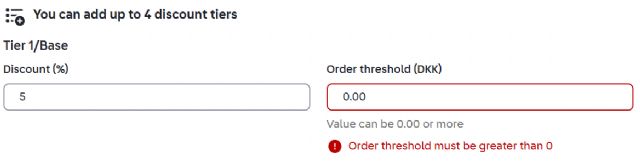
There are many problems with the new page and we are losing functionality again...
It doesn't auto populate the username when following the direct link from
the orders page, but I suppose this will be fixed as the URL is generated correctly.
For already created coupons that link should go to that coupon or at least implement
back a search within the coupons page and autofill it when coming from the orders
page link.
Preset settings should be that, a preset as the word is defined, now we have
even more clicks to do... Maybe just add a checkbox in the settings if we want
the preset auto applied always like it worked before.
And you completely removed the setting that a coupon apply for certain item types,
now we are not able to differentiate parts from sets? I think this is a major
problem...
The margin to give offers to customers is vastly different from sets cost than
the rest of items like parts and minifigures? Did you convert all item type specific
coupons to storewide ones?
BTW How are we supposed to go back to our orders screen? The store icon is missing
from the navigation, I already reported this back when the new color guide page
was launched...
These new pages are nice and look nice on mobile, but you need real life user
testing before removing the old pages from access...
Sellers will no longer need to create custom HTML emails for their coupons. Instead,
they can now add a custom note to the buyer using the Note to Customer field
on the Create a Coupon page. After creating the coupon, the buyer will automatically
receive an email with the seller’s note and coupon information.
Streamlined coupon creation
To save time, Sellers can use the Coupon Preset Settings page to create default
coupon settings that prefill the Create a Coupon form. This makes it easy to
send personalized offers without having to start from scratch each time.
Restrictions such as minimum spend limits, maximum discount limits, and the exclusion
of sale items can be applied to tailor offers.
For more information on the updates, please visit the Coupon Help Page: https://www.bricklink.com/help.asp?helpID=626.
Thank you,
The BrickLink Team
There are many problems with the new page and we are losing functionality again...
It doesn't auto populate the username when following the direct link from
the orders page, but I suppose this will be fixed as the URL is generated correctly.
For now copy/paste it it's in the URL
BTW How are we supposed to go back to our orders screen?
Sellers will no longer need to create custom HTML emails for their coupons. Instead,
they can now add a custom note to the buyer using the Note to Customer field
on the Create a Coupon page. After creating the coupon, the buyer will automatically
receive an email with the seller’s note and coupon information.
Streamlined coupon creation
To save time, Sellers can use the Coupon Preset Settings page to create default
coupon settings that prefill the Create a Coupon form. This makes it easy to
send personalized offers without having to start from scratch each time.
Restrictions such as minimum spend limits, maximum discount limits, and the exclusion
of sale items can be applied to tailor offers.
For more information on the updates, please visit the Coupon Help Page: https://www.bricklink.com/help.asp?helpID=626.
Thank you,
The BrickLink Team
There are many problems with the new page and we are losing functionality again...
It doesn't auto populate the username when following the direct link from
the orders page, but I suppose this will be fixed as the URL is generated correctly.
For already created coupons that link should go to that coupon or at least implement
back a search within the coupons page and autofill it when coming from the orders
page link.
Preset settings should be that, a preset as the word is defined, now we have
even more clicks to do... Maybe just add a checkbox in the settings if we want
the preset auto applied always like it worked before.
And you completely removed the setting that a coupon apply for certain item types,
now we are not able to differentiate parts from sets? I think this is a major
problem...
The margin to give offers to customers is vastly different from sets cost than
the rest of items like parts and minifigures? Did you convert all item type specific
coupons to storewide ones?
BTW How are we supposed to go back to our orders screen? The store icon is missing
from the navigation, I already reported this back when the new color guide page
was launched...
These new pages are nice and look nice on mobile, but you need real life user
testing before removing the old pages from access...
Sellers will no longer need to create custom HTML emails for their coupons. Instead,
they can now add a custom note to the buyer using the Note to Customer field
on the Create a Coupon page. After creating the coupon, the buyer will automatically
receive an email with the seller’s note and coupon information.
Streamlined coupon creation
To save time, Sellers can use the Coupon Preset Settings page to create default
coupon settings that prefill the Create a Coupon form. This makes it easy to
send personalized offers without having to start from scratch each time.
Restrictions such as minimum spend limits, maximum discount limits, and the exclusion
of sale items can be applied to tailor offers.
For more information on the updates, please visit the Coupon Help Page: https://www.bricklink.com/help.asp?helpID=626.
Thank you,
The BrickLink Team
There are many problems with the new page and we are losing functionality again...
It doesn't auto populate the username when following the direct link from
the orders page, but I suppose this will be fixed as the URL is generated correctly.
For already created coupons that link should go to that coupon or at least implement
back a search within the coupons page and autofill it when coming from the orders
page link.
Preset settings should be that, a preset as the word is defined, now we have
even more clicks to do... Maybe just add a checkbox in the settings if we want
the preset auto applied always like it worked before.
And you completely removed the setting that a coupon apply for certain item types,
now we are not able to differentiate parts from sets? I think this is a major
problem...
The margin to give offers to customers is vastly different from sets cost than
the rest of items like parts and minifigures? Did you convert all item type specific
coupons to storewide ones?
BTW How are we supposed to go back to our orders screen? The store icon is missing
from the navigation, I already reported this back when the new color guide page
was launched...
These new pages are nice and look nice on mobile, but you need real life user
testing before removing the old pages from access...
More things:
The email link you get when receiving a coupon to "View My Coupon" doesn't
work.
And we should be able to delete coupons issued to us as mentioned...
Also sorting and/or filtering on the coupons page would be good to check many
things.
Why we can no longer click the ursername of people we created a coupon for? Neither
see their feedback number or badge on the new page... Goodbye BrickLink community
connections?
An ALT text of the country name would be nice when hovering the flags, just little
details and good for accessibility.
Seems there is no pagination now, so the page is slow to load too.
Noting also on the mobile view the first two coupons are auto expanded.
PD: Will the whole website text fields become siblings to this phrase and huge
white empty spaces?
It’s important to prioritize your privacy and the privacy of others. Please
refrain from including any personal information in this field.
Sellers will no longer need to create custom HTML emails for their coupons. Instead,
they can now add a custom note to the buyer using the Note to Customer field
on the Create a Coupon page. After creating the coupon, the buyer will automatically
receive an email with the seller’s note and coupon information.
Streamlined coupon creation
To save time, Sellers can use the Coupon Preset Settings page to create default
coupon settings that prefill the Create a Coupon form. This makes it easy to
send personalized offers without having to start from scratch each time.
Restrictions such as minimum spend limits, maximum discount limits, and the exclusion
of sale items can be applied to tailor offers.
For more information on the updates, please visit the Coupon Help Page: https://www.bricklink.com/help.asp?helpID=626.
Thank you,
The BrickLink Team
There are many problems with the new page and we are losing functionality again...
It doesn't auto populate the username when following the direct link from
the orders page, but I suppose this will be fixed as the URL is generated correctly.
For already created coupons that link should go to that coupon or at least implement
back a search within the coupons page and autofill it when coming from the orders
page link.
Preset settings should be that, a preset as the word is defined, now we have
even more clicks to do... Maybe just add a checkbox in the settings if we want
the preset auto applied always like it worked before.
And you completely removed the setting that a coupon apply for certain item types,
now we are not able to differentiate parts from sets? I think this is a major
problem...
The margin to give offers to customers is vastly different from sets cost than
the rest of items like parts and minifigures? Did you convert all item type specific
coupons to storewide ones?
BTW How are we supposed to go back to our orders screen? The store icon is missing
from the navigation, I already reported this back when the new color guide page
was launched...
These new pages are nice and look nice on mobile, but you need real life user
testing before removing the old pages from access...
More things:
The email link you get when receiving a coupon to "View My Coupon" doesn't
work.
And we should be able to delete coupons issued to us as mentioned...
Also sorting and/or filtering on the coupons page would be good to check many
things.
Why we can no longer click the ursername of people we created a coupon for? Neither
see their feedback number or badge on the new page... Goodbye BrickLink community
connections?
An ALT text of the country name would be nice when hovering the flags, just little
details and good for accessibility.
Seems there is no pagination now, so the page is slow to load too.
Noting also on the mobile view the first two coupons are auto expanded.
PD: Will the whole website text fields become siblings to this phrase and huge
white empty spaces?
It’s important to prioritize your privacy and the privacy of others. Please
refrain from including any personal information in this field.
There sure should be a better way...
Sergio
Just echoing some of what was said. I primarily browse on mobile, so it’s welcome
to see the design of the site shifting to better support that, but the loss of
functionality on the page is a little rough. I’m not sure what determines the
sort order, but it’s no longer sorted or sortable by expiration date which makes
it difficult to keep track of when coupons are expiring.
Both the new coupon page and the new color guide page load much slower than any
other pages on the site, but I’m assuming the v2 subdomain isn’t fully set up
yet and that the load times will improve in the future.
It would be appreciated if we could still get to the old pages while new functionality
is developed and piloted. Thanks!
Sellers will no longer need to create custom HTML emails for their coupons. Instead,
they can now add a custom note to the buyer using the Note to Customer field
on the Create a Coupon page. After creating the coupon, the buyer will automatically
receive an email with the seller’s note and coupon information.
Streamlined coupon creation
To save time, Sellers can use the Coupon Preset Settings page to create default
coupon settings that prefill the Create a Coupon form. This makes it easy to
send personalized offers without having to start from scratch each time.
Restrictions such as minimum spend limits, maximum discount limits, and the exclusion
of sale items can be applied to tailor offers.
For more information on the updates, please visit the Coupon Help Page: https://www.bricklink.com/help.asp?helpID=626.
Thank you,
The BrickLink Team
There are many problems with the new page and we are losing functionality again...
It doesn't auto populate the username when following the direct link from
the orders page, but I suppose this will be fixed as the URL is generated correctly.
For already created coupons that link should go to that coupon or at least implement
back a search within the coupons page and autofill it when coming from the orders
page link.
Preset settings should be that, a preset as the word is defined, now we have
even more clicks to do... Maybe just add a checkbox in the settings if we want
the preset auto applied always like it worked before.
And you completely removed the setting that a coupon apply for certain item types,
now we are not able to differentiate parts from sets? I think this is a major
problem...
The margin to give offers to customers is vastly different from sets cost than
the rest of items like parts and minifigures? Did you convert all item type specific
coupons to storewide ones?
BTW How are we supposed to go back to our orders screen? The store icon is missing
from the navigation, I already reported this back when the new color guide page
was launched...
These new pages are nice and look nice on mobile, but you need real life user
testing before removing the old pages from access...
More things:
The email link you get when receiving a coupon to "View My Coupon" doesn't
work.
And we should be able to delete coupons issued to us as mentioned...
Also sorting and/or filtering on the coupons page would be good to check many
things.
Why we can no longer click the ursername of people we created a coupon for? Neither
see their feedback number or badge on the new page... Goodbye BrickLink community
connections?
An ALT text of the country name would be nice when hovering the flags, just little
details and good for accessibility.
Seems there is no pagination now, so the page is slow to load too.
Noting also on the mobile view the first two coupons are auto expanded.
PD: Will the whole website text fields become siblings to this phrase and huge
white empty spaces?
It’s important to prioritize your privacy and the privacy of others. Please
refrain from including any personal information in this field.
There sure should be a better way...
Sergio
There are even more errors with this, a returning buyer used a coupon today for
an order and the bag icon on the orders received screen remains colored as if
he still had a coupon active. If I go to the all open coupons page and search
for him it is not there, but if I go to the tab of redeemed there it is him with
the date of today and a link to the order details (that is nice), so there is
a problem in the system logic somewhere... Not tested using the changed feature?
Also the link next to it to create a new coupon for the same user should have
its username prefilled too not just a link to the new coupon page blank.
An easier and faster method to all would be if you come to the new coupon creation
page with a variable in the URL like the username then the preset data should
be autofilled too automatically without needed another click.
There are even more errors with this, a returning buyer used a coupon today for
an order and the bag icon on the orders received screen remains colored as if
he still had a coupon active. If I go to the all open coupons page and search
for him it is not there, but if I go to the tab of redeemed there it is him with
the date of today and a link to the order details (that is nice), so there is
a problem in the system logic somewhere... Not tested using the changed feature?
Also the link next to it to create a new coupon for the same user should have
its username prefilled too not just a link to the new coupon page blank.
An easier and faster method to all would be if you come to the new coupon creation
page with a variable in the URL like the username then the preset data should
be autofilled too automatically without needed another click.
Hi Sergio,
Thank you for reporting the bag icon issue, the team is going to look Into that.
Sellers will no longer need to create custom HTML emails for their coupons. Instead,
they can now add a custom note to the buyer using the Note to Customer field
on the Create a Coupon page. After creating the coupon, the buyer will automatically
receive an email with the seller’s note and coupon information.
Streamlined coupon creation
To save time, Sellers can use the Coupon Preset Settings page to create default
coupon settings that prefill the Create a Coupon form. This makes it easy to
send personalized offers without having to start from scratch each time.
Restrictions such as minimum spend limits, maximum discount limits, and the exclusion
of sale items can be applied to tailor offers.
For more information on the updates, please visit the Coupon Help Page: https://www.bricklink.com/help.asp?helpID=626.
Thank you,
The BrickLink Team
There are many problems with the new page and we are losing functionality again...
It doesn't auto populate the username when following the direct link from
the orders page, but I suppose this will be fixed as the URL is generated correctly.
For already created coupons that link should go to that coupon or at least implement
back a search within the coupons page and autofill it when coming from the orders
page link.
Preset settings should be that, a preset as the word is defined, now we have
even more clicks to do... Maybe just add a checkbox in the settings if we want
the preset auto applied always like it worked before.
And you completely removed the setting that a coupon apply for certain item types,
now we are not able to differentiate parts from sets? I think this is a major
problem...
The margin to give offers to customers is vastly different from sets cost than
the rest of items like parts and minifigures? Did you convert all item type specific
coupons to storewide ones?
BTW How are we supposed to go back to our orders screen? The store icon is missing
from the navigation, I already reported this back when the new color guide page
was launched...
These new pages are nice and look nice on mobile, but you need real life user
testing before removing the old pages from access...
Entirely agree.
Also, the impossibility to edit coupons is far from ideal.
Simple case: Buyer has a coupon for 1.00$ for missing parts on a previous order.
They did not use it. Then, a part worth 0.10$ is not available. We would just
edit the previous coupon, add the 0.10$ to it and change the date it. Done!
Or, has a coupon and decides to add parts to the order before it ships. We could
edit the coupon to adjust it for the parts being sent as a replacement. Now,
with this new and faster (!) method, we'll have to go the the list of coupons,
find the one for the buyer, and then delete it. Then we will have to go through
the coupon creation process, with the long delays on page loading. This is a
big step backwards.
Simple case: Buyer has a coupon for 1.00$ for missing parts on a previous order.
They did not use it. Then, a part worth 0.10$ is not available. We would just
edit the previous coupon, add the 0.10$ to it and change the date it. Done!
Agreed on this, 100%!
Ah and BrickLink/LEGO - please try to avoid ANY change 15 days before Xmas.
It makes people nervous.
June to October is fine for us to test and accomodate.
But exactly right now, changing a page, removing features? That's rough.
Simple case: Buyer has a coupon for 1.00$ for missing parts on a previous order.
They did not use it. Then, a part worth 0.10$ is not available. We would just
edit the previous coupon, add the 0.10$ to it and change the date it. Done!
Alternative solution. Refund the customer properly when you cannot provide all
the parts they paid for, instead of giving out coupons.
Simple case: Buyer has a coupon for 1.00$ for missing parts on a previous order.
They did not use it. Then, a part worth 0.10$ is not available. We would just
edit the previous coupon, add the 0.10$ to it and change the date it. Done!
Alternative solution. Refund the customer properly when you cannot provide all
the parts they paid for, instead of giving out coupons.
We offer both, some buyers prefer coupons.
Also, some payment methods suchs as bank transfers cannot logically be used for
very small amounts.
Simple case: Buyer has a coupon for 1.00$ for missing parts on a previous order.
They did not use it. Then, a part worth 0.10$ is not available. We would just
edit the previous coupon, add the 0.10$ to it and change the date it. Done!
Alternative solution. Refund the customer properly when you cannot provide all
the parts they paid for, instead of giving out coupons.
Just to be clear, our message when a part is missing is that we can offer a refund
or a coupon for the part, the buyer decides.
Sellers will no longer need to create custom HTML emails for their coupons. Instead,
they can now add a custom note to the buyer using the Note to Customer field
on the Create a Coupon page. After creating the coupon, the buyer will automatically
receive an email with the seller’s note and coupon information.
Streamlined coupon creation
To save time, Sellers can use the Coupon Preset Settings page to create default
coupon settings that prefill the Create a Coupon form. This makes it easy to
send personalized offers without having to start from scratch each time.
Restrictions such as minimum spend limits, maximum discount limits, and the exclusion
of sale items can be applied to tailor offers.
For more information on the updates, please visit the Coupon Help Page: https://www.bricklink.com/help.asp?helpID=626.
Thank you,
The BrickLink Team
There are many problems with the new page and we are losing functionality again...
It doesn't auto populate the username when following the direct link from
the orders page, but I suppose this will be fixed as the URL is generated correctly.
For already created coupons that link should go to that coupon or at least implement
back a search within the coupons page and autofill it when coming from the orders
page link.
Preset settings should be that, a preset as the word is defined, now we have
even more clicks to do... Maybe just add a checkbox in the settings if we want
the preset auto applied always like it worked before.
And you completely removed the setting that a coupon apply for certain item types,
now we are not able to differentiate parts from sets? I think this is a major
problem...
The margin to give offers to customers is vastly different from sets cost than
the rest of items like parts and minifigures? Did you convert all item type specific
coupons to storewide ones?
BTW How are we supposed to go back to our orders screen? The store icon is missing
from the navigation, I already reported this back when the new color guide page
was launched...
These new pages are nice and look nice on mobile, but you need real life user
testing before removing the old pages from access...
This is really bad, there is a major problem with this.
We offer exhibitors to our convention coupons of 40% off on everything except
for sets.
At the moment, the system does not appear to allow us to create a coupon with
a rebate applied to 'all except' and a category of items.
Is this an oversight, or am I looking at the page wrong?
At the moment this is causing a huge problem for us.
Stéphane
Even worse, unless I'm looking at the existing coupons wrong, it appears
that it retroactively modified the existing coupons that had a rebate of 40%
for everything but sets to just 40% off everything.
This is really bad, there is a major problem with this.
We offer exhibitors to our convention coupons of 40% off on everything except
for sets.
At the moment, the system does not appear to allow us to create a coupon with
a rebate applied to 'all except' and a category of items.
Is this an oversight, or am I looking at the page wrong?
At the moment this is causing a huge problem for us.
Stéphane
Even worse, unless I'm looking at the existing coupons wrong, it appears
that it retroactively modified the existing coupons that had a rebate of 40%
for everything but sets to just 40% off everything.
This is highly problematic.
Stéphane
I completly agree. I also only want to give a coupon for parts but not sets.
The actual settings are worse than before. I will delete all existing coupons
and do not have any at all. It is better to have a sale than coupons.
I completly agree. I also only want to give a coupon for parts but not sets.
The actual settings are worse than before. I will delete all existing coupons
and do not have any at all. It is better to have a sale than coupons.
This is what I don't really understand about giving coupons. I can understand
that issuing a coupon can help attract repeat buyers, so offering a coupon helps
to get them to place another order if that makes your prices better than other
stores. But if they need to have a coupon to place another order in that store
rather than elsewhere, doesn't that mean that the base prices are maybe not
so competitive. Why not just offer the same discount to everyone via a sale rather
than a select few via a discount? It is not like a sale to a repeat customer
is necessarily any better than a sale to another user that doesn't have a
coupon.
I completly agree. I also only want to give a coupon for parts but not sets.
The actual settings are worse than before. I will delete all existing coupons
and do not have any at all. It is better to have a sale than coupons.
This is what I don't really understand about giving coupons. I can understand
that issuing a coupon can help attract repeat buyers, so offering a coupon helps
to get them to place another order if that makes your prices better than other
stores. But if they need to have a coupon to place another order in that store
rather than elsewhere, doesn't that mean that the base prices are maybe not
so competitive. Why not just offer the same discount to everyone via a sale rather
than a select few via a discount? It is not like a sale to a repeat customer
is necessarily any better than a sale to another user that doesn't have a
coupon.
I can think of all kinds of reasons to use coupons.
Sellers will no longer need to create custom HTML emails for their coupons. Instead,
they can now add a custom note to the buyer using the Note to Customer field
on the Create a Coupon page. After creating the coupon, the buyer will automatically
receive an email with the seller’s note and coupon information.
Streamlined coupon creation
To save time, Sellers can use the Coupon Preset Settings page to create default
coupon settings that prefill the Create a Coupon form. This makes it easy to
send personalized offers without having to start from scratch each time.
Restrictions such as minimum spend limits, maximum discount limits, and the exclusion
of sale items can be applied to tailor offers.
For more information on the updates, please visit the Coupon Help Page: https://www.bricklink.com/help.asp?helpID=626.
Thank you,
The BrickLink Team
Hello, are they going to switch it back while they make changes with all the
feedback that came in? I know my feedback wasn't helpful but others have
lots of great posts.
If you know a date or anything it would help as I can't do anything at the
moment.
Sellers will no longer need to create custom HTML emails for their coupons. Instead,
they can now add a custom note to the buyer using the Note to Customer field
on the Create a Coupon page. After creating the coupon, the buyer will automatically
receive an email with the seller’s note and coupon information.
Streamlined coupon creation
To save time, Sellers can use the Coupon Preset Settings page to create default
coupon settings that prefill the Create a Coupon form. This makes it easy to
send personalized offers without having to start from scratch each time.
Restrictions such as minimum spend limits, maximum discount limits, and the exclusion
of sale items can be applied to tailor offers.
For more information on the updates, please visit the Coupon Help Page: https://www.bricklink.com/help.asp?helpID=626.
Thank you,
The BrickLink Team
I suppose it's obligatory at this point for me to remind everyone working
at TLG that we don't appreciate the fact you bought Bricklink. We don't
like any of the changes you're making. We hate the fact you bought Bricklink.
You're destroying 25 years worth of community effort that went into creating
this site. We don't want you here.
Sellers will no longer need to create custom HTML emails for their coupons. Instead,
they can now add a custom note to the buyer using the Note to Customer field
on the Create a Coupon page. After creating the coupon, the buyer will automatically
receive an email with the seller’s note and coupon information.
Streamlined coupon creation
To save time, Sellers can use the Coupon Preset Settings page to create default
coupon settings that prefill the Create a Coupon form. This makes it easy to
send personalized offers without having to start from scratch each time.
Restrictions such as minimum spend limits, maximum discount limits, and the exclusion
of sale items can be applied to tailor offers.
For more information on the updates, please visit the Coupon Help Page: https://www.bricklink.com/help.asp?helpID=626.
Thank you,
The BrickLink Team
I suppose it's obligatory at this point for me to remind everyone working
at TLG that we don't appreciate the fact you bought Bricklink. We don't
like any of the changes you're making.
Sellers will no longer need to create custom HTML emails for their coupons. Instead,
they can now add a custom note to the buyer using the Note to Customer field
on the Create a Coupon page. After creating the coupon, the buyer will automatically
receive an email with the seller’s note and coupon information.
Streamlined coupon creation
To save time, Sellers can use the Coupon Preset Settings page to create default
coupon settings that prefill the Create a Coupon form. This makes it easy to
send personalized offers without having to start from scratch each time.
Restrictions such as minimum spend limits, maximum discount limits, and the exclusion
of sale items can be applied to tailor offers.
For more information on the updates, please visit the Coupon Help Page: https://www.bricklink.com/help.asp?helpID=626.
Thank you,
The BrickLink Team
I suppose it's obligatory at this point for me to remind everyone working
at TLG that we don't appreciate the fact you bought Bricklink. We don't
like any of the changes you're making.
Sellers will no longer need to create custom HTML emails for their coupons. Instead,
they can now add a custom note to the buyer using the Note to Customer field
on the Create a Coupon page. After creating the coupon, the buyer will automatically
receive an email with the seller’s note and coupon information.
Streamlined coupon creation
To save time, Sellers can use the Coupon Preset Settings page to create default
coupon settings that prefill the Create a Coupon form. This makes it easy to
send personalized offers without having to start from scratch each time.
Restrictions such as minimum spend limits, maximum discount limits, and the exclusion
of sale items can be applied to tailor offers.
For more information on the updates, please visit the Coupon Help Page: https://www.bricklink.com/help.asp?helpID=626.
Thank you,
The BrickLink Team
I suppose it's obligatory at this point for me to remind everyone working
at TLG that we don't appreciate the fact you bought Bricklink. We don't
like any of the changes you're making.
I suppose it's obligatory at this point for me to remind everyone working
at TLG that we don't appreciate the fact you bought Bricklink. We don't
like any of the changes you're making. We hate the fact you bought Bricklink.
You're destroying 25 years worth of community effort that went into creating
this site. We don't want you here.
Did you want Nexon to keep it instead? I don't recall their ownership being
that popular.
I suppose it's obligatory at this point for me to remind everyone working
at TLG that we don't appreciate the fact you bought Bricklink. We don't
like any of the changes you're making. We hate the fact you bought Bricklink.
You're destroying 25 years worth of community effort that went into creating
this site. We don't want you here.
Did you want Nexon to keep it instead? I don't recall their ownership being
that popular.
I suppose it's obligatory at this point for me to remind everyone working
at TLG that we don't appreciate the fact you bought Bricklink. We don't
like any of the changes you're making. We hate the fact you bought Bricklink.
You're destroying 25 years worth of community effort that went into creating
this site. We don't want you here.
Did you want Nexon to keep it instead? I don't recall their ownership being
that popular.
We owe them Studio, that's not bad
Indeed, I think they made some good changes. They also did ADP.
Personally I liked that they made it so brickarms part sales could be tracked
in the PG too, but a lot didn't like them going in the catalogue even though
they were always allowed to be sold here.
I suppose it's obligatory at this point for me to remind everyone working
at TLG that we don't appreciate the fact you bought Bricklink. We don't
like any of the changes you're making. We hate the fact you bought Bricklink.
You're destroying 25 years worth of community effort that went into creating
this site. We don't want you here.
Did you want Nexon to keep it instead? I don't recall their ownership being
that popular.
We owe them Studio, that's not bad
Indeed, I think they made some good changes. They also did ADP.
Personally I liked that they made it so brickarms part sales could be tracked
in the PG too, but a lot didn't like them going in the catalogue even though
they were always allowed to be sold here.
Lego also removed some of their own items from the catalog, like the Osprey.
I expect we'll see further censorship in the future, and eventually the entire
forum will be removed.
The Osprey has been added in the catalogue, with its inventory. It has been
“marked for deletion” as soon as it was added because that’s the only way they
can prevent it from being sold here, not because it’ll really get deleted.
I expect we'll see further censorship in the future, and eventually the entire
forum will be removed.
I suppose it's obligatory at this point for me to remind everyone working
at TLG that we don't appreciate the fact you bought Bricklink. We don't
like any of the changes you're making. We hate the fact you bought Bricklink.
You're destroying 25 years worth of community effort that went into creating
this site. We don't want you here.
Did you want Nexon to keep it instead? I don't recall their ownership being
that popular.
We owe them Studio, that's not bad
Indeed, I think they made some good changes. They also did ADP.
Personally I liked that they made it so brickarms part sales could be tracked
in the PG too, but a lot didn't like them going in the catalogue even though
they were always allowed to be sold here.
Lego also removed some of their own items from the catalog, like the Osprey.
I'm not fond of war toys neither.
I expect we'll see further censorship in the future, and eventually the entire
forum will be removed.
I suppose it's obligatory at this point for me to remind everyone working
at TLG that we don't appreciate the fact you bought Bricklink. We don't
like any of the changes you're making. We hate the fact you bought Bricklink.
You're destroying 25 years worth of community effort that went into creating
this site. We don't want you here.
Did you want Nexon to keep it instead? I don't recall their ownership being
that popular.
We owe them Studio, that's not bad
Indeed, I think they made some good changes. They also did ADP.
Personally I liked that they made it so brickarms part sales could be tracked
in the PG too, but a lot didn't like them going in the catalogue even though
they were always allowed to be sold here.
Lego also removed some of their own items from the catalog, like the Osprey.
I expect we'll see further censorship in the future, and eventually the entire
forum will be removed.
Sellers will no longer need to create custom HTML emails for their coupons. Instead,
they can now add a custom note to the buyer using the Note to Customer field
on the Create a Coupon page. After creating the coupon, the buyer will automatically
receive an email with the seller’s note and coupon information.
Streamlined coupon creation
To save time, Sellers can use the Coupon Preset Settings page to create default
coupon settings that prefill the Create a Coupon form. This makes it easy to
send personalized offers without having to start from scratch each time.
Restrictions such as minimum spend limits, maximum discount limits, and the exclusion
of sale items can be applied to tailor offers.
For more information on the updates, please visit the Coupon Help Page: https://www.bricklink.com/help.asp?helpID=626.
Thank you,
The BrickLink Team
I suppose it's obligatory at this point for me to remind everyone working
at TLG that we don't appreciate the fact you bought Bricklink. We don't
like any of the changes you're making. We hate the fact you bought Bricklink.
You're destroying 25 years worth of community effort that went into creating
this site. We don't want you here.
Lol speak for yourself. God the people on this forum are so delulu.
Does your programmers team not know how to beta test? Did they use the old coupon
page at all before reprogramming it?
Before using it I was actually excited that a poor page got redesigned. I never
imagined it would get worse.
At the very least please take the user back to the page they started on after
coupon creation. ie If I use the link from the Orders Received page, take me
back to that page after the coupon is created.
It is literally shocking that BO has had better functionality all along (coupons
that can be used multiple times!!!) I bet that wasn't even considered.
As an ex programmer, you programmers should be ashamed of your results.
I concur with most of the comments already made in this thread, but in the spirit
of giving some positive feedback, thanks for trying to modernize our platform.
Something that I would find great would be the ability to type in a list of users
and have the coupons created in bulk rather than individually - even if it’s
crude like the mass update interface. Also with this new change can coupons still
be created through the API, did anything change? My current API connection for
creating coupons doesn’t appear to be working.
I concur with most of the comments already made in this thread, but in the spirit
of giving some positive feedback, thanks for trying to modernize our platform.
Something that I would find great would be the ability to type in a list of users
and have the coupons created in bulk rather than individually - even if it’s
crude like the mass update interface. Also with this new change can coupons still
be created through the API, did anything change? My current API connection for
creating coupons doesn’t appear to be working.
You are still able to create coupons through the API. However, you cannot edit
them, you would have to create new ones to make changes.
Sellers will no longer need to create custom HTML emails for their coupons. Instead,
they can now add a custom note to the buyer using the Note to Customer field
on the Create a Coupon page. After creating the coupon, the buyer will automatically
receive an email with the seller’s note and coupon information.
Streamlined coupon creation
To save time, Sellers can use the Coupon Preset Settings page to create default
coupon settings that prefill the Create a Coupon form. This makes it easy to
send personalized offers without having to start from scratch each time.
Restrictions such as minimum spend limits, maximum discount limits, and the exclusion
of sale items can be applied to tailor offers.
For more information on the updates, please visit the Coupon Help Page: https://www.bricklink.com/help.asp?helpID=626.
Thank you,
The BrickLink Team
God help us all when Bricklink/You(Admin) decide to change the Orders Received
or Placed pages be "quicker and easier."
Was a seller even asked to test this change?
Which suggestion is this that was implemented?
I am so disappointed in Lego, Bricklink, and the developers that released this
crap upon us.
LEGO company motto: "Only the best is good enough."
Yeah, right! This motto obviously changed during the last decade or so.
Sellers will no longer need to create custom HTML emails for their coupons. Instead,
they can now add a custom note to the buyer using the Note to Customer field
on the Create a Coupon page. After creating the coupon, the buyer will automatically
receive an email with the seller’s note and coupon information.
Streamlined coupon creation
To save time, Sellers can use the Coupon Preset Settings page to create default
coupon settings that prefill the Create a Coupon form. This makes it easy to
send personalized offers without having to start from scratch each time.
Restrictions such as minimum spend limits, maximum discount limits, and the exclusion
of sale items can be applied to tailor offers.
For more information on the updates, please visit the Coupon Help Page: https://www.bricklink.com/help.asp?helpID=626.
Thank you,
The BrickLink Team
Is there any update on this? Can you switch it back until you fix all the problems?
I send 500 coupons a month and now that it takes hours to do that I send none.
We give 10–15% coupons to repeat buyers - meant for parts only.
Without category exclusions, coupons apply to everything.
To honour old promises, I’d have to raise set prices just to cover unintended
discounts.
That makes BrickLink less competitive especially for sets.
It could be accidental but with all other “improvements” it feels deliberate.
Is that’s another step towards making BrickLink into “parts-only” marketplace
and pushing set sales to other TLG controlled channels?
[…]
It could be accidental but with all other “improvements” it feels deliberate.
Is that’s another step towards making BrickLink into “parts-only” marketplace
and pushing set sales to other TLG controlled channels?
[…]
It could be accidental but with all other “improvements” it feels deliberate.
Is that’s another step towards making BrickLink into “parts-only” marketplace
and pushing set sales to other TLG controlled channels?
It could be accidental but with all other “improvements” it feels deliberate.
Is that’s another step towards making BrickLink into “parts-only” marketplace
and pushing set sales to other TLG controlled channels?
Which other TLG controlled channels?
Currently resellers mainly either buy direct from LEGO, or via a retailer that
gives LEGO revenue. And then LEGO profits again from the resale of those sets.
LEGO don't seem to want to sell retired sets themselves. If they did then
this would mean that either they don't actually retire sets and they would
need to keep many more sets in stock, or they retire them (as in stop producing
them) but keep taking orders for them until they are gone. Both would be detrimental
to direct sales of new sets.
If they killed off set sales here, then resellers of sets would move stock to
amazon and ebay (and a lot of resellers already do). LEGO has no control over
set sales there. Worse still, if they cut off the places to resell LEGO sets,
then eventually this would hit the sales of their current sets as resellers wouldn't
buy them if they couldn't sell them.
Sellers will no longer need to create custom HTML emails for their coupons. Instead,
they can now add a custom note to the buyer using the Note to Customer field
on the Create a Coupon page. After creating the coupon, the buyer will automatically
receive an email with the seller’s note and coupon information.
Streamlined coupon creation
To save time, Sellers can use the Coupon Preset Settings page to create default
coupon settings that prefill the Create a Coupon form. This makes it easy to
send personalized offers without having to start from scratch each time.
Restrictions such as minimum spend limits, maximum discount limits, and the exclusion
of sale items can be applied to tailor offers.
For more information on the updates, please visit the Coupon Help Page: https://www.bricklink.com/help.asp?helpID=626.
Thank you,
The BrickLink Team
Is this all being ignored now? The page is the slowest loading page on all of
BL for me and that's when it works.
All the people saying BL is trying to ruin the site, I always thought they were
crazy but when this happens and there is zero response after weeks.
Sellers will no longer need to create custom HTML emails for their coupons. Instead,
they can now add a custom note to the buyer using the Note to Customer field
on the Create a Coupon page. After creating the coupon, the buyer will automatically
receive an email with the seller’s note and coupon information.
Streamlined coupon creation
To save time, Sellers can use the Coupon Preset Settings page to create default
coupon settings that prefill the Create a Coupon form. This makes it easy to
send personalized offers without having to start from scratch each time.
Restrictions such as minimum spend limits, maximum discount limits, and the exclusion
of sale items can be applied to tailor offers.
For more information on the updates, please visit the Coupon Help Page: https://www.bricklink.com/help.asp?helpID=626.
Thank you,
The BrickLink Team
Is this all being ignored now? The page is the slowest loading page on all of
BL for me and that's when it works.
On the other side, why would a seller use this page more than once or a couple
of times per week?
Sellers will no longer need to create custom HTML emails for their coupons. Instead,
they can now add a custom note to the buyer using the Note to Customer field
on the Create a Coupon page. After creating the coupon, the buyer will automatically
receive an email with the seller’s note and coupon information.
Streamlined coupon creation
To save time, Sellers can use the Coupon Preset Settings page to create default
coupon settings that prefill the Create a Coupon form. This makes it easy to
send personalized offers without having to start from scratch each time.
Restrictions such as minimum spend limits, maximum discount limits, and the exclusion
of sale items can be applied to tailor offers.
For more information on the updates, please visit the Coupon Help Page: https://www.bricklink.com/help.asp?helpID=626.
Thank you,
The BrickLink Team
Is this all being ignored now? The page is the slowest loading page on all of
BL for me and that's when it works.
On the other side, why would a seller use this page more than once or a couple
of times per week?
I use it to send a coupon whenever I mail an order. So, I use this page ~10 times
a day, and it is VERY slow, and very annoying, so something that should, and
can, be rapidly fixed.
Sellers will no longer need to create custom HTML emails for their coupons. Instead,
they can now add a custom note to the buyer using the Note to Customer field
on the Create a Coupon page. After creating the coupon, the buyer will automatically
receive an email with the seller’s note and coupon information.
Streamlined coupon creation
To save time, Sellers can use the Coupon Preset Settings page to create default
coupon settings that prefill the Create a Coupon form. This makes it easy to
send personalized offers without having to start from scratch each time.
Restrictions such as minimum spend limits, maximum discount limits, and the exclusion
of sale items can be applied to tailor offers.
For more information on the updates, please visit the Coupon Help Page: https://www.bricklink.com/help.asp?helpID=626.
Thank you,
The BrickLink Team
Is this all being ignored now? The page is the slowest loading page on all of
BL for me and that's when it works.
On the other side, why would a seller use this page more than once or a couple
of times per week?
I use it to send a coupon whenever I mail an order. So, I use this page ~10 times
a day, and it is VERY slow, and very annoying, so something that should, and
can, be rapidly fixed.
Hi Paul!!!
If this e-mail wasn't sollicitated, then it's unsollicitated - which
has another name, hasn't it?
Note also I don't find any mention of "Coupon" in your Terms, as
of right now anyway.
So please don't say buyers are aware of this
Sellers will no longer need to create custom HTML emails for their coupons. Instead,
they can now add a custom note to the buyer using the Note to Customer field
on the Create a Coupon page. After creating the coupon, the buyer will automatically
receive an email with the seller’s note and coupon information.
Streamlined coupon creation
To save time, Sellers can use the Coupon Preset Settings page to create default
coupon settings that prefill the Create a Coupon form. This makes it easy to
send personalized offers without having to start from scratch each time.
Restrictions such as minimum spend limits, maximum discount limits, and the exclusion
of sale items can be applied to tailor offers.
For more information on the updates, please visit the Coupon Help Page: https://www.bricklink.com/help.asp?helpID=626.
Thank you,
The BrickLink Team
Is this all being ignored now? The page is the slowest loading page on all of
BL for me and that's when it works.
On the other side, why would a seller use this page more than once or a couple
of times per week?
Why would we use the coupon page more than a couple times a week? I use the link
hundreds of times a week and haven't used it since it was ruined.
One other error that may or may not have been mentioned. I can't use a coupon
either from a seller unless I pay for the entire order right now. It took the
ability to make an order and add to it over a few days away. The coupon is made
so you can't select it. I can't select it until I have a set amount spent
but once I start the order you can't add a coupon. Another way it was ruined.
Sure I can email the seller and ask them to do it manually every single time
which I've been doing. So much for faster LOL
Sellers will no longer need to create custom HTML emails for their coupons. Instead,
they can now add a custom note to the buyer using the Note to Customer field
on the Create a Coupon page. After creating the coupon, the buyer will automatically
receive an email with the seller’s note and coupon information.
Streamlined coupon creation
To save time, Sellers can use the Coupon Preset Settings page to create default
coupon settings that prefill the Create a Coupon form. This makes it easy to
send personalized offers without having to start from scratch each time.
Restrictions such as minimum spend limits, maximum discount limits, and the exclusion
of sale items can be applied to tailor offers.
For more information on the updates, please visit the Coupon Help Page: https://www.bricklink.com/help.asp?helpID=626.
Thank you,
The BrickLink Team
Is this all being ignored now? The page is the slowest loading page on all of
BL for me and that's when it works.
On the other side, why would a seller use this page more than once or a couple
of times per week?
Why would we use the coupon page more than a couple times a week? I use the link
hundreds of times a week and haven't used it since it was ruined.
Sellers will no longer need to create custom HTML emails for their coupons. Instead,
they can now add a custom note to the buyer using the Note to Customer field
on the Create a Coupon page. After creating the coupon, the buyer will automatically
receive an email with the seller’s note and coupon information.
Streamlined coupon creation
To save time, Sellers can use the Coupon Preset Settings page to create default
coupon settings that prefill the Create a Coupon form. This makes it easy to
send personalized offers without having to start from scratch each time.
Restrictions such as minimum spend limits, maximum discount limits, and the exclusion
of sale items can be applied to tailor offers.
For more information on the updates, please visit the Coupon Help Page: https://www.bricklink.com/help.asp?helpID=626.
Thank you,
The BrickLink Team
Is this all being ignored now? The page is the slowest loading page on all of
BL for me and that's when it works.
On the other side, why would a seller use this page more than once or a couple
of times per week?
Why would we use the coupon page more than a couple times a week? I use the link
hundreds of times a week and haven't used it since it was ruined.
Then you're sending spam?
After I get an order it is spam if I send them a coupon? That is your argument?
I get you love BL and defend them every chance you get. I love BL too but come
on. If it makes you feel better I can put in my terms that you will get a coupon
after you order LOL
Then what?
Sellers will no longer need to create custom HTML emails for their coupons. Instead,
they can now add a custom note to the buyer using the Note to Customer field
on the Create a Coupon page. After creating the coupon, the buyer will automatically
receive an email with the seller’s note and coupon information.
Streamlined coupon creation
To save time, Sellers can use the Coupon Preset Settings page to create default
coupon settings that prefill the Create a Coupon form. This makes it easy to
send personalized offers without having to start from scratch each time.
Restrictions such as minimum spend limits, maximum discount limits, and the exclusion
of sale items can be applied to tailor offers.
For more information on the updates, please visit the Coupon Help Page: https://www.bricklink.com/help.asp?helpID=626.
Thank you,
The BrickLink Team
Is this all being ignored now? The page is the slowest loading page on all of
BL for me and that's when it works.
On the other side, why would a seller use this page more than once or a couple
of times per week?
Why would we use the coupon page more than a couple times a week? I use the link
hundreds of times a week and haven't used it since it was ruined.
Then you're sending spam?
After I get an order it is spam if I send them a coupon? That is your argument?
Technically yes, it's not related to the current order, it's an offer
for a next.
I get you love BL and defend them every chance you get. I love BL too but come
on. If it makes you feel better I can put in my terms that you will get a coupon
after you order LOL
At least, yes you should write this in Terms clearly.
But then it also depends your laws and BrickLink opinion about this.
Sellers will no longer need to create custom HTML emails for their coupons. Instead,
they can now add a custom note to the buyer using the Note to Customer field
on the Create a Coupon page. After creating the coupon, the buyer will automatically
receive an email with the seller’s note and coupon information.
Streamlined coupon creation
To save time, Sellers can use the Coupon Preset Settings page to create default
coupon settings that prefill the Create a Coupon form. This makes it easy to
send personalized offers without having to start from scratch each time.
Restrictions such as minimum spend limits, maximum discount limits, and the exclusion
of sale items can be applied to tailor offers.
For more information on the updates, please visit the Coupon Help Page: https://www.bricklink.com/help.asp?helpID=626.
Thank you,
The BrickLink Team
Is this all being ignored now? The page is the slowest loading page on all of
BL for me and that's when it works.
On the other side, why would a seller use this page more than once or a couple
of times per week?
Why would we use the coupon page more than a couple times a week? I use the link
hundreds of times a week and haven't used it since it was ruined.
Then you're sending spam?
After I get an order it is spam if I send them a coupon? That is your argument?
Technically yes, it's not related to the current order, it's an offer
for a next.
I get you love BL and defend them every chance you get. I love BL too but come
on. If it makes you feel better I can put in my terms that you will get a coupon
after you order LOL
At least, yes you should write this in Terms clearly.
But then it also depends your laws and BrickLink opinion about this.
Instead of fixing the problem just act like they are the problem instead. You
sound like a politician. Do you get paid for these posts?
Nobody can send coupons anymore because this guy thinks it's spam LOL
Sellers will no longer need to create custom HTML emails for their coupons. Instead,
they can now add a custom note to the buyer using the Note to Customer field
on the Create a Coupon page. After creating the coupon, the buyer will automatically
receive an email with the seller’s note and coupon information.
Streamlined coupon creation
To save time, Sellers can use the Coupon Preset Settings page to create default
coupon settings that prefill the Create a Coupon form. This makes it easy to
send personalized offers without having to start from scratch each time.
Restrictions such as minimum spend limits, maximum discount limits, and the exclusion
of sale items can be applied to tailor offers.
For more information on the updates, please visit the Coupon Help Page: https://www.bricklink.com/help.asp?helpID=626.
Thank you,
The BrickLink Team
Is this all being ignored now? The page is the slowest loading page on all of
BL for me and that's when it works.
On the other side, why would a seller use this page more than once or a couple
of times per week?
Why would we use the coupon page more than a couple times a week? I use the link
hundreds of times a week and haven't used it since it was ruined.
Then you're sending spam?
After I get an order it is spam if I send them a coupon? That is your argument?
Technically yes, it's not related to the current order, it's an offer
for a next.
I get you love BL and defend them every chance you get. I love BL too but come
on. If it makes you feel better I can put in my terms that you will get a coupon
after you order LOL
At least, yes you should write this in Terms clearly.
But then it also depends your laws and BrickLink opinion about this.
Instead of fixing the problem just act like they are the problem instead. You
sound like a politician. Do you get paid for these posts?
No, I just discovered some are mass sending Coupons, while I naively thought
it wasn't allowed here.
Nobody can send coupons anymore because this guy thinks it's spam LOL
Sellers will no longer need to create custom HTML emails for their coupons. Instead,
they can now add a custom note to the buyer using the Note to Customer field
on the Create a Coupon page. After creating the coupon, the buyer will automatically
receive an email with the seller’s note and coupon information.
Streamlined coupon creation
To save time, Sellers can use the Coupon Preset Settings page to create default
coupon settings that prefill the Create a Coupon form. This makes it easy to
send personalized offers without having to start from scratch each time.
Restrictions such as minimum spend limits, maximum discount limits, and the exclusion
of sale items can be applied to tailor offers.
For more information on the updates, please visit the Coupon Help Page: https://www.bricklink.com/help.asp?helpID=626.
Thank you,
The BrickLink Team
Is this all being ignored now? The page is the slowest loading page on all of
BL for me and that's when it works.
On the other side, why would a seller use this page more than once or a couple
of times per week?
Why would we use the coupon page more than a couple times a week? I use the link
hundreds of times a week and haven't used it since it was ruined.
Then you're sending spam?
After I get an order it is spam if I send them a coupon? That is your argument?
Technically yes, it's not related to the current order, it's an offer
for a next.
I get you love BL and defend them every chance you get. I love BL too but come
on. If it makes you feel better I can put in my terms that you will get a coupon
after you order LOL
At least, yes you should write this in Terms clearly.
But then it also depends your laws and BrickLink opinion about this.
Instead of fixing the problem just act like they are the problem instead. You
sound like a politician. Do you get paid for these posts?
No, I just discovered some are mass sending Coupons, while I naively thought
it wasn't allowed here.
Nobody can send coupons anymore because this guy thinks it's spam LOL
Correlation, consequence...
Bricklink can see how many coupons are sent. If someone makes an order and I
send them a coupon that is mass sending coupons? All of this doesn't change
the fact that it doesn't work.
It would be nice if Bricklink responded to the replies though. If Bricklink says
sending a coupon is spam so don't send coupons then fine.
I can't find where it says you can only send them to 1 customer a day or
10.
I do agree with you that it is spam when I get coupons from people I've never
bought from. That happens a couple times a month. I've even received coupons
from people that do not ship to my country lol. Do you get those too?
Anyway, the fact is there are several things that need to be fixed that were
not broken.
I would love to know anything, an update or something.
Sellers will no longer need to create custom HTML emails for their coupons. Instead,
they can now add a custom note to the buyer using the Note to Customer field
on the Create a Coupon page. After creating the coupon, the buyer will automatically
receive an email with the seller’s note and coupon information.
Streamlined coupon creation
To save time, Sellers can use the Coupon Preset Settings page to create default
coupon settings that prefill the Create a Coupon form. This makes it easy to
send personalized offers without having to start from scratch each time.
Restrictions such as minimum spend limits, maximum discount limits, and the exclusion
of sale items can be applied to tailor offers.
For more information on the updates, please visit the Coupon Help Page: https://www.bricklink.com/help.asp?helpID=626.
Thank you,
The BrickLink Team
Is this all being ignored now? The page is the slowest loading page on all of
BL for me and that's when it works.
On the other side, why would a seller use this page more than once or a couple
of times per week?
Why would we use the coupon page more than a couple times a week? I use the link
hundreds of times a week and haven't used it since it was ruined.
Then you're sending spam?
After I get an order it is spam if I send them a coupon? That is your argument?
Technically yes, it's not related to the current order, it's an offer
for a next.
I get you love BL and defend them every chance you get. I love BL too but come
on. If it makes you feel better I can put in my terms that you will get a coupon
after you order LOL
At least, yes you should write this in Terms clearly.
But then it also depends your laws and BrickLink opinion about this.
Instead of fixing the problem just act like they are the problem instead. You
sound like a politician. Do you get paid for these posts?
No, I just discovered some are mass sending Coupons, while I naively thought
it wasn't allowed here.
Nobody can send coupons anymore because this guy thinks it's spam LOL
Correlation, consequence...
Bricklink can see how many coupons are sent. If someone makes an order and I
send them a coupon that is mass sending coupons?
Spam isn't only a question of number, but an e-mail received while you didn't
ask for it (unsolicited). Especially if you don't announce that in Terms
and give info in the e-mail on how to unregister, and you DO manage the ones
who don't wish anymore (with a list or a note to every buyer?)...
It would be nice if Bricklink responded to the replies though. If Bricklink says
sending a coupon is spam so don't send coupons then fine.
I can't find where it says you can only send them to 1 customer a day or
10.
Previously you HAD to type a 3 digits challenge to send to buyers you don't
have an order in shop. I don't know if it was recently the case, but this
was clearly intended to reduce mass spamming (in this case).
I do agree with you that it is spam when I get coupons from people I've never
bought from. That happens a couple times a month. I've even received coupons
from people that do not ship to my country lol. Do you get those too?
Some, also couple ones who sends me from time to time a coupon while I wasn't
there for 6 months or such
I don't complain, from BrickLink spam's rare and few.
I receive 50 spams from outside every freaking day.
It's good for BrickLink reputation that sellers don't add to pollution,
me thinks.
Anyway, the fact is there are several things that need to be fixed that were
not broken.
I would love to know anything, an update or something.
Sellers will no longer need to create custom HTML emails for their coupons. Instead,
they can now add a custom note to the buyer using the Note to Customer field
on the Create a Coupon page. After creating the coupon, the buyer will automatically
receive an email with the seller’s note and coupon information.
Streamlined coupon creation
To save time, Sellers can use the Coupon Preset Settings page to create default
coupon settings that prefill the Create a Coupon form. This makes it easy to
send personalized offers without having to start from scratch each time.
Restrictions such as minimum spend limits, maximum discount limits, and the exclusion
of sale items can be applied to tailor offers.
For more information on the updates, please visit the Coupon Help Page: https://www.bricklink.com/help.asp?helpID=626.
Thank you,
The BrickLink Team
Is this all being ignored now? The page is the slowest loading page on all of
BL for me and that's when it works.
On the other side, why would a seller use this page more than once or a couple
of times per week?
Why would we use the coupon page more than a couple times a week? I use the link
hundreds of times a week and haven't used it since it was ruined.
Then you're sending spam?
Well, I can't say that until it is fixed because I can't send coupons
now. Once I can I will edit my terms for you
Sellers will no longer need to create custom HTML emails for their coupons. Instead,
they can now add a custom note to the buyer using the Note to Customer field
on the Create a Coupon page. After creating the coupon, the buyer will automatically
receive an email with the seller’s note and coupon information.
Streamlined coupon creation
To save time, Sellers can use the Coupon Preset Settings page to create default
coupon settings that prefill the Create a Coupon form. This makes it easy to
send personalized offers without having to start from scratch each time.
Restrictions such as minimum spend limits, maximum discount limits, and the exclusion
of sale items can be applied to tailor offers.
For more information on the updates, please visit the Coupon Help Page: https://www.bricklink.com/help.asp?helpID=626.
Thank you,
The BrickLink Team
Is this all being ignored now? The page is the slowest loading page on all of
BL for me and that's when it works.
On the other side, why would a seller use this page more than once or a couple
of times per week?
Why would we use the coupon page more than a couple times a week? I use the link
hundreds of times a week and haven't used it since it was ruined.
Then you're sending spam?
Well, I can't say that until it is fixed because I can't send coupons
now. Once I can I will edit my terms for you
8 days later and the coupon page is still down. How come they can't put the
old one back up until they fix it?
People love coupons. I averaged 40 orders a day for the month of November because
I gave every customer a coupon. Without coupons I will be back to averaging 10
a day.
Please put the page back up. I have to feed the wife (she eats like a cow) and
14 kids with 5 more on the way. They all chat "coupon coupon" all day
and it is driving me crazy.
Maybe a little exaggeration but the page still doesn't work
Sellers will no longer need to create custom HTML emails for their coupons. Instead,
they can now add a custom note to the buyer using the Note to Customer field
on the Create a Coupon page. After creating the coupon, the buyer will automatically
receive an email with the seller’s note and coupon information.
Streamlined coupon creation
To save time, Sellers can use the Coupon Preset Settings page to create default
coupon settings that prefill the Create a Coupon form. This makes it easy to
send personalized offers without having to start from scratch each time.
Restrictions such as minimum spend limits, maximum discount limits, and the exclusion
of sale items can be applied to tailor offers.
For more information on the updates, please visit the Coupon Help Page: https://www.bricklink.com/help.asp?helpID=626.
Thank you,
The BrickLink Team
Is this all being ignored now? The page is the slowest loading page on all of
BL for me and that's when it works.
On the other side, why would a seller use this page more than once or a couple
of times per week?
Why would we use the coupon page more than a couple times a week? I use the link
hundreds of times a week and haven't used it since it was ruined.
Then you're sending spam?
Well, I can't say that until it is fixed because I can't send coupons
now. Once I can I will edit my terms for you
8 days later and the coupon page is still down. How come they can't put the
old one back up until they fix it?
People love coupons. I averaged 40 orders a day for the month of November because
I gave every customer a coupon. Without coupons I will be back to averaging 10
a day.
Please put the page back up. I have to feed the wife (she eats like a cow) and
14 kids with 5 more on the way.
8 days later and the coupon page is still down. How come they can't put the
old one back up until they fix it?
People love coupons. I averaged 40 orders a day for the month of November because
I gave every customer a coupon. Without coupons I will be back to averaging 10
a day.
Please put the page back up. I have to feed the wife (she eats like a cow) and
14 kids with 5 more on the way.
8 days later and the coupon page is still down. How come they can't put the
old one back up until they fix it?
People love coupons. I averaged 40 orders a day for the month of November because
I gave every customer a coupon. Without coupons I will be back to averaging 10
a day.
Please put the page back up. I have to feed the wife (she eats like a cow) and
14 kids with 5 more on the way.
8 days later and the coupon page is still down. How come they can't put the
old one back up until they fix it?
People love coupons. I averaged 40 orders a day for the month of November because
I gave every customer a coupon. Without coupons I will be back to averaging 10
a day.
Please put the page back up. I have to feed the wife (she eats like a cow) and
14 kids with 5 more on the way.
Sellers will no longer need to create custom HTML emails for their coupons. Instead,
they can now add a custom note to the buyer using the Note to Customer field
on the Create a Coupon page. After creating the coupon, the buyer will automatically
receive an email with the seller’s note and coupon information.
Streamlined coupon creation
To save time, Sellers can use the Coupon Preset Settings page to create default
coupon settings that prefill the Create a Coupon form. This makes it easy to
send personalized offers without having to start from scratch each time.
Restrictions such as minimum spend limits, maximum discount limits, and the exclusion
of sale items can be applied to tailor offers.
For more information on the updates, please visit the Coupon Help Page: https://www.bricklink.com/help.asp?helpID=626.
Thank you,
The BrickLink Team
Is this all being ignored now? The page is the slowest loading page on all of
BL for me and that's when it works.
On the other side, why would a seller use this page more than once or a couple
of times per week?
Why would we use the coupon page more than a couple times a week? I use the link
hundreds of times a week and haven't used it since it was ruined.
Then you're sending spam?
Well, I can't say that until it is fixed because I can't send coupons
now. Once I can I will edit my terms for you
8 days later and the coupon page is still down. How come they can't put the
old one back up until they fix it?
People love coupons. I averaged 40 orders a day for the month of November because
I gave every customer a coupon. Without coupons I will be back to averaging 10
a day.
Please put the page back up. I have to feed the wife (she eats like a cow) and
14 kids with 5 more on the way.
Sellers will no longer need to create custom HTML emails for their coupons. Instead,
they can now add a custom note to the buyer using the Note to Customer field
on the Create a Coupon page. After creating the coupon, the buyer will automatically
receive an email with the seller’s note and coupon information.
Streamlined coupon creation
To save time, Sellers can use the Coupon Preset Settings page to create default
coupon settings that prefill the Create a Coupon form. This makes it easy to
send personalized offers without having to start from scratch each time.
Restrictions such as minimum spend limits, maximum discount limits, and the exclusion
of sale items can be applied to tailor offers.
For more information on the updates, please visit the Coupon Help Page: https://www.bricklink.com/help.asp?helpID=626.
Thank you,
The BrickLink Team
29 days later and the page is still not working. It was up a couple days ago
and I sent some coupons out BAM tons of orders that day. If you have a store
and don't use coupons you are missing out.
Hi! Just FYI we just have to follow our laws here.
Buyer didn't ask for a Coupon? Can't send it.
Buyer asked? Send, but you msut provide a clear way to unsubscribe for this specific
shop.
As BrickLink doesn't have this feature, we can't send a Coupon per order,
or such.
Apart this, yes, BrickLink recently implement very roughly.
See the awful nav bar.
See the Color guide some complain here (I'm not sure why, though, to me it
seems OK).
See Coupons, yes the Usernam should be automatically add when you create a Coupon
based on an order, as it was before.
And I have the Preset set to EUR off, when I create a Coupon it says Percentage
off
Buyer asked? Send, but you msut provide a clear way to unsubscribe for this specific
shop.
As BrickLink doesn't have this feature, we can't send a Coupon per order,
or such.
Can you post a link to this rule? Your opinion doesn't matter but if you
are going to be a mod at least show some proof or maybe Bricklink can make you
a moderator too.
I'm not a mod or a police.
I'm just a shop owner a tad unhappy to learn other shops can mass bomb coupons
to buyers; you can understand this, can't you?
Buyer asked? Send, but you msut provide a clear way to unsubscribe for this specific
shop.
As BrickLink doesn't have this feature, we can't send a Coupon per order,
or such.
Can you post a link to this rule? Your opinion doesn't matter but if you
are going to be a mod at least show some proof or maybe Bricklink can make you
a moderator too.
I'm not a mod or a police.
I'm just a shop owner a tad unhappy to learn other shops can mass bomb coupons
to buyers; you can understand this, can't you?
Oh and the only thing I can think of that bothers me are stores that sell used
parts as new. I can pick out 25 without trying.
Stores that get suspended for doing a bad job and come back. I know of a couple
and it is easy to spot them too.
I can't do anything about it, I don't spend my time worrying about what
others are doing. All I can do is trust Bricklink to handle it and when they
get enough proof I'm sure they will.
Yep - that's the problem, they won't do anything without reports.
If you seriously know stores which sell Used for New, report them, by e-mail
so you can give them intels, actual infos in your possession, not just "I'm
sure this one sucks big".
Selling's already difficult, you can be unhappy of those who clearly bypass
the rules.
Sellers will no longer need to create custom HTML emails for their coupons. Instead,
they can now add a custom note to the buyer using the Note to Customer field
on the Create a Coupon page. After creating the coupon, the buyer will automatically
receive an email with the seller’s note and coupon information.
Streamlined coupon creation
To save time, Sellers can use the Coupon Preset Settings page to create default
coupon settings that prefill the Create a Coupon form. This makes it easy to
send personalized offers without having to start from scratch each time.
Restrictions such as minimum spend limits, maximum discount limits, and the exclusion
of sale items can be applied to tailor offers.
For more information on the updates, please visit the Coupon Help Page: https://www.bricklink.com/help.asp?helpID=626.
Thank you,
The BrickLink Team
The new page looks and works great!
Thanks for fixing it.
I just issued a coupon for a buyer and although it appears in the shop's
list of coupons, the create coupon for the buyer hasn't updated to its yellow/gold
that shows that a buyer has a coupon.
I just issued a coupon for a buyer and although it appears in the shop's
list of coupons, the create coupon for the buyer hasn't updated to its yellow/gold
that shows that a buyer has a coupon.
I've reloaded the page from scratch, zilch, nada.
This used to work not long ago.
Stéphane
That broke with the new update too, also when a user uses a coupon the yellow
bag still stays colored instead of gray... Practically all of the steps of this
release have something wrong...
I was about to report the same issue, as I see the exact same as you.
And due to this missing coloring on Orders Received page, I managed to issue
two coupons to the same user. I did not think that should be (or at least was)
possible. Now I deleted one of the coupons and maybe left the user very confused.
I was about to report the same issue, as I see the exact same as you.
And due to this missing coloring on Orders Received page, I managed to issue
two coupons to the same user. I did not think that should be (or at least was)
possible. Now I deleted one of the coupons and maybe left the user very confused.
Sellers will no longer need to create custom HTML emails for their coupons. Instead,
they can now add a custom note to the buyer using the Note to Customer field
on the Create a Coupon page. After creating the coupon, the buyer will automatically
receive an email with the seller’s note and coupon information.
Streamlined coupon creation
To save time, Sellers can use the Coupon Preset Settings page to create default
coupon settings that prefill the Create a Coupon form. This makes it easy to
send personalized offers without having to start from scratch each time.
Restrictions such as minimum spend limits, maximum discount limits, and the exclusion
of sale items can be applied to tailor offers.
For more information on the updates, please visit the Coupon Help Page: https://www.bricklink.com/help.asp?helpID=626.
Thank you,
The BrickLink Team
The new page looks and works great!
Thanks for fixing it.
Am I looking wrong, I don,t see anything fixed. It still doesn't autofill
the username, and it's still not possible to exclude categories like we used
to be able to do with the previous incarnation of the page. Being able to exclude
sets is very important to us.


 United Kingdom, England
 USA, Ohio
 Canada, Quebec


 France, Provence-Alpes-Côte d'Azur





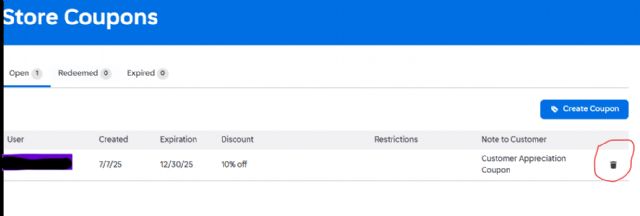
 Spain, Comunidad Valenciana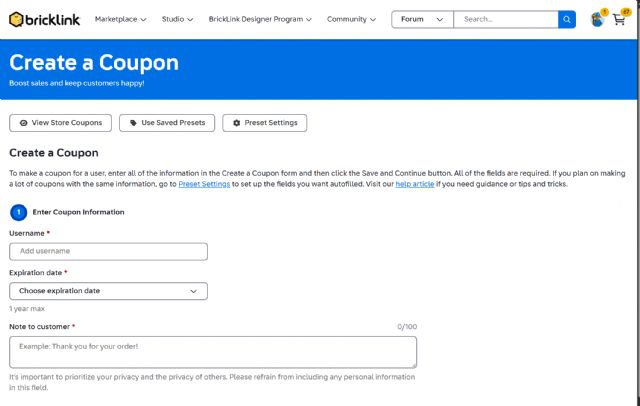


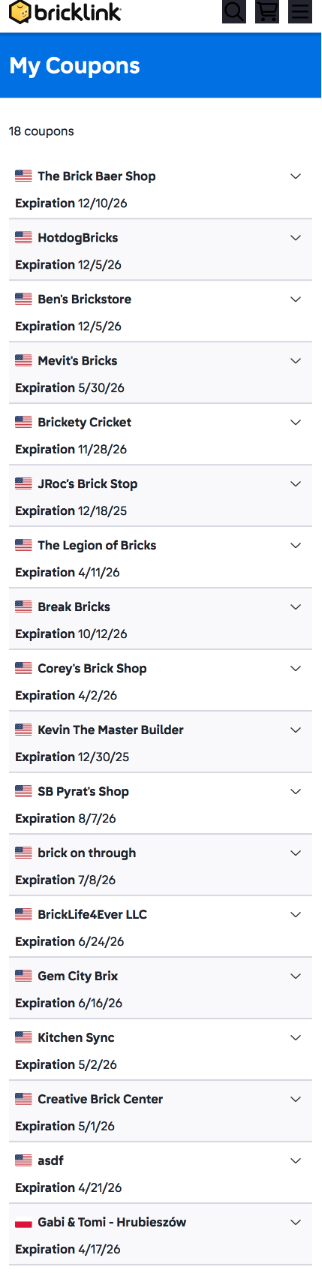
 Switzerland, Bern
)
)
 Denmark