My unofficial research says we are being redirected every hour or so...
5:45am
6:48am
7:53am
8:54am
Here is the SSO (single sign on) information from my resident expert:
"There appears to be a different time-out for the SP (service provider) ie:
BrickLink, than the IDP (identity provider) ie: Lego.com login.
Assuming you are using OAUTH or SAML. You need a refresh token."
Hope that makes sense to someone who can fix stuff. SOON.
Thanks,
~Jen
I wonder if that explains why it appears to work with only a refresh from a non-Windows
mobile device??? At least *my* non-Windows mobile device (Android cell phone).
It's a bit more clustered for me which could lend to disparity across territories.
I had to log in 6 or 7 times yesterday morning, sometime minutes after doing
so and then it was fine in the afternoon. I was parting out so was mostly using
it all day yesterday.
Very very annoying, especially when it logs out while you are updating something
on the page.
1) no need to log in at all on two of my PCs, the login remains active over many
days.
2) on one tablet, no need to log in after a weekend of inactivity on that device,
but logged out after about thirty minutes but that was about 9.30. I have to
log in every 2-4 hours.
3) On another tablet, I get logged out every 30 minutes to 2 hours.
1) no need to log in at all on two of my PCs, the login remains active over many
days.
2) on one tablet, no need to log in after a weekend of inactivity on that device,
but logged out after about thirty minutes but that was about 9.30. I have to
log in every 2-4 hours.
3) On another tablet, I get logged out every 30 minutes to 2 hours.
I would say the log in/out problem comes if you're simultaneously logged
in here at BrickLink and with the same (or another) account at lego.com
Meaning you have multiple tabs or windows opened on both sites.
In this case, one solution would be (Firefox) to open LEGO in a Container tab,
or a private window - so the cookies don't mix up.
1) no need to log in at all on two of my PCs, the login remains active over many
days.
2) on one tablet, no need to log in after a weekend of inactivity on that device,
but logged out after about thirty minutes but that was about 9.30. I have to
log in every 2-4 hours.
3) On another tablet, I get logged out every 30 minutes to 2 hours.
I would say the log in/out problem comes if you're simultaneously logged
in here at BrickLink and with the same (or another) account at lego.com
Meaning you have multiple tabs or windows opened on both sites.
In this case, one solution would be (Firefox) to open LEGO in a Container tab,
or a private window - so the cookies don't mix up.
PS: didn't try, but this is my intuition on what happens.
1) no need to log in at all on two of my PCs, the login remains active over many
days.
2) on one tablet, no need to log in after a weekend of inactivity on that device,
but logged out after about thirty minutes but that was about 9.30. I have to
log in every 2-4 hours.
3) On another tablet, I get logged out every 30 minutes to 2 hours.
I would say the log in/out problem comes if you're simultaneously logged
in here at BrickLink and with the same (or another) account at lego.com
Meaning you have multiple tabs or windows opened on both sites.
In this case, one solution would be (Firefox) to open LEGO in a Container tab,
or a private window - so the cookies don't mix up.
I don't think the number of windows is playing a role. I'm typing this
on a tablet and currently have two lego.com windows and three BL windows plus
a fourth for the forum. I regularly do the same although often have 7-8 windows
open with carts if I am preparing to place an order.
On the tablet I find I get logged out less using Opera rather than Brave. But
it also varies day to day. Some days, I don't need to log on and don't
get logged off at all. The next day, it can be frequent.
Maybe they are tinkering with it constantly, or maybe there is a maximum number
of users that they allow before something gets reset and new cookies are needed.
Or maybe cookies for mobile devices are given less priority / shorter life than
those for PCs.
I would say the log in/out problem comes if you're simultaneously logged
in here at BrickLink and with the same (or another) account at lego.com
[…]
I don't think the number of windows is playing a role. […]
One PC, one browser, one account here: the whole weekend, I got logged off at
random intervals:
— sometimes, more than one hour without interaction, come back, still logged
in,
— other times, go away for 5 min, come back, logged off.
I would say the log in/out problem comes if you're simultaneously logged
in here at BrickLink and with the same (or another) account at lego.com
[…]
I don't think the number of windows is playing a role. […]
One PC, one browser, one account here: the whole weekend, I got logged off at
random intervals:
— sometimes, more than one hour without interaction, come back, still logged
in,
— other times, go away for 5 min, come back, logged off.
🙃🙃🙃
Just now: posted this message here, went to the Studio forum to finish a post
(just the time to add two characters), submit = log in please 😤
I would say the log in/out problem comes if you're simultaneously logged
in here at BrickLink and with the same (or another) account at lego.com
[…]
I don't think the number of windows is playing a role. […]
One PC, one browser, one account here: the whole weekend, I got logged off at
random intervals:
— sometimes, more than one hour without interaction, come back, still logged
in,
— other times, go away for 5 min, come back, logged off.
🙃🙃🙃
Yes, but what I said was: did you have BOTH BrickLink and LEGO opened in the
same Browser (windows or tabs)?
I would say the log in/out problem comes if you're simultaneously logged
in here at BrickLink and with the same (or another) account at lego.com
[…]
I don't think the number of windows is playing a role. […]
One PC, one browser, one account here: the whole weekend, I got logged off at
random intervals:
— sometimes, more than one hour without interaction, come back, still logged
in,
— other times, go away for 5 min, come back, logged off.
🙃🙃🙃
Yes, but what I said was: did you have BOTH BrickLink and LEGO opened in the
same Browser (windows or tabs)?
No. I haven’t browsed S@H for some time.
Now, the S@H page is opened when you sign in in Studio… but I didn’t do that
since at least Saturday night.
I would say the log in/out problem comes if you're simultaneously logged
in here at BrickLink and with the same (or another) account at lego.com
[…]
I don't think the number of windows is playing a role. […]
One PC, one browser, one account here: the whole weekend, I got logged off at
random intervals:
— sometimes, more than one hour without interaction, come back, still logged
in,
— other times, go away for 5 min, come back, logged off.
🙃🙃🙃
Yes, but what I said was: did you have BOTH BrickLink and LEGO opened in the
same Browser (windows or tabs)?
I left both bricklink and lego tabs open in multiple browsers on multiple PCs
last night. On Windows PC, Firefox logins both OK, Edge both OK. On Linux PC,
Firefox login OK. On android tablet, Opera OK, Brave OK. On other android tablet,
Brave OK but Opera logged out.
Within 30 minutes, Windows Edge needs to be logged in but Firefox is still OK.
I don't think there is any pattern in when it is happening.
I would say the log in/out problem comes if you're simultaneously logged
in here at BrickLink and with the same (or another) account at lego.com
[…]
I don't think the number of windows is playing a role. […]
One PC, one browser, one account here: the whole weekend, I got logged off at
random intervals:
— sometimes, more than one hour without interaction, come back, still logged
in,
— other times, go away for 5 min, come back, logged off.
🙃🙃🙃
Yes, but what I said was: did you have BOTH BrickLink and LEGO opened in the
same Browser (windows or tabs)?
I left both bricklink and lego tabs open in multiple browsers on multiple PCs
last night. On Windows PC, Firefox logins both OK, Edge both OK. On Linux PC,
Firefox login OK. On android tablet, Opera OK, Brave OK. On other android tablet,
Brave OK but Opera logged out.
Within 30 minutes, Windows Edge needs to be logged in but Firefox is still OK.
I don't think there is any pattern in when it is happening.
Indeed it’s a mess. On my phone it will go days all fine but on my pc every 60
min (or less) it logs me out every day
I would say the log in/out problem comes if you're simultaneously logged
in here at BrickLink and with the same (or another) account at lego.com
[…]
I don't think the number of windows is playing a role. […]
One PC, one browser, one account here: the whole weekend, I got logged off at
random intervals:
— sometimes, more than one hour without interaction, come back, still logged
in,
— other times, go away for 5 min, come back, logged off.
🙃🙃🙃
Yes, but what I said was: did you have BOTH BrickLink and LEGO opened in the
same Browser (windows or tabs)?
I left both bricklink and lego tabs open in multiple browsers on multiple PCs
last night. On Windows PC, Firefox logins both OK, Edge both OK. On Linux PC,
Firefox login OK. On android tablet, Opera OK, Brave OK. On other android tablet,
Brave OK but Opera logged out.
Within 30 minutes, Windows Edge needs to be logged in but Firefox is still OK.
I don't think there is any pattern in when it is happening.
Indeed it’s a mess. On my phone it will go days all fine but on my pc every 60
min (or less) it logs me out every day
My theory is that the website resets its self, or whatever tech term, at an unknown
interval, and if you happen to be browsing it at that time then it logs you out,
else if you just visit sporadically and don't come exactly at those times
then the login cookie is not reset.
I would say the log in/out problem comes if you're simultaneously logged
in here at BrickLink and with the same (or another) account at lego.com
[…]
I don't think the number of windows is playing a role. […]
One PC, one browser, one account here: the whole weekend, I got logged off at
random intervals:
— sometimes, more than one hour without interaction, come back, still logged
in,
— other times, go away for 5 min, come back, logged off.
🙃🙃🙃
Yes, but what I said was: did you have BOTH BrickLink and LEGO opened in the
same Browser (windows or tabs)?
I left both bricklink and lego tabs open in multiple browsers on multiple PCs
last night. On Windows PC, Firefox logins both OK, Edge both OK. On Linux PC,
Firefox login OK. On android tablet, Opera OK, Brave OK. On other android tablet,
Brave OK but Opera logged out.
Within 30 minutes, Windows Edge needs to be logged in but Firefox is still OK.
I don't think there is any pattern in when it is happening.
Indeed it’s a mess. On my phone it will go days all fine but on my pc every 60
min (or less) it logs me out every day
My theory is that the website resets its self, or whatever tech term, at an unknown
interval, and if you happen to be browsing it at that time then it logs you out,
else if you just visit sporadically and don't come exactly at those times
then the login cookie is not reset.
I have managed to stay logged in the past 8 hours! Maybe they have sorted it.
My theory is that the website resets its self, or whatever tech term, at an unknown
interval, and if you happen to be browsing it at that time then it logs you out,
else if you just visit sporadically and don't come exactly at those times
then the login cookie is not reset.
I don't think it is the website (as a whole) as it affects different people
at different times. I've had good days when others keep getting logged out
but then I have had bad days when others report being logged in all day. I even
have good days on one device and bad on another even though it is the same account.
My theory is that the website resets its self, or whatever tech term, at an unknown
interval, and if you happen to be browsing it at that time then it logs you out,
else if you just visit sporadically and don't come exactly at those times
then the login cookie is not reset.
I don't think it is the website (as a whole) as it affects different people
at different times. I've had good days when others keep getting logged out
but then I have had bad days when others report being logged in all day. I even
have good days on one device and bad on another even though it is the same account.
I would say the log in/out problem comes if you're simultaneously logged
in here at BrickLink and with the same (or another) account at lego.com
[…]
I don't think the number of windows is playing a role. […]
One PC, one browser, one account here: the whole weekend, I got logged off at
random intervals:
— sometimes, more than one hour without interaction, come back, still logged
in,
— other times, go away for 5 min, come back, logged off.
🙃🙃🙃
Yes, but what I said was: did you have BOTH BrickLink and LEGO opened in the
same Browser (windows or tabs)?
I left both bricklink and lego tabs open in multiple browsers on multiple PCs
last night. On Windows PC, Firefox logins both OK, Edge both OK. On Linux PC,
Firefox login OK. On android tablet, Opera OK, Brave OK. On other android tablet,
Brave OK but Opera logged out.
Within 30 minutes, Windows Edge needs to be logged in but Firefox is still OK.
I don't think there is any pattern in when it is happening.
Indeed it’s a mess. On my phone it will go days all fine but on my pc every 60
min (or less) it logs me out every day
My theory is that the website resets its self, or whatever tech term, at an unknown
interval, and if you happen to be browsing it at that time then it logs you out,
else if you just visit sporadically and don't come exactly at those times
then the login cookie is not reset.
If I understood well, there 2 types of cookies, the technical ones like AWSALB
which have a expiration of 1 hour, and the main ones BrickLink or LEGO which
have (last time I quickly checked) an expiration of 7 days or such long period.
The short expiration ones should NOT be a problem and be renewed automatically
as long as the main ones are valid.
I've no idea why it's not the case, but the 1 hour seems to correspond
to our problems here.
The AWSALB cookies are for the AWS application load balancer.
There are multiple session cookies for the LEGO and Bricklink domains and their
various subdomains.
Cookie expiration times can be refreshed before they expire, and other cookies
with longer expiration times can be rejected in code for various reasons well
before their expiration.
The AWSALB cookies are for the AWS application load balancer.
There are multiple session cookies for the LEGO and Bricklink domains and their
various subdomains.
Cookie expiration times can be refreshed before they expire, and other cookies
with longer expiration times can be rejected in code for various reasons well
before their expiration.
Absolutely - but it seems the 1 hours delay corresponds to what a few have told
us here.
I had it set before like this, and changed it the 18th September for the new
login.
But as of right now I'm trying since half an hour with BrickLink scripts
disabled, as before, so AWS and such aren't triggered whatever, maybe
it'll help not to have to re login.
Note it doesn't change anything on BL functionnalities.
The AWSALB cookies are for the AWS application load balancer.
There are multiple session cookies for the LEGO and Bricklink domains and their
various subdomains.
Cookie expiration times can be refreshed before they expire, and other cookies
with longer expiration times can be rejected in code for various reasons well
before their expiration.
Absolutely - but it seems the 1 hours delay corresponds to what a few have told
us here.
I had it set before like this, and changed it the 18th September for the new
login.
But as of right now I'm trying since half an hour with BrickLink scripts
disabled, as before, so AWS and such aren't triggered whatever, maybe
it'll help not to have to re login.
Note it doesn't change anything on BL functionnalities.
It doesn't change anything - last sign in at 19:24, and this one just before
this post 21:04 (local time).
But I'll keep scripts off, I don't need Amazon or whoever else to get
more info than what's necessary.
The AWSALB cookies are for the AWS application load balancer.
There are multiple session cookies for the LEGO and Bricklink domains and their
various subdomains.
Cookie expiration times can be refreshed before they expire, and other cookies
with longer expiration times can be rejected in code for various reasons well
before their expiration.
Absolutely - but it seems the 1 hours delay corresponds to what a few have told
us here.
I had it set before like this, and changed it the 18th September for the new
login.
But as of right now I'm trying since half an hour with BrickLink scripts
disabled, as before, so AWS and such aren't triggered whatever, maybe
it'll help not to have to re login.
Note it doesn't change anything on BL functionnalities.
It doesn't change anything - last sign in at 19:24, and this one just before
this post 21:04 (local time).
But I'll keep scripts off, I don't need Amazon or whoever else to get
more info than what's necessary.
Bing 22:04 local time, last sign in at 21:04, exactly 1 hour.
[…]
But as of right now I'm trying since half an hour with BrickLink scripts
disabled, as before, so AWS and such aren't triggered whatever, maybe
it'll help not to have to re login.
Note it doesn't change anything on BL functionnalities.
Are you acceptinng “All the cookies” and then manually removing the unnecessary
/ non-preference cookies?
Because I don’t see cookies from amazonaws.com or bricklink.info on my browser
🤔
[…]
But as of right now I'm trying since half an hour with BrickLink scripts
disabled, as before, so AWS and such aren't triggered whatever, maybe
it'll help not to have to re login.
Note it doesn't change anything on BL functionnalities.
Are you acceptinng “All the cookies” and then manually removing the unnecessary
/ non-preference cookies?
No no - Always accepted only the necessary AND the preferences ones.
Darn something went wrong during the 18th Sept transition, I just checked now
in my cookie page and it shows that that I ALSO allowed then Analytics ones https://v2.bricklink.com/en-us/cookies
Are you acceptinng “All the cookies” and then manually removing the unnecessary
/ non-preference cookies?
No no - Always accepted only the necessary AND the preferences ones.
Darn something went wrong during the 18th Sept transition, I just checked now
in my cookie page and it shows that that I ALSO allowed then Analytics ones https://v2.bricklink.com/en-us/cookies
So unhappy
Ah, you went too fast. Now they have you in their files!
Couldn’t wait to check the “new” BrickLink, eh?
Are you acceptinng “All the cookies” and then manually removing the unnecessary
/ non-preference cookies?
No no - Always accepted only the necessary AND the preferences ones.
Darn something went wrong during the 18th Sept transition, I just checked now
in my cookie page and it shows that that I ALSO allowed then Analytics ones https://v2.bricklink.com/en-us/cookies
So unhappy
Ah, you went too fast. Now they have you in their files!
Couldn’t wait to check the “new” BrickLink, eh?
At least, they don't know how much time I spend in forum! Low profile, that's
the key.
1) no need to log in at all on two of my PCs, the login remains active over many
days.
2) on one tablet, no need to log in after a weekend of inactivity on that device,
but logged out after about thirty minutes but that was about 9.30. I have to
log in every 2-4 hours.
3) On another tablet, I get logged out every 30 minutes to 2 hours.
I would say the log in/out problem comes if you're simultaneously logged
in here at BrickLink and with the same (or another) account at lego.com
Meaning you have multiple tabs or windows opened on both sites.
In this case, one solution would be (Firefox) to open LEGO in a Container tab,
or a private window - so the cookies don't mix up.
I don't think the number of windows is playing a role. I'm typing this
on a tablet and currently have two lego.com windows and three BL windows plus
a fourth for the forum.
No I said, the fact 2 windows or tabs have simultaneously BrickLink and LEGO.
Not the number, I can have 50 tabs opened for both.
1) no need to log in at all on two of my PCs, the login remains active over many
days.
2) on one tablet, no need to log in after a weekend of inactivity on that device,
but logged out after about thirty minutes but that was about 9.30. I have to
log in every 2-4 hours.
3) On another tablet, I get logged out every 30 minutes to 2 hours.
I would say the log in/out problem comes if you're simultaneously logged
in here at BrickLink and with the same (or another) account at lego.com
Meaning you have multiple tabs or windows opened on both sites.
In this case, one solution would be (Firefox) to open LEGO in a Container tab,
or a private window - so the cookies don't mix up.
I don't think the number of windows is playing a role. I'm typing this
on a tablet and currently have two lego.com windows and three BL windows plus
a fourth for the forum.
No I said, the fact 2 windows or tabs have simultaneously BrickLink and LEGO.
Not the number, I can have 50 tabs opened for both.
I never have a Lego tab open. Just kicked randomly and need relogin
My unofficial research says we are being redirected every hour or so...
5:45am
6:48am
7:53am
8:54am
Here is the SSO (single sign on) information from my resident expert:
"There appears to be a different time-out for the SP (service provider) ie:
BrickLink, than the IDP (identity provider) ie: Lego.com login.
Assuming you are using OAUTH or SAML. You need a refresh token."
Hope that makes sense to someone who can fix stuff. SOON.
Thanks,
~Jen
During the initial merge "fiasco" unlike most I wasn't having any
issues with being logged out. For multiple days running until I cleaned my PC
with Norton Utilities, I would stay logged in. Just the later part of last week
I started to be logged out multiple times per day sometimes within minutes of
being logged in. I have noticed that I am staying logged in at Lego.com even
after I close that window. My last time signing in at Lego.com was Thursday last
week. I just clicked a saved tab for Lego.com and it opened the last page I looked
at and I am still logged in to my Lego account but logged out of bricklink. Go
figure!
Howard
yeah, I thought I was immune too, until day before yesterday. The being logged
out all the time is meh/whatever, but the main issue I'm having is I log
in, then it starts me all over again. So I'm entering my birthday and
accepting cookies 2-3 before it actually logs me in.
Parting out a set ATM is not possible, it loses all data when I get logged out
mid part out.
yeah, I thought I was immune too, until day before yesterday. The being logged
out all the time is meh/whatever, but the main issue I'm having is I log
in, then it starts me all over again. So I'm entering my birthday and
accepting cookies 2-3 before it actually logs me in.
Parting out a set ATM is not possible, it loses all data when I get logged out
mid part out.
Crystal
I was just typing how I've not needed to log in at all today, I hit post,
and ... had to log in and lost my post.
yeah, I thought I was immune too, until day before yesterday. The being logged
out all the time is meh/whatever, but the main issue I'm having is I log
in, then it starts me all over again. So I'm entering my birthday and
accepting cookies 2-3 before it actually logs me in.
Parting out a set ATM is not possible, it loses all data when I get logged out
mid part out.
Crystal
I was just typing how I've not needed to log in at all today, I hit post,
and ... had to log in and lost my post.
For Firefox at least there's this extension which automatically saves what
you type and can restore, like in case of a server crash or page refresh... Also
can help you to fill again some info. Didn't test it though, but seems people
are happy.
https://addons.mozilla.org/fr/firefox/addon/form-history-control
I was just typing how I've not needed to log in at all today, I hit post,
and ... had to log in and lost my post.
For Firefox at least there's this extension which automatically saves what
you type and can restore, like in case of a server crash or page refresh... Also
can help you to fill again some info. Didn't test it though, but seems people
are happy.
https://addons.mozilla.org/fr/firefox/addon/form-history-control
Just going back twice (first one is the login screen) Works For Me™.
I was just typing how I've not needed to log in at all today, I hit post,
and ... had to log in and lost my post.
For Firefox at least there's this extension which automatically saves what
you type and can restore, like in case of a server crash or page refresh... Also
can help you to fill again some info. Didn't test it though, but seems people
are happy.
https://addons.mozilla.org/fr/firefox/addon/form-history-control
Just going back twice (first one is the login screen) Works For Me™.
I could have done that, but what I had written was now untrue.
yeah, I thought I was immune too, until day before yesterday. The being logged
out all the time is meh/whatever, but the main issue I'm having is I log
in, then it starts me all over again. So I'm entering my birthday and
accepting cookies 2-3 before it actually logs me in.
Parting out a set ATM is not possible, it loses all data when I get logged out
mid part out.
Crystal
I was just typing how I've not needed to log in at all today, I hit post,
and ... had to log in and lost my post.
For Firefox at least there's this extension which automatically saves what
you type and can restore, like in case of a server crash or page refresh... Also
can help you to fill again some info. Didn't test it though, but seems people
are happy.
https://addons.mozilla.org/fr/firefox/addon/form-history-control
yeah, I thought I was immune too, until day before yesterday. The being logged
out all the time is meh/whatever, but the main issue I'm having is I log
in, then it starts me all over again. So I'm entering my birthday and
accepting cookies 2-3 before it actually logs me in.
Parting out a set ATM is not possible, it loses all data when I get logged out
mid part out.
Crystal
I was just typing how I've not needed to log in at all today, I hit post,
and ... had to log in and lost my post.
Yeah, I have a huge set sitting on my table waiting for upload too, guess I'm
gardening today. lol
All throughout the day, every day, having to re-authenticate. I've lost count
how many times my session has been terminated whether I leave it for a bit or
I'm in the middle of doing stuff. It's enough of a frustration that I
still want to chime in and repeat what everyone else is saying even though I
see admins are already aware of and investigating the issue.
My unofficial research says we are being redirected every hour or so...
Today I wans't disconnected (as usual) when I arrived on this PC.
Knock wood.
Do you people noticed a difference?
( apart we're banning the Austrians )
It seems to be alleviated somewhat since yesterday afternoon BUT I also decided
yesterday to log out from my mobile device (which wasn't getting logged out)
so I can't be sure there isn't a causal link between the two.
Today I logged in once this morning - c'est tout. Je suis très heureux. Hurrah!
Tomorrow is a new day though
Same here, no log out for about what 6 hours now? What a relief!
They must have fixed something-I logged into bricklink this morning about 7:30
AM EST before leaving for work and left 2 tabs open to bricklink pages (the forum
and my cart page) when i left for work. Just returned home at 4:30 PM EST both
tabs are still logged in. Cudos to bricklink for getting this fixed-said part
is how long it took to get it that way!
Howard


 USA, Illinois


 United Kingdom, Scotland
 United Kingdom, England
 France, Provence-Alpes-Côte d'Azur

 Canada, Ontario
 Spain, Comunidad Valenciana


 Netherlands, Overijssel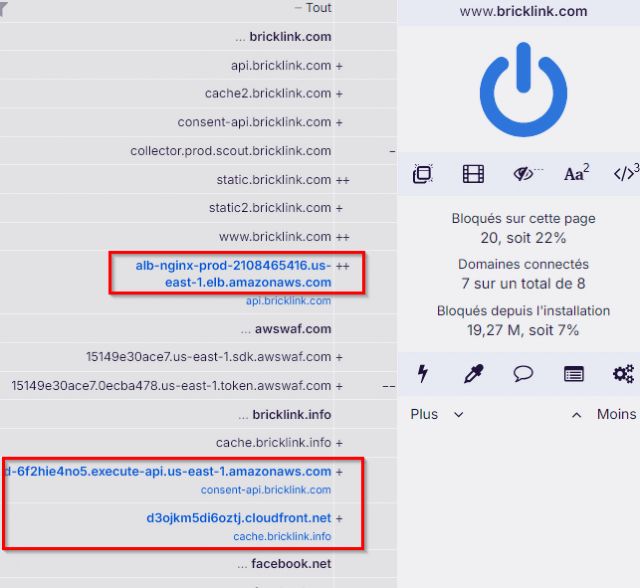



 Austria, Wien
 By far.

 Bulgaria, Sofia City
 Germany, Nordrhein-Westfalen

