We want to thank everyone for your patience as we launch LEGO® Account Integration.
Thanks to your honest feedback and detailed reports, we’ve been able to quickly
identify issues and start working on fixes.
We want to thank everyone for your patience as we launch LEGO® Account Integration.
Thanks to your honest feedback and detailed reports, we’ve been able to quickly
identify issues and start working on fixes.
We want to thank everyone for your patience as we launch LEGO® Account Integration.
Thanks to your honest feedback and detailed reports, we’ve been able to quickly
identify issues and start working on fixes.
Maybe Google testing in a sandbox, not in production. These are global issues
that must have come up I. Testing, if any testing was undertaken. It should be
embarrassing to Bricklink and Lego but there seems to be no reaction other than
we will look into at some point and fix it sometime later..
I've just cleared my cookies and still had to go through the following steps
to login afterwards:
Enter Birth Year
Cookies - Accept all
Click on Bricklink login - redirected to LEGO
Enter username & password
Enter 2-step authentication password
Cookies - Accept all
Go to Store Orders
Enter 2-step authentication password
I'm using a Windows 11 (10.0.26100 N/A Build 26100) laptop and MS Edge (Version
140.0.3485.81 (Official build) (64-bit)).
Are you able to provide any indication of how this is affecting site traffic/orders?
I appreciate that this varies significantly on a day-to-day basis, but I've
seen several comments about this in the forum. I only have a relatively small
store (100k parts) but I've only had 1 order since the 18th Sept (compared
to 6 for the same period last year)l; it's very much a hobby for me, but
there are a lot of sellers who rely on this site for a living.
If you need any help with UAT of any fixes I'd be very happy to help!
I've just cleared my cookies and still had to go through the following steps
to login afterwards:
Enter Birth Year
Cookies - Accept all
Click on Bricklink login - redirected to LEGO
Enter username & password
Enter 2-step authentication password
Cookies - Accept all
Go to Store Orders
Enter 2-step authentication password
I'm using a Windows 11 (10.0.26100 N/A Build 26100) laptop and MS Edge (Version
140.0.3485.81 (Official build) (64-bit)).
Are you able to provide any indication of how this is affecting site traffic/orders?
I appreciate that this varies significantly on a day-to-day basis, but I've
seen several comments about this in the forum. I only have a relatively small
store (100k parts) but I've only had 1 order since the 18th Sept (compared
to 6 for the same period last year)l; it's very much a hobby for me, but
there are a lot of sellers who rely on this site for a living.
If you need any help with UAT of any fixes I'd be very happy to help!
Regards, Robin
Hi Robin, and thank you for the detailed report, I'll be passing this along
to the team. As this is one of the prioritized issues it should be fixed soon.
Regarding the site traffic, we can see that the numbers are identical to the
first week of September. We have seen other reports about order volumes, so
I can confirm that this is on our radar as well.
We want to thank everyone for your patience as we launch LEGO® Account Integration.
Thanks to your honest feedback and detailed reports, we’ve been able to quickly
identify issues and start working on fixes.
Your feedback makes a huge difference, so please keep it coming. We’re listening
and we’re committed to making your BrickLink experience better.
Thank you again,
The BrickLink Team
I was excited about the avatars until I realized it most likely means they're
just going to add more pre-selected images to choose from. Every website in the
world allows personal avatars, but not Lego. We have to think of the children!
(Who are not allowed to use this site!)
At the very least, bringing back the original Bricklink avatars would be nice.
But no one's going to be happy until we can have custom avatars again. It
also just feels insulting that the only avatars available represent parts that
are currently in production.
[…]
Every website in the
world allows personal avatars, but not Lego.
LEGO Ideas allows you to use your own image…
We have to think of the children!
(Who are not allowed to use this site!)
… and kids are allowed on LEGO Ideas.
[…]
It
also just feels insulting that the only avatars available represent parts that
are currently in production.
That would be because LEGO doesn’t use Studio and only has current parts.
I don't think it's about what parts they have in their digital catalog.
They also have a rule for in store displays. You're only allowed to use parts
that are currently in production. I think it has more to do with wanting to control
their image so that their branding always reflects their current identity.
That would be because LEGO doesn’t use Studio and only has current parts.
I don't think it's about what parts they have in their digital catalog.
They also have a rule for in store displays. You're only allowed to use parts
that are currently in production. I think it has more to do with wanting to control
their image so that their branding always reflects their current identity.
That would be because LEGO doesn’t use Studio and only has current parts.
I don't think it's about what parts they have in their digital catalog.
They also have a rule for in store displays. You're only allowed to use parts
that are currently in production. I think it has more to do with wanting to control
their image so that their branding always reflects their current identity.
That would be because LEGO doesn’t use Studio and only has current parts.
I don't think it's about what parts they have in their digital catalog.
They also have a rule for in store displays. You're only allowed to use parts
that are currently in production. I think it has more to do with wanting to control
their image so that their branding always reflects their current identity.
That would be because LEGO doesn’t use Studio and only has current parts.
I don't think it's about what parts they have in their digital catalog.
They also have a rule for in store displays. You're only allowed to use parts
that are currently in production. I think it has more to do with wanting to control
their image so that their branding always reflects their current identity.
dates from 2016 and you can choose its hair/horns/ears in the Play app:
This is just speculation, but I'm guessing that's because the code is
that old.
Well, I only installed a few weeks ago
And it’s on kids.lego.com too… but it’s the same feature, so maybe the same age.
And it then shows (fully) on identity.lego.com and in Studio (face medallion).
I think there's some kind of relationship to the static avatars on lego.com,
and I've probably had the same one there for a decade. I think it's just
old.
We want to thank everyone for your patience as we launch LEGO® Account Integration.
Thanks to your honest feedback and detailed reports, we’ve been able to quickly
identify issues and start working on fixes.
We want to thank everyone for your patience as we launch LEGO® Account Integration.
Thanks to your honest feedback and detailed reports, we’ve been able to quickly
identify issues and start working on fixes.
Your feedback makes a huge difference, so please keep it coming. We’re listening
and we’re committed to making your BrickLink experience better.
Thank you again,
The BrickLink Team
My current issues are two:
1. I keep getting logged out and there's no "Remember Me" option
when logging in to lego.com. This is contrary not only to how BrickLink previously
worked, but also to how lego.com normally functions. This is new as of today,
it wasn't happening in the days immediately following the merge.
2. A couple of days ago I was able to use one account for lego.com and another
for BrickLink (that is, I could be logged in to both at the same time). This
no longer appears to be the case. Kind of annoying.
1. I keep getting logged out and there's no "Remember Me" option
when logging in to lego.com. This is contrary not only to how BrickLink previously
worked, but also to how lego.com normally functions. This is new as of today,
it wasn't happening in the days immediately following the merge.
2. A couple of days ago I was able to use one account for lego.com and another
for BrickLink (that is, I could be logged in to both at the same time). This
no longer appears to be the case. Kind of annoying.
Both of these issues appear to have been alleviated. Will continue to check.
As others have said, the repeated have to enter, birthdate, accept cookies, Name,
Password , then repeat is frustrating.
My main problem is that it says I cannot use my BL Username for my Lego name.
This is my business's name and many of us have merchandise, websites, established
customers. Has this been addressed?
Chris
Our team has deployed several fixes earlier today. Please keep reporting new
concerns. You can check the progress on the currently investigated issues here:
https://www.bricklink.com/help.asp?helpID=2678.
Unfortunately, the issue with repeated cookie prompts isn't fully resolved.
I've just signed out of Bricklink (whilst keeping my browser open) and when
I logged back in again, it re-appeared. In addition, if I log out of Bricklink
(and close the browser) I'm being asked to confirm my birth year again, and
also to accept cookies.
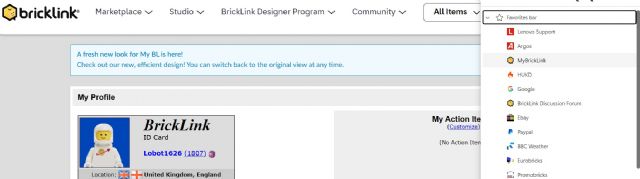
Also, I've just found that if I log out of Bricklink, it actually deletes
my shortcut from MS Edge. However, if I then log back into it (via the a link
to the Discussion Forum and then navigate to My BrickLink) the shortcut re-appears
on my menu...
Unfortunately, the issue with repeated cookie prompts isn't fully resolved.
I've just signed out of Bricklink (whilst keeping my browser open) and when
I logged back in again, it re-appeared. In addition, if I log out of Bricklink
(and close the browser) I'm being asked to confirm my birth year again, and
also to accept cookies.
Also, I've just found that if I log out of Bricklink, it actually deletes
my shortcut from MS Edge. However, if I then log back into it (via the a link
to the Discussion Forum and then navigate to My BrickLink) the shortcut re-appears
on my menu...
I can provide screenshots if that's helpful?
Regards, Robin
Thank you as always! I've passed this information forward, and will reach
out directly if the team needs more information.
Unfortunately, the issue with repeated cookie prompts isn't fully resolved.
I've just signed out of Bricklink (whilst keeping my browser open) and when
I logged back in again, it re-appeared. In addition, if I log out of Bricklink
(and close the browser) I'm being asked to confirm my birth year again, and
also to accept cookies.
Also, I've just found that if I log out of Bricklink, it actually deletes
my shortcut from MS Edge. However, if I then log back into it (via the a link
to the Discussion Forum and then navigate to My BrickLink) the shortcut re-appears
on my menu...
I can provide screenshots if that's helpful?
Regards, Robin
Hi Robin, the situation you're describing is expected behavior. When you
sign out, you are treated as a new visitor. All new visitors are asked for age
and cookie consent every time. However, there are currently issues with the logic,
and we are still working on the fix.
It seems odd that I have to confirm my birth year and accept cookies each time
I login; surely this should only be necessary when I've cleared my browsing
history? I don't have to accept any new cookies if I logout of my LEGO account,
and then sign back in again afterwards?
Also, the issue I reported yesterday regarding my Bricklink MS Edge shortcut
disappearing seems to have resolved itself. However, the shortcut icon is now
alternating between the classic yellow Bricklink logo (when I'm logged in)
and the red LEGO website brick (when I've logged out)! Only a minor niggle,
but I've attached a couple of screenshots for reference.
Unfortunately, the issue with repeated cookie prompts isn't fully resolved.
I've just signed out of Bricklink (whilst keeping my browser open) and when
I logged back in again, it re-appeared. In addition, if I log out of Bricklink
(and close the browser) I'm being asked to confirm my birth year again, and
also to accept cookies.
Also, I've just found that if I log out of Bricklink, it actually deletes
my shortcut from MS Edge. However, if I then log back into it (via the a link
to the Discussion Forum and then navigate to My BrickLink) the shortcut re-appears
on my menu...
I can provide screenshots if that's helpful?
Regards, Robin
Hi Robin, the situation you're describing is expected behavior. When you
sign out, you are treated as a new visitor. All new visitors are asked for age
and cookie consent every time. However, there are currently issues with the logic,
and we are still working on the fix.
But surely you can tell by previous cookies that the device has used Bricklink
before?
Unfortunately, the issue with repeated cookie prompts isn't fully resolved.
I've just signed out of Bricklink (whilst keeping my browser open) and when
I logged back in again, it re-appeared. In addition, if I log out of Bricklink
(and close the browser) I'm being asked to confirm my birth year again, and
also to accept cookies.
Also, I've just found that if I log out of Bricklink, it actually deletes
my shortcut from MS Edge. However, if I then log back into it (via the a link
to the Discussion Forum and then navigate to My BrickLink) the shortcut re-appears
on my menu...
I can provide screenshots if that's helpful?
Regards, Robin
Hi Robin, the situation you're describing is expected behavior. When you
sign out, you are treated as a new visitor. All new visitors are asked for age
and cookie consent every time. However, there are currently issues with the logic,
and we are still working on the fix.
Hmmm but cookies shouldn't work that way, If someone accepts all cookies,
when they return to the site it should know this is not a new visitor so not
need to ask for age and cookies again... even if he logged out, cookies have
different values to save and erase after session. I still suggest to try to implement
a trusted devices log, we use this site daily for many hours for many consecutive
days...
Our team has deployed several fixes earlier today. Please keep reporting new
concerns. You can check the progress on the currently investigated issues here:
https://www.bricklink.com/help.asp?helpID=2678.
The issue with cookies isn't fixed yet unfortunately.
I have to confirm and accept cookies everytime after starting the browser and
visit the bricklink page for the first time.
I also deleted the old cookie but it doesn't work.
Our team has deployed several fixes earlier today. Please keep reporting new
concerns. You can check the progress on the currently investigated issues here:
https://www.bricklink.com/help.asp?helpID=2678.
The issue with cookies isn't fixed yet unfortunately.
I have to confirm and accept cookies everytime after starting the browser and
visit the bricklink page for the first time.
I also deleted the old cookie but it doesn't work.
Thank you for the report! Can you confirm that you are using the same browser
and are not logging out manually?
Our team has deployed several fixes earlier today. Please keep reporting new
concerns. You can check the progress on the currently investigated issues here:
https://www.bricklink.com/help.asp?helpID=2678.
The issue with cookies isn't fixed yet unfortunately.
I have to confirm and accept cookies everytime after starting the browser and
visit the bricklink page for the first time.
I also deleted the old cookie but it doesn't work.
Thank you for the report! Can you confirm that you are using the same browser
and are not logging out manually?
Yep, same browser. This happened when I did "Show catalog info..." through
BrickStore. It opened a new tab and made me go through the sign in process again.
Yep, same browser. This happened when I did "Show catalog info..." through
BrickStore. It opened a new tab and made me go through the sign in process again.
Thank you! Just confirmed that there was an issue after the fix, we are looking
into it as a priority.
Yep, same browser. This happened when I did "Show catalog info..." through
BrickStore. It opened a new tab and made me go through the sign in process again.
Thank you! Just confirmed that there was an issue after the fix, we are looking
into it as a priority.
Thanks.
Just happened again. Left browser idle for half an hour or so and came back having
to log in again.
Our team has deployed several fixes earlier today. Please keep reporting new
concerns. You can check the progress on the currently investigated issues here:
https://www.bricklink.com/help.asp?helpID=2678.
The issue with cookies isn't fixed yet unfortunately.
I have to confirm and accept cookies everytime after starting the browser and
visit the bricklink page for the first time.
I also deleted the old cookie but it doesn't work.
Thank you for the report! Can you confirm that you are using the same browser
and are not logging out manually?
Yes, I use the same browser and I do not log out manually.
I only have one computer with Win11 and I use the Firefox browser.
Our team has deployed several fixes earlier today. Please keep reporting new
concerns. You can check the progress on the currently investigated issues here:
https://www.bricklink.com/help.asp?helpID=2678.
I don't know what you did but it has made things worse for me. I now have
to accept cookies during every session. That was not the case earlier this week.
Our team has deployed several fixes earlier today. Please keep reporting new
concerns. You can check the progress on the currently investigated issues here:
https://www.bricklink.com/help.asp?helpID=2678.
I don't know what you did but it has made things worse for me. I now have
to accept cookies during every session. That was not the case earlier this week.
And now it appears to be fixed. I did not have to accept cookies when I first
came to Bricklink this morning. And as a test I closed my browser and went to
Bricklink again and still was not asked to accept cookies. I also haven't
had to log in since yesterday so I am cautiously optimistic that things are fixed
for me.
Our team has deployed several fixes earlier today. Please keep reporting new
concerns. You can check the progress on the currently investigated issues here:
https://www.bricklink.com/help.asp?helpID=2678.
I don't know what you did but it has made things worse for me. I now have
to accept cookies during every session. That was not the case earlier this week.
And now it appears to be fixed. I did not have to accept cookies when I first
came to Bricklink this morning. And as a test I closed my browser and went to
Bricklink again and still was not asked to accept cookies. I also haven't
had to log in since yesterday so I am cautiously optimistic that things are fixed
for me.
Same over here, it seems to be working. Tho occasionally I still get the cookie
pop up but if I refresh the page it disappears and dosent show again (for a while
at least)
Our team has deployed several fixes earlier today. Please keep reporting new
concerns. You can check the progress on the currently investigated issues here:
https://www.bricklink.com/help.asp?helpID=2678.
I don't know what you did but it has made things worse for me. I now have
to accept cookies during every session. That was not the case earlier this week.
And now it appears to be fixed. I did not have to accept cookies when I first
came to Bricklink this morning. And as a test I closed my browser and went to
Bricklink again and still was not asked to accept cookies. I also haven't
had to log in since yesterday so I am cautiously optimistic that things are fixed
for me.
Same over here, it seems to be working. Tho occasionally I still get the cookie
pop up but if I refresh the page it disappears and dosent show again (for a while
at least)
Our team has deployed several fixes earlier today. Please keep reporting new
concerns. You can check the progress on the currently investigated issues here:
https://www.bricklink.com/help.asp?helpID=2678.
I don't know what you did but it has made things worse for me. I now have
to accept cookies during every session. That was not the case earlier this week.
And now it appears to be fixed. I did not have to accept cookies when I first
came to Bricklink this morning. And as a test I closed my browser and went to
Bricklink again and still was not asked to accept cookies. I also haven't
had to log in since yesterday so I am cautiously optimistic that things are fixed
for me.
Me too. All day yesterday and so far today. No signing out and no cookies!
Our team has deployed several fixes earlier today. Please keep reporting new
concerns. You can check the progress on the currently investigated issues here:
https://www.bricklink.com/help.asp?helpID=2678.
Seems ok for me so far. It kept me logged in since my last session yesterday
both on my phone and PC. Cookie banner hasn't popped up since either. I'll
monitor it though.
Our team has deployed several fixes earlier today. Please keep reporting new
concerns. You can check the progress on the currently investigated issues here:
https://www.bricklink.com/help.asp?helpID=2678.
Seems ok for me so far. It kept me logged in since my last session yesterday
both on my phone and PC. Cookie banner hasn't popped up since either. I'll
monitor it though.
Aaaaand it's back to square one. It logged me out again today, I needed to
log back in and accept the cookies again. Yesterday all seemed fine.
Our team has deployed several fixes earlier today. Please keep reporting new
concerns. You can check the progress on the currently investigated issues here:
https://www.bricklink.com/help.asp?helpID=2678.
Seems ok for me so far. It kept me logged in since my last session yesterday
both on my phone and PC. Cookie banner hasn't popped up since either. I'll
monitor it though.
Aaaaand it's back to square one. It logged me out again today, I needed to
log back in and accept the cookies again. Yesterday all seemed fine.
It's still not fully fixed. I needed to log back in again after today's
daily maintenance. My ID pic also changed to the parrot one but then changed
back, really strange...
Our team has deployed several fixes earlier today. Please keep reporting new
concerns. You can check the progress on the currently investigated issues here:
https://www.bricklink.com/help.asp?helpID=2678.
Still logging me out and having to enter birth year & accept cookies again. It
was fine all day yesterday!
Our team has deployed several fixes earlier today. Please keep reporting new
concerns. You can check the progress on the currently investigated issues here:
https://www.bricklink.com/help.asp?helpID=2678.
Still logging me out and having to enter birth year & accept cookies again. It
was fine all day yesterday!
Logical, because every day could be your birthday - so your birth year could
have changed!
Our team has deployed several fixes earlier today. Please keep reporting new
concerns. You can check the progress on the currently investigated issues here:
https://www.bricklink.com/help.asp?helpID=2678.
Still logging me out and having to enter birth year & accept cookies again. It
was fine all day yesterday!
Logical, because every day could be your birthday - so your birth year could
have changed!
Our team has deployed several fixes earlier today. Please keep reporting new
concerns. You can check the progress on the currently investigated issues here:
https://www.bricklink.com/help.asp?helpID=2678.
Still logging me out and having to enter birth year & accept cookies again. It
was fine all day yesterday!
Logical, because every day could be your birthday - so your birth year could
have changed!
Our team has deployed several fixes earlier today. Please keep reporting new
concerns. You can check the progress on the currently investigated issues here:
https://www.bricklink.com/help.asp?helpID=2678.
Still logging me out and having to enter birth year & accept cookies again. It
was fine all day yesterday!
I think they must be trolling us. Yesterday I had nothing but trouble but today,
I've logged in only once. I've closed my browser multiple times and not
needed to login again.
Our team has deployed several fixes earlier today. Please keep reporting new
concerns. You can check the progress on the currently investigated issues here:
https://www.bricklink.com/help.asp?helpID=2678.
Still logging me out and having to enter birth year & accept cookies again. It
was fine all day yesterday!
I think they must be trolling us. Yesterday I had nothing but trouble but today,
I've logged in only once. I've closed my browser multiple times and not
needed to login again.
It does feel that way! Yesterday apart from once was great. Today has been worse
for issues for me.
Our team has deployed several fixes earlier today. Please keep reporting new
concerns. You can check the progress on the currently investigated issues here:
https://www.bricklink.com/help.asp?helpID=2678.
My work has just been interrupted. (again) My browser tab stolen and sent to
Lego.com. My credentials added again. The cookies accepted again. And then I
was redirected to My BL instead of the page you kidnapped me from.
My work on the page I had open was lost. Can you at the very least, have the
login open on a new tab or window?
My work has just been interrupted. (again) My browser tab stolen and sent to
Lego.com. My credentials added again. The cookies accepted again. And then I
was redirected to My BL instead of the page you kidnapped me from.
My work on the page I had open was lost. Can you at the very least, have the
login open on a new tab or window?
Sigh.
~Jen
Hi Jen, thank you for reporting this in such detail. I've passed your report
over, and developers are looking into this at the moment.
I just encountered the same thing. I clicked submit to update inventory number
changes only to find that I had been logged out. Then I had to go through the
2FA yet again (every single time - very frustrating) on the main LEGO site.
(my cookies are fine and I am not asked to redo those any longer)
In Administrative, CE_Anastasia writes:
In Administrative, jennnifer writes:
My work has just been interrupted. (again) My browser tab stolen and sent to
Lego.com. My credentials added again. The cookies accepted again. And then I
was redirected to My BL instead of the page you kidnapped me from.
My work on the page I had open was lost. Can you at the very least, have the
login open on a new tab or window?
Sigh.
~Jen
Hi Jen, thank you for reporting this in such detail. I've passed your report
over, and developers are looking into this at the moment.
Our team has deployed several fixes earlier today. Please keep reporting new
concerns. You can check the progress on the currently investigated issues here:
https://www.bricklink.com/help.asp?helpID=2678.
My browser still keeps me logged in even though I do not want it to!
This was not an issue before the merge! This is a massive breach of privacy when
I log in to a shared computer!
Our team has deployed several fixes earlier today. Please keep reporting new
concerns. You can check the progress on the currently investigated issues here:
https://www.bricklink.com/help.asp?helpID=2678.
My browser still keeps me logged in even though I do not want it to!
This was not an issue before the merge! This is a massive breach of privacy when
I log in to a shared computer!
Are you guys even trying to fix this because its been a few days and I am still
logged in after closing the browser!!!
Our team has deployed several fixes earlier today. Please keep reporting new
concerns. You can check the progress on the currently investigated issues here:
https://www.bricklink.com/help.asp?helpID=2678.
My browser still keeps me logged in even though I do not want it to!
This was not an issue before the merge! This is a massive breach of privacy when
I log in to a shared computer!
Are you guys even trying to fix this because its been a few days and I am still
logged in after closing the browser!!!
Our team has deployed several fixes earlier today. Please keep reporting new
concerns. You can check the progress on the currently investigated issues here:
https://www.bricklink.com/help.asp?helpID=2678.
My browser still keeps me logged in even though I do not want it to!
This was not an issue before the merge! This is a massive breach of privacy when
I log in to a shared computer!
Are you guys even trying to fix this because its been a few days and I am still
logged in after closing the browser!!!
Are you explicitly logging out?
No and I never had to before the login integration!
If I log in and there is no option of "keep me logged in" it should not
keep me logged in!
No and I never had to before the login integration!
If I log in and there is no option of "keep me logged in" it should not
keep me logged in!
I suspect this is just going to be how it works moving forward as it does on
Lego.com. Maybe try an incognito window?
its not about using a different browser, its about a blatant disregard for privacy!
So just log out when done.
all fine, but what if I forget? I repeat again its a breach of privacy.
This might not be a thing in the US & UK but I dont like it when companies try
to breach my privacy!
No and I never had to before the login integration!
If I log in and there is no option of "keep me logged in" it should not
keep me logged in!
I suspect this is just going to be how it works moving forward as it does on
Lego.com. Maybe try an incognito window?
its not about using a different browser, its about a blatant disregard for privacy!
So just log out when done.
all fine, but what if I forget? I repeat again its a breach of privacy.
This might not be a thing in the US & UK but I dont like it when companies try
to breach my privacy!
Teach yourself to remember to log out or to use private browsing. You will also
be leaving a trail of other personal data such as which sites you've been
to and what you have looked at that you would need to remember to manually clear,
so private browsing on a shared computer with a shared account is probably best.
We want to thank everyone for your patience as we launch LEGO® Account Integration.
Thanks to your honest feedback and detailed reports, we’ve been able to quickly
identify issues and start working on fixes.
Your feedback makes a huge difference, so please keep it coming. We’re listening
and we’re committed to making your BrickLink experience better.
Thank you again,
The BrickLink Team
I sincerely hope that we either regain the ability to use custom profile images,
or you really REALLY REALLY expand the selection of options, because
there's barely any worthwhile options for me to pick from (hence the default
image in use) and I can't just reupload my custom profile image. Like, I'd
be happy with something involving, say, catalog item no. 6649pb01 to use as a
profile picture...
We want to thank everyone for your patience as we launch LEGO® Account Integration.
Thanks to your honest feedback and detailed reports, we’ve been able to quickly
identify issues and start working on fixes.
Your feedback makes a huge difference, so please keep it coming. We’re listening
and we’re committed to making your BrickLink experience better.
Thank you again,
The BrickLink Team
I sincerely hope that we either regain the ability to use custom profile images,
or you really REALLY REALLY expand the selection of options, because
there's barely any worthwhile options for me to pick from (hence the default
image in use) and I can't just reupload my custom profile image. Like, I'd
be happy with something involving, say, catalog item no. 6649pb01 to use as a
profile picture...
Definitely Needs to Be more Options I liked having several types in Dif Colors!!!
Your feedback makes a huge difference, so please keep it coming. We’re listening
and we’re committed to making your BrickLink experience better.
Just had a somewhat alarming experience in that I wasn't able to log in to
BrickLink at all (even though I was logged in to lego.com). Clearing BrickLink
cookies allowed me to log in here. This used to happen from time to time under
the old login scheme, but I had not seen it since the merge.
Your feedback makes a huge difference, so please keep it coming. We’re listening
and we’re committed to making your BrickLink experience better.
Just had a somewhat alarming experience in that I wasn't able to log in to
BrickLink at all (even though I was logged in to lego.com). Clearing BrickLink
cookies allowed me to log in here. This used to happen from time to time under
the old login scheme, but I had not seen it since the merge.
And my avatar is messed up again even though it shows correctly on the "My
BrickLink" page (but trying to edit it gives an error).
Your feedback makes a huge difference, so please keep it coming. We’re listening
and we’re committed to making your BrickLink experience better.
Just had a somewhat alarming experience in that I wasn't able to log in to
BrickLink at all (even though I was logged in to lego.com). Clearing BrickLink
cookies allowed me to log in here. This used to happen from time to time under
the old login scheme, but I had not seen it since the merge.
And my avatar is messed up again even though it shows correctly on the "My
BrickLink" page (but trying to edit it gives an error).
We've been getting some reports about an issue with the nickname change on
LEGO.com. Once a nickname is changed, the page displays the following message:
'Your nickname is ready. You can change it again in 0 days' indefinitely.
We're working on fixing this issue and will update the big tracker page once
done.


 USA, California


 Canada, Alberta


 Austria, Wien

 United Kingdom, Scotland

 United Kingdom, England
 France, Nouvelle-Aquitaine



 Australia, Queensland

)
)
 Spain, Comunidad Valenciana
 Germany, Baden-Württemberg

 Netherlands, Overijssel