I wasn't sure if this was a good fit for the Catalog Request topic, so I'm
posting it here.
I have a really nasty habit of looking at the color on the screen/printout when
I'm working on an order that uses a lot of white, LBG and DBG. I've
sent LBG instead of white before and I've sent DBG instead of LBG. I've
been slowing down and double checking and just caught this almost boo boo.
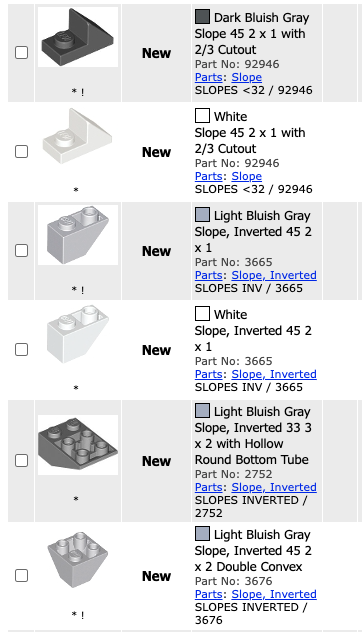
Look at the 2752 at the bottom of the screen shot for example compared to the
92946 near the top. If you're zipping through the order like a coked up
monkey it's easy to make a mistake. Is this something I can change when
I spot it, or do I need to put in a request to "fix the color" so to
speak?
I wasn't sure if this was a good fit for the Catalog Request topic, so I'm
posting it here.
I have a really nasty habit of looking at the color on the screen/printout when
I'm working on an order that uses a lot of white, LBG and DBG. I've
sent LBG instead of white before and I've sent DBG instead of LBG. I've
been slowing down and double checking and just caught this almost boo boo.
Look at the 2752 at the bottom of the screen shot for example compared to the
92946 near the top. If you're zipping through the order like a coked up
monkey it's easy to make a mistake. Is this something I can change when
I spot it, or do I need to put in a request to "fix the color" so to
speak?
I've submitted a color-corrected replacement for this image. These are only
done by a few volunteers, so the only real way to request a fix is to ping me
or post here in the Forum. I do fix these one at time and am happy to do it,
but many more are always needed. For colors like LBG, Med Nougat, and White,
the difference in LEGO renders and actual plastic color is vast. Best to keep
a closer eye on certain colors to avoid mistakes.
And before anyone can argue that we should just use the vanilla LEGO renders
instead for consistency, I vote NO. Just because they produce poorly lit images,
doesn't mean we have to live with them.
I wasn't sure if this was a good fit for the Catalog Request topic, so I'm
posting it here.
I have a really nasty habit of looking at the color on the screen/printout when
I'm working on an order that uses a lot of white, LBG and DBG. I've
sent LBG instead of white before and I've sent DBG instead of LBG. I've
been slowing down and double checking and just caught this almost boo boo.
Look at the 2752 at the bottom of the screen shot for example compared to the
92946 near the top. If you're zipping through the order like a coked up
monkey it's easy to make a mistake. Is this something I can change when
I spot it, or do I need to put in a request to "fix the color" so to
speak?
I've submitted a color-corrected replacement for this image. These are only
done by a few volunteers, so the only real way to request a fix is to ping me
or post here in the Forum. I do fix these one at time and am happy to do it,
but many more are always needed. For colors like LBG, Med Nougat, and White,
the difference in LEGO renders and actual plastic color is vast. Best to keep
a closer eye on certain colors to avoid mistakes.
And before anyone can argue that we should just use the vanilla LEGO renders
instead for consistency, I vote NO. Just because they produce poorly lit images,
doesn't mean we have to live with them.
~Jen
No I get it, I'll take better notes because I slipped last month and sent
a DBG piece instead of verifying what the color actually said.
I wasn't sure if this was a good fit for the Catalog Request topic, so I'm
posting it here.
I have a really nasty habit of looking at the color on the screen/printout when
I'm working on an order that uses a lot of white, LBG and DBG. I've
sent LBG instead of white before and I've sent DBG instead of LBG. I've
been slowing down and double checking and just caught this almost boo boo.
Look at the 2752 at the bottom of the screen shot for example compared to the
92946 near the top. If you're zipping through the order like a coked up
monkey it's easy to make a mistake. Is this something I can change when
I spot it, or do I need to put in a request to "fix the color" so to
speak?
I've submitted a color-corrected replacement for this image. These are only
done by a few volunteers, so the only real way to request a fix is to ping me
or post here in the Forum. I do fix these one at time and am happy to do it,
but many more are always needed. For colors like LBG, Med Nougat, and White,
the difference in LEGO renders and actual plastic color is vast. Best to keep
a closer eye on certain colors to avoid mistakes.
And before anyone can argue that we should just use the vanilla LEGO renders
instead for consistency, I vote NO. Just because they produce poorly lit images,
doesn't mean we have to live with them.
~Jen
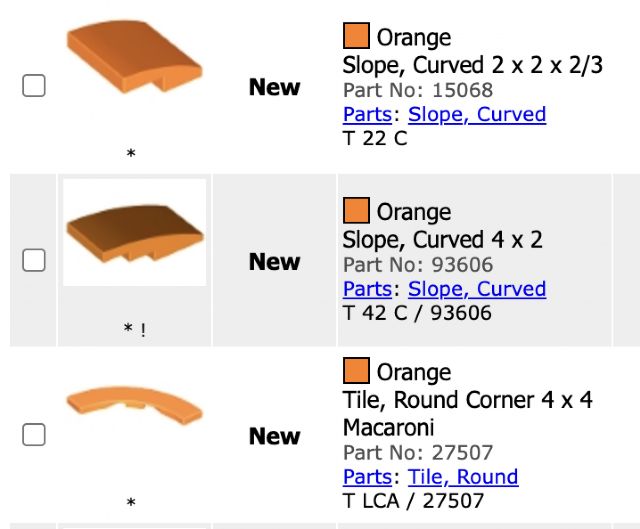
Here are a few. These are all orange but it appears the images are from a CAD
program and the light source is coming from below?
I wasn't sure if this was a good fit for the Catalog Request topic, so I'm
posting it here.
I have a really nasty habit of looking at the color on the screen/printout when
I'm working on an order that uses a lot of white, LBG and DBG. I've
sent LBG instead of white before and I've sent DBG instead of LBG. I've
been slowing down and double checking and just caught this almost boo boo.
Look at the 2752 at the bottom of the screen shot for example compared to the
92946 near the top. If you're zipping through the order like a coked up
monkey it's easy to make a mistake. Is this something I can change when
I spot it, or do I need to put in a request to "fix the color" so to
speak?
I've submitted a color-corrected replacement for this image. These are only
done by a few volunteers, so the only real way to request a fix is to ping me
or post here in the Forum. I do fix these one at time and am happy to do it,
but many more are always needed. For colors like LBG, Med Nougat, and White,
the difference in LEGO renders and actual plastic color is vast. Best to keep
a closer eye on certain colors to avoid mistakes.
And before anyone can argue that we should just use the vanilla LEGO renders
instead for consistency, I vote NO. Just because they produce poorly lit images,
doesn't mean we have to live with them.
~Jen
Here are a few. These are all orange but it appears the images are from a CAD
program and the light source is coming from below?
The 93606 you show here is unedited. I can fix it though! The other two have
already been corrected by randyf.
Yes, most of the renders straight from LEGO display the light source from down
and to the left of center. Their program has the lighting effects set too harshly
creating strong highlights and shadows that affect how accurate the color appears.
When I edit them I basically remove some of the shading and replace it with more
of the base color of the part.
I've been working on some of these since your post last week and the admins
have approved at least 60 new Light Bluish Gray images.


 USA, Ohio




 Canada, Ontario