Quite possibly my browser, but I can't close down the pop-up monthly maintenance
banner at the top of the screen
Any help appreciated
It’s not your browser, it’s broken.
#justbricklinkthings
And so we are stuck with it for the whole weekend...
Some of you didn't have a junker as your first car and it shows. Just get
some black electrical tape and string a ribbon of it across the top of your screen
- and don't move the browser window all weekend.
Quite possibly my browser, but I can't close down the pop-up monthly maintenance
banner at the top of the screen
Any help appreciated
It’s not your browser, it’s broken.
#justbricklinkthings
And so we are stuck with it for the whole weekend...
Some of you didn't have a junker as your first car and it shows. Just get
some black electrical tape and string a ribbon of it across the top of your screen
- and don't move the browser window all weekend.
Voila!
You mean to cover the "check engine" light? HAHA Mine went off one time
and that made me worry more
Quite possibly my browser, but I can't close down the pop-up monthly maintenance
banner at the top of the screen
Any help appreciated
It’s not your browser, it’s broken.
#justbricklinkthings
And so we are stuck with it for the whole weekend...
Some of you didn't have a junker as your first car and it shows. Just get
some black electrical tape and string a ribbon of it across the top of your screen
- and don't move the browser window all weekend.
Voila!
You mean to cover the "check engine" light? HAHA Mine went off one time
and that made me worry more
Quite possibly my browser, but I can't close down the pop-up monthly maintenance
banner at the top of the screen
Any help appreciated
It’s not your browser, it’s broken.
#justbricklinkthings
And so we are stuck with it for the whole weekend...
Some of you didn't have a junker as your first car and it shows. Just get
some black electrical tape and string a ribbon of it across the top of your screen
- and don't move the browser window all weekend.
Voila!
You mean to cover the "check engine" light? HAHA Mine went off one time
and that made me worry more
Bingo. It's no fun if I have to explain the joke.
I wasn't sure, it was my first car so I saw it more like a Rolls-Royce than
a junker
Quite possibly my browser, but I can't close down the pop-up monthly maintenance
banner at the top of the screen
Any help appreciated
It’s not your browser, it’s broken.
#justbricklinkthings
And so we are stuck with it for the whole weekend...
Some of you didn't have a junker as your first car and it shows. Just get
some black electrical tape and string a ribbon of it across the top of your screen
- and don't move the browser window all weekend.
Quite possibly my browser, but I can't close down the pop-up monthly maintenance
banner at the top of the screen
Any help appreciated
It’s not your browser, it’s broken.
#justbricklinkthings
And so we are stuck with it for the whole weekend...
Some of you didn't have a junker as your first car and it shows. Just get
some black electrical tape and string a ribbon of it across the top of your screen
- and don't move the browser window all weekend.
Voila!
There are two rules in life -
If it moves and shouldn't, use duct tape
If it doesn't move and should, use WD-40.
Quite possibly my browser, but I can't close down the pop-up monthly maintenance
banner at the top of the screen
Any help appreciated
It’s not your browser, it’s broken.
#justbricklinkthings
And so we are stuck with it for the whole weekend...
Some of you didn't have a junker as your first car and it shows. Just get
some black electrical tape and string a ribbon of it across the top of your screen
- and don't move the browser window all weekend.
Voila!
There are two rules in life -
If it moves and shouldn't, use duct tape
If it doesn't move and should, use WD-40.
Quite possibly my browser, but I can't close down the pop-up monthly maintenance
banner at the top of the screen
Any help appreciated
I've clicked it every single time my page loads just to make sure. I need
a brace on my finger as 21,884 clicks is causing some pain. If it's not fixed
soon I will have to learn to use the mouse with my left hand.
I tried your suggestion and it does not seem to work. I went to settings on uBlock
Origin then to My Filters, pasted, checked box for Enable my custom filters and
Allow custom filters requiring trust, but still the banner is there and can not
be closed.
I tried your suggestion and it does not seem to work. I went to settings on uBlock
Origin then to My Filters, pasted, checked box for Enable my custom filters and
Allow custom filters requiring trust, but still the banner is there and can not
be closed.
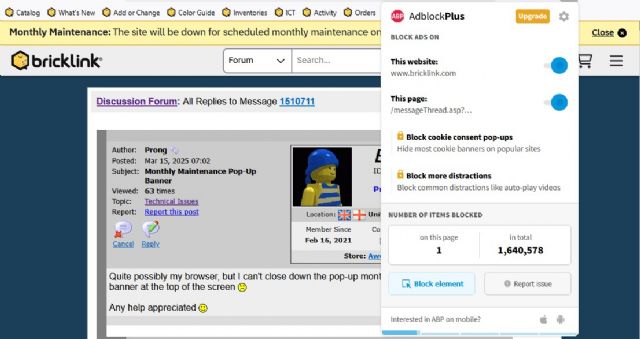
It only works if uBlock is blocking BrickLink (even if you permit everything
apart this). In short, you should have it in Blue, not gray here:
I tried your suggestion and it does not seem to work. I went to settings on uBlock
Origin then to My Filters, pasted, checked box for Enable my custom filters and
Allow custom filters requiring trust, but still the banner is there and can not
be closed.
It only works if uBlock is blocking BrickLink (even if you permit everything
apart this). In short, you should have it in Blue, not gray here:
I have the same blue switch thingy and under it shows the number of blocked items
on the page and a few other stats. I wonder if it has anything to do with location
- you being in France and me in US? Maybe the filter rule needs to be written
a little differently to work here?
Probably not, I'm sorry
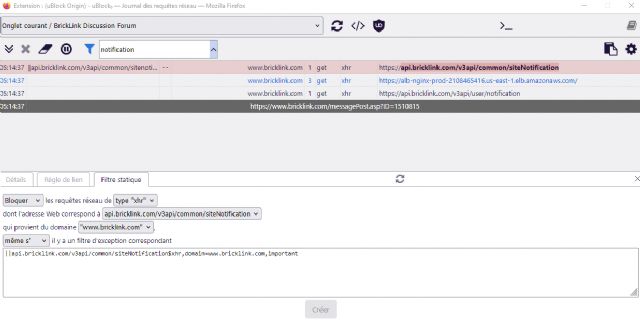
You could use its Query log (translation) window, filter on "notification",
and create the static filter from here.
What I did in fact.
In the pic below it's already blocked, so in red, but basically you can do
the same. Here it works since this morning on all pages.
I tried your suggestion and it does not seem to work. I went to settings on uBlock
Origin then to My Filters, pasted, checked box for Enable my custom filters and
Allow custom filters requiring trust, but still the banner is there and can not
be closed.
It only works if uBlock is blocking BrickLink (even if you permit everything
apart this). In short, you should have it in Blue, not gray here:
I tried your suggestion and it does not seem to work. I went to settings on uBlock
Origin then to My Filters, pasted, checked box for Enable my custom filters and
Allow custom filters requiring trust, but still the banner is there and can not
be closed.
It only works if uBlock is blocking BrickLink (even if you permit everything
apart this). In short, you should have it in Blue, not gray here:
I tried your suggestion and it does not seem to work. I went to settings on uBlock
Origin then to My Filters, pasted, checked box for Enable my custom filters and
Allow custom filters requiring trust, but still the banner is there and can not
be closed.
It only works if uBlock is blocking BrickLink (even if you permit everything
apart this). In short, you should have it in Blue, not gray here:
I tried your suggestion and it does not seem to work. I went to settings on uBlock
Origin then to My Filters, pasted, checked box for Enable my custom filters and
Allow custom filters requiring trust, but still the banner is there and can not
be closed.
Quite possibly my browser, but I can't close down the pop-up monthly maintenance
banner at the top of the screen
Any help appreciated
Admins, please fix this, the menu bar already takes up a ton of space (way more
than it should) now the maintenance banner don't go away either. URGHHHH!


 United Kingdom, England


 Austria, Wien
 Germany, Niedersachsen


 USA, Ohio


 Canada, Ontario
 France, Provence-Alpes-Côte d'Azur



)
)