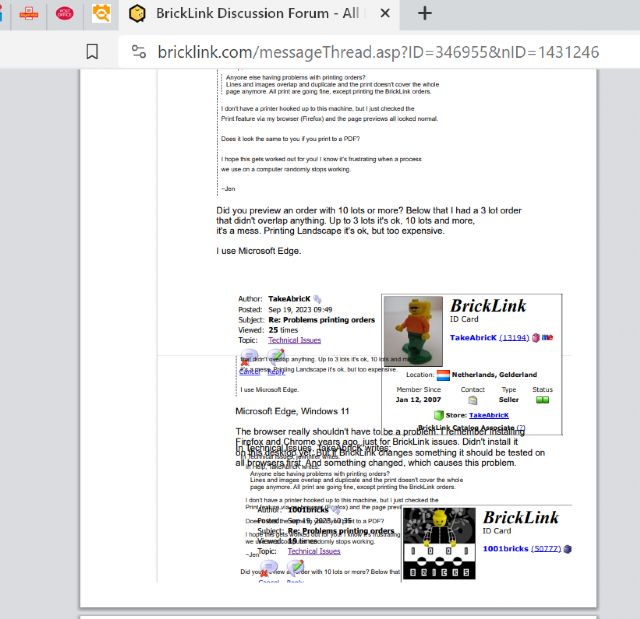
Anyone else having problems with printing orders?
Lines and images overlap and duplicate and the print doesn't cover the whole
page anymore. All print are going fine, except printing the BrickLink orders.
Anyone else having problems with printing orders?
Lines and images overlap and duplicate and the print doesn't cover the whole
page anymore. All print are going fine, except printing the BrickLink orders.
I don't have a printer hooked up to this machine, but I just checked the
Print feature via my browser (Firefox) and the page previews all looked normal.
Does it look the same to you if you print to a PDF?
I hope this gets worked out for you! I know it's frustrating when a process
we use on a computer randomly stops working.
Anyone else having problems with printing orders?
Lines and images overlap and duplicate and the print doesn't cover the whole
page anymore. All print are going fine, except printing the BrickLink orders.
I don't have a printer hooked up to this machine, but I just checked the
Print feature via my browser (Firefox) and the page previews all looked normal.
Does it look the same to you if you print to a PDF?
I hope this gets worked out for you! I know it's frustrating when a process
we use on a computer randomly stops working.
~Jen
Did you preview an order with 10 lots or more? Below that I had a 3 lot order
that didn't overlap anything. Up to 3 lots it's ok, 10 lots and more,
it's a mess. Printing Landscape it's ok, but too expensive.
Anyone else having problems with printing orders?
Lines and images overlap and duplicate and the print doesn't cover the whole
page anymore. All print are going fine, except printing the BrickLink orders.
I don't have a printer hooked up to this machine, but I just checked the
Print feature via my browser (Firefox) and the page previews all looked normal.
Does it look the same to you if you print to a PDF?
I hope this gets worked out for you! I know it's frustrating when a process
we use on a computer randomly stops working.
~Jen
Did you preview an order with 10 lots or more? Below that I had a 3 lot order
that didn't overlap anything. Up to 3 lots it's ok, 10 lots and more,
it's a mess. Printing Landscape it's ok, but too expensive.
I use Microsoft Edge.
Microsoft Edge, Windows 11
The browser really shouldn't have to be a problem. I remember installing
Firefox and Chrome years ago, just for BrickLink issues. Didn't install it
on this desktop yet. But if BrickLink changes something it should be tested on
all browsers first. And something changed, which causes this problem.
The browser really shouldn't have to be a problem. I remember installing
Firefox and Chrome years ago, just for BrickLink issues. Didn't install it
on this desktop yet. But if BrickLink changes something it should be tested on
all browsers first. And something changed, which causes this problem.
The browser really shouldn't have to be a problem. I remember installing
Firefox and Chrome years ago, just for BrickLink issues. Didn't install it
on this desktop yet. But if BrickLink changes something it should be tested on
all browsers first. And something changed, which causes this problem.
Now Chrome is the hegemon and almost every other browser is Chrome- or Chromium-based.
(Chromium is the open-source base of Chrome, without the proprietary and privacy-raping
bits. Edge is based on Chromium, with Microsoft’s own proprietary and privacy-raping
bits added.)
That seems contradictory with the fact the BL printing problems occur on Chrome
and Edge: You’d think that testing on “Chrome only” would suffice to ensure it
works almost everywhere. But there’s no “Chrome only”: there’s multiple versions
of Chrome/Chromium and Google doesn’t care if they break things from one version
to the other because they control the market.
Also, about the Technical debt, new pages on BL that don’t depend on older code
don’t necessarily work better.
For instance, it’s impossible to upload an .io file for the BDP on any browser
on Linux. (You can upload .io files on the Gallery, or images for the BDP, but
not .io files for BDP. Go figure.) (I’m saying that as an example, I’m not
trying to piggyback the report )
Anyone else having problems with printing orders?
Lines and images overlap and duplicate and the print doesn't cover the whole
page anymore. All print are going fine, except printing the BrickLink orders.
I don't have a printer hooked up to this machine, but I just checked the
Print feature via my browser (Firefox) and the page previews all looked normal.
Does it look the same to you if you print to a PDF?
I hope this gets worked out for you! I know it's frustrating when a process
we use on a computer randomly stops working.
~Jen
Did you preview an order with 10 lots or more? Below that I had a 3 lot order
that didn't overlap anything. Up to 3 lots it's ok, 10 lots and more,
it's a mess. Printing Landscape it's ok, but too expensive.
I use Microsoft Edge.
Microsoft Edge is a Chromium-based browser just like Google Chrome, so the issue
is probably affecting all Chromium-based browsers.
Anyone else having problems with printing orders?
Lines and images overlap and duplicate and the print doesn't cover the whole
page anymore. All print are going fine, except printing the BrickLink orders.
Anyone else having problems with printing orders?
Lines and images overlap and duplicate and the print doesn't cover the whole
page anymore. All print are going fine, except printing the BrickLink orders.
Anyone else having problems with printing orders?
Lines and images overlap and duplicate and the print doesn't cover the whole
page anymore. All print are going fine, except printing the BrickLink orders.
Anyone else having problems with printing orders?
Lines and images overlap and duplicate and the print doesn't cover the whole
page anymore. All print are going fine, except printing the BrickLink orders.
Yep, that's it. Except I don't use Chrome.
I have to print 'laying down' now, or how do you say this in English?!
I believe we use 'Portrait' for a vertical page and 'Landscape'
for a horizontal page. Because Art.
haha, I knew it didn't sound correct.
In Dutch it is
Staand (Stand-up) for Portrait
Liggend (Lying) for Landscape
4 times as much paper and about 8 times as much inkt. 6 lots on one page
This is a serious problem.
Ugh! Did you check the PDF method?
~Jen
I can only do this when I 'print to PDF', but the problem occurs before
printing. I press print, get that awfull order on my screen and after that I
can choose to print it or save it as a PDF. So it's the same result.
I can only do this when I 'print to PDF', but the problem occurs before
printing. I press print, get that awfull order on my screen and after that I
can choose to print it or save it as a PDF. So it's the same result.
Got it. Sorry, I couldn't help. I don't see any issues on a Windows 10
machine on Firefox or Chrome. I hope someone figures out a solution soon!
Anyone else having problems with printing orders?
Lines and images overlap and duplicate and the print doesn't cover the whole
page anymore. All print are going fine, except printing the BrickLink orders.
Using a Canon printer, Edge browser, overcome the problem by setting the scale
to 70%, found under more settings, reset every time you print.
Anyone else having problems with printing orders?
Lines and images overlap and duplicate and the print doesn't cover the whole
page anymore. All print are going fine, except printing the BrickLink orders.
Anyone else having problems with printing orders?
Lines and images overlap and duplicate and the print doesn't cover the whole
page anymore. All print are going fine, except printing the BrickLink orders.
Anyone else having problems with printing orders?
Lines and images overlap and duplicate and the print doesn't cover the whole
page anymore. All print are going fine, except printing the BrickLink orders.
even trying to print this page comes out weird
I can confirm all these printing problems on Edge Windows 11, just reported the
problem...
Anyone else having problems with printing orders?
Lines and images overlap and duplicate and the print doesn't cover the whole
page anymore. All print are going fine, except printing the BrickLink orders.
even trying to print this page comes out weird
I can confirm all these printing problems on Edge Windows 11, just reported the
problem...
Anyone else having problems with printing orders?
Lines and images overlap and duplicate and the print doesn't cover the whole
page anymore. All print are going fine, except printing the BrickLink orders.
even trying to print this page comes out weird
I can confirm all these printing problems on Edge Windows 11, just reported the
problem...
Chrome works fine, Edge does not (I never use Edge but I just wanted to check
it).
Anyone else having problems with printing orders?
Lines and images overlap and duplicate and the print doesn't cover the whole
page anymore. All print are going fine, except printing the BrickLink orders.
even trying to print this page comes out weird
I can confirm all these printing problems on Edge Windows 11, just reported the
problem...
Bug acknowledged seems to be a problem with just the newest version of Chromium
based browsers, a quick fix is in the works to release soon for the Order Details
page, for now
Anyone else having problems with printing orders?
Lines and images overlap and duplicate and the print doesn't cover the whole
page anymore. All print are going fine, except printing the BrickLink orders.
even trying to print this page comes out weird
I can confirm all these printing problems on Edge Windows 11, just reported the
problem...
Bug acknowledged seems to be a problem with just the newest version of Chromium
based browsers, a quick fix is in the works to release soon for the Order Details
page, for now
Ah, makes sense! Thanks for reporting. It probably still worked on my Chrome
because I refuse to update anything ever.
Anyone else having problems with printing orders?
Lines and images overlap and duplicate and the print doesn't cover the whole
page anymore. All print are going fine, except printing the BrickLink orders.
I don't think it is browser specific, because even now when I try to print
an order from my iphone, the order doesn't come out right.
It appears as if the right hand margin/border of the print area in portrait mode
isn't being acknowledged.
Usually we could set the zoom, the size of the items and images on the page would
auto size to fit within the margins. This isnt currently working.
Anyone else having problems with printing orders?
Lines and images overlap and duplicate and the print doesn't cover the whole
page anymore. All print are going fine, except printing the BrickLink orders.
I don't think it is browser specific, because even now when I try to print
an order from my iphone, the order doesn't come out right.
It appears as if the right hand margin/border of the print area in portrait mode
isn't being acknowledged.
Usually we could set the zoom, the size of the items and images on the page would
auto size to fit within the margins. This isnt currently working.
I've had problems like this too when printing wanted lists from my PC. Tried
other browser, cleared cache, etc, but nothing worked. HOWEVER, it works fine
from my iPad and from my friend's PC.


 Netherlands, Gelderland


 USA, Illinois
 France, Provence-Alpes-Côte d'Azur

 )
)


 Spain, Comunidad Valenciana

 United Kingdom, England