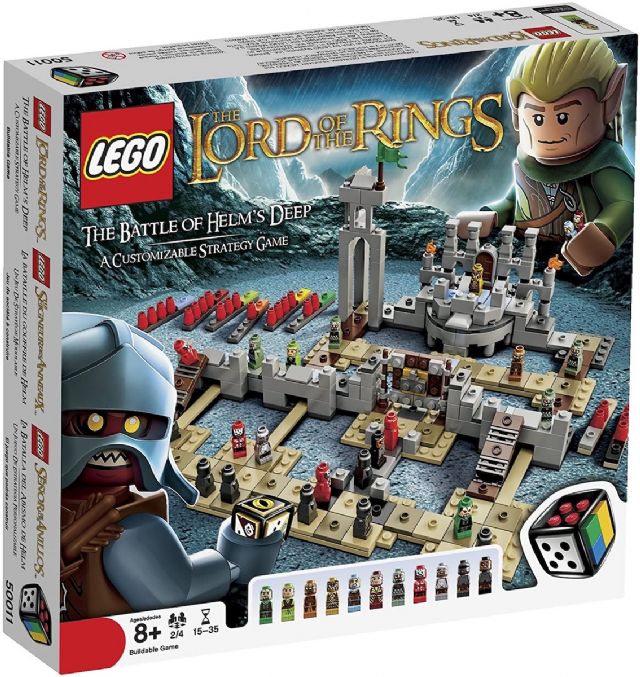
I attempted to add an original box entry for 50011 Lord of the Rings: Battle
of Helm's Deep (game) and the item number verify fails. I entered 50011
and the system autofilled "1" in the next column but it doesn't recognize
it. Also tried G50011. Is the issue because the set is catalogued as "gear"
rather than as a set?
I attempted to add an original box entry for 50011 Lord of the Rings: Battle
of Helm's Deep (game) and the item number verify fails. I entered 50011
and the system autofilled "1" in the next column but it doesn't recognize
it. Also tried G50011. Is the issue because the set is catalogued as "gear"
rather than as a set?
I attempted to add an original box entry for 50011 Lord of the Rings: Battle
of Helm's Deep (game) and the item number verify fails. I entered 50011
and the system autofilled "1" in the next column but it doesn't recognize
it. Also tried G50011. Is the issue because the set is catalogued as "gear"
rather than as a set?
Gear items do not have box entries, so there is no way to add it as a box. What
I have done is added the image as an additional image to the item and credited
you with it.
All of this will be changing soon for these Game sets, though:
I attempted to add an original box entry for 50011 Lord of the Rings: Battle
of Helm's Deep (game) and the item number verify fails. I entered 50011
and the system autofilled "1" in the next column but it doesn't recognize
it. Also tried G50011. Is the issue because the set is catalogued as "gear"
rather than as a set?
That's excellent news. I always wondered why brick-built games, which are
obviously sets that happened to be games, were categorized this way. Also curious
why some of them have a "G" prefix on the set number and some do not. (i.e.
3835 Robo Champ is listed a G3835, while 3851 Atlantis Treasure is simply listed
as 3851.).
In Inventories, randyf writes:
In Inventories, BobShuster writes:
So is there a way to add this?
Gear items do not have box entries, so there is no way to add it as a box. What
I have done is added the image as an additional image to the item and credited
you with it.
All of this will be changing soon for these Game sets, though:
I attempted to add an original box entry for 50011 Lord of the Rings: Battle
of Helm's Deep (game) and the item number verify fails. I entered 50011
and the system autofilled "1" in the next column but it doesn't recognize
it. Also tried G50011. Is the issue because the set is catalogued as "gear"
rather than as a set?
That's excellent news. I always wondered why brick-built games, which are
obviously sets that happened to be games, were categorized this way. Also curious
why some of them have a "G" prefix on the set number and some do not. (i.e.
3835 Robo Champ is listed a G3835, while 3851 Atlantis Treasure is simply listed
as 3851.).
Gear items are like parts, so can't have the same ID as another items.
If it is a set entry in the catalog, then there is no problem because sets have
suffixes.
In Inventories, randyf writes:
In Inventories, BobShuster writes:
So is there a way to add this?
Gear items do not have box entries, so there is no way to add it as a box. What
I have done is added the image as an additional image to the item and credited
you with it.
All of this will be changing soon for these Game sets, though:
I attempted to add an original box entry for 50011 Lord of the Rings: Battle
of Helm's Deep (game) and the item number verify fails. I entered 50011
and the system autofilled "1" in the next column but it doesn't recognize
it. Also tried G50011. Is the issue because the set is catalogued as "gear"
rather than as a set?
OK, now I understand. So once the category for 3835 Robo Champ is changed from
"gear" to "set" it will no longer be listed as G3835, but rather 3835-1. The
link Randy provided discusses the item type change, but gives no time reference
except the October 21, 2021 date at the top. And while it states that the "changes
were made" nothing seems to have changed yet. Do we have an ETA for these changes?
Is it October 21, 2021? (NOTE: I mistakenly read October 21, 2020 when I initially
posted this reply!)
I searched through the forums and found this to be a hot topic of discussion.
I guess I never thought about the process changes like these went through, and
the amount of discussion that preceded any such changes or the actual organization
of BrickLink. I find this all fascinating, and will do some further reading-up!
In Inventories, Stellar writes:
In Inventories, BobShuster writes:
That's excellent news. I always wondered why brick-built games, which are
obviously sets that happened to be games, were categorized this way. Also curious
why some of them have a "G" prefix on the set number and some do not. (i.e.
3835 Robo Champ is listed a G3835, while 3851 Atlantis Treasure is simply listed
as 3851.).
Gear items are like parts, so can't have the same ID as another items.
If it is a set entry in the catalog, then there is no problem because sets have
suffixes.
In Inventories, randyf writes:
In Inventories, BobShuster writes:
So is there a way to add this?
Gear items do not have box entries, so there is no way to add it as a box. What
I have done is added the image as an additional image to the item and credited
you with it.
All of this will be changing soon for these Game sets, though:
I attempted to add an original box entry for 50011 Lord of the Rings: Battle
of Helm's Deep (game) and the item number verify fails. I entered 50011
and the system autofilled "1" in the next column but it doesn't recognize
it. Also tried G50011. Is the issue because the set is catalogued as "gear"
rather than as a set?
OK, now I understand. So once the category for 3835 Robo Champ is changed from
"gear" to "set" it will no longer be listed as G3835, but rather 3835-1. The
link Randy provided discusses the item type change, but gives no time reference
except the October 21, 2021 date at the top. And while it states that the "changes
were made" nothing seems to have changed yet. Do we have an ETA for these changes?
Is it October 21, 2021? (NOTE: I mistakenly read October 21, 2020 when I initially
posted this reply!)
The page is going to be a record of changes that _will_ be made on October 1.
What's the status of this? The catalog changes page shows the transition
from Gear to Sets for games to be complete, but even the example 40161 What Am
I? set is still listed as "gear".
What's the status of this? The catalog changes page shows the transition
from Gear to Sets for games to be complete, but even the example 40161 What Am
I? set is still listed as "gear".
We are waiting for a bug fix to be able to move the games from gear to sets.
What's the status of this? The catalog changes page shows the transition
from Gear to Sets for games to be complete, but even the example 40161 What Am
I? set is still listed as "gear".
For the simplicity for our sake, the help pages are always worded as if all changes
are already done so that we do not have to rework the pages later. That is why
we use the help page titles to communicate the statuses.
On that page, some things are complete, and others are waiting to be completed.
In this specific case, everything has been completed except for moving the games
from gear items to sets. The reason for this is that we are waiting for a bug
fix to be able to do this. The bug fix has been promised within the next week.


 USA, Pennsylvania



 Spain, Comunidad Valenciana

 Germany, Niedersachsen