Hi,
I wanted to know how many minifigures Ninjago has. By using "All Items"
search for "Ninjago" it says 148 minifgures found. That´s wrong. There
are a lot more and several are missing like the NRGs and more.
So what is wrong here?
Hi,
I wanted to know how many minifigures Ninjago has. By using "All Items"
search for "Ninjago" it says 148 minifgures found. That´s wrong. There
are a lot more and several are missing like the NRGs and more.
So what is wrong here?
Instead of searching the word "Ninjago" it's better to select the
Ninjago category from the Minifigure option in the catalog. Clicking that will
show 978 results.
Hi,
I wanted to know how many minifigures Ninjago has. By using "All Items"
search for "Ninjago" it says 148 minifgures found. That´s wrong. There
are a lot more and several are missing like the NRGs and more.
So what is wrong here?
Instead of searching the word "Ninjago" it's better to select the
Ninjago category from the Minifigure option in the catalog. Clicking that will
show 978 results.
Hi,
I wanted to know how many minifigures Ninjago has. By using "All Items"
search for "Ninjago" it says 148 minifgures found. That´s wrong. There
are a lot more and several are missing like the NRGs and more.
So what is wrong here?
Instead of searching the word "Ninjago" it's better to select the
Ninjago category from the Minifigure option in the catalog. Clicking that will
show 978 results.
David
Or searching for njo*
Why are there different searches? Makes 0 sense...
Also searching in the catalog doesnt help as I want to sort the figs by price
[…]
Why are there different searches? Makes 0 sense...
They are searches for different things, those things overlap but are not complete.
— There’s the search (yours) for the word “Ninjago,” but not all Ninjago minifigures
have that word in their description.
— There’s the search (HoosierNinja’s) in the Ninjago category, but there’s actually
other categories (see Stellar’s post, https://www.bricklink.com/message.asp?ID=1536645
).
— There’s the search (yorbrick’s) for all the minifigures whose ID starts with
“njo,” but some don’t (see Stellar’s post again).
Also searching in the catalog doesnt help as I want to sort the figs by price
Make the search(es) in BrickStore and put the results in a BS file, then set
their prices as you wish (6-months for sale average or whatever…), then sort
them by the price column.
[…]
Why are there different searches? Makes 0 sense...
They are searches for different things, those things overlap but are not complete.
— There’s the search (yours) for the word “Ninjago,” but not all Ninjago minifigures
have that word in their description.
— There’s the search (HoosierNinja’s) in the Ninjago category, but there’s actually
other categories (see Stellar’s post, https://www.bricklink.com/message.asp?ID=1536645
).
— There’s the search (yorbrick’s) for all the minifigures whose ID starts with
“njo,” but some don’t (see Stellar’s post again).
Also searching in the catalog doesnt help as I want to sort the figs by price
Make the search(es) in BrickStore and put the results in a BS file, then set
their prices as you wish (6-months for sale average or whatever…), then sort
them by the price column.
I tried BS; how can I add all at once? Can´t find it, only single adding; and
that´s a little work for 1000+ figs
[…]
I tried BS; how can I add all at once? Can´t find it, only single adding; and
that´s a little work for 1000+ figs
I don’t know… but BS is the best solution for the other part of you problem:
being able to get prices for the items from BL’s Price Guide and sorting them
by price.
[…]
Why are there different searches? Makes 0 sense...
They are searches for different things, those things overlap but are not complete.
— There’s the search (yours) for the word “Ninjago,” but not all Ninjago minifigures
have that word in their description.
— There’s the search (HoosierNinja’s) in the Ninjago category, but there’s actually
other categories (see Stellar’s post, https://www.bricklink.com/message.asp?ID=1536645
).
— There’s the search (yorbrick’s) for all the minifigures whose ID starts with
“njo,” but some don’t (see Stellar’s post again).
Also searching in the catalog doesnt help as I want to sort the figs by price
Make the search(es) in BrickStore and put the results in a BS file, then set
their prices as you wish (6-months for sale average or whatever…), then sort
them by the price column.
I tried BS; how can I add all at once? Can´t find it, only single adding; and
that´s a little work for 1000+ figs
Hi,
I wanted to know how many minifigures Ninjago has. By using "All Items"
search for "Ninjago" it says 148 minifgures found. That´s wrong. There
are a lot more and several are missing like the NRGs and more.
So what is wrong here?
Instead of searching the word "Ninjago" it's better to select the
Ninjago category from the Minifigure option in the catalog. Clicking that will
show 978 results.
David
Or searching for njo*
Not all of them are numbered like that, these are most links needed:
Hi,
I wanted to know how many minifigures Ninjago has. By using "All Items"
search for "Ninjago" it says 148 minifgures found. That´s wrong. There
are a lot more and several are missing like the NRGs and more.
So what is wrong here?
Instead of searching the word "Ninjago" it's better to select the
Ninjago category from the Minifigure option in the catalog. Clicking that will
show 978 results.
David
Or searching for njo*
Not all of them are numbered like that, these are most links needed:
Hi,
I wanted to know how many minifigures Ninjago has. By using "All Items"
search for "Ninjago" it says 148 minifgures found. That´s wrong. There
are a lot more and several are missing like the NRGs and more.
So what is wrong here?
Hi,
I wanted to know how many minifigures Ninjago has. By using "All Items"
search for "Ninjago" it says 148 minifgures found. That´s wrong. There
are a lot more and several are missing like the NRGs and more.
So what is wrong here?
Open up the file in notepad and change the very first line from CATLOG to INVENTORY
and then change the very last line CATALOG to INVENTORY - just keep the special
symbols in place.
You can now open the file up in BrickStore. to open up the file, instead of choosing
to Open a file instead chose "Import" and pick "BrickLink xml".
Now sort all figs by "Item ID", delete all minifigures except for njo
figs (and any others you want to keep) and the total of njo figs will total 838.
Select all and click the icon to set the price for all figs to the 6 month average
price and Wala.
Hi,
I wanted to know how many minifigures Ninjago has. By using "All Items"
search for "Ninjago" it says 148 minifgures found. That´s wrong. There
are a lot more and several are missing like the NRGs and more.
So what is wrong here?
Open up the file in notepad and change the very first line from CATLOG to INVENTORY
and then change the very last line CATALOG to INVENTORY - just keep the special
symbols in place.
You can now open the file up in BrickStore. to open up the file, instead of choosing
to Open a file instead chose "Import" and pick "BrickLink xml".
Now sort all figs by "Item ID", delete all minifigures except for njo
figs (and any others you want to keep) and the total of njo figs will total 838.
Select all and click the icon to set the price for all figs to the 6 month average
price and Wala.
Jim
Except for the fact that there are actually 1089 Ninjago minifigures in total.
Currently.
BS does show me 1058 Figures; last is njo1050; 8 have an "a" number,
so a variant
But you are saying now there are 1089???
In General, randyf writes:
In General, TheBrickGuys writes:
In General, Martin_MD writes:
Hi,
I wanted to know how many minifigures Ninjago has. By using "All Items"
search for "Ninjago" it says 148 minifgures found. That´s wrong. There
are a lot more and several are missing like the NRGs and more.
So what is wrong here?
Open up the file in notepad and change the very first line from CATLOG to INVENTORY
and then change the very last line CATALOG to INVENTORY - just keep the special
symbols in place.
You can now open the file up in BrickStore. to open up the file, instead of choosing
to Open a file instead chose "Import" and pick "BrickLink xml".
Now sort all figs by "Item ID", delete all minifigures except for njo
figs (and any others you want to keep) and the total of njo figs will total 838.
Select all and click the icon to set the price for all figs to the 6 month average
price and Wala.
Jim
Except for the fact that there are actually 1089 Ninjago minifigures in total.
Currently.
BS does show me 1058 Figures; last is njo1050; 8 have an "a" number,
so a variant
But you are saying now there are 1089???
In General, randyf writes:
In General, TheBrickGuys writes:
In General, Martin_MD writes:
Hi,
I wanted to know how many minifigures Ninjago has. By using "All Items"
search for "Ninjago" it says 148 minifgures found. That´s wrong. There
are a lot more and several are missing like the NRGs and more.
So what is wrong here?
Open up the file in notepad and change the very first line from CATLOG to INVENTORY
and then change the very last line CATALOG to INVENTORY - just keep the special
symbols in place.
You can now open the file up in BrickStore. to open up the file, instead of choosing
to Open a file instead chose "Import" and pick "BrickLink xml".
Now sort all figs by "Item ID", delete all minifigures except for njo
figs (and any others you want to keep) and the total of njo figs will total 838.
Select all and click the icon to set the price for all figs to the 6 month average
price and Wala.
Jim
Except for the fact that there are actually 1089 Ninjago minifigures in total.
Currently.
Ahh wait I know why; I sort for "njo" in Brickstore, but there are several
more figures that are from Ninjago but doesn´t have "njo" ID., e. g.
dim011, gen069, the micro figures and the Ninajgo Movie CMFs
Hi,
I wanted to know how many minifigures Ninjago has. By using "All Items"
search for "Ninjago" it says 148 minifgures found. That´s wrong. There
are a lot more and several are missing like the NRGs and more.
So what is wrong here?
Open up the file in notepad and change the very first line from CATLOG to INVENTORY
and then change the very last line CATALOG to INVENTORY - just keep the special
symbols in place.
You can now open the file up in BrickStore. to open up the file, instead of choosing
to Open a file instead chose "Import" and pick "BrickLink xml".
Now sort all figs by "Item ID", delete all minifigures except for njo
figs (and any others you want to keep) and the total of njo figs will total 838.
Select all and click the icon to set the price for all figs to the 6 month average
price and Wala.
Jim
Except for the fact that there are actually 1089 Ninjago minifigures in total.
Currently.
I actually sorted the figs by Category instead of by Item Id. Once I did that
and selected all figs starting with njo I now have a total of 1058 figs starting
with njo.
Hi,
I wanted to know how many minifigures Ninjago has. By using "All Items"
search for "Ninjago" it says 148 minifgures found. That´s wrong. There
are a lot more and several are missing like the NRGs and more.
So what is wrong here?
Open up the file in notepad and change the very first line from CATLOG to INVENTORY
and then change the very last line CATALOG to INVENTORY - just keep the special
symbols in place.
You can now open the file up in BrickStore. to open up the file, instead of choosing
to Open a file instead chose "Import" and pick "BrickLink xml".
Now sort all figs by "Item ID", delete all minifigures except for njo
figs (and any others you want to keep) and the total of njo figs will total 838.
Select all and click the icon to set the price for all figs to the 6 month average
price and Wala.
Jim
Except for the fact that there are actually 1089 Ninjago minifigures in total.
Currently.
I actually sorted the figs by Category instead of by Item Id. Once I did that
and selected all figs starting with njo I now have a total of 1058 figs starting
with njo.
Jim
Yeah, got the same number Big thanks!
Now another task: It was possible with figs, but can we do the same also for
parts? I want to sort by price for all parts with their colour...any chance to
do that with this method?
Hi,
I wanted to know how many minifigures Ninjago has. By using "All Items"
search for "Ninjago" it says 148 minifgures found. That´s wrong. There
are a lot more and several are missing like the NRGs and more.
So what is wrong here?
Open up the file in notepad and change the very first line from CATLOG to INVENTORY
and then change the very last line CATALOG to INVENTORY - just keep the special
symbols in place.
You can now open the file up in BrickStore. to open up the file, instead of choosing
to Open a file instead chose "Import" and pick "BrickLink xml".
Now sort all figs by "Item ID", delete all minifigures except for njo
figs (and any others you want to keep) and the total of njo figs will total 838.
Select all and click the icon to set the price for all figs to the 6 month average
price and Wala.
Jim
Except for the fact that there are actually 1089 Ninjago minifigures in total.
Currently.
I actually sorted the figs by Category instead of by Item Id. Once I did that
and selected all figs starting with njo I now have a total of 1058 figs starting
with njo.
Jim
Yeah, got the same number Big thanks!
Now another task: It was possible with figs, but can we do the same also for
parts? I want to sort by price for all parts with their colour...any chance to
do that with this method?
From what I remember you can do the same with parts as long as you change the
words I mentioned in my other post.
Glad it worked out for you but I cant take credit for it as I learned out how
to do it myself by asking a similar question here on the forums a long time ago.
A great bunch of people here (except for maybe those who droll on about the many
benefits of mustard ).
Doesn´t work for parts...as parts are not separated by colour. I get all parts,
but only without colour...so still trying to find out which are the most expensive
parts (+ colour)
In General, TheBrickGuys writes:
In General, Martin_MD writes:
In General, TheBrickGuys writes:
In General, randyf writes:
In General, TheBrickGuys writes:
In General, Martin_MD writes:
Hi,
I wanted to know how many minifigures Ninjago has. By using "All Items"
search for "Ninjago" it says 148 minifgures found. That´s wrong. There
are a lot more and several are missing like the NRGs and more.
So what is wrong here?
Open up the file in notepad and change the very first line from CATLOG to INVENTORY
and then change the very last line CATALOG to INVENTORY - just keep the special
symbols in place.
You can now open the file up in BrickStore. to open up the file, instead of choosing
to Open a file instead chose "Import" and pick "BrickLink xml".
Now sort all figs by "Item ID", delete all minifigures except for njo
figs (and any others you want to keep) and the total of njo figs will total 838.
Select all and click the icon to set the price for all figs to the 6 month average
price and Wala.
Jim
Except for the fact that there are actually 1089 Ninjago minifigures in total.
Currently.
I actually sorted the figs by Category instead of by Item Id. Once I did that
and selected all figs starting with njo I now have a total of 1058 figs starting
with njo.
Jim
Yeah, got the same number Big thanks!
Now another task: It was possible with figs, but can we do the same also for
parts? I want to sort by price for all parts with their colour...any chance to
do that with this method?
From what I remember you can do the same with parts as long as you change the
words I mentioned in my other post.
Glad it worked out for you but I cant take credit for it as I learned out how
to do it myself by asking a similar question here on the forums a long time ago.
A great bunch of people here (except for maybe those who droll on about the many
benefits of mustard ).
Doesn´t work for parts...as parts are not separated by colour. I get all parts,
but only without colour...so still trying to find out which are the most expensive
parts (+ colour)
All parts in catalog in all known colors? We're talking about million(s)
combinations, and million(s) price information to get, then sort. This isn't
available on BrickLink, and there's no simple way to do this.
Doesn´t work for parts...as parts are not separated by colour. I get all parts,
but only without colour...so still trying to find out which are the most expensive
parts (+ colour)
All parts in catalog in all known colors? We're talking about million(s)
combinations, and million(s) price information to get, then sort. This isn't
available on BrickLink, and there's no simple way to do this.
All available combinations, yes.
I wanted to know the most expensive parts with their certain colours. I often
look in bulks and would be nice to know for what to look
Doesn´t work for parts...as parts are not separated by colour. I get all parts,
but only without colour...so still trying to find out which are the most expensive
parts (+ colour)
All parts in catalog in all known colors? We're talking about million(s)
combinations, and million(s) price information to get, then sort. This isn't
available on BrickLink, and there's no simple way to do this.
Not millions.
There were (as of Jan 21st) 93,080 parts in the catalogue.
Counting the possible colours with the PCCs (eliminating the doublets), I get
132,705.
A lot of parts don’t have PCC… but they are also generally those that only exist
in one colour. I’m talking about the stickered parts. (I could check that I
guess….)
Even if this count is off, it’s not off by a factor 10.
In any case, that would makes a big BS file and lots of requests to get the prices
Doesn´t work for parts...as parts are not separated by colour. I get all parts,
but only without colour...so still trying to find out which are the most expensive
parts (+ colour)
All parts in catalog in all known colors? We're talking about million(s)
combinations, and million(s) price information to get, then sort. This isn't
available on BrickLink, and there's no simple way to do this.
Not millions.
A bit exaggerated, wanted to emphasis it's a huge task.
There were (as of Jan 21st) 93,080 parts in the catalogue.
Counting the possible colours with the PCCs (eliminating the doublets), I get
132,705.
A lot of parts don’t have PCC… but they are also generally those that only exist
in one colour. I’m talking about the stickered parts. (I could check that I
guess….)
Even if this count is off, it’s not off by a factor 10.
Never tried to approximate an average, but sure many are in a single color, others
are in 50 or more.
x10 is maybe not so wrong? I don't know.
In any case, that would makes a big BS file and lots of requests to get the prices
Yep, and assuming it's a low x5 average, say 500000 combinations at 5000
quests per day (if we don't count the pictures etc, which count) that's
a minimum of 3 months.
In short, if you want this to be updated, as soon as you've done all you
can restart the loop
[…]
A bit exaggerated, wanted to emphasis it's a huge task.
Yeah, I know where you live, peuchère!
There were (as of Jan 21st) 93,080 parts in the catalogue.
Counting the possible colours with the PCCs (eliminating the doublets), I get
132,705.
A lot of parts don’t have PCC… but they are also generally those that only exist
in one colour. I’m talking about the stickered parts. (I could check that I
guess….)
Even if this count is off, it’s not off by a factor 10.
Never tried to approximate an average, but sure many are in a single color, others
are in 50 or more.
x10 is maybe not so wrong? I don't know.
Very, very few parts exist in many colours.
93,080 is decomposed into:
— 43,489 parts that have PCCs. They have an average of 2 colours (1.911).
a. 30,475 parts that have “pattern” in their name.
b. 13,014 aren’t decorated and count for 51,632 colors. So an average of 4
colours (3.967) per part.
— 49,591 parts that have 0 known PCCs.
c. 45,414 of those have Sticker, Pattern, or Undetermined in their name.
d. 4,177 don’t.
So, even if there were a lot of PCCs missing, those numbers can’t be wrong by
a factor 10, at most by a factor 2 on (b) and a factor 8 on (d) (8 = 4 x 2, the
average number of combinations for (b) multiplied by the “wrongness” factor).
That would mean about 85,000 more combinations.
So 220,000 combinations / prices to fetch at most.
In any case, that would makes a big BS file and lots of requests to get the prices
Yep, and assuming it's a low x5 average,
5 is not low. It’s very high. My guesstimated high above is 2.5.
But that doesn’t change the conclusion
say 500000 combinations at 5000
quests per day (if we don't count the pictures etc, which count) that's
a minimum of 3 months.
In short, if you want this to be updated, as soon as you've done all you
can restart the loop


 Germany, Sachsen-Anhalt


 USA, Indiana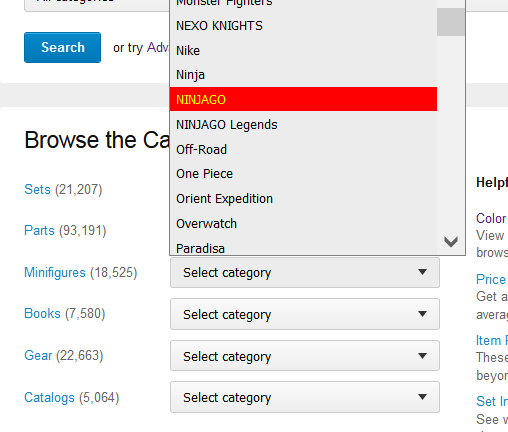

 United Kingdom, England


 France, Nouvelle-Aquitaine
 Netherlands, Gelderland

 Spain, Comunidad Valenciana
 Austria, Wien


