I have a new customer place an order and choose instant checkout but did not
complete the payment. Because he chose Instant Checkout so if I send him an invoice
it will not have a payment link on it. So my question is, how can the payment
be made thru BrickLink? I don't want to send him a payment link from PayPal
to make the payment because then BrickLink will not recognize that the payment
has been made so I cant change the order status to "Shipped".
I want to make sure the payment goes thru BrickLink but am not sure how to go
about it. Any suggestions?
I have a new customer place an order and choose instant checkout but did not
complete the payment. Because he chose Instant Checkout so if I send him an invoice
it will not have a payment link on it. So my question is, how can the payment
be made thru BrickLink? I don't want to send him a payment link from PayPal
to make the payment because then BrickLink will not recognize that the payment
has been made so I cant change the order status to "Shipped".
I want to make sure the payment goes thru BrickLink but am not sure how to go
about it. Any suggestions?
I have a new customer place an order and choose instant checkout but did not
complete the payment. Because he chose Instant Checkout so if I send him an invoice
it will not have a payment link on it. So my question is, how can the payment
be made thru BrickLink? I don't want to send him a payment link from PayPal
to make the payment because then BrickLink will not recognize that the payment
has been made so I cant change the order status to "Shipped".
I want to make sure the payment goes thru BrickLink but am not sure how to go
about it. Any suggestions?
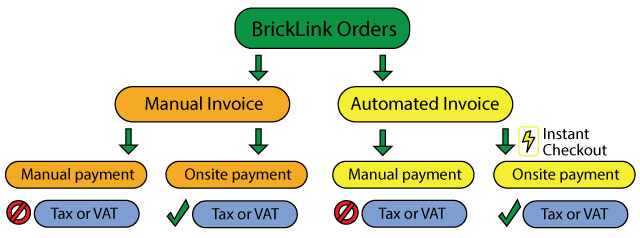
Weird… I thought orders didn't exist until they were paid with IC (= auto-invoice
+ onsite payment).
I just sent a message asking the customer if he sees the link on the Orders Placed
page - I will update once he gets back to me but I think because he chose instant
checkout that there will not be the link you mentioned, but we will see?
I have a new customer place an order and choose instant checkout but did not
complete the payment. Because he chose Instant Checkout so if I send him an invoice
it will not have a payment link on it. So my question is, how can the payment
be made thru BrickLink? I don't want to send him a payment link from PayPal
to make the payment because then BrickLink will not recognize that the payment
has been made so I cant change the order status to "Shipped".
I want to make sure the payment goes thru BrickLink but am not sure how to go
about it. Any suggestions?
Weird… I thought orders didn't exist until they were paid with IC (= auto-invoice
+ onsite payment).
I just sent a message asking the customer if he sees the link on the Orders Placed
page - I will update once he gets back to me but I think because he chose instant
checkout that there will not be the link you mentioned, but we will see?
I have a new customer place an order and choose instant checkout but did not
complete the payment. Because he chose Instant Checkout so if I send him an invoice
it will not have a payment link on it. So my question is, how can the payment
be made thru BrickLink? I don't want to send him a payment link from PayPal
to make the payment because then BrickLink will not recognize that the payment
has been made so I cant change the order status to "Shipped".
I want to make sure the payment goes thru BrickLink but am not sure how to go
about it. Any suggestions?
Weird… I thought orders didn't exist until they were paid with IC (= auto-invoice
+ onsite payment).
I just sent a message asking the customer if he sees the link on the Orders Placed
page - I will update once he gets back to me but I think because he chose instant
checkout that there will not be the link you mentioned, but we will see?
Jim
Customer just confirmed - no button
Jim
Just to confirm, have you tried resending the invoice? So long as an order isn’t
paid you should be able to resend it and the buyer will get a payment link
I have a new customer place an order and choose instant checkout but did not
complete the payment. Because he chose Instant Checkout so if I send him an invoice
it will not have a payment link on it. So my question is, how can the payment
be made thru BrickLink? I don't want to send him a payment link from PayPal
to make the payment because then BrickLink will not recognize that the payment
has been made so I cant change the order status to "Shipped".
I want to make sure the payment goes thru BrickLink but am not sure how to go
about it. Any suggestions?
Weird… I thought orders didn't exist until they were paid with IC (= auto-invoice
+ onsite payment).
I just sent a message asking the customer if he sees the link on the Orders Placed
page - I will update once he gets back to me but I think because he chose instant
checkout that there will not be the link you mentioned, but we will see?
Jim
Customer just confirmed - no button
Jim
Just to confirm, have you tried resending the invoice? So long as an order isn’t
paid you should be able to resend it and the buyer will get a payment link
I did but the customer said that there was no link on it. I think because he
chose instant checkout (but did not follow thru with the payment) is why there
is no payment link on the on the invoice.
I have a new customer place an order and choose instant checkout but did not
complete the payment. Because he chose Instant Checkout so if I send him an invoice
it will not have a payment link on it. So my question is, how can the payment
be made thru BrickLink? I don't want to send him a payment link from PayPal
to make the payment because then BrickLink will not recognize that the payment
has been made so I cant change the order status to "Shipped".
I want to make sure the payment goes thru BrickLink but am not sure how to go
about it. Any suggestions?
Weird… I thought orders didn't exist until they were paid with IC (= auto-invoice
+ onsite payment).
I just sent a message asking the customer if he sees the link on the Orders Placed
page - I will update once he gets back to me but I think because he chose instant
checkout that there will not be the link you mentioned, but we will see?
Jim
Customer just confirmed - no button
Jim
Just to confirm, have you tried resending the invoice? So long as an order isn’t
paid you should be able to resend it and the buyer will get a payment link
I did but the customer said that there was no link on it. I think because he
chose instant checkout (but did not follow thru with the payment) is why there
is no payment link on the on the invoice.
Jim
Did the buyer choose PayPal Onsite or the normal PayPal?
It reads as if he chose the latter.
According to the FAQ (https://www.bricklink.com/help.asp?helpID=2466 ), during
IC, the items are reserved for 10 min and if the payment is not done in that
delay, the items are released.
To me, that means that without payment, there’s no order because, otherwise,
you’d have an order with items that are not reserved.
So I don’t get how TheBrickGuys have an unpaid IC order. That shouldn’t be possible.
So, as Nubs said, the order must somehow wrongly be marked as paid.
Though, contrarily to him, I don’t think the buyer did it (1001 often talks about
a bug where buyers can still mark Onsite payment orders paid… but, AFAIK, it’s
not full-IC orders).
According to the FAQ (https://www.bricklink.com/help.asp?helpID=2466 ), during
IC, the items are reserved for 10 min and if the payment is not done in that
delay, the items are released.
To me, that means that without payment, there’s no order because, otherwise,
you’d have an order with items that are not reserved.
So I don’t get how TheBrickGuys have an unpaid IC order. That shouldn’t be possible.
So, as Nubs said, the order must somehow wrongly be marked as paid.
Though, contrarily to him, I don’t think the buyer did it (1001 often talks about
a bug where buyers can still mark Onsite payment orders paid… but, AFAIK, it’s
not full-IC orders).
You still CAN mark paid manually a "PayPal (onsite)" order, I do it from
time to time as a buyer when I have to. Though I don't know if it's possible
for a fill-IC order as you say. One should test this...
I have a new customer place an order and choose instant checkout but did not
complete the payment. Because he chose Instant Checkout so if I send him an invoice
it will not have a payment link on it. So my question is, how can the payment
be made thru BrickLink? I don't want to send him a payment link from PayPal
to make the payment because then BrickLink will not recognize that the payment
has been made so I cant change the order status to "Shipped".
I want to make sure the payment goes thru BrickLink but am not sure how to go
about it. Any suggestions?
Weird… I thought orders didn't exist until they were paid with IC (= auto-invoice
+ onsite payment).
I just sent a message asking the customer if he sees the link on the Orders Placed
page - I will update once he gets back to me but I think because he chose instant
checkout that there will not be the link you mentioned, but we will see?
Jim
Customer just confirmed - no button
Jim
Just to confirm, have you tried resending the invoice? So long as an order isn’t
paid you should be able to resend it and the buyer will get a payment link
I did but the customer said that there was no link on it. I think because he
chose instant checkout (but did not follow thru with the payment) is why there
is no payment link on the on the invoice.
Jim
instant checkout will always let them pay during it, unless it was a bug, have
you tried setting payment status to none and trying again? (they may have marked
it as paid on their end not knowing how it all works)


 USA, California


 France, Nouvelle-Aquitaine


 Canada, Ontario
 Netherlands, Drenthe