Discussion Forum: Thread 371340

 Author: Stellar View Messages Posted By Stellar
 Posted: Jul 25, 2025 07:23
 Subject: Backup My Favorite Stores notes
 Viewed: 142 times
 Topic: General
 Report:
Cancel Message
Cancel
Reply to Message
Reply
BrickLink
ID Card

Stellar (4210)

Location:  Spain, Comunidad Valenciana
Member Since Contact Type Status
Sep 24, 2015 Contact Member Seller
Buying Privileges - OKSelling Privileges - OK
Store: Stellar Bricks
BrickLink Inventories Administrator (?)
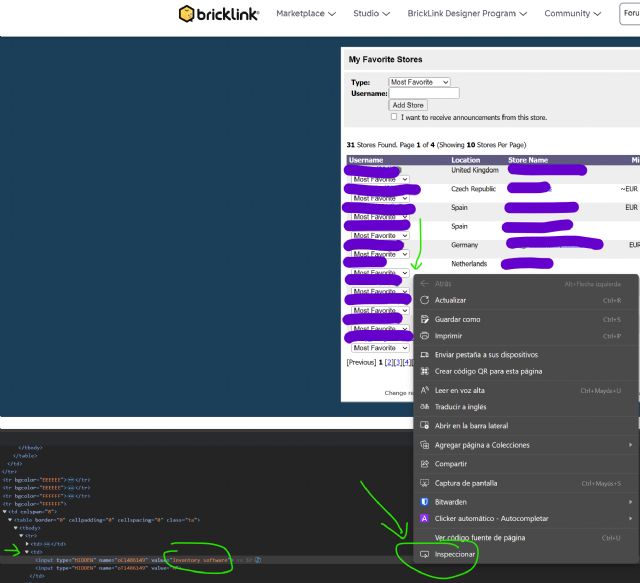
Bricklink updated the site to hide them in the site:

https://www.bricklink.com/pref_favorite.asp

But for now they are still available in 2 ways, one easier than the other. But
a hassle from now on and in the future if they are fully removed.


 Author: peregrinator View Messages Posted By peregrinator
 Posted: Jul 25, 2025 10:13
 Subject: Re: Backup My Favorite Stores notes
 Viewed: 48 times
 Topic: General
 Report:
Cancel Message
Cancel
Reply to Message
Reply
BrickLink
ID Card

peregrinator (1121)

Location:  USA, New Jersey
Member Since Contact Type Status
Jan 21, 2003 Contact Member Seller
Buying Privileges - OKSelling Privileges - OK
Store: Faber Family Bricks
In General, Stellar writes:
  Bricklink updated the site to hide them in the site:

Hmmm, I think if I were developing the site now I would make those comments available
in the "favorites" list page as JavaScript tooltips. Or having the user
click a button to see them one at a time.

Although I can honestly say in my time on this site I don't think I ever
looked at that page, only at the bookmark settings on individual stores.
 Author: nammasnart96 View Messages Posted By nammasnart96
 Posted: Jul 25, 2025 22:33
 Subject: Re: Backup My Favorite Stores notes
 Viewed: 53 times
 Topic: General
 Report:
Cancel Message
Cancel
Reply to Message
Reply
BrickLink
ID Card

nammasnart96 (501)

Location:  USA, South Carolina
Member Since Contact Type Status
Dec 11, 2015 Contact Member Seller
Buying Privileges - OKSelling Privileges - OK
Store Closed Store: Bionicles, Bricks and More
In General, Stellar writes:
  Bricklink updated the site to hide them in the site:

https://www.bricklink.com/pref_favorite.asp

But for now they are still available in 2 ways, one easier than the other. But
a hassle from now on and in the future if they are fully removed.

Thanks for posting the link! I was able to copy and save my list to a word document.
Howard
 Author: MrPetovan View Messages Posted By MrPetovan
 Posted: Jul 25, 2025 23:54
 Subject: Re: Backup My Favorite Stores notes
 Viewed: 51 times
 Topic: General
 Report:
Cancel Message
Cancel
Reply to Message
Reply
BrickLink
ID Card

MrPetovan (1289)

Location:  USA, New York
Member Since Contact Type Status
Jun 2, 2019 Contact Member Seller
Buying Privileges - OKSelling Privileges - OK
Store: MrPetovan's Clearance Sale
In General, Stellar writes:
  Bricklink updated the site to hide them in the site:

https://www.bricklink.com/pref_favorite.asp

But for now they are still available in 2 ways, one easier than the other. But
a hassle from now on and in the future if they are fully removed.

Thank you for the tip, I found out the hard way a caveat:

If any change is made to the list like removing a store from it, it blanks out
the comment of all the stores on the same page, as if empty comments had been
submitted for them.

😡