Discussion Forum: Thread 370722

 Author: Saitobricks.ca View Messages Posted By Saitobricks.ca
 Posted: Jun 27, 2025 20:27
 Subject: Tips for changing your Lego name and avatar
 Viewed: 192 times
 Topic: General
 Report:
Cancel Message
Cancel
Reply to Message
Reply
BrickLink
ID Card

Saitobricks.ca (64) 
(was Saitobricksca)

Location:  Canada, Ontario
Member Since Contact Type Status
Aug 28, 2021 Contact Member Seller
Buying Privileges - OKSelling Privileges - OK
Store Closed Store: Unlicensed Brick
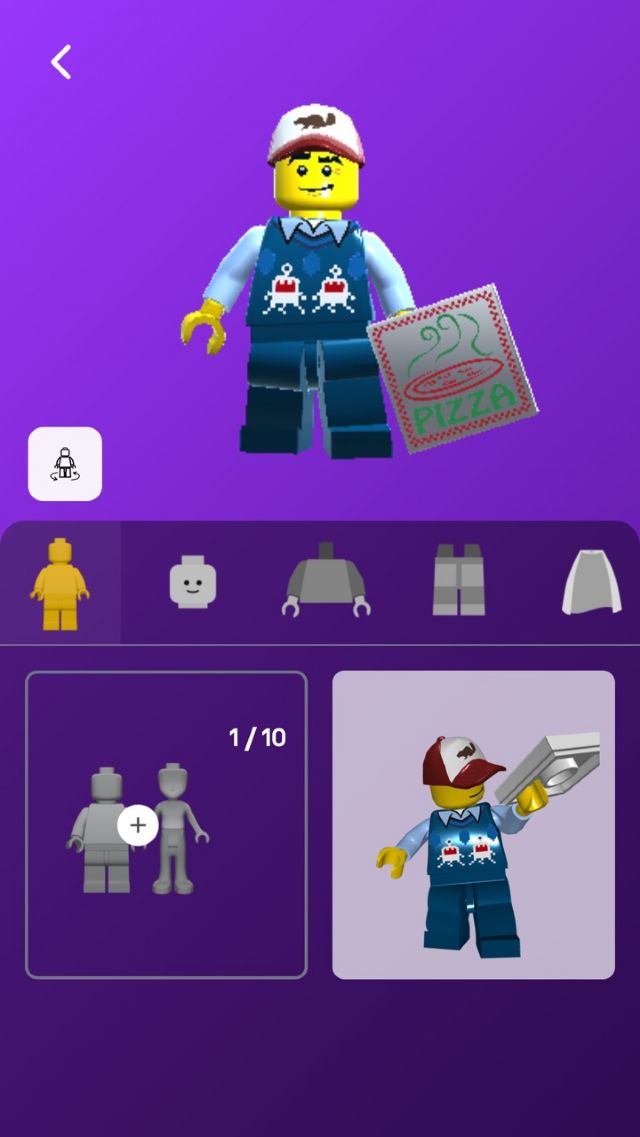
If you haven’t yet, download the Lego play app, from there there is a whole menu
of options for more customization of your sig fig, and username. Any questions
welcome as the system can be quite difficult to operate
 
 Author: SylvainLS View Messages Posted By SylvainLS
 Posted: Jun 28, 2025 06:11
 Subject: Re: Tips for changing your Lego name and avatar
 Viewed: 90 times
 Topic: General
 Report:
Cancel Message
Cancel
Reply to Message
Reply
BrickLink
ID Card

SylvainLS (52)

Location:  France, Nouvelle-Aquitaine
Member Since Contact Type Status
Apr 25, 2014 Contact Member Seller
Buying Privileges - OKSelling Privileges - OK
Store Closed Store: BuyerOnly
BrickLink Discussions Moderator (?)
In General, Saitobricks.ca writes:
  If you haven’t yet, download the Lego play app, from there there is a whole menu
of options for more customization of your sig fig, and username.

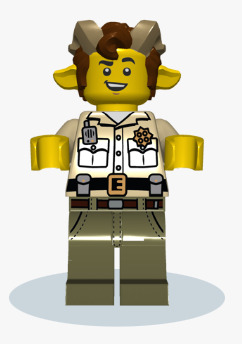
Yes, more options, thanks for the headsup… but still very limited.
(No goat legs, no sweater or muscular torso… but the horns are there….)


   Any questions
welcome as the system can be quite difficult to operate

To summarize: First, click the + to create a minifigure, because if you don’t,
they still let you play with an avatar but it’s not saved, and then you have
to start from scratch….
 
 Author: Stellar View Messages Posted By Stellar
 Posted: Aug 20, 2025 12:39
 Subject: Re: Tips for changing your Lego name and avatar
 Viewed: 35 times
 Topic: General
 Report:
Cancel Message
Cancel
Reply to Message
Reply
BrickLink
ID Card

Stellar (4117)

Location:  Spain, Comunidad Valenciana
Member Since Contact Type Status
Sep 24, 2015 Contact Member Seller
Buying Privileges - OKSelling Privileges - OK
Store: Stellar Bricks
BrickLink Inventories Administrator (?)
In General, SylvainLS writes:
  In General, Saitobricks.ca writes:
  If you haven’t yet, download the Lego play app, from there there is a whole menu
of options for more customization of your sig fig, and username.

Yes, more options, thanks for the headsup… but still very limited.
(No goat legs, no sweater or muscular torso… but the horns are there….)


   Any questions
welcome as the system can be quite difficult to operate

To summarize: First, click the + to create a minifigure, because if you don’t,
they still let you play with an avatar but it’s not saved, and then you have
to start from scratch….

All my avatars are in nougat/flesh, does anyone know how to change the skin color
to yellow?
 Author: Stellar View Messages Posted By Stellar
 Posted: Aug 20, 2025 12:45
 Subject: Re: Tips for changing your Lego name and avatar
 Viewed: 43 times
 Topic: General
 Report:
Cancel Message
Cancel
Reply to Message
Reply
BrickLink
ID Card

Stellar (4117)

Location:  Spain, Comunidad Valenciana
Member Since Contact Type Status
Sep 24, 2015 Contact Member Seller
Buying Privileges - OKSelling Privileges - OK
Store: Stellar Bricks
BrickLink Inventories Administrator (?)
In General, Stellar writes:
  In General, SylvainLS writes:
  In General, Saitobricks.ca writes:
  If you haven’t yet, download the Lego play app, from there there is a whole menu
of options for more customization of your sig fig, and username.

Yes, more options, thanks for the headsup… but still very limited.
(No goat legs, no sweater or muscular torso… but the horns are there….)


   Any questions
welcome as the system can be quite difficult to operate

To summarize: First, click the + to create a minifigure, because if you don’t,
they still let you play with an avatar but it’s not saved, and then you have
to start from scratch….

All my avatars are in nougat/flesh, does anyone know how to change the skin color
to yellow?

got it, just had to create a few dozens until one random yellow appeared.
 Author: SylvainLS View Messages Posted By SylvainLS
 Posted: Aug 20, 2025 12:59
 Subject: Re: Tips for changing your Lego name and avatar
 Viewed: 44 times
 Topic: General
 Report:
Cancel Message
Cancel
Reply to Message
Reply
BrickLink
ID Card

SylvainLS (52)

Location:  France, Nouvelle-Aquitaine
Member Since Contact Type Status
Apr 25, 2014 Contact Member Seller
Buying Privileges - OKSelling Privileges - OK
Store Closed Store: BuyerOnly
BrickLink Discussions Moderator (?)
In General, Stellar writes:
  […]
got it, just had to create a few dozens until one random yellow appeared.

Yep, it seems to be the only way.


Funny: the Play app shows the old avatar… even though I changed it a long time
ago 😮‍💨

I mean the “login” icon.  The avatar is the new one if I click on that godzilla
one….

Oh, and it’s the same (same godzilla costume avatar, not the same pic) on the
Build app 😭
 Author: SylvainLS View Messages Posted By SylvainLS
 Posted: Aug 20, 2025 12:50
 Subject: Re: Tips for changing your Lego name and avatar
 Viewed: 32 times
 Topic: General
 Report:
Cancel Message
Cancel
Reply to Message
Reply
BrickLink
ID Card

SylvainLS (52)

Location:  France, Nouvelle-Aquitaine
Member Since Contact Type Status
Apr 25, 2014 Contact Member Seller
Buying Privileges - OKSelling Privileges - OK
Store Closed Store: BuyerOnly
BrickLink Discussions Moderator (?)
In General, Stellar writes:
  […]
All my avatars are in nougat/flesh, does anyone know how to change the skin color
to yellow?

Mine is yellow.

Let’s see… well, it seems the skin colour is random and from the creation.  So
delete and create until you get a yellow one?
 Author: Saitobricks.ca View Messages Posted By Saitobricks.ca
 Posted: Aug 20, 2025 18:18
 Subject: Re: Tips for changing your Lego name and avatar
 Viewed: 64 times
 Topic: General
 Report:
Cancel Message
Cancel
Reply to Message
Reply
BrickLink
ID Card

Saitobricks.ca (64) 
(was Saitobricksca)

Location:  Canada, Ontario
Member Since Contact Type Status
Aug 28, 2021 Contact Member Seller
Buying Privileges - OKSelling Privileges - OK
Store Closed Store: Unlicensed Brick
In General, Stellar writes:
  In General, SylvainLS writes:
  In General, Saitobricks.ca writes:
  If you haven’t yet, download the Lego play app, from there there is a whole menu
of options for more customization of your sig fig, and username.

Yes, more options, thanks for the headsup… but still very limited.
(No goat legs, no sweater or muscular torso… but the horns are there….)


   Any questions
welcome as the system can be quite difficult to operate

To summarize: First, click the + to create a minifigure, because if you don’t,
they still let you play with an avatar but it’s not saved, and then you have
to start from scratch….

All my avatars are in nougat/flesh, does anyone know how to change the skin color
to yellow?

Yes this is the problem I ran into, the only way to change the colour is to go
to the Lego play website kids.Lego.com, then click on your profile and go to
the avatar builder and change the colour