I recently got an order from Italy and invoiced like normal. I have done many
international orders before including to Italy.
The invoice is missing the payment link, and so is the order detail page.
Here is what a typical international invoice text looks like.
----
Message from BrickLink:
This message is to guide you through the payment process for BrickLink Order
#29999999. In the rare case that Seller provides different off-site payment instructions
below, we would like to advise you to submit payment using the PAY NOW button
on the Order Details page. This is because any payments made using other methods
may result in an improper transaction where VAT is not paid to the local tax
authorities. Thank you, and we appreciate your continued support.
To submit payment for this order, click on the PAY NOW button on the order details
page.
Order details page: https://www.bricklink.com/orderDetail.asp?ID=29999999
--------------------------------------
Comments from Seller:
.... (rest of note omitted, it's the same from here onwards)
----
contrast that (all the other invoices I checked were like that, or the domestic
sales tax version for US buyers) with what this invoice looks like. No intro.
I've sold to Italy before (buyer's country). He's right, something's
missing.
----
Order Date: May 27, 2025 04:37
Payment By: PayPal
Payment Instructions: (not specified)
--------------------------------------
Comments from Seller:
... (rest of note omitted, it's the same from here onwards)
---
What the heck is going on? I asked about this on FB and got the suggestion to
change one of the charges so the order total is different, which I did. No change
in behaviour.
How can my seller pay? I want to go through BL so the VAT gets paid and the right
invoice gets generated, etc.
I recently got an order from Italy and invoiced like normal. I have done many
international orders before including to Italy.
The invoice is missing the payment link, and so is the order detail page.
Here is what a typical international invoice text looks like.
----
Message from BrickLink:
This message is to guide you through the payment process for BrickLink Order
#29999999. In the rare case that Seller provides different off-site payment instructions
below, we would like to advise you to submit payment using the PAY NOW button
on the Order Details page. This is because any payments made using other methods
may result in an improper transaction where VAT is not paid to the local tax
authorities. Thank you, and we appreciate your continued support.
To submit payment for this order, click on the PAY NOW button on the order details
page.
Order details page: https://www.bricklink.com/orderDetail.asp?ID=29999999
--------------------------------------
Comments from Seller:
.... (rest of note omitted, it's the same from here onwards)
----
contrast that (all the other invoices I checked were like that, or the domestic
sales tax version for US buyers) with what this invoice looks like. No intro.
I've sold to Italy before (buyer's country). He's right, something's
missing.
----
Order Date: May 27, 2025 04:37
Payment By: PayPal
Payment Instructions: (not specified)
--------------------------------------
Comments from Seller:
... (rest of note omitted, it's the same from here onwards)
---
What the heck is going on? I asked about this on FB and got the suggestion to
change one of the charges so the order total is different, which I did. No change
in behaviour.
How can my seller pay? I want to go through BL so the VAT gets paid and the right
invoice gets generated, etc.
Make sure the payment method on the invoice is "Paypal(Onsite)" otherwise
BrickLink cannot remit the VAT correctly.
That is the only thing I can think of at the moment since you have both options
enabled in your store.
----
Order Date: May 27, 2025 04:37
Payment By: PayPal
Payment Instructions: (not specified)
--------------------------------------
Comments from Seller:
The answer is here.
Payment option chosen is (normal) PayPal, not onsite.
Change it to onsite and resend the invoice, then there will be a payment link/button.
----
Order Date: May 27, 2025 04:37
Payment By: PayPal
Payment Instructions: (not specified)
--------------------------------------
Comments from Seller:
The answer is here.
Payment option chosen is (normal) PayPal, not onsite.
Change it to onsite and resend the invoice, then there will be a payment link/button.
Can I change the payment type selected at my end? I suspect maybe the buyer needs
to? I have sent them a note about it.
I also disabled all my other payment types so this doesn't happen again.
I had a domestic buyer pay in cash a few months back and I was never able to
set the order complete.
----
Order Date: May 27, 2025 04:37
Payment By: PayPal
Payment Instructions: (not specified)
--------------------------------------
Comments from Seller:
The answer is here.
Payment option chosen is (normal) PayPal, not onsite.
Change it to onsite and resend the invoice, then there will be a payment link/button.
Can I change the payment type selected at my end? I suspect maybe the buyer needs
to? I have sent them a note about it.
You should be able to do it yourself. (There should be an "edit order"
button somewhere.
I also disabled all my other payment types so this doesn't happen again.
I had a domestic buyer pay in cash a few months back and I was never able to
set the order complete.
If sales tax is involved payment must be made onsite so bricklink can remit it
to the proper authorities.
----
Order Date: May 27, 2025 04:37
Payment By: PayPal
Payment Instructions: (not specified)
--------------------------------------
Comments from Seller:
The answer is here.
Payment option chosen is (normal) PayPal, not onsite.
Change it to onsite and resend the invoice, then there will be a payment link/button.
Can I change the payment type selected at my end? I suspect maybe the buyer needs
to? I have sent them a note about it.
You should be able to do it yourself. (There should be an "edit order"
button somewhere.
I also disabled all my other payment types so this doesn't happen again.
I had a domestic buyer pay in cash a few months back and I was never able to
set the order complete.
If sales tax is involved payment must be made onsite so bricklink can remit it
to the proper authorities.
----
Order Date: May 27, 2025 04:37
Payment By: PayPal
Payment Instructions: (not specified)
--------------------------------------
Comments from Seller:
The answer is here.
Payment option chosen is (normal) PayPal, not onsite.
Change it to onsite and resend the invoice, then there will be a payment link/button.
Can I change the payment type selected at my end? I suspect maybe the buyer needs
to? I have sent them a note about it.
You should be able to do it yourself. (There should be an "edit order"
button somewhere.
I also disabled all my other payment types so this doesn't happen again.
I had a domestic buyer pay in cash a few months back and I was never able to
set the order complete.
If sales tax is involved payment must be made onsite so bricklink can remit it
to the proper authorities.
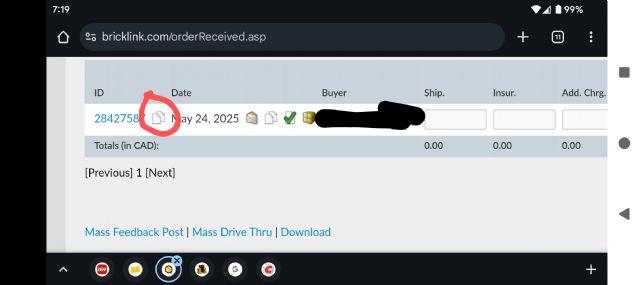
It's this button:
I can’t remember if that needs to be activated somewhere to show, in which case
the edit order button can also be used on the bottom of the orders page
----
Order Date: May 27, 2025 04:37
Payment By: PayPal
Payment Instructions: (not specified)
--------------------------------------
Comments from Seller:
The answer is here.
Payment option chosen is (normal) PayPal, not onsite.
Change it to onsite and resend the invoice, then there will be a payment link/button.
Can I change the payment type selected at my end? I suspect maybe the buyer needs
to? I have sent them a note about it.
You should be able to do it yourself. (There should be an "edit order"
button somewhere.
I also disabled all my other payment types so this doesn't happen again.
I had a domestic buyer pay in cash a few months back and I was never able to
set the order complete.
If sales tax is involved payment must be made onsite so bricklink can remit it
to the proper authorities.
Yup! I like not having to worry about remitting sales tax or VAT. I sell at
shows and I have to do it there and it's a pain.
It's this button:
I can’t remember if that needs to be activated somewhere to show, in which case
the edit order button can also be used on the bottom of the orders page
I don't have that edit order button, nor do I have one at the bottom of the
orders page (I changed to classic and back to make sure I wasn't missing
it)
I haven't yet found where to enable these in store settings but am searching.
Any clues?
I don't have that edit order button, nor do I have one at the bottom of the
orders page (I changed to classic and back to make sure I wasn't missing
it)
I haven't yet found where to enable these in store settings but am searching.
Any clues?


 USA, Michigan


 Canada, Alberta

 Netherlands, Drenthe