I have some buyers not electing to pay shipping up front (my store asks that
any large orders wait to be invoiced since they often exceed the $5.85 for ground
advantage). The order shows up as . When I use the drop-down to select
I'm taken to an orders page that just lists those pending
orders, waiting for shipping invoices. I add shipping to the correct window
for the order and click , but the buyers say this doesn't
generate an invoice that goes to them. I don't see any other link to generate
an invoice.
Been invoicing through PayPal, but I still have orders packed and ready for a
shipping label without any shipping payment or response from buyer. Need help.
I have some buyers not electing to pay shipping up front (my store asks that
any large orders wait to be invoiced since they often exceed the $5.85 for ground
advantage). The order shows up as . When I use the drop-down to select
I'm taken to an orders page that just lists those pending
orders, waiting for shipping invoices. I add shipping to the correct window
for the order and click , but the buyers say this doesn't
generate an invoice that goes to them. I don't see any other link to generate
an invoice.
Been invoicing through PayPal, but I still have orders packed and ready for a
shipping label without any shipping payment or response from buyer. Need help.
you should never be sending bricklink invoices via Paypal, on bricklink, enter
the shipping costs, then save changes, then click on the paper to send the invoice.
As you are in the USA, its likely most/all of your sales are to the USA, most
states require sales tax collection, bricklink collects this sales tax which
means the payment must be done thru bricklink, otherwise either 1 the buyer wont
pay it (not allowed) or you will collect it (which you likely arent authorized
to do unless you have registered in each state but even then its bricklink who
is authorized to collect it not you) which isn't allowed.
as for preventing this in the future, its best to create and modify your own
instant checkout method, you can play with the prices as needed but never use
premade ones as they are not kept up or anything,
I have some buyers not electing to pay shipping up front (my store asks that
any large orders wait to be invoiced since they often exceed the $5.85 for ground
advantage). The order shows up as . When I use the drop-down to select
I'm taken to an orders page that just lists those pending
orders, waiting for shipping invoices. I add shipping to the correct window
for the order and click , but the buyers say this doesn't
generate an invoice that goes to them. I don't see any other link to generate
an invoice.
Been invoicing through PayPal, but I still have orders packed and ready for a
shipping label without any shipping payment or response from buyer. Need help.
you should never be sending bricklink invoices via Paypal, on bricklink, enter
the shipping costs, then save changes, then click on the paper to send the invoice.
As you are in the USA, its likely most/all of your sales are to the USA, most
states require sales tax collection, bricklink collects this sales tax which
means the payment must be done thru bricklink, otherwise either 1 the buyer wont
pay it (not allowed) or you will collect it (which you likely arent authorized
to do unless you have registered in each state but even then its bricklink who
is authorized to collect it not you) which isn't allowed.
as for preventing this in the future, its best to create and modify your own
instant checkout method, you can play with the prices as needed but never use
premade ones as they are not kept up or anything,
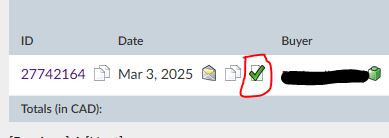
Its this button. it will take you to the invoice template (2nd picture). that
you can send
I have some buyers not electing to pay shipping up front (my store asks that
any large orders wait to be invoiced since they often exceed the $5.85 for ground
advantage). The order shows up as . When I use the drop-down to select
I'm taken to an orders page that just lists those pending
orders, waiting for shipping invoices. I add shipping to the correct window
for the order and click , but the buyers say this doesn't
generate an invoice that goes to them. I don't see any other link to generate
an invoice.
Been invoicing through PayPal, but I still have orders packed and ready for a
shipping label without any shipping payment or response from buyer. Need help.
you should never be sending bricklink invoices via Paypal, on bricklink, enter
the shipping costs, then save changes, then click on the paper to send the invoice.
As you are in the USA, its likely most/all of your sales are to the USA, most
states require sales tax collection, bricklink collects this sales tax which
means the payment must be done thru bricklink, otherwise either 1 the buyer wont
pay it (not allowed) or you will collect it (which you likely arent authorized
to do unless you have registered in each state but even then its bricklink who
is authorized to collect it not you) which isn't allowed.
as for preventing this in the future, its best to create and modify your own
instant checkout method, you can play with the prices as needed but never use
premade ones as they are not kept up or anything,
Thank you! It's the paper icon I missed! I thought they'd paid for
the pieces but not for shipping, but when I did the invoice I noticed they hadn't
paid at all. Probably a no-brainer for a veteran so that's kind of embarrassing.
I'll look into setting up instant checkout.
I have some buyers not electing to pay shipping up front (my store asks that
any large orders wait to be invoiced since they often exceed the $5.85 for ground
advantage). The order shows up as . When I use the drop-down to select
I'm taken to an orders page that just lists those pending
orders, waiting for shipping invoices. I add shipping to the correct window
for the order and click , but the buyers say this doesn't
generate an invoice that goes to them. I don't see any other link to generate
an invoice.
Been invoicing through PayPal, but I still have orders packed and ready for a
shipping label without any shipping payment or response from buyer. Need help.
you should never be sending bricklink invoices via Paypal, on bricklink, enter
the shipping costs, then save changes, then click on the paper to send the invoice.
As you are in the USA, its likely most/all of your sales are to the USA, most
states require sales tax collection, bricklink collects this sales tax which
means the payment must be done thru bricklink, otherwise either 1 the buyer wont
pay it (not allowed) or you will collect it (which you likely arent authorized
to do unless you have registered in each state but even then its bricklink who
is authorized to collect it not you) which isn't allowed.
as for preventing this in the future, its best to create and modify your own
instant checkout method, you can play with the prices as needed but never use
premade ones as they are not kept up or anything,
Thank you! It's the paper icon I missed! I thought they'd paid for
the pieces but not for shipping, but when I did the invoice I noticed they hadn't
paid at all. Probably a no-brainer for a veteran so that's kind of embarrassing.
I'll look into setting up instant checkout.


 USA, Washington


 Canada, Ontario

)
)
 we all start somewhere! Best of luck!