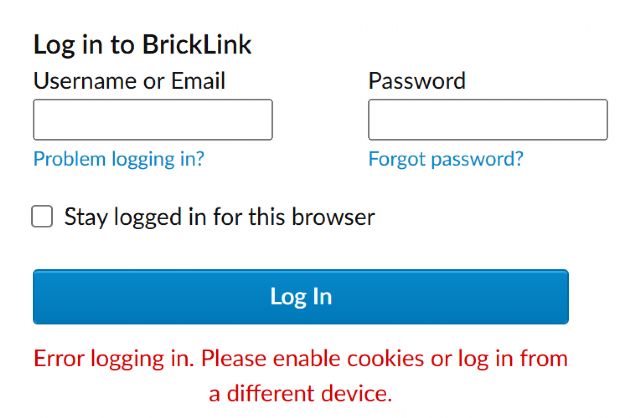
It's getting annoying that I constantly have to reload the page without internet
and delete the cookies so that I can log in to Bricklink without an error message
(Error logging in. Please enable cookies or log in from a different device.).
Bricklink is the only site that has this problem. Please fix this.
It's getting annoying that I constantly have to reload the page without internet
and delete the cookies so that I can log in to Bricklink without an error message
(Error logging in. Please enable cookies or log in from a different device.).
Bricklink is the only site that has this problem. Please fix this.
Hi,
Did you accept BrickLink’s cookies on https://www.bricklink.com/v3/cookies.page
?
Necessary cookies are, well, necessary, and then only Preference are useful (to
stay logged in).
What’s your browser, its version? Your operating system, its version?
I only allow the most necessary cookies, which works for all pages. I work in
the IT industry myself and know that you don't need cookies for sessions.
I am therefore skeptical about cookies. The problem with Bricklink is that it
keeps setting tokens and cookies automatically at xx-second intervals, so I can't
log in until I disconnect from the internet and delete the session and cookies
in the browser's dev tools. This is simply annoying, so action is needed
here. I frequently switch between different end devices and therefore have this
problem almost daily and it is just annoying, which is why I have now reported
it here after a long period of suffering.
Yours sincerely, t31
In Technical Issues, SylvainLS writes:
In Technical Issues, Brick_Jongleur writes:
Hello,
It's getting annoying that I constantly have to reload the page without internet
and delete the cookies so that I can log in to Bricklink without an error message
(Error logging in. Please enable cookies or log in from a different device.).
Bricklink is the only site that has this problem. Please fix this.
Hi,
Did you accept BrickLink’s cookies on https://www.bricklink.com/v3/cookies.page
?
Necessary cookies are, well, necessary, and then only Preference are useful (to
stay logged in).
What’s your browser, its version? Your operating system, its version?
I only allow the most necessary cookies, which works for all pages. I work in
the IT industry myself and know that you don't need cookies for sessions.
I am therefore skeptical about cookies. The problem with Bricklink is that it
keeps setting tokens and cookies automatically at xx-second intervals, so I can't
log in until I disconnect from the internet and delete the session and cookies
in the browser's dev tools. This is simply annoying, so action is needed
here.
If you don't want to change, and BrickLink won't change everything specifically
for you, then it's simply impossible to solve.
Usually, the smartest one gives in, and I don't think BrickLink will, so...?
Of course, this is easy to solve, instead of the error message, the Bricklink
page itself deletes the token and the cookie in question, so you are logged out
save, the session is ended save and you can log in save. Absolutely easy. The
problem is that Bricklink keeps the session even though it is invalid, requests
a new login and rejects it with the error message. A normal user who does not
know the DEV tools or deletes the browser cache hard can no longer log in. This
is bad design and I am pointing this out. What does this have to do with giving
in and being smart?
Best regards t31
Translated with DeepL.com (free version)
In Technical Issues, 1001bricks writes:
In Technical Issues, Brick_Jongleur writes:
I only allow the most necessary cookies, which works for all pages. I work in
the IT industry myself and know that you don't need cookies for sessions.
I am therefore skeptical about cookies. The problem with Bricklink is that it
keeps setting tokens and cookies automatically at xx-second intervals, so I can't
log in until I disconnect from the internet and delete the session and cookies
in the browser's dev tools. This is simply annoying, so action is needed
here.
If you don't want to change, and BrickLink won't change everything specifically
for you, then it's simply impossible to solve.
Usually, the smartest one gives in, and I don't think BrickLink will, so...?
Of course, this is easy to solve, instead of the error message, the Bricklink
page itself deletes the token and the cookie in question, so you are logged out
save, the session is ended save and you can log in save. Absolutely easy. The
problem is that Bricklink keeps the session even though it is invalid, requests
a new login and rejects it with the error message. A normal user who does not
know the DEV tools or deletes the browser cache hard can no longer log in. This
is bad design and I am pointing this out. What does this have to do with giving
in and being smart?
Best regards t31
Translated with DeepL.com (free version)
In Technical Issues, 1001bricks writes:
In Technical Issues, Brick_Jongleur writes:
I only allow the most necessary cookies, which works for all pages. I work in
the IT industry myself and know that you don't need cookies for sessions.
I am therefore skeptical about cookies. The problem with Bricklink is that it
keeps setting tokens and cookies automatically at xx-second intervals, so I can't
log in until I disconnect from the internet and delete the session and cookies
in the browser's dev tools. This is simply annoying, so action is needed
here.
If you don't want to change, and BrickLink won't change everything specifically
for you, then it's simply impossible to solve.
Usually, the smartest one gives in, and I don't think BrickLink will, so...?
You can open a Help Desk ticket explaining the issue you have and possible errors:
So at least they know about it, but keep in mind that the website code is a bit
of a mess since many many years ago and they are trying to modernise it bit by
bit.
It's getting annoying that I constantly have to reload the page without internet
and delete the cookies so that I can log in to Bricklink without an error message
(Error logging in. Please enable cookies or log in from a different device.).
Bricklink is the only site that has this problem. Please fix this.
Best regards t31
I also have had this problem repeatedly. It is inconsistent but happens most
often when I am trying to re-log into the site via an open Firefox window after
waking my computer up. I frequently have to delete every open BrickLink tab and
start a fresh window to be able to log in.
It happens on Firefox on both my Windows 10 computers.


 Germany, Sachsen


 France, Nouvelle-Aquitaine


 Spain, Comunidad Valenciana
 USA, Illinois