In the past, I have had success on adding a couple stickered parts to the catalog.
But following the same exact steps again from the guide linked, over the past
few months I have tried multiple times and I keep getting this error message:
The page cannot be displayed because an internal server error has occurred.
In the past, I have had success on adding a couple stickered parts to the catalog.
But following the same exact steps again from the guide linked, over the past
few months I have tried multiple times and I keep getting this error message:
The page cannot be displayed because an internal server error has occurred.
I'm not sure what the issue is?
Thanks!
First, you need to report to us exactly which step is giving you this error:
adding the item or adding the images.
Then, you need to show us a screenshot of what you tried to submit. Hitting the
Back button usually works well on those old pages.
In the past, I have had success on adding a couple stickered parts to the catalog.
But following the same exact steps again from the guide linked, over the past
few months I have tried multiple times and I keep getting this error message:
The page cannot be displayed because an internal server error has occurred.
I'm not sure what the issue is?
Thanks!
First, you need to report to us exactly which step is giving you this error:
adding the item or adding the images.
Then, you need to show us a screenshot of what you tried to submit. Hitting the
Back button usually works well on those old pages.
Thanks,
~Jen
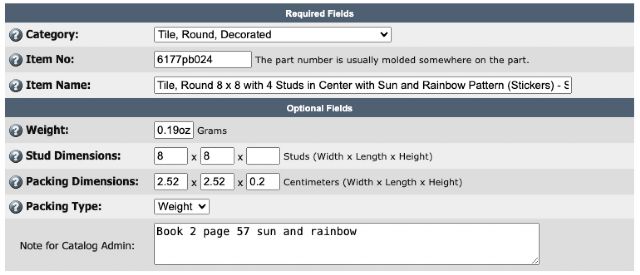
The error was in adding the item itself. Here is a screenshot of what I tried
to put.
In the past, I have had success on adding a couple stickered parts to the catalog.
But following the same exact steps again from the guide linked, over the past
few months I have tried multiple times and I keep getting this error message:
The page cannot be displayed because an internal server error has occurred.
I'm not sure what the issue is?
Thanks!
First, you need to report to us exactly which step is giving you this error:
adding the item or adding the images.
Then, you need to show us a screenshot of what you tried to submit. Hitting the
Back button usually works well on those old pages.
Thanks,
~Jen
The error was in adding the item itself. Here is a screenshot of what I tried
to put.
remove "oz" from the weight thing as it can only be a number (and decimal)
In the past, I have had success on adding a couple stickered parts to the catalog.
But following the same exact steps again from the guide linked, over the past
few months I have tried multiple times and I keep getting this error message:
The page cannot be displayed because an internal server error has occurred.
I'm not sure what the issue is?
Thanks!
First, you need to report to us exactly which step is giving you this error:
adding the item or adding the images.
Then, you need to show us a screenshot of what you tried to submit. Hitting the
Back button usually works well on those old pages.
Thanks,
~Jen
The error was in adding the item itself. Here is a screenshot of what I tried
to put.
remove "oz" from the weight thing as it can only be a number (and decimal)
And make sure it is actually the weight in grams and not ounces.


 USA, Illinois


 Canada, Ontario