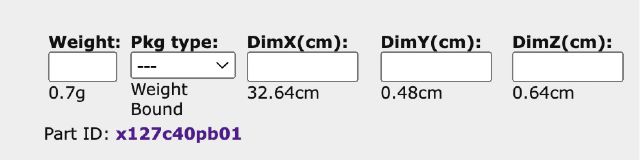
The system goes off the fully extended dimensions when calculating the correct
box size. If I want to override that, I just go in to the lot and enter my preferred
dimensions in the lower right fields correct?
The system goes off the fully extended dimensions when calculating the correct
box size. If I want to override that, I just go in to the lot and enter my preferred
dimensions in the lower right fields correct?
I believe so, but the dimensions can be upgraded for the entry itself as for
items like that, bricklink prefers them in the way it comes in a set rather then
fully extended
The system goes off the fully extended dimensions when calculating the correct
box size. If I want to override that, I just go in to the lot and enter my preferred
dimensions in the lower right fields correct?
I believe so, but the dimensions can be upgraded for the entry itself as for
items like that, bricklink prefers them in the way it comes in a set rather then
fully extended
They come looped around on itself and then taped together. I have these and
the c30, I can update the dims.
The system goes off the fully extended dimensions when calculating the correct
box size. If I want to override that, I just go in to the lot and enter my preferred
dimensions in the lower right fields correct?
I believe so, but the dimensions can be upgraded for the entry itself as for
items like that, bricklink prefers them in the way it comes in a set rather then
fully extended
They come looped around on itself and then taped together. I have these and
the c30, I can update the dims.
Exciting! Always good when improvements to the catalog are made!


 USA, Ohio




 Canada, Ontario