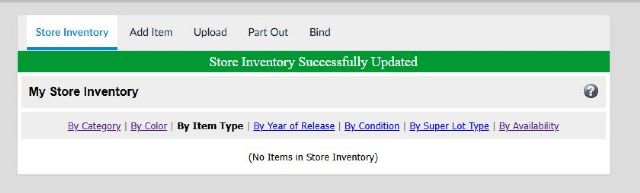
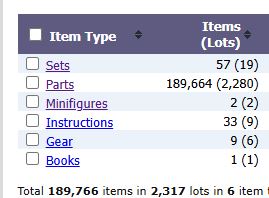
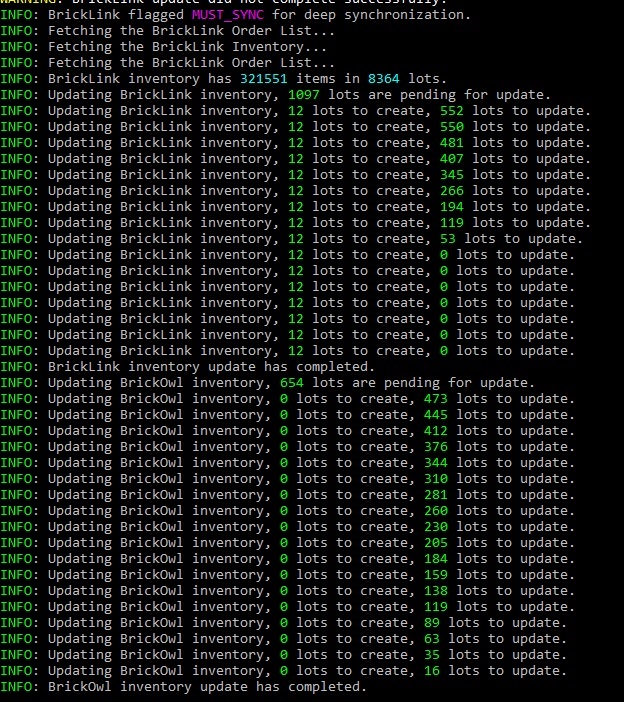
Any idea what happened here? I always do a "blmaster on" and "blmaster
off" when I add new inventory. But this time when I rebooted my computer
it did this and wiped out all of my inventory changes that I had been making....
Any idea what happened here? I always do a "blmaster on" and "blmaster
off" when I add new inventory. But this time when I rebooted my computer
it did this and wiped out all of my inventory changes that I had been making....
How do I fix or restore the changes? BrickSync has a BrickStore back-up file
from yesterday, but I don't use BrickStore.
Any idea what happened here? I always do a "blmaster on" and "blmaster
off" when I add new inventory. But this time when I rebooted my computer
it did this and wiped out all of my inventory changes that I had been making....
How do I fix or restore the changes? BrickSync has a BrickStore back-up file
from yesterday, but I don't use BrickStore.
At least you've the solution.
It's for years I'm telling every seller to use BrickStore and/or at the
minimum to simply download by hand your Inventory in XML on BrickLink. It's
ONE click if the page is opened on a Browser tab.
Any idea what happened here? I always do a "blmaster on" and "blmaster
off" when I add new inventory. But this time when I rebooted my computer
it did this and wiped out all of my inventory changes that I had been making....
How do I fix or restore the changes? BrickSync has a BrickStore back-up file
from yesterday, but I don't use BrickStore.
At least you've the solution.
It's for years I'm telling every seller to use BrickStore and/or at the
minimum to simply download by hand your Inventory in XML on BrickLink. It's
ONE click if the page is opened on a Browser tab.
You didn't? Can't help more.
I belive bricksync saves a brickstore usable file of the inventory as its starting
point. you should be able to look in the bricksync folder and then find it and
replace your prior inventory with it. by the sounds of it, it for some reason
considered your brickowl store.
as the main inventory and changed your bricklink to match so maybe that somehow
got mixed up.
Any idea what happened here? I always do a "blmaster on" and "blmaster
off" when I add new inventory. But this time when I rebooted my computer
it did this and wiped out all of my inventory changes that I had been making....
How do I fix or restore the changes? BrickSync has a BrickStore back-up file
from yesterday, but I don't use BrickStore.
At least you've the solution.
It's for years I'm telling every seller to use BrickStore and/or at the
minimum to simply download by hand your Inventory in XML on BrickLink. It's
ONE click if the page is opened on a Browser tab.
You didn't? Can't help more.
I belive bricksync saves a brickstore usable file of the inventory as its starting
point. you should be able to look in the bricksync folder and then find it and
replace your prior inventory with it. by the sounds of it, it for some reason
considered your brickowl store.
as the main inventory and changed your bricklink to match so maybe that somehow
got mixed up.
Any idea what happened here? I always do a "blmaster on" and "blmaster
off" when I add new inventory. But this time when I rebooted my computer
it did this and wiped out all of my inventory changes that I had been making....
How do I fix or restore the changes? BrickSync has a BrickStore back-up file
from yesterday, but I don't use BrickStore.
At least you've the solution.
It's for years I'm telling every seller to use BrickStore and/or at the
minimum to simply download by hand your Inventory in XML on BrickLink. It's
ONE click if the page is opened on a Browser tab.
You didn't? Can't help more.
I belive bricksync saves a brickstore usable file of the inventory as its starting
point. you should be able to look in the bricksync folder and then find it and
replace your prior inventory with it. by the sounds of it, it for some reason
considered your brickowl store.
as the main inventory and changed your bricklink to match so maybe that somehow
got mixed up.
Yup. I've got the file, but how do I restore from it?
Please keep in mind I've never had to restore a file before so hopefully
others can chime in. I believe the best way to do it is to first backup your
current inventory just incase, then delete your current inventory, then go to
this
Any idea what happened here? I always do a "blmaster on" and "blmaster
off" when I add new inventory. But this time when I rebooted my computer
it did this and wiped out all of my inventory changes that I had been making....
How do I fix or restore the changes? BrickSync has a BrickStore back-up file
from yesterday, but I don't use BrickStore.
At least you've the solution.
It's for years I'm telling every seller to use BrickStore and/or at the
minimum to simply download by hand your Inventory in XML on BrickLink. It's
ONE click if the page is opened on a Browser tab.
You didn't? Can't help more.
I belive bricksync saves a brickstore usable file of the inventory as its starting
point. you should be able to look in the bricksync folder and then find it and
replace your prior inventory with it. by the sounds of it, it for some reason
considered your brickowl store.
as the main inventory and changed your bricklink to match so maybe that somehow
got mixed up.
Yup. I've got the file, but how do I restore from it?
Please keep in mind I've never had to restore a file before so hopefully
others can chime in. I believe the best way to do it is to first backup your
current inventory just incase, then delete your current inventory, then go to
this
Any idea what happened here? I always do a "blmaster on" and "blmaster
off" when I add new inventory. But this time when I rebooted my computer
it did this and wiped out all of my inventory changes that I had been making....
How do I fix or restore the changes? BrickSync has a BrickStore back-up file
from yesterday, but I don't use BrickStore.
At least you've the solution.
It's for years I'm telling every seller to use BrickStore and/or at the
minimum to simply download by hand your Inventory in XML on BrickLink. It's
ONE click if the page is opened on a Browser tab.
You didn't? Can't help more.
I belive bricksync saves a brickstore usable file of the inventory as its starting
point. you should be able to look in the bricksync folder and then find it and
replace your prior inventory with it. by the sounds of it, it for some reason
considered your brickowl store.
as the main inventory and changed your bricklink to match so maybe that somehow
got mixed up.
Yup. I've got the file, but how do I restore from it?
Please keep in mind I've never had to restore a file before so hopefully
others can chime in. I believe the best way to do it is to first backup your
current inventory just incase, then delete your current inventory, then go to
this
page and then upload the text from the backup file.
as mentioned, ive never done this before so please make sure you have backups
of your current inventory incase you need to revert back or such.
Depending the number of lots it may not work (due to browser upload and BrickLink
server limitations).
Then simply open the file with BrickStore, select 500 lots, upload them, etc.
It'll take few minutes.
No need for 500 nowadays, Bricklink was updated more than a year ago to accept
larger uploads of lots, but it takes the file and takes a few minutes to do the
upload in the backend.
Also for wahiggin, I see you now deleted your whole inventory, but next time
this happens (hope not) you can see and upload only the difference with Brickstore.
Download your current wrong inventory in Brickstore, mutliply all with -1, then
merge in Brickstore the file with a copy of the backed up file you had from the
previous night.
Then the remaining positive QTY items you upload them to Bricklink.
Any idea what happened here? I always do a "blmaster on" and "blmaster
off" when I add new inventory. But this time when I rebooted my computer
it did this and wiped out all of my inventory changes that I had been making....
How do I fix or restore the changes? BrickSync has a BrickStore back-up file
from yesterday, but I don't use BrickStore.
At least you've the solution.
It's for years I'm telling every seller to use BrickStore and/or at the
minimum to simply download by hand your Inventory in XML on BrickLink. It's
ONE click if the page is opened on a Browser tab.
You didn't? Can't help more.
I belive bricksync saves a brickstore usable file of the inventory as its starting
point. you should be able to look in the bricksync folder and then find it and
replace your prior inventory with it. by the sounds of it, it for some reason
considered your brickowl store.
as the main inventory and changed your bricklink to match so maybe that somehow
got mixed up.
Yup. I've got the file, but how do I restore from it?
Please keep in mind I've never had to restore a file before so hopefully
others can chime in. I believe the best way to do it is to first backup your
current inventory just incase, then delete your current inventory, then go to
this
page and then upload the text from the backup file.
as mentioned, ive never done this before so please make sure you have backups
of your current inventory incase you need to revert back or such.
Depending the number of lots it may not work (due to browser upload and BrickLink
server limitations).
Then simply open the file with BrickStore, select 500 lots, upload them, etc.
It'll take few minutes.
No need for 500 nowadays, Bricklink was updated more than a year ago to accept
larger uploads of lots, but it takes the file and takes a few minutes to do the
upload in the backend.
Also for wahiggin, I see you now deleted your whole inventory, but next time
this happens (hope not) you can see and upload only the difference with Brickstore.
Download your current wrong inventory in Brickstore, mutliply all with -1, then
merge in Brickstore the file with a copy of the backed up file you had from the
previous night.
Then the remaining positive QTY items you upload them to Bricklink.
Smart, but I thought it could be more complicated, and when an inventory is damaged
maybe some quantities are. So it's probably better to restart from scratch?
[…]
Please keep in mind I've never had to restore a file before
Every should have heard the three rules of backup now:
First rule: Backup!
Second rule: Backup!
Third rule: Backup!
But there’s a fourth rule: Test your backups and the procedure before you need
them! When you’re up poop creek without a paddle is not the time to try things.
(Obviously too late for wahiggin right now but something that I felt should be
said.)
[…]
Please keep in mind I've never had to restore a file before
Every should have heard the three rules of backup now:
First rule: Backup!
Second rule: Backup!
Third rule: Backup!
But there’s a fourth rule: Test your backups and the procedure before you need
them! When you’re up poop creek without a paddle is not the time to try things.
(Obviously too late for wahiggin right now but something that I felt should be
said.)
HA! I appreciate that. I do backup periodically, but have never tested the
restore process. In 20 years on BrickLink I have thankfully never needed to!
[…]
Please keep in mind I've never had to restore a file before
Every should have heard the three rules of backup now:
First rule: Backup!
Second rule: Backup!
Third rule: Backup!
But there’s a fourth rule: Test your backups and the procedure before you need
them! When you’re up poop creek without a paddle is not the time to try things.
(Obviously too late for wahiggin right now but something that I felt should be
said.)
I know its probably wise to test your backup procedure... however... that would
be spooky to test so for the time being ill horde my daily backups that I get
from multiple sources (daily backup from bricksync, BLS manager, and the occasional
manual backup from brickstore)
[…]
I know its probably wise to test your backup procedure...
Of course it’s wise! I said it!
however... that would
be spooky to test so for the time being ill horde my daily backups that I get
from multiple sources (daily backup from bricksync, BLS manager, and the occasional
manual backup from brickstore)
Well, don’t come seeking help in the forum when you need to, because the one
who generally answers those questions (that’s you!) will be busy trying to decide
which of his backup files he should use
[…]
I know its probably wise to test your backup procedure...
Of course it’s wise! I said it!
however... that would
be spooky to test so for the time being ill horde my daily backups that I get
from multiple sources (daily backup from bricksync, BLS manager, and the occasional
manual backup from brickstore)
Well, don’t come seeking help in the forum when you need to, because the one
who generally answers those questions (that’s you!) will be busy trying to decide
which of his backup files he should use
Any idea what happened here? I always do a "blmaster on" and "blmaster
off" when I add new inventory. But this time when I rebooted my computer
it did this and wiped out all of my inventory changes that I had been making....
How do I fix or restore the changes? BrickSync has a BrickStore back-up file
from yesterday, but I don't use BrickStore.
At least you've the solution.
It's for years I'm telling every seller to use BrickStore and/or at the
minimum to simply download by hand your Inventory in XML on BrickLink. It's
ONE click if the page is opened on a Browser tab.
You didn't? Can't help more.
I belive bricksync saves a brickstore usable file of the inventory as its starting
point. you should be able to look in the bricksync folder and then find it and
replace your prior inventory with it. by the sounds of it, it for some reason
considered your brickowl store.
as the main inventory and changed your bricklink to match so maybe that somehow
got mixed up.
Yup. I've got the file, but how do I restore from it?
Please keep in mind I've never had to restore a file before so hopefully
others can chime in. I believe the best way to do it is to first backup your
current inventory just incase, then delete your current inventory, then go to
this
Any idea what happened here? I always do a "blmaster on" and "blmaster
off" when I add new inventory. But this time when I rebooted my computer
it did this and wiped out all of my inventory changes that I had been making....
How do I fix or restore the changes? BrickSync has a BrickStore back-up file
from yesterday, but I don't use BrickStore.
At least you've the solution.
It's for years I'm telling every seller to use BrickStore and/or at the
minimum to simply download by hand your Inventory in XML on BrickLink. It's
ONE click if the page is opened on a Browser tab.
You didn't? Can't help more.
I belive bricksync saves a brickstore usable file of the inventory as its starting
point. you should be able to look in the bricksync folder and then find it and
replace your prior inventory with it. by the sounds of it, it for some reason
considered your brickowl store.
as the main inventory and changed your bricklink to match so maybe that somehow
got mixed up.
Yup. I've got the file, but how do I restore from it?
Please keep in mind I've never had to restore a file before so hopefully
others can chime in. I believe the best way to do it is to first backup your
current inventory just incase, then delete your current inventory, then go to
this
Any idea what happened here? I always do a "blmaster on" and "blmaster
off" when I add new inventory. But this time when I rebooted my computer
it did this and wiped out all of my inventory changes that I had been making....
How do I fix or restore the changes? BrickSync has a BrickStore back-up file
from yesterday, but I don't use BrickStore.
At least you've the solution.
It's for years I'm telling every seller to use BrickStore and/or at the
minimum to simply download by hand your Inventory in XML on BrickLink. It's
ONE click if the page is opened on a Browser tab.
You didn't? Can't help more.
I belive bricksync saves a brickstore usable file of the inventory as its starting
point. you should be able to look in the bricksync folder and then find it and
replace your prior inventory with it. by the sounds of it, it for some reason
considered your brickowl store.
as the main inventory and changed your bricklink to match so maybe that somehow
got mixed up.
Yup. I've got the file, but how do I restore from it?
Please keep in mind I've never had to restore a file before so hopefully
others can chime in. I believe the best way to do it is to first backup your
current inventory just incase, then delete your current inventory, then go to
this
Oops! There was a problem processing your request:
Invalid File Format.
What part is invalid?
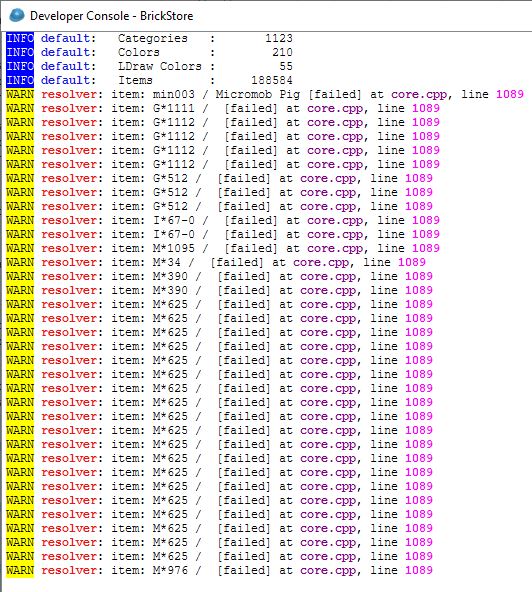
Make an update database in Brickstore, under the Extras menu, then open the file
again, maybe you have a part that changed ID, it will be shown if you open the
Extras - developer console.
Oops! There was a problem processing your request:
Invalid File Format.
What part is invalid?
Make an update database in Brickstore, under the Extras menu, then open the file
again, maybe you have a part that changed ID, it will be shown if you open the
Extras - developer console.
Oops! There was a problem processing your request:
Invalid File Format.
What part is invalid?
Make an update database in Brickstore, under the Extras menu, then open the file
again, maybe you have a part that changed ID, it will be shown if you open the
Extras - developer console.
Ok, done....but what does this mean?
Are you sure that backup is from the correct date?
Bricklink changed min003 minifigure to minepig07 part on Dec 15th.
Oops! There was a problem processing your request:
Invalid File Format.
What part is invalid?
Make an update database in Brickstore, under the Extras menu, then open the file
again, maybe you have a part that changed ID, it will be shown if you open the
Extras - developer console.
Ok, done....but what does this mean?
Are you sure that backup is from the correct date?
Bricklink changed min003 minifigure to minepig07 part on Dec 15th.
For now delete that line and save it for adding it later manually.
In a general manner:
* open the file,
* save it as a BSX file locally,
* then upload in batches - when you've got an upload, delete the selected
items, save
If you've a problem, keep on uploading trying by batches which work, and
delete what's been done.
What remains is problems you can fix at the end.
Oops! There was a problem processing your request:
Invalid File Format.
What part is invalid?
Make an update database in Brickstore, under the Extras menu, then open the file
again, maybe you have a part that changed ID, it will be shown if you open the
Extras - developer console.
Ok, done....but what does this mean?
Are you sure that backup is from the correct date?
Bricklink changed min003 minifigure to minepig07 part on Dec 15th.
For now delete that line and save it for adding it later manually.
In a general manner:
* open the file,
* save it as a BSX file locally,
* then upload in batches - when you've got an upload, delete the selected
items, save
If you've a problem, keep on uploading trying by batches which work, and
delete what's been done.
What remains is problems you can fix at the end.
This is what I did. Cutting the list in half each time. Taking the top half
to see if it worked, if not I did the bottom half. Then the half that didn't
work, I split it in half again and repeated the process. But when I got down
to the last 20 or so items and tried it, it just worked....no errors. So I have
no idea what part was broken?
Oops! There was a problem processing your request:
Invalid File Format.
What part is invalid?
Make an update database in Brickstore, under the Extras menu, then open the file
again, maybe you have a part that changed ID, it will be shown if you open the
Extras - developer console.
Ok, done....but what does this mean?
Are you sure that backup is from the correct date?
Bricklink changed min003 minifigure to minepig07 part on Dec 15th.
For now delete that line and save it for adding it later manually.
In a general manner:
* open the file,
* save it as a BSX file locally,
* then upload in batches - when you've got an upload, delete the selected
items, save
If you've a problem, keep on uploading trying by batches which work, and
delete what's been done.
What remains is problems you can fix at the end.
This is what I did. Cutting the list in half each time. Taking the top half
to see if it worked, if not I did the bottom half. Then the half that didn't
work, I split it in half again and repeated the process. But when I got down
to the last 20 or so items and tried it, it just worked....no errors. So I have
no idea what part was broken?
Really no idea, maybe BrickStore corrected it silently while you were uploading
the rest?
Congratulations, you've restored your shop, or at least a huge part of it?
Please take a lot of time now checking, comparing total lots, quantities, etc.
Ah, and use BrickStore to download your shop inventory, save it locally (it names
it automagically) like once per week minimum. Use a specific folder just for
backups.
Oops! There was a problem processing your request:
Invalid File Format.
What part is invalid?
Make an update database in Brickstore, under the Extras menu, then open the file
again, maybe you have a part that changed ID, it will be shown if you open the
Extras - developer console.
Ok, done....but what does this mean?
Are you sure that backup is from the correct date?
Bricklink changed min003 minifigure to minepig07 part on Dec 15th.
For now delete that line and save it for adding it later manually.
In a general manner:
* open the file,
* save it as a BSX file locally,
* then upload in batches - when you've got an upload, delete the selected
items, save
If you've a problem, keep on uploading trying by batches which work, and
delete what's been done.
What remains is problems you can fix at the end.
This is what I did. Cutting the list in half each time. Taking the top half
to see if it worked, if not I did the bottom half. Then the half that didn't
work, I split it in half again and repeated the process. But when I got down
to the last 20 or so items and tried it, it just worked....no errors. So I have
no idea what part was broken?
Really no idea, maybe BrickStore corrected it silently while you were uploading
the rest?
Congratulations, you've restored your shop, or at least a huge part of it?
Please take a lot of time now checking, comparing total lots, quantities, etc.
Ah, and use BrickStore to download your shop inventory, save it locally (it names
it automagically) like once per week minimum. Use a specific folder just for
backups.
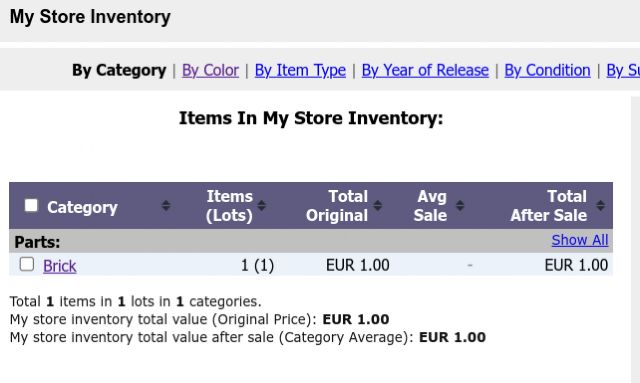
Looks like only one order had to be manually removed from my inventory. Still
checking and verifying everything I can.
Any idea what happened here? I always do a "blmaster on" and "blmaster
off" when I add new inventory. But this time when I rebooted my computer
it did this and wiped out all of my inventory changes that I had been making....
How do I fix or restore the changes? BrickSync has a BrickStore back-up file
from yesterday, but I don't use BrickStore.
At least you've the solution.
It's for years I'm telling every seller to use BrickStore and/or at the
minimum to simply download by hand your Inventory in XML on BrickLink. It's
ONE click if the page is opened on a Browser tab.
You didn't? Can't help more.
I do have the backup file from last night, but how do I use it to restore from?
Any idea what happened here? I always do a "blmaster on" and "blmaster
off" when I add new inventory. But this time when I rebooted my computer
it did this and wiped out all of my inventory changes that I had been making....
How do I fix or restore the changes? BrickSync has a BrickStore back-up file
from yesterday, but I don't use BrickStore.
Next time do the blmaster on and off before rebooting the software.
Also that backup that you are working on was from yourself or the one that Bricksync
creates, if that last one, then it only backups the tracked local inventory not
the online current Bricklink one before doing the changes.


 USA, Alabama


 France, Provence-Alpes-Côte d'Azur
 Canada, Ontario
 Spain, Comunidad Valenciana