Discussion Forum: Thread 360781

 Author: Twardy78 View Messages Posted By Twardy78
 Posted: Aug 6, 2024 10:54
 Subject: Add two new parts with sticker (set 76265)
 Viewed: 107 times
 Topic: Catalog
 Status:Open
 Report:
Cancel Message
Cancel
Reply to Message
Reply
BrickLink
ID Card

Twardy78 (83)

Location:  Poland, w. Śląskie
Member Since Contact Type Status
Oct 1, 2022 Contact Member Seller
Buying Privileges - OKSelling Privileges - OK
Store: Five Stars Brick Store
Hi there,

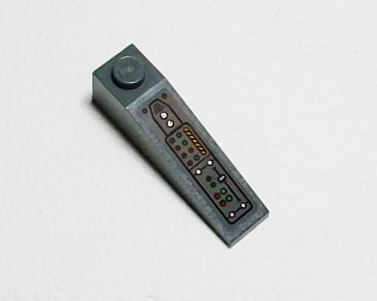
Please add two new parts with sticker
60477pb025 and 60477pb024.
Parts are from set 76265.

Thanks.


 Author: jennnifer View Messages Posted By jennnifer
 Posted: Aug 6, 2024 11:04
 Subject: Re: Add two new parts with sticker (set 76265)
 Viewed: 66 times
 Topic: Catalog
 Report:
Cancel Message
Cancel
Reply to Message
Reply
BrickLink
ID Card

jennnifer (3696)

Location:  USA, Illinois
Member Since Contact Type Status
Sep 8, 2009 Contact Member Seller
Buying Privileges - OKSelling Privileges - OK
Store: Old Grey Bricks
In Catalog Requests, Twardy78 writes:
  Hi there,

Please add two new parts with sticker
60477pb025 and 60477pb024.
Parts are from set 76265.

Thanks.


You don't have the third one maybe?

Here is a guide I wrote for the process:

How to Stickers:

https://www.dropbox.com/scl/fi/kdlqdrmu5u2gm7odvmn2a/How-to-Stickers.pdf?rlkey=zx9ohb9cyag6scheeo4fc80d3&dl=0

Feel free to reach out if you have questions,
~Jen
 Author: Twardy78 View Messages Posted By Twardy78
 Posted: Aug 6, 2024 11:38
 Subject: Re: Add two new parts with sticker (set 76265)
 Viewed: 51 times
 Topic: Catalog
 Report:
Cancel Message
Cancel
Reply to Message
Reply
BrickLink
ID Card

Twardy78 (83)

Location:  Poland, w. Śląskie
Member Since Contact Type Status
Oct 1, 2022 Contact Member Seller
Buying Privileges - OKSelling Privileges - OK
Store: Five Stars Brick Store
In Catalog Requests, jennnifer writes:
  In Catalog Requests, Twardy78 writes:
  Hi there,

Please add two new parts with sticker
60477pb025 and 60477pb024.
Parts are from set 76265.

Thanks.


You don't have the third one maybe?

Here is a guide I wrote for the process:

How to Stickers:

https://www.dropbox.com/scl/fi/kdlqdrmu5u2gm7odvmn2a/How-to-Stickers.pdf?rlkey=zx9ohb9cyag6scheeo4fc80d3&dl=0

Feel free to reach out if you have questions,
~Jen

I looked for them based on your guide and they are not in catalog.
 Author: jennnifer View Messages Posted By jennnifer
 Posted: Aug 6, 2024 12:30
 Subject: Re: Add two new parts with sticker (set 76265)
 Viewed: 68 times
 Topic: Catalog
 Report:
Cancel Message
Cancel
Reply to Message
Reply
BrickLink
ID Card

jennnifer (3696)

Location:  USA, Illinois
Member Since Contact Type Status
Sep 8, 2009 Contact Member Seller
Buying Privileges - OKSelling Privileges - OK
Store: Old Grey Bricks
In Catalog Requests, Twardy78 writes:
  In Catalog Requests, jennnifer writes:
  In Catalog Requests, Twardy78 writes:
  Hi there,

Please add two new parts with sticker
60477pb025 and 60477pb024.
Parts are from set 76265.

Thanks.


You don't have the third one maybe?

Here is a guide I wrote for the process:

How to Stickers:

https://www.dropbox.com/scl/fi/kdlqdrmu5u2gm7odvmn2a/How-to-Stickers.pdf?rlkey=zx9ohb9cyag6scheeo4fc80d3&dl=0

Feel free to reach out if you have questions,
~Jen

I looked for them based on your guide and they are not in catalog.

Nice work!
~Jen
 Author: randyf View Messages Posted By randyf
 Posted: Aug 6, 2024 18:35
 Subject: Re: Add two new parts with sticker (set 76265)
 Viewed: 59 times
 Topic: Catalog
 Report:
Cancel Message
Cancel
Reply to Message
Reply
BrickLink
ID Card

randyf (448)

Location:  USA, Ohio
Member Since Contact Type Status
Sep 16, 2009 Member Does Not Allow Contact Seller
Buying Privileges - OKSelling Privileges - OK
Store Closed Store: The Bricking Spectre
In Catalog Requests, Twardy78 writes:
  Hi there,

Please add two new parts with sticker
60477pb025 and 60477pb024.
Parts are from set 76265.

Thanks.


Hi there!

Thanks for wanting to contribute to the BrickLink catalog!

The proper procedure to add a stickered Counterpart to BrickLink and a set inventory
is as follows:

(1) Add the stickered part to the BrickLink catalog:

https://www.bricklink.com/wantedCatalog.asp?catType=P

Help on adding an item to the BrickLink catalog:

https://www.bricklink.com/help.asp?helpID=71

(2) Add an image to the BrickLink catalog for the stickered part:

https://www.bricklink.com/v2/catalog/catalogImageAdd.page?itemType=P

Help on adding an image to the BrickLink catalog:

https://www.bricklink.com/help.asp?helpID=87

(3) Fill out an Inventory Change Request to add the stickered part to the set
inventory after it is approved by a Catalog Associate or Catalog Administrator:

https://www.bricklink.com/catalogInvChange.asp?itemType=S

----------

Here is a great tutorial that BrickLink member jennnifer created to help others
with this process:

https://www.dropbox.com/scl/fi/kdlqdrmu5u2gm7odvmn2a/How-to-Stickers.pdf?rlkey=zx9ohb9cyag6scheeo4fc80d3&dl=0

Cheers,
Randy
 Author: 1001bricks View Messages Posted By 1001bricks
 Posted: Aug 6, 2024 18:38
 Subject: Re: Add two new parts with sticker (set 76265)
 Viewed: 70 times
 Topic: Catalog
 Report:
Cancel Message
Cancel
Reply to Message
Reply
BrickLink
ID Card

1001bricks (55703)

Location:  France, Provence-Alpes-Côte d'Azur
Member Since Contact Type Status
Sep 6, 2005 Contact Member Seller
Buying Privileges - OKSelling Privileges - OK
Store: 1001bricks
In Catalog, randyf writes:
  In Catalog Requests, Twardy78 writes:
  Hi there,

Please add two new parts with sticker
60477pb025 and 60477pb024.
Parts are from set 76265.

Thanks.


Hi there!

Thanks for wanting to contribute to the BrickLink catalog!

The proper procedure to add a stickered Counterpart to BrickLink and a set inventory
is as follows:

(1) Add the stickered part to the BrickLink catalog:

https://www.bricklink.com/wantedCatalog.asp?catType=P

Help on adding an item to the BrickLink catalog:

https://www.bricklink.com/help.asp?helpID=71

(2) Add an image to the BrickLink catalog for the stickered part:

https://www.bricklink.com/v2/catalog/catalogImageAdd.page?itemType=P

Help on adding an image to the BrickLink catalog:

https://www.bricklink.com/help.asp?helpID=87

(3) Fill out an Inventory Change Request to add the stickered part to the set
inventory after it is approved by a Catalog Associate or Catalog Administrator:

https://www.bricklink.com/catalogInvChange.asp?itemType=S

----------

Here is a great tutorial that BrickLink member jennnifer created to help others
with this process:

https://www.dropbox.com/scl/fi/kdlqdrmu5u2gm7odvmn2a/How-to-Stickers.pdf?rlkey=zx9ohb9cyag6scheeo4fc80d3&dl=0

Cheers,
Randy

You forgot the recommended (it's an old website):