I have multiple items that have sold or been deleted out of my inventory that
are showing up on new orders showing quantity X instead of a number. How do I
find and get rid of these items as they are not showing in my inventory.
I have multiple items that have sold or been deleted out of my inventory that
are showing up on new orders showing quantity X instead of a number. How do I
find and get rid of these items as they are not showing in my inventory.
Are you looking in the column for how many you have left?
Yes that is where the X is showing, all other items in the order are showing
QTY that I have left. Those that show X I cannot locate even on my bricklink
store if I searched for the item. They are just phantom items.
Yes that is where the X is showing, all other items in the order are showing
QTY that I have left. Those that show X I cannot locate even on my bricklink
store if I searched for the item. They are just phantom items.
0 says I sold all of them X does not. I know the difference. When an X appears
it is on items I have sold previously and when I click on the item it is not
even showing in my inventory anymore. I had it set to retain sold pieces so
when I added more it would go in the same location with the same price. I just
disabled this because the phantom items are causing issues on my orders as I
no longer have them.
In Help, ImperialFleet writes:
In Suggestions, ToppleBricks writes:
Yes that is where the X is showing, all other items in the order are showing
QTY that I have left. Those that show X I cannot locate even on my bricklink
store if I searched for the item. They are just phantom items.
0 says I sold all of them X does not. I know the difference. When an X appears
it is on items I have sold previously and when I click on the item it is not
even showing in my inventory anymore. I had it set to retain sold pieces so
when I added more it would go in the same location with the same price. I just
disabled this because the phantom items are causing issues on my orders as I
no longer have them.
In Help, ImperialFleet writes:
In Suggestions, ToppleBricks writes:
Yes that is where the X is showing, all other items in the order are showing
QTY that I have left. Those that show X I cannot locate even on my bricklink
store if I searched for the item. They are just phantom items.
That means you sold all of them.
All my orders show an X, occasionally I'll get a 0. But that's rare.
Maybe its a setting.
0 says I sold all of them X does not. I know the difference. When an X appears
it is on items I have sold previously and when I click on the item it is not
even showing in my inventory anymore. I had it set to retain sold pieces so
when I added more it would go in the same location with the same price. I just
disabled this because the phantom items are causing issues on my orders as I
no longer have them.
In Help, ImperialFleet writes:
In Suggestions, ToppleBricks writes:
Yes that is where the X is showing, all other items in the order are showing
QTY that I have left. Those that show X I cannot locate even on my bricklink
store if I searched for the item. They are just phantom items.
That means you sold all of them.
Also, wow, 23k lots and 2m parts is crazy for 9 feedback.
0 says I sold all of them X does not. I know the difference. When an X appears
it is on items I have sold previously and when I click on the item it is not
even showing in my inventory anymore. I had it set to retain sold pieces so
when I added more it would go in the same location with the same price. I just
disabled this because the phantom items are causing issues on my orders as I
no longer have them.
In Help, ImperialFleet writes:
In Suggestions, ToppleBricks writes:
Yes that is where the X is showing, all other items in the order are showing
QTY that I have left. Those that show X I cannot locate even on my bricklink
store if I searched for the item. They are just phantom items.
That means you sold all of them.
Also, wow, 23k lots and 2m parts is crazy for 9 feedback.
That’s probably just because the orders haven’t arrived yet
0 says I sold all of them X does not. I know the difference. When an X appears
it is on items I have sold previously and when I click on the item it is not
even showing in my inventory anymore. I had it set to retain sold pieces so
when I added more it would go in the same location with the same price. I just
disabled this because the phantom items are causing issues on my orders as I
no longer have them.
In Help, ImperialFleet writes:
In Suggestions, ToppleBricks writes:
Yes that is where the X is showing, all other items in the order are showing
QTY that I have left. Those that show X I cannot locate even on my bricklink
store if I searched for the item. They are just phantom items.
That means you sold all of them.
Also, wow, 23k lots and 2m parts is crazy for 9 feedback.
That’s probably just because the orders haven’t arrived yet
He has 90 so far, I'm sure they are so new they haven't arrived yet
0 says I sold all of them X does not. I know the difference. When an X appears
it is on items I have sold previously and when I click on the item it is not
even showing in my inventory anymore. I had it set to retain sold pieces so
when I added more it would go in the same location with the same price. I just
disabled this because the phantom items are causing issues on my orders as I
no longer have them.
In Help, ImperialFleet writes:
In Suggestions, ToppleBricks writes:
Yes that is where the X is showing, all other items in the order are showing
QTY that I have left. Those that show X I cannot locate even on my bricklink
store if I searched for the item. They are just phantom items.
That means you sold all of them.
Also, wow, 23k lots and 2m parts is crazy for 9 feedback.
With stores like this I always click 'all items' and sort by quantity
down.
It shows that only 50 lots roughly account for 1m parts.
Nevertheless this shop is only 1 month old so that's pretty impressive.
0 says I sold all of them X does not. I know the difference. When an X appears
it is on items I have sold previously and when I click on the item it is not
even showing in my inventory anymore. I had it set to retain sold pieces so
when I added more it would go in the same location with the same price. I just
disabled this because the phantom items are causing issues on my orders as I
no longer have them.
In Help, ImperialFleet writes:
In Suggestions, ToppleBricks writes:
Yes that is where the X is showing, all other items in the order are showing
QTY that I have left. Those that show X I cannot locate even on my bricklink
store if I searched for the item. They are just phantom items.
That means you sold all of them.
Also, wow, 23k lots and 2m parts is crazy for 9 feedback.
Yeah, i did the same, but that many parts is still crazy. 23k lots is a good
spread to bring in plenty of customers.
With stores like this I always click 'all items' and sort by quantity
down.
It shows that only 50 lots roughly account for 1m parts.
Nevertheless this shop is only 1 month old so that's pretty impressive.
0 says I sold all of them X does not. I know the difference. When an X appears
it is on items I have sold previously and when I click on the item it is not
even showing in my inventory anymore. I had it set to retain sold pieces so
when I added more it would go in the same location with the same price. I just
disabled this because the phantom items are causing issues on my orders as I
no longer have them.
An X means sold out and not retained, the entry is deleted from inventory. A
zero (0) means sold out and retained. Hope this helps.
Not everyone likes to use retain because then the lots aren't new, you can't
send out new item notifications.
Yes that is where the X is showing, all other items in the order are showing
QTY that I have left. Those that show X I cannot locate even on my bricklink
store if I searched for the item. They are just phantom items.
That means you don't have any left, and the item is not retained as it is
sold out. Whereas if you have it on retain when sold out, it will have a zero
instead and the item lot number is kept.
Why am I unable to locate the item? On some of them I recognize the piece and
know I have sold it previously but I no longer have it.
In Help, yorbrick writes:
In Suggestions, ToppleBricks writes:
Yes that is where the X is showing, all other items in the order are showing
QTY that I have left. Those that show X I cannot locate even on my bricklink
store if I searched for the item. They are just phantom items.
That means you don't have any left, and the item is not retained as it is
sold out. Whereas if you have it on retain when sold out, it will have a zero
instead and the item lot number is kept.
I have multiple items that have sold or been deleted out of my inventory that
are showing up on new orders showing quantity X instead of a number. How do I
find and get rid of these items as they are not showing in my inventory.
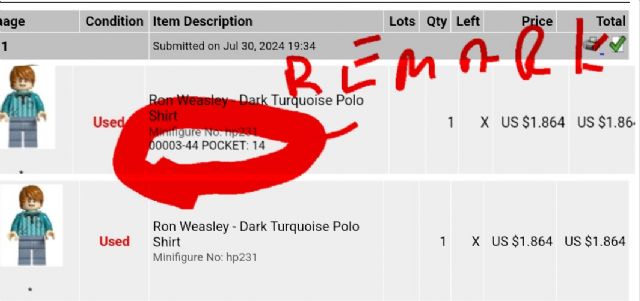
there should be 2 columns, one for QTY SOLD and one for QTY LEFT. "X"
would only appear in the LEFT column when a lot sells out completely and that
lot will automatically disappear from you store (unless you set your store to
retain empty lots).
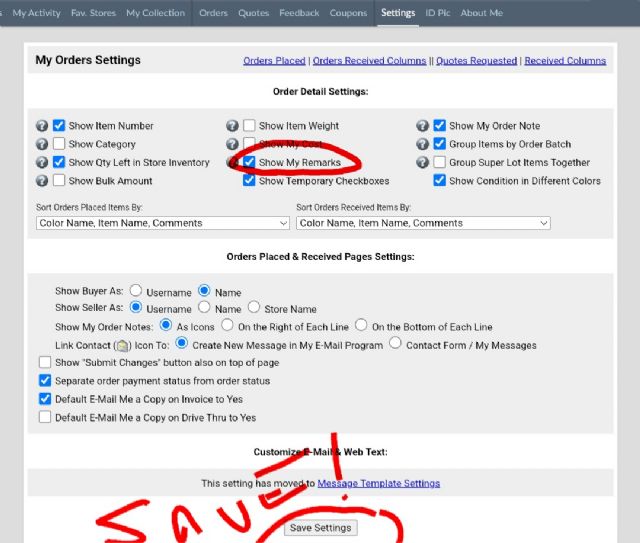
If you do not see these 2 columns perhaps you can select what your orders show
by going here:
I have multiple items that have sold or been deleted out of my inventory that
are showing up on new orders showing quantity X instead of a number. How do I
find and get rid of these items as they are not showing in my inventory.
By chance did you re-upload your inventory recently from brick store? I’ve
had items that were previously sold out but retained reappear with available
inventory after doing an update/upload.
When you say “not showing in my inventory” do you mean they physically don’t
exist in your inventory or when you try to find the item in your inventory on
the site?
I have multiple items that have sold or been deleted out of my inventory that
are showing up on new orders showing quantity X instead of a number. How do I
find and get rid of these items as they are not showing in my inventory.
just a fun bricklink quirk. they usually clear at midnight during daily maintenance
I have multiple items that have sold or been deleted out of my inventory that
are showing up on new orders showing quantity X instead of a number. How do I
find and get rid of these items as they are not showing in my inventory.
just a fun bricklink quirk. they usually clear at midnight during daily maintenance
Take a good look at the software you are using for syncing your inventory between
Bricklink and BrickOwl.
I think the issue lies within the settings of that software.
Reading your posts it doesn't adjust the inventory on BO when a sale is done
on BrickLink and with a sale on BO it adjusts the BL inventory, but does not
retain the lot.
I have multiple items that have sold or been deleted out of my inventory that
are showing up on new orders showing quantity X instead of a number. How do I
find and get rid of these items as they are not showing in my inventory.
A little bit more info on what peregrinator said: When you put new stuff into
your inventory you can choose from 2 options for when all of the items of a particular
lot are sold. One option (tick box 0n the adding inventory page) is to retain
the lot with zero qty / the other option is to have the lot deleted completely
from your inventory when all the pieces of the lot are sold and that leaves no
trace of that part being in your store, thus the X under qty on your order.


 USA, Utah


 United Kingdom, England


 Netherlands, Overijssel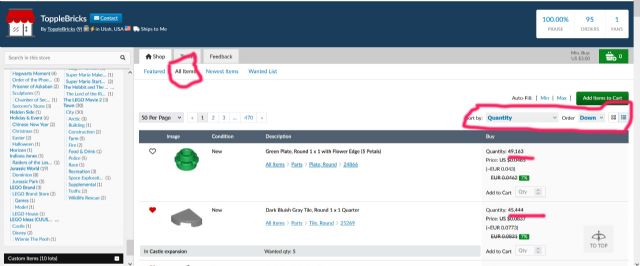

 Canada, Ontario
