For all those who use part recognition applications, I have just discovered
a site (which is not available in application but which is very easy to use)
if it can help you when you want to reference.
You have the scans for the minifigures but also the parts.
For all those who use part recognition applications, I have just discovered
a site (which is not available in application but which is very easy to use)
if it can help you when you want to reference.
You have the scans for the minifigures but also the parts.
There are almost all the items referenced and the creator is really very nice.
Yes - note also it's implemented in BrickStore for 6 month / a year...
You can create your list of parts with optical recognition (at least on parts
you've difficulties to find), it's very convenient!
For all those who use part recognition applications, I have just discovered
a site (which is not available in application but which is very easy to use)
if it can help you when you want to reference.
You have the scans for the minifigures but also the parts.
There are almost all the items referenced and the creator is really very nice.
Yes - note also it's implemented in BrickStore for 6 month / a year...
You can create your list of parts with optical recognition (at least on parts
you've difficulties to find), it's very convenient!
Indeed! It’s one of the main reasons I was able to finally use brickstore! It
makes it really nice to use!
Yes - note also it's implemented in BrickStore for 6 month / a year...
You can create your list of parts with optical recognition (at least on parts
you've difficulties to find), it's very convenient!
Correct, it is 'hidden' in the 'add items' dialogue.
Anyway to have it shown on the menu bar or as a button?
Yes - note also it's implemented in BrickStore for 6 month / a year...
You can create your list of parts with optical recognition (at least on parts
you've difficulties to find), it's very convenient!
Correct, it is 'hidden' in the 'add items' dialogue.
Anyway to have it shown on the menu bar or as a button?
Yes - note also it's implemented in BrickStore for 6 month / a year...
You can create your list of parts with optical recognition (at least on parts
you've difficulties to find), it's very convenient!
Correct, it is 'hidden' in the 'add items' dialogue.
Anyway to have it shown on the menu bar or as a button?
Yes - note also it's implemented in BrickStore for 6 month / a year...
You can create your list of parts with optical recognition (at least on parts
you've difficulties to find), it's very convenient!
Correct, it is 'hidden' in the 'add items' dialogue.
Anyway to have it shown on the menu bar or as a button?
Ahhhhh bright mode! My eyes!
Everyone's not a mole!
Light mode attracts all the bugs! If you used dark mode your inventory would
never have issues!
Yes - note also it's implemented in BrickStore for 6 month / a year...
You can create your list of parts with optical recognition (at least on parts
you've difficulties to find), it's very convenient!
Correct, it is 'hidden' in the 'add items' dialogue.
Anyway to have it shown on the menu bar or as a button?
I had heard of it but considering find it. Thanks for helping. Now I should be
able to add parts at twice the speeds that is if I don’t get distracted


 France, Provence-Alpes-Côte d'Azur


 Canada, Ontario
 Netherlands, Gelderland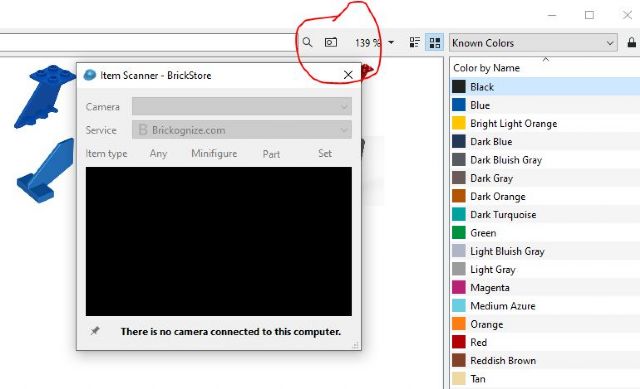


 USA, New Jersey