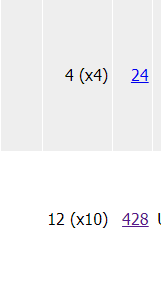
For both items shown, the bulk quantity should be x4
The buyer completed the purchase correctly, but BL screwed up the display for
the bulk of the second item. I have never seen this error before now.
* * *
My second BL glitch in 48 hours. The other one was an order item that my records
and my BL emails prove I sold about 6 weeks ago, but appeared in a new order.
I know it's an error listing because the Retain Lots was NOT enabled and
pretty much 100 percent of my inventory items have Retain Lots turned ON.
My second BL glitch in 48 hours. The other one was an order item that my records
and my BL emails prove I sold about 6 weeks ago, but appeared in a new order.
this happens to me too much. Always happens in groups, like they backed up our
inventory from an old database.
Recently, BL sold a torso I never had listed. I thought perhaps I had imputed
it accidentally, apologized to the customer, and made sure I did not have any
more in my inventory. This was some odd/rare torso in a non existent color.
a few days later, bl sells it AGAIN. Same song and dance.
It sold yet a third time.
The orders were not cancelled, just given credit for the "missing" part,
so I have no idea how it kept getting put back in my inventory and selling over
and over when it was never in my inventory to begin with.
I've had this happen about 1-2 times a year but always figured I was at fault
even though it didn't seem that way, after the whole recent fiasco I don't
think its me.
I have been doing a massive switch from one type of storage to another, doing
inventory in the process. I was missing about a fifth to a quarter of my stock.
I never saw anything weird during the great BrickLink hack of 2023. I changed
my password etc. it's bizarre though, entire lots missing, thousands of pieces.
For both items shown, the bulk quantity should be x4
The buyer completed the purchase correctly, but BL screwed up the display for
the bulk of the second item. I have never seen this error before now.
* * *
My second BL glitch in 48 hours. The other one was an order item that my records
and my BL emails prove I sold about 6 weeks ago, but appeared in a new order.
I know it's an error listing because the Retain Lots was NOT enabled and
pretty much 100 percent of my inventory items have Retain Lots turned ON.
I see in your inventory you have many items with bulk x4 and x20, could it be
that when listing this item you wanted to put x20 and typed 10 instead?
You can download Brickstore and sort your inventory by the retain column to see
if all items are changed, do you use any other software?
For both items shown, the bulk quantity should be x4
The buyer completed the purchase correctly, but BL screwed up the display for
the bulk of the second item. I have never seen this error before now.
* * *
My second BL glitch in 48 hours. The other one was an order item that my records
and my BL emails prove I sold about 6 weeks ago, but appeared in a new order.
I know it's an error listing because the Retain Lots was NOT enabled and
pretty much 100 percent of my inventory items have Retain Lots turned ON.
Already said: do you have recent invxml.txt files downloaded and timestamped
to check and compare?
Or BrickStore files?
If not, it's very possibly an human error, or a inventory sync in between
platforms?
I could verify 2 BrickLink cases where it increased our Inventory of a lot in
almost 5 years. So 2 in 48hrs, sur that can happen, but far more probably something
else.
For both items shown, the bulk quantity should be x4
The buyer completed the purchase correctly, but BL screwed up the display for
the bulk of the second item. I have never seen this error before now.
* * *
My second BL glitch in 48 hours. The other one was an order item that my records
and my BL emails prove I sold about 6 weeks ago, but appeared in a new order.
I know it's an error listing because the Retain Lots was NOT enabled and
pretty much 100 percent of my inventory items have Retain Lots turned ON.
Wasn't the update just a few nights ago? That is usually the pre-cursor
to this type of problem cropping up.


 USA, New York



 Canada, British Columbia
 Spain, Comunidad Valenciana
 France, Provence-Alpes-Côte d'Azur