Discussion Forum: Thread 353439

 Author: Stellar View Messages Posted By Stellar
 Posted: Feb 2, 2024 13:57
 Subject: Fix for Invoice not showing comments
 Viewed: 100 times
 Topic: Technical Issues
 Report:
Cancel Message
Cancel
Reply to Message
Reply
BrickLink
ID Card

Stellar (4138)

Location:  Spain, Comunidad Valenciana
Member Since Contact Type Status
Sep 24, 2015 Contact Member Seller
Buying Privileges - OKSelling Privileges - OK
Store: Stellar Bricks
BrickLink Inventories Administrator (?)
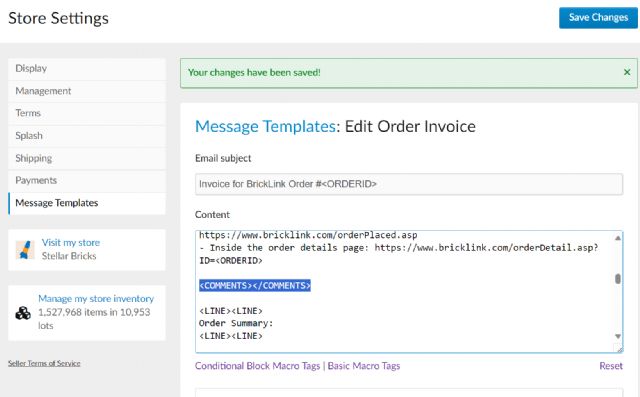
This is a workaround not a fix as you can't edit it when sending an invoice,
but if you have the template customized you can make it work by removing the
tag [COMMENTS] and [/COMMENTS] in this page:

https://www.bricklink.com/v2/mystore/message_templates.page#/1

Leave you custom instructions on the template


 Author: Pipadi.Ladeloe View Messages Posted By Pipadi.Ladeloe
 Posted: Feb 2, 2024 14:02
 Subject: Re: Fix for Invoice not showing comments
 Viewed: 60 times
 Topic: Technical Issues
 Report:
Cancel Message
Cancel
Reply to Message
Reply
BrickLink
ID Card

Pipadi.Ladeloe (2139)

Location:  Belgium
Member Since Contact Type Status
Oct 20, 2013 Contact Member Seller
Buying Privileges - OKSelling Privileges - OK
Store Closed Store: Pipadi And Ladeloe Store
In Technical Issues, Stellar writes:
  This is a workaround not a fix as you can't edit it when sending an invoice,
but if you have the template customized you can make it work by removing the
tag [COMMENTS] and [/COMMENTS] in this page:

https://www.bricklink.com/v2/mystore/message_templates.page#/1

Leave you custom instructions on the template

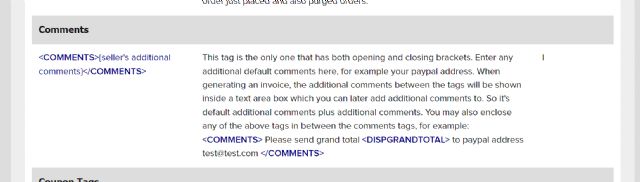
Seems that you have to change the tag to

{seller's additional comments}

This tag is the only one that has both opening and closing brackets. Enter any
additional default comments here, for example your paypal address. When generating
an invoice, the additional comments between the tags will be shown inside a text
area box which you can later add additional comments to. So it's default
additional comments plus additional comments. You may also enclose any of the
above tags in between the comments tags, for example: Please send grand total
to paypal address test@test.com
 Author: Stellar View Messages Posted By Stellar
 Posted: Feb 2, 2024 14:13
 Subject: Re: Fix for Invoice not showing comments
 Viewed: 61 times
 Topic: Technical Issues
 Report:
Cancel Message
Cancel
Reply to Message
Reply
BrickLink
ID Card

Stellar (4138)

Location:  Spain, Comunidad Valenciana
Member Since Contact Type Status
Sep 24, 2015 Contact Member Seller
Buying Privileges - OKSelling Privileges - OK
Store: Stellar Bricks
BrickLink Inventories Administrator (?)
In Technical Issues, Krekeltje62 writes:
  In Technical Issues, Stellar writes:
  This is a workaround not a fix as you can't edit it when sending an invoice,
but if you have the template customized you can make it work by removing the
tag [COMMENTS] and [/COMMENTS] in this page:

https://www.bricklink.com/v2/mystore/message_templates.page#/1

Leave you custom instructions on the template

Seems that you have to change the tag to

{seller's additional comments}

This tag is the only one that has both opening and closing brackets. Enter any
additional default comments here, for example your paypal address. When generating
an invoice, the additional comments between the tags will be shown inside a text
area box which you can later add additional comments to. So it's default
additional comments plus additional comments. You may also enclose any of the
above tags in between the comments tags, for example: Please send grand total
to paypal address test@test.com

That is the same error happening in the help page:

https://www.bricklink.com/help.asp?helpID=661

Old view:

https://web.archive.org/web/20210506172548/https://www.bricklink.com/help.asp?helpID=661

PD: Tried with the {} and it didn't work either.


 Author: Pipadi.Ladeloe View Messages Posted By Pipadi.Ladeloe
 Posted: Feb 2, 2024 14:46
 Subject: (Cancelled)
 Viewed: 45 times
 Topic: Technical Issues
Cancel Message
Cancel
BrickLink
ID Card

Pipadi.Ladeloe (2139)

Location:  Belgium
Member Since Contact Type Status
Oct 20, 2013 Contact Member Seller
Buying Privileges - OKSelling Privileges - OK
Store Closed Store: Pipadi And Ladeloe Store
(Cancelled)
 Author: Pipadi.Ladeloe View Messages Posted By Pipadi.Ladeloe
 Posted: Feb 2, 2024 14:47
 Subject: Re: Fix for Invoice not showing comments
 Viewed: 50 times
 Topic: Technical Issues
 Report:
Cancel Message
Cancel
Reply to Message
Reply
BrickLink
ID Card

Pipadi.Ladeloe (2139)

Location:  Belgium
Member Since Contact Type Status
Oct 20, 2013 Contact Member Seller
Buying Privileges - OKSelling Privileges - OK
Store Closed Store: Pipadi And Ladeloe Store
In Technical Issues, Stellar writes:
  In Technical Issues, Krekeltje62 writes:
  In Technical Issues, Stellar writes:
  This is a workaround not a fix as you can't edit it when sending an invoice,
but if you have the template customized you can make it work by removing the
tag [COMMENTS] and [/COMMENTS] in this page:

https://www.bricklink.com/v2/mystore/message_templates.page#/1

Leave you custom instructions on the template

Seems that you have to change the tag to

{seller's additional comments}

This tag is the only one that has both opening and closing brackets. Enter any
additional default comments here, for example your paypal address. When generating
an invoice, the additional comments between the tags will be shown inside a text
area box which you can later add additional comments to. So it's default
additional comments plus additional comments. You may also enclose any of the
above tags in between the comments tags, for example: Please send grand total
to paypal address test@test.com

That is the same error happening in the help page:

https://www.bricklink.com/help.asp?helpID=661

Old view:

https://web.archive.org/web/20210506172548/https://www.bricklink.com/help.asp?helpID=661

PD: Tried with the {} and it didn't work either.

Put the {seller's additional comments} just behind the Comments end tag.
worked for me.
 Author: Vosblokjes View Messages Posted By Vosblokjes
 Posted: Feb 2, 2024 15:49
 Subject: Re: Fix for Invoice not showing comments
 Viewed: 62 times
 Topic: Technical Issues
 Report:
Cancel Message
Cancel
Reply to Message
Reply
BrickLink
ID Card

Vosblokjes (7655)

Location:  Netherlands, Drenthe
Member Since Contact Type Status
Dec 5, 2014 Contact Member Seller
Buying Privileges - OKSelling Privileges - OK
Store: Vosblokjes
In Technical Issues, Krekeltje62 writes:
  In Technical Issues, Stellar writes:
  In Technical Issues, Krekeltje62 writes:
  In Technical Issues, Stellar writes:
  This is a workaround not a fix as you can't edit it when sending an invoice,
but if you have the template customized you can make it work by removing the
tag [COMMENTS] and [/COMMENTS] in this page:

https://www.bricklink.com/v2/mystore/message_templates.page#/1

Leave you custom instructions on the template

Seems that you have to change the tag to

{seller's additional comments}

This tag is the only one that has both opening and closing brackets. Enter any
additional default comments here, for example your paypal address. When generating
an invoice, the additional comments between the tags will be shown inside a text
area box which you can later add additional comments to. So it's default
additional comments plus additional comments. You may also enclose any of the
above tags in between the comments tags, for example: Please send grand total
to paypal address test@test.com

That is the same error happening in the help page:

https://www.bricklink.com/help.asp?helpID=661

Old view:

https://web.archive.org/web/20210506172548/https://www.bricklink.com/help.asp?helpID=661

PD: Tried with the {} and it didn't work either.

Put the {seller's additional comments} just behind the Comments end tag.
worked for me.

At 15:47 local time (6 hours ago) it was working fine.
After that the tags got broken.
But the first reported issues we're from before that, so it doesn't to
break at the same time for different people

As far as I now have tested there is no need for any tag/macro.
My template uses payment type and country of origin for different texts.
They now seem to work fine without the 'comment' and 'seller's
additional comments'

Now hope it doesn't get broken again