this may sound odd and lengthy, but please read the entirety because it is impacting
our business.
We've just noticed that before the BL got hacked, we get rebrickable business
redirected to our BL store. After the hacked, BL business from rebrickable are
gone. This morning, we went directly to rebrickable and to "build MOC"
and under the page for "buy parts", noticed BrickOwl stores shows up
as selection for buying, not BrickLink stores. And there is a warning message
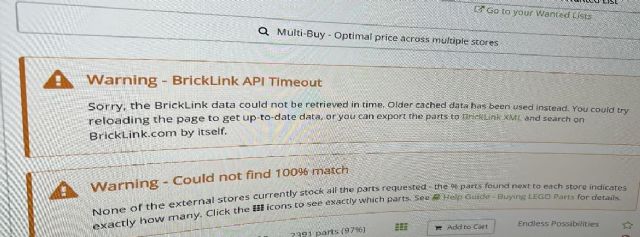
said: "Warning - BrickLink API Timeout: Sorry, the brickLink data count
not be retrieved in time. Older cached data has been used instead. You could
try reloading the page to get up-to-date data, or you can export the parts to
BrickLink XML, and search on BrickLink.com by itself"
After reading the warning message, we've tried to reset the link between
BL to rebrickable in the store management page, also tried to reset cookies on
our internet browsers. We even contacted Brickfreedom (the program we uses to
sync our inventory & pricing between stores) to see if it's API key issue.
None of them works!
As for right now, on rebrickable page, only BrickOwl stores or other independents
site shows up when you "buy parts" not BrickLink. Going further, there
is a small number of stores that operates on several sites, their stores (both
BL and independent sites) shows up.
Is it something on our BL site we need to fix? Please help!!
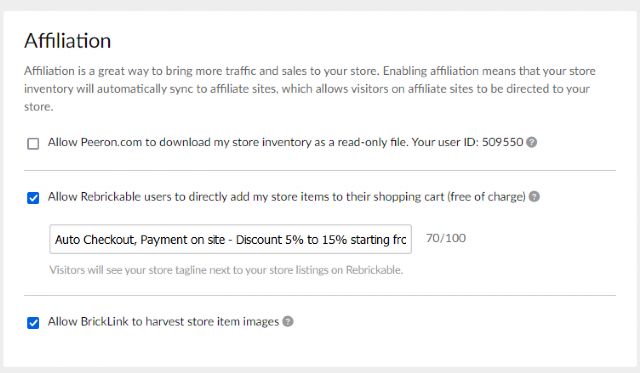
But verify you have this checked in your Shop Settings?
Hi, 1001bricks:
yes, our store setting is always checked with Affiliations and re-done this morning
as well. But, still no show on rebrickable when you do "buy parts" on
rebrickable.
But verify you have this checked in your Shop Settings?
Hi, 1001bricks:
yes, our store setting is always checked with Affiliations and re-done this morning
as well. But, still no show on rebrickable when you do "buy parts" on
rebrickable.
I'd wait until midnight BrickLink hour (EST) after they nightly process by
batches, maybe it'll come then?
But verify you have this checked in your Shop Settings?
Hi, 1001bricks:
yes, our store setting is always checked with Affiliations and re-done this morning
as well. But, still no show on rebrickable when you do "buy parts" on
rebrickable.
I'd wait until midnight BrickLink hour (EST) after they nightly process by
batches, maybe it'll come then?
Hi, 1001bricks:
I will wait. However, I am thinking, perhaps it's between BrickLink & Rebrickable's
link that has a bug? because not all BL stores shows up on the "buy parts"
option. and at times, None BL stores shows up.
But verify you have this checked in your Shop Settings?
Hi, 1001bricks:
yes, our store setting is always checked with Affiliations and re-done this morning
as well. But, still no show on rebrickable when you do "buy parts" on
rebrickable.
I'd wait until midnight BrickLink hour (EST) after they nightly process by
batches, maybe it'll come then?
Hi, 1001bricks:
I will wait. However, I am thinking, perhaps it's between BrickLink & Rebrickable's
link that has a bug? because not all BL stores shows up on the "buy parts"
option. and at times, None BL stores shows up.
"None BL stores shows up"
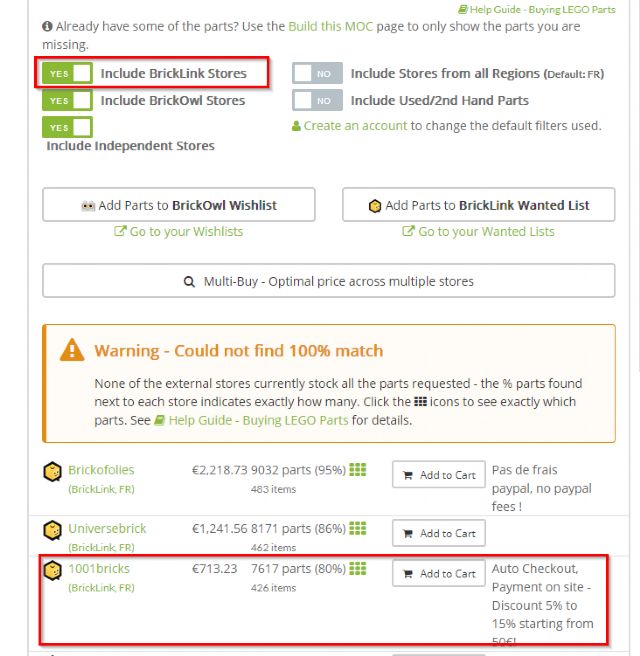
See my screen copy above: I can see our shop.
I don't know what happens to you.
See also in this screen copy, you've to select BrickLink also in rebrickable
sources, of course.
But verify you have this checked in your Shop Settings?
Hi, 1001bricks:
yes, our store setting is always checked with Affiliations and re-done this morning
as well. But, still no show on rebrickable when you do "buy parts" on
rebrickable.
I'd wait until midnight BrickLink hour (EST) after they nightly process by
batches, maybe it'll come then?
Hi, 1001bricks:
I will wait. However, I am thinking, perhaps it's between BrickLink & Rebrickable's
link that has a bug? because not all BL stores shows up on the "buy parts"
option. and at times, None BL stores shows up.
"None BL stores shows up"
See my screen copy above: I can see our shop.
I don't know what happens to you.
See also in this screen copy, you've to select BrickLink also in rebrickable
sources, of course.
Hi, 1001bricks;
Yes, like I said. At times, when you refreshed the page, some BL stores shows
up, like yours. At times, No BL stores shows. It's been like that "Unstable"
for the whole morning. Especially, my store hasn't show up at all, that's
why I am wondering if something in BL setting or my setting needs to be fix and
am asking for help.
But verify you have this checked in your Shop Settings?
Hi, 1001bricks:
yes, our store setting is always checked with Affiliations and re-done this morning
as well. But, still no show on rebrickable when you do "buy parts" on
rebrickable.
I'd wait until midnight BrickLink hour (EST) after they nightly process by
batches, maybe it'll come then?
Hi, 1001bricks:
I will wait. However, I am thinking, perhaps it's between BrickLink & Rebrickable's
link that has a bug? because not all BL stores shows up on the "buy parts"
option. and at times, None BL stores shows up.
"None BL stores shows up"
See my screen copy above: I can see our shop.
I don't know what happens to you.
See also in this screen copy, you've to select BrickLink also in rebrickable
sources, of course.
Hi, 1001bricks;
Yes, like I said. At times, when you refreshed the page, some BL stores shows
up, like yours. At times, No BL stores shows. It's been like that "Unstable"
for the whole morning. Especially, my store hasn't show up at all, that's
why I am wondering if something in BL setting or my setting needs to be fix and
am asking for help.
thank you.
Ah then, can't help you much on this.
Apart rebrickable and BrickLink (and LEGO) are exploding a few days before Xmas.
It may be "normal" in that their respective servers to be overloaded?
But verify you have this checked in your Shop Settings?
Hi, 1001bricks:
yes, our store setting is always checked with Affiliations and re-done this morning
as well. But, still no show on rebrickable when you do "buy parts" on
rebrickable.
I'd wait until midnight BrickLink hour (EST) after they nightly process by
batches, maybe it'll come then?
Hi, 1001bricks:
I will wait. However, I am thinking, perhaps it's between BrickLink & Rebrickable's
link that has a bug? because not all BL stores shows up on the "buy parts"
option. and at times, None BL stores shows up.
"None BL stores shows up"
See my screen copy above: I can see our shop.
I don't know what happens to you.
See also in this screen copy, you've to select BrickLink also in rebrickable
sources, of course.
Hi, 1001bricks;
Yes, like I said. At times, when you refreshed the page, some BL stores shows
up, like yours. At times, No BL stores shows. It's been like that "Unstable"
for the whole morning. Especially, my store hasn't show up at all, that's
why I am wondering if something in BL setting or my setting needs to be fix and
am asking for help.
thank you.
Hi, 1001bricks:
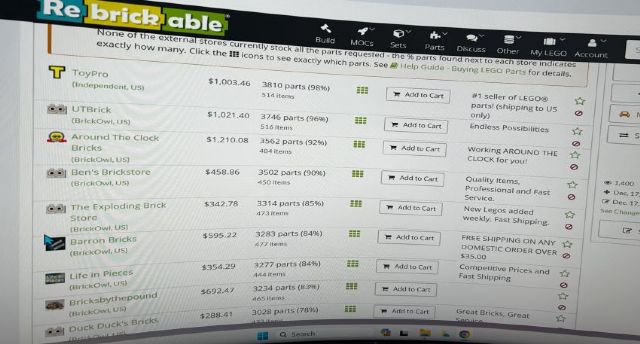
Just went on rebrickable, randomly picked a MOC to buy parts, and attached images
are what's showing. No BrickLink Stores showns.
But verify you have this checked in your Shop Settings?
Hi, 1001bricks:
yes, our store setting is always checked with Affiliations and re-done this morning
as well. But, still no show on rebrickable when you do "buy parts" on
rebrickable.
I'd wait until midnight BrickLink hour (EST) after they nightly process by
batches, maybe it'll come then?
Hi, 1001bricks:
I will wait. However, I am thinking, perhaps it's between BrickLink & Rebrickable's
link that has a bug? because not all BL stores shows up on the "buy parts"
option. and at times, None BL stores shows up.
"None BL stores shows up"
See my screen copy above: I can see our shop.
I don't know what happens to you.
See also in this screen copy, you've to select BrickLink also in rebrickable
sources, of course.
Hi, 1001bricks;
Yes, like I said. At times, when you refreshed the page, some BL stores shows
up, like yours. At times, No BL stores shows. It's been like that "Unstable"
for the whole morning. Especially, my store hasn't show up at all, that's
why I am wondering if something in BL setting or my setting needs to be fix and
am asking for help.
thank you.
Hi, 1001bricks:
Just went on rebrickable, randomly picked a MOC to buy parts, and attached images
are what's showing. No BrickLink Stores showns.
this may sound odd and lengthy, but please read the entirety because it is impacting
our business.
We've just noticed that before the BL got hacked, we get rebrickable business
redirected to our BL store. After the hacked, BL business from rebrickable are
gone. This morning, we went directly to rebrickable and to "build MOC"
and under the page for "buy parts", noticed BrickOwl stores shows up
as selection for buying, not BrickLink stores. And there is a warning message
said: "Warning - BrickLink API Timeout: Sorry, the brickLink data count
not be retrieved in time. Older cached data has been used instead. You could
try reloading the page to get up-to-date data, or you can export the parts to
BrickLink XML, and search on BrickLink.com by itself"
After reading the warning message, we've tried to reset the link between
BL to rebrickable in the store management page, also tried to reset cookies on
our internet browsers. We even contacted Brickfreedom (the program we uses to
sync our inventory & pricing between stores) to see if it's API key issue.
None of them works!
As for right now, on rebrickable page, only BrickOwl stores or other independents
site shows up when you "buy parts" not BrickLink. Going further, there
is a small number of stores that operates on several sites, their stores (both
BL and independent sites) shows up.
Is it something on our BL site we need to fix? Please help!!


 USA, California


 France, Provence-Alpes-Côte d'Azur
 ) :
) :
)
)


 Canada, Ontario