New seller here and i'm wondering how to fix the "TBD" announcement
when people want to check out. I already missed a sale from a customer that messaged
me that he wasn't able to pay.
So i've selected multiple shipping methods, and added a payment option and
still it shows "TBD" when trying to checkout? Anyone know what to do
so shipping costs are automatically calculated?
Second question: i just tried to put an order with myself and it seems that it's
not even possible to "proceed to check out" and my shop keeps showing
a red warning sign.
New seller here and i'm wondering how to fix the "TBD" announcement
when people want to check out. I already missed a sale from a customer that messaged
me that he wasn't able to pay.
So i've selected multiple shipping methods, and added a payment option and
still it shows "TBD" when trying to checkout? Anyone know what to do
so shipping costs are automatically calculated?
Second question: i just tried to put an order with myself and it seems that it's
not even possible to "proceed to check out" and my shop keeps showing
a red warning sign.
You need to enable shipping methods with the setting Automated enabled, or if
you select Manual then click the checkbox to show the estimate:
New seller here and i'm wondering how to fix the "TBD" announcement
when people want to check out. I already missed a sale from a customer that messaged
me that he wasn't able to pay.
So i've selected multiple shipping methods, and added a payment option and
still it shows "TBD" when trying to checkout? Anyone know what to do
so shipping costs are automatically calculated?
Second question: i just tried to put an order with myself and it seems that it's
not even possible to "proceed to check out" and my shop keeps showing
a red warning sign.
You need to enable shipping methods with the setting Automated enabled, or if
you select Manual then click the checkbox to show the estimate:
New seller here and i'm wondering how to fix the "TBD" announcement
when people want to check out. I already missed a sale from a customer that messaged
me that he wasn't able to pay.
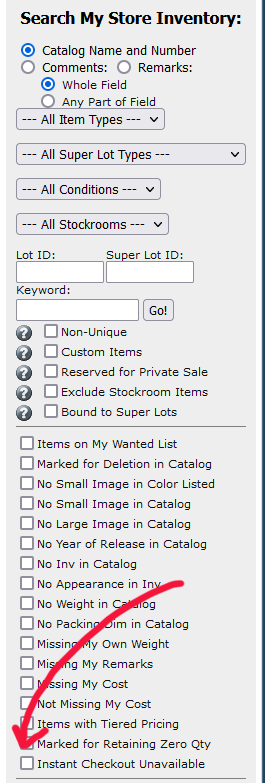
I tried to check out in your store and it worked fine. It's possible you
have an item for sale that's missing dimensions or weight - that would prevent
shipping costs being calculated.
By the way, this is decidedly unfriendly and won't be enforced by BrickLink
or PayPal. Seller is responsible:
!!!No tracking!!! Using this shipping method is at the buyers own risk. In the unlikely event of loss of the parcel, please keep it fair and don't blame me for it.
Second question: i just tried to put an order with myself and it seems that it's
not even possible to "proceed to check out" and my shop keeps showing
a red warning sign.
That's normal - sellers can't buy from themselves.
New seller here and i'm wondering how to fix the "TBD" announcement
when people want to check out. I already missed a sale from a customer that messaged
me that he wasn't able to pay.
I tried to check out in your store and it worked fine. It's possible you
have an item for sale that's missing dimensions or weight - that would prevent
shipping costs being calculated.
By the way, this is decidedly unfriendly and won't be enforced by BrickLink
or PayPal. Seller is responsible:
!!!No tracking!!! Using this shipping method is at the buyers own risk. In the unlikely event of loss of the parcel, please keep it fair and don't blame me for it.
Second question: i just tried to put an order with myself and it seems that it's
not even possible to "proceed to check out" and my shop keeps showing
a red warning sign.
That's normal - sellers can't buy from themselves.
Thanks you so much for answering! I'll delete the no tracking shipping method.
It's a copy of an already existing method
New seller here and i'm wondering how to fix the "TBD" announcement
when people want to check out. I already missed a sale from a customer that messaged
me that he wasn't able to pay.
So i've selected multiple shipping methods, and added a payment option and
still it shows "TBD" when trying to checkout? Anyone know what to do
so shipping costs are automatically calculated?
Second question: i just tried to put an order with myself and it seems that it's
not even possible to "proceed to check out" and my shop keeps showing
a red warning sign.


 Belgium, Flemish Brabant


 Spain, Comunidad Valenciana
 USA, New Jersey