So I’ve made a couple orders as of recently, and both have been with PayPal.
The first transaction went fine, and was super easy. But my second one keeps
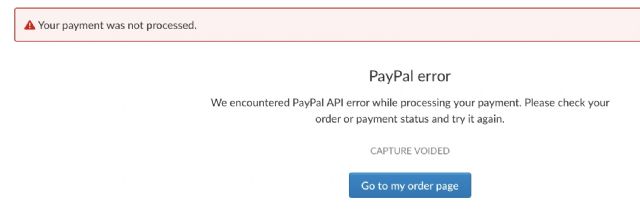
giving me an API error.
I’ve tried switching currencies, I logged out and in again, I connected to different
wifi networks, I tried everything. I’ve gotten the error message like 20 times
now.
Any ideas? Has anyone else encountered this problem recently? It makes no sense
since I literally just made another order a few days ago and it worked. I googled
this issue and got some forum posts on here but none of them helped.
Could I just send money directly through PayPal to the seller’s email and see
if that works?
[…]
Could I just send money directly through PayPal to the seller’s email and see
if that works?
Hi,
If the order is Instant Checkout (= automatically invoiced and with PayPal Onsite
(or Stripe)), then there won’t be an order on BrickLink until it’s paid.
If the order is not Instant Checkout, that is, it exists in your Order Placed
page, but is marked Unpaid, then, as you’re in Canada, there shouldn’t be taxes
issues (with BrickLink), so the seller may be able to change the payment method.
But maybe they can’t (because they don’t have other methods).
In any case, don’t do anything without talking to the seller first.
[…]
Could I just send money directly through PayPal to the seller’s email and see
if that works?
Hi,
If the order is Instant Checkout (= automatically invoiced and with PayPal Onsite
(or Stripe)), then there won’t be an order on BrickLink until it’s paid.
If the order is not Instant Checkout, that is, it exists in your Order Placed
page, but is marked Unpaid, then, as you’re in Canada, there shouldn’t be taxes
issues (with BrickLink), so the seller may be able to change the payment method.
But maybe they can’t (because they don’t have other methods).
In any case, don’t do anything without talking to the seller first.
Also, try to pay later today or tomorrow, this error happens sometimes and you
usually are able to pay just later...
So I’ve made a couple orders as of recently, and both have been with PayPal.
The first transaction went fine, and was super easy. But my second one keeps
giving me an API error.
I’ve tried switching currencies, I logged out and in again, I connected to different
wifi networks, I tried everything. I’ve gotten the error message like 20 times
now.
Any ideas? Has anyone else encountered this problem recently? It makes no sense
since I literally just made another order a few days ago and it worked. I googled
this issue and got some forum posts on here but none of them helped.
Could I just send money directly through PayPal to the seller’s email and see
if that works?
Capture voided means that they actual transfer of funds was stopped. Paying for
anything, involving a card, is a two step: authorize then capture. Sounds like
the authorize worked, but the capture was stopped. Is this one particular seller,
or is it happening on multiple stores ? If one seller, maybe the seller has a
problem with their PayPal account.
3. The seller has noted that this is the first time she has had an order from
Australia since taxes were first collected by Bricklink on Australian orders
(July 1st iirc)
4. I have successfully paid via PayPal (Onsite) with domestic stores about a
week ago.
5. I have gotten two errors, one saying that it is already authorised and is
being processed, and the other which is the API error.
What's common is that CAD is involved. Can I ask if AUD is involved also?
The store I'm buying from said that someone buying in USD was able to make
their payment recently.
In Technical Issues, MasonBrickStore writes:
Hi,
So I’ve made a couple orders as of recently, and both have been with PayPal.
The first transaction went fine, and was super easy. But my second one keeps
giving me an API error.
I’ve tried switching currencies, I logged out and in again, I connected to different
wifi networks, I tried everything. I’ve gotten the error message like 20 times
now.
Any ideas? Has anyone else encountered this problem recently? It makes no sense
since I literally just made another order a few days ago and it worked. I googled
this issue and got some forum posts on here but none of them helped.
Could I just send money directly through PayPal to the seller’s email and see
if that works?
Hi again. I just got it to work by using a different card. Something about a
rolling limit, a spouse limit and a credit card limit. Although I was confident
that my card had a very high limit, it could have been a different one.
3. The seller has noted that this is the first time she has had an order from
Australia since taxes were first collected by Bricklink on Australian orders
(July 1st iirc)
4. I have successfully paid via PayPal (Onsite) with domestic stores about a
week ago.
5. I have gotten two errors, one saying that it is already authorised and is
being processed, and the other which is the API error.
What's common is that CAD is involved. Can I ask if AUD is involved also?
The store I'm buying from said that someone buying in USD was able to make
their payment recently.
In Technical Issues, MasonBrickStore writes:
Hi,
So I’ve made a couple orders as of recently, and both have been with PayPal.
The first transaction went fine, and was super easy. But my second one keeps
giving me an API error.
I’ve tried switching currencies, I logged out and in again, I connected to different
wifi networks, I tried everything. I’ve gotten the error message like 20 times
now.
Any ideas? Has anyone else encountered this problem recently? It makes no sense
since I literally just made another order a few days ago and it worked. I googled
this issue and got some forum posts on here but none of them helped.
Could I just send money directly through PayPal to the seller’s email and see
if that works?


 Canada, Alberta

 France, Nouvelle-Aquitaine


 Spain, Comunidad Valenciana
 USA, Florida

 Australia, Victoria