So there I was, going through my minifigs, lowering prices on everything over
1 year without movement...
I had adjusted about half a page of prices, and I saw a figure I didn't recognize.
So I click on the photo, to bring up the old pop up photo...
TERROR!!!
Instead of the pop up, it takes me to a different page now!
Okay. Don't panic. Maybe when you go back, the data you entered will still
be there, and you can still submit it.
(Cue scream)
It's gone. It's all gone! All that work I did, just... Gone!
Who's bright idea was it to get rid of those pop up images?
I had noticed the change recently, but it had not occurred to me that it might
cause this kind of issue.
Can we please go back to the pop up, so that we can check images without losing
everything we are working on in our inventories?
I am pretty sure it is a glitch, but I reported it a week or so ago. It has
done the same thing to me a couple times.
In Suggestions, Kenopolis writes:
So there I was, going through my minifigs, lowering prices on everything over
1 year without movement...
I had adjusted about half a page of prices, and I saw a figure I didn't recognize.
So I click on the photo, to bring up the old pop up photo...
TERROR!!!
Instead of the pop up, it takes me to a different page now!
Okay. Don't panic. Maybe when you go back, the data you entered will still
be there, and you can still submit it.
(Cue scream)
It's gone. It's all gone! All that work I did, just... Gone!
Who's bright idea was it to get rid of those pop up images?
I had noticed the change recently, but it had not occurred to me that it might
cause this kind of issue.
Can we please go back to the pop up, so that we can check images without losing
everything we are working on in our inventories?
So there I was, going through my minifigs, lowering prices on everything over
1 year without movement...
I had adjusted about half a page of prices, and I saw a figure I didn't recognize.
So I click on the photo, to bring up the old pop up photo...
TERROR!!!
Instead of the pop up, it takes me to a different page now!
Okay. Don't panic. Maybe when you go back, the data you entered will still
be there, and you can still submit it.
(Cue scream)
It's gone. It's all gone! All that work I did, just... Gone!
Who's bright idea was it to get rid of those pop up images?
I had noticed the change recently, but it had not occurred to me that it might
cause this kind of issue.
Can we please go back to the pop up, so that we can check images without losing
everything we are working on in our inventories?
Thanks.
Rant over.
Okay, that is a terrible bug! That needs fixed ASAP.
So there I was, going through my minifigs, lowering prices on everything over
1 year without movement...
I had adjusted about half a page of prices, and I saw a figure I didn't recognize.
So I click on the photo, to bring up the old pop up photo...
TERROR!!!
Instead of the pop up, it takes me to a different page now!
Okay. Don't panic. Maybe when you go back, the data you entered will still
be there, and you can still submit it.
(Cue scream)
It's gone. It's all gone! All that work I did, just... Gone!
Who's bright idea was it to get rid of those pop up images?
I had noticed the change recently, but it had not occurred to me that it might
cause this kind of issue.
Can we please go back to the pop up, so that we can check images without losing
everything we are working on in our inventories?
Thanks.
Rant over.
What device, OS, browser, are you using?
If this is client side, there might not be much BrickLink admins can do to fix
it. If that turns out to be the case, you would need to file an issue report
with the browser's development team.
So there I was, going through my minifigs, lowering prices on everything over
1 year without movement...
I had adjusted about half a page of prices, and I saw a figure I didn't recognize.
So I click on the photo, to bring up the old pop up photo...
TERROR!!!
Instead of the pop up, it takes me to a different page now!
Okay. Don't panic. Maybe when you go back, the data you entered will still
be there, and you can still submit it.
(Cue scream)
It's gone. It's all gone! All that work I did, just... Gone!
Who's bright idea was it to get rid of those pop up images?
I had noticed the change recently, but it had not occurred to me that it might
cause this kind of issue.
Can we please go back to the pop up, so that we can check images without losing
everything we are working on in our inventories?
Thanks.
Rant over.
What device, OS, browser, are you using?
If this is client side, there might not be much BrickLink admins can do to fix
it. If that turns out to be the case, you would need to file an issue report
with the browser's development team.
Cheers ...
ghyde
I am on an acer laptop, Windows 10, on chrome browser.
It's not. It's BL directing to the Large Image default page instead of
the Large Image pop-up. This is not the first time this has happened.
~Jen
I mentioned it becaues I've had similar caching issues with some sites in
the past. When asked to clear the cache, or having found solutions stating I
should do so, the issue resolved itself.
I've had issues where my own ISP is caching sites and doesn't immediately
refresh it properly.
I passed this information in the rare case that it might have been this type
of issue that the OP was experiencing.
It's not. It's BL directing to the Large Image default page instead of
the Large Image pop-up. This is not the first time this has happened.
~Jen
I mentioned it becaues I've had similar caching issues with some sites in
the past. When asked to clear the cache, or having found solutions stating I
should do so, the issue resolved itself.
I've had issues where my own ISP is caching sites and doesn't immediately
refresh it properly.
I passed this information in the rare case that it might have been this type
of issue that the OP was experiencing.
Cheers ...
ghyde
Fair enough! It's just that I get the same error on 3 different Windows machines
and an iPad. Also, a very similar glitch happened when they were working on that
page previously that caused the Price Guide pop-ups not to work correctly.
This needs fixing ASAP. I just finished updating a page of inventory via inventory
search and then clicked an image to zoom in and... lost all my edits because
it took me to a new page instead of popping up the image popup! Just lost a whole
lot of time. Stop working on taxes and "my collections" for a second
and please fix this!!!
In Suggestions, Kenopolis writes:
So there I was, going through my minifigs, lowering prices on everything over
1 year without movement...
I had adjusted about half a page of prices, and I saw a figure I didn't recognize.
So I click on the photo, to bring up the old pop up photo...
TERROR!!!
Instead of the pop up, it takes me to a different page now!
Okay. Don't panic. Maybe when you go back, the data you entered will still
be there, and you can still submit it.
(Cue scream)
It's gone. It's all gone! All that work I did, just... Gone!
Who's bright idea was it to get rid of those pop up images?
I had noticed the change recently, but it had not occurred to me that it might
cause this kind of issue.
Can we please go back to the pop up, so that we can check images without losing
everything we are working on in our inventories?
This needs fixing ASAP. I just finished updating a page of inventory via inventory
search and then clicked an image to zoom in and... lost all my edits because
it took me to a new page instead of popping up the image popup! Just lost a whole
lot of time. Stop working on taxes and "my collections" for a second
and please fix this!!!
Taxes are a legal issue and so need to be worked on.
There is an easy work around, just long click to open the part in another tab.
This needs fixing ASAP. I just finished updating a page of inventory via inventory
search and then clicked an image to zoom in and... lost all my edits because
it took me to a new page instead of popping up the image popup! Just lost a whole
lot of time. Stop working on taxes and "my collections" for a second
and please fix this!!!
Taxes are a legal issue and so need to be worked on.
There is an easy work around, just long click to open the part in another tab.
I would disagree that that is an easy work around. The fact of the matter is
that this bug affects seller's productivity, has a super-easy fix, and should
have been looked into when it was reported weeks ago. BL definitely dropping
the ball here.
This needs fixing ASAP. I just finished updating a page of inventory via inventory
search and then clicked an image to zoom in and... lost all my edits because
it took me to a new page instead of popping up the image popup! Just lost a whole
lot of time. Stop working on taxes and "my collections" for a second
and please fix this!!!
Taxes are a legal issue and so need to be worked on.
There is an easy work around, just long click to open the part in another tab.
I would disagree that that is an easy work around. The fact of the matter is
that this bug affects seller's productivity, has a super-easy fix, and should
have been looked into when it was reported weeks ago. BL definitely dropping
the ball here.
~Jen
Thanks! 8 years of muscle memory means i'm going to click that image everytime
I want to zoom in. C'mon BL, let's get this fixed!
This needs fixing ASAP. I just finished updating a page of inventory via inventory
search and then clicked an image to zoom in and... lost all my edits because
it took me to a new page instead of popping up the image popup! Just lost a whole
lot of time. Stop working on taxes and "my collections" for a second
and please fix this!!!
Taxes are a legal issue and so need to be worked on.
There is an easy work around, just long click to open the part in another tab.
So there I was, going through my minifigs, lowering prices on everything over
1 year without movement...
I had adjusted about half a page of prices, and I saw a figure I didn't recognize.
So I click on the photo, to bring up the old pop up photo...
TERROR!!!
Instead of the pop up, it takes me to a different page now!
Okay. Don't panic. Maybe when you go back, the data you entered will still
be there, and you can still submit it.
(Cue scream)
It's gone. It's all gone! All that work I did, just... Gone!
Who's bright idea was it to get rid of those pop up images?
I had noticed the change recently, but it had not occurred to me that it might
cause this kind of issue.
Can we please go back to the pop up, so that we can check images without losing
everything we are working on in our inventories?
So there I was, going through my minifigs, lowering prices on everything over
1 year without movement...
I had adjusted about half a page of prices, and I saw a figure I didn't recognize.
So I click on the photo, to bring up the old pop up photo...
TERROR!!!
Instead of the pop up, it takes me to a different page now!
Okay. Don't panic. Maybe when you go back, the data you entered will still
be there, and you can still submit it.
(Cue scream)
It's gone. It's all gone! All that work I did, just... Gone!
Who's bright idea was it to get rid of those pop up images?
I had noticed the change recently, but it had not occurred to me that it might
cause this kind of issue.
Can we please go back to the pop up, so that we can check images without losing
everything we are working on in our inventories?
Yes, it has been fixed. Please let us know if you are still experiencing this
issue.
Hi Russell,
Not sure if this was brought up before but now when one clicks the Wanted icon
(heart) when inside a store and change something on the pop-up window and then
click the Update button, it doesn't update anything.
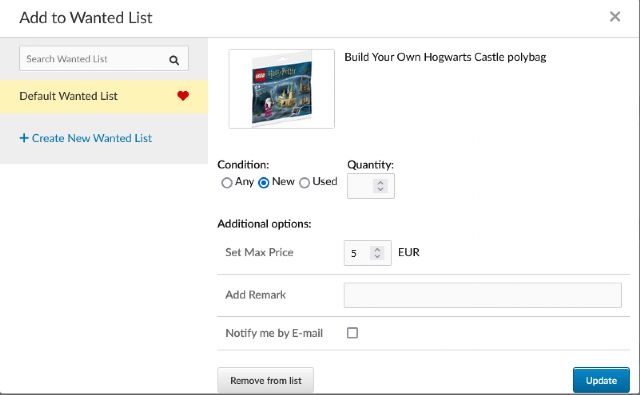
In the image below, if I change the price to 4 EUR and click the Update button
it remains 5 EUR. Same for "condition", "remarks", etc. It would
be handy if it lets changes stick.
Yes, it has been fixed. Please let us know if you are still experiencing this
issue.
Hi Russell,
Not sure if this was brought up before but now when one clicks the Wanted icon
(heart) when inside a store and change something on the pop-up window and then
click the Update button, it doesn't update anything.
In the image below, if I change the price to 4 EUR and click the Update button
it remains 5 EUR. Same for "condition", "remarks", etc. It would
be handy if it lets changes stick.
Thank you!
Renato
GMaB
Hello Paulo,
It does update the part in the correct Wanted List, the problem is when you click
the heart again it opens the part view but the selected WL is always the Default
WL where you don't have that part and shows fields as empty, clicking the
correct heart WL on the left shows the updated fields correctly.
Yes, it has been fixed. Please let us know if you are still experiencing this
issue.
Hi Russell,
Not sure if this was brought up before but now when one clicks the Wanted icon
(heart) when inside a store and change something on the pop-up window and then
click the Update button, it doesn't update anything.
In the image below, if I change the price to 4 EUR and click the Update button
it remains 5 EUR. Same for "condition", "remarks", etc. It would
be handy if it lets changes stick.
Thank you!
Renato
GMaB
Hello Paulo,
It does update the part in the correct Wanted List, the problem is when you click
the heart again it opens the part view but the selected WL is always the Default
WL where you don't have that part and shows fields as empty, clicking the
correct heart WL on the left shows the updated fields correctly.
Hola Sergio,
Sorry, I didn't understand your message.
I have only one Wanted List (which is the Default Wanted List)
When I click in the heart (inside the store) and change, for instance, the max
price to 4 EUR it stays 5 EUR both in that page (inside the store) and in my
main Wanted List page.
It didn't use to be like that. There was a time when I changed the max price
in the heart, inside the store, and it updated right away.
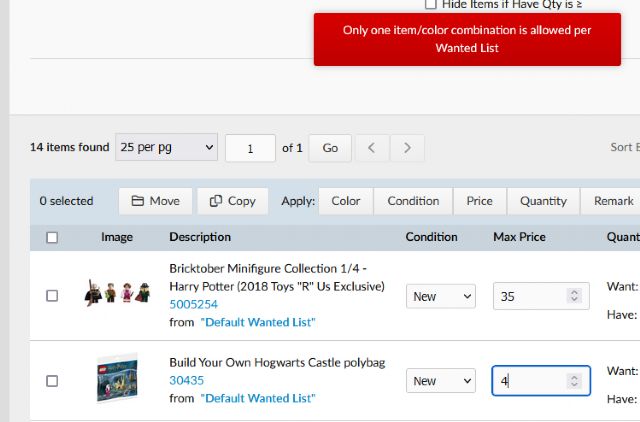
P.S. - Actually I can't change it even in my Wanted List page. The only workaround
is to delete it and add it again (see image).
P.P.S. - It just occurred to me: Maybe the Default Wanted List doesn't accept
"changes" anymore?
Yes, it has been fixed. Please let us know if you are still experiencing this
issue.
Hi Russell,
Not sure if this was brought up before but now when one clicks the Wanted icon
(heart) when inside a store and change something on the pop-up window and then
click the Update button, it doesn't update anything.
In the image below, if I change the price to 4 EUR and click the Update button
it remains 5 EUR. Same for "condition", "remarks", etc. It would
be handy if it lets changes stick.
Thank you!
Renato
GMaB
Hello Paulo,
It does update the part in the correct Wanted List, the problem is when you click
the heart again it opens the part view but the selected WL is always the Default
WL where you don't have that part and shows fields as empty, clicking the
correct heart WL on the left shows the updated fields correctly.
Hola Sergio,
Sorry, I didn't understand your message.
I have only one Wanted List (which is the Default Wanted List)
When I click in the heart (inside the store) and change, for instance, the max
price to 4 EUR it stays 5 EUR both in that page (inside the store) and in my
main Wanted List page.
It didn't use to be like that. There was a time when I changed the max price
in the heart, inside the store, and it updated right away.
P.S. - Actually I can't change it even in my Wanted List page. The only workaround
is to delete it and add it again (see image).
P.P.S. - It just occurred to me: Maybe the Default Wanted List doesn't accept
"changes" anymore?
Gracias!
Seems you have an item twice in your wanted list, until you resolve it by removing
the duplicate you can't make any change to any of your Wanted Lists. It's
Bricklink logic :/
Yes, it has been fixed. Please let us know if you are still experiencing this
issue.
Hi Russell,
Not sure if this was brought up before but now when one clicks the Wanted icon
(heart) when inside a store and change something on the pop-up window and then
click the Update button, it doesn't update anything.
In the image below, if I change the price to 4 EUR and click the Update button
it remains 5 EUR. Same for "condition", "remarks", etc. It would
be handy if it lets changes stick.
Thank you!
Renato
GMaB
Hello Paulo,
It does update the part in the correct Wanted List, the problem is when you click
the heart again it opens the part view but the selected WL is always the Default
WL where you don't have that part and shows fields as empty, clicking the
correct heart WL on the left shows the updated fields correctly.
Hola Sergio,
Sorry, I didn't understand your message.
I have only one Wanted List (which is the Default Wanted List)
When I click in the heart (inside the store) and change, for instance, the max
price to 4 EUR it stays 5 EUR both in that page (inside the store) and in my
main Wanted List page.
It didn't use to be like that. There was a time when I changed the max price
in the heart, inside the store, and it updated right away.
P.S. - Actually I can't change it even in my Wanted List page. The only workaround
is to delete it and add it again (see image).
P.P.S. - It just occurred to me: Maybe the Default Wanted List doesn't accept
"changes" anymore?
Gracias!
Seems you have an item twice in your wanted list, until you resolve it by removing
the duplicate you can't make any change to any of your Wanted Lists. It's
Bricklink logic :/
Yes, it has been fixed. Please let us know if you are still experiencing this
issue.
Hi Russell,
Not sure if this was brought up before but now when one clicks the Wanted icon
(heart) when inside a store and change something on the pop-up window and then
click the Update button, it doesn't update anything.
In the image below, if I change the price to 4 EUR and click the Update button
it remains 5 EUR. Same for "condition", "remarks", etc. It would
be handy if it lets changes stick.
Thank you!
Renato
GMaB
Hello Paulo,
It does update the part in the correct Wanted List, the problem is when you click
the heart again it opens the part view but the selected WL is always the Default
WL where you don't have that part and shows fields as empty, clicking the
correct heart WL on the left shows the updated fields correctly.
Hola Sergio,
Sorry, I didn't understand your message.
I have only one Wanted List (which is the Default Wanted List)
When I click in the heart (inside the store) and change, for instance, the max
price to 4 EUR it stays 5 EUR both in that page (inside the store) and in my
main Wanted List page.
It didn't use to be like that. There was a time when I changed the max price
in the heart, inside the store, and it updated right away.
P.S. - Actually I can't change it even in my Wanted List page. The only workaround
is to delete it and add it again (see image).
P.P.S. - It just occurred to me: Maybe the Default Wanted List doesn't accept
"changes" anymore?
Gracias!
Seems you have an item twice in your wanted list, until you resolve it by removing
the duplicate you can't make any change to any of your Wanted Lists. It's
Bricklink logic :/
Do you know an easy way to find the duplicates?
(I have 8000+ items in my Wanted List.)
OK, I exported to BrickStore and Consolidated items to see the duplicates, and
there are 7.
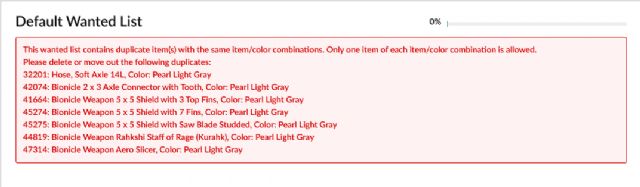
But actually there was no need for that, BrickLink identifies the duplicates:
[…]
P.S. - Actually I can't change it even in my Wanted List page. The only workaround
is to delete it and add it again (see image).
P.P.S. - It just occurred to me: Maybe the Default Wanted List doesn't accept
"changes" anymore?
You need to correct that first.
Maybe you have items on your WL that have been merged in the catalogue?
Shouldn’t be hard to find the problem if you have only one list and 14 items
on it.
(If you have other lists, check those lists too: all the lists are blocked even
if only one has a problem.)
[…]
P.S. - Actually I can't change it even in my Wanted List page. The only workaround
is to delete it and add it again (see image).
P.P.S. - It just occurred to me: Maybe the Default Wanted List doesn't accept
"changes" anymore?
You need to correct that first.
Maybe you have items on your WL that have been merged in the catalogue?
Shouldn’t be hard to find the problem if you have only one list and 14 items
on it.
(If you have other lists, check those lists too: all the lists are blocked even
if only one has a problem.)
Those 14 items were just the Harry Potter sets
I have 8000+ items on my Wanted List.
But I found the 7 duplicates and have deleted them and now it is working fine.
Now, if we only could have on the Wanted List the same item same color in both
used and new condition set to different max prices...


 USA, Missouri


 Australia, Queensland
 France, Provence-Alpes-Côte d'Azur
 Canada, Alberta
 United Kingdom, England
 Spain, Comunidad Valenciana
 Portugal