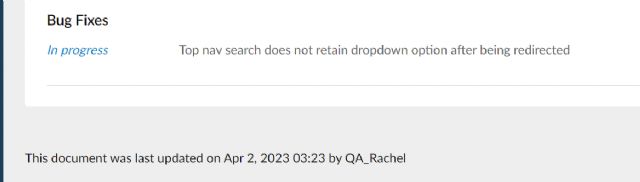
Just noticed today that when searching the shop's inventory multiple times,
the search dropdown keeps reverting to search within all items on bricklink instead
of in store inventory. This was not the case when inputting items yesterday so
I was wondering if this is a glitch/change/setting that anyone has a fix for?
The muscle memory of just searching repetedly is slowing down us down and causing
some frustration.
Same here! I had just installed the Bricktinker extension and I had assumed that
the change was due to the extension, but now that I read this thread, I'm
thinking that the change to the default search was just a coincidence and is
not linked to Bricktinker.
Hopefully there is a way to revert this back so that I don't have to manually
select My Store Inventory each time I'm searching for a part number in my
store! This is frustrating!
I thought it was me. Never thought it was a BrickLink malfunction.
In Searching, simmonsfamily writes:
Hi,
Just noticed today that when searching the shop's inventory multiple times,
the search dropdown keeps reverting to search within all items on bricklink instead
of in store inventory. This was not the case when inputting items yesterday so
I was wondering if this is a glitch/change/setting that anyone has a fix for?
The muscle memory of just searching repetedly is slowing down us down and causing
some frustration.
Not to pile on but this is happening to me too. Chrome/Windows user. Very frustrating
as I use the BL interface for search/entry and not 3rd party tools.
Please change this back. Thanks!
In Technical Issues, simmonsfamily writes:
Hi,
Just noticed today that when searching the shop's inventory multiple times,
the search dropdown keeps reverting to search within all items on bricklink instead
of in store inventory. This was not the case when inputting items yesterday so
I was wondering if this is a glitch/change/setting that anyone has a fix for?
The muscle memory of just searching repetedly is slowing down us down and causing
some frustration.
I noticed this and came here to see if this was a 'me' problem or if
BL changed something. They changed something.
Tech folks....PLEASE change it back. When I am in my store working it is inconvenient
(really, really annoying) to have to change the drop-down back to my store only
for it to revert back to All items each and every time.
thanks!
In Technical Issues, simmonsfamily writes:
Hi,
Just noticed today that when searching the shop's inventory multiple times,
the search dropdown keeps reverting to search within all items on bricklink instead
of in store inventory. This was not the case when inputting items yesterday so
I was wondering if this is a glitch/change/setting that anyone has a fix for?
The muscle memory of just searching repetedly is slowing down us down and causing
some frustration.
This is driving me NUTS!
I move a Lot of stock around from Reserved to in the store and this is a mental
extra step (esp to remember) for each and every part.
#CHANGE_IT_BACK
In Technical Issues, simmonsfamily writes:
Hi,
Just noticed today that when searching the shop's inventory multiple times,
the search dropdown keeps reverting to search within all items on bricklink instead
of in store inventory. This was not the case when inputting items yesterday so
I was wondering if this is a glitch/change/setting that anyone has a fix for?
The muscle memory of just searching repetedly is slowing down us down and causing
some frustration.
This is driving me NUTS!
I move a Lot of stock around from Reserved to in the store and this is a mental
extra step (esp to remember) for each and every part.
#CHANGE_IT_BACK
In Technical Issues, simmonsfamily writes:
Hi,
Just noticed today that when searching the shop's inventory multiple times,
the search dropdown keeps reverting to search within all items on bricklink instead
of in store inventory. This was not the case when inputting items yesterday so
I was wondering if this is a glitch/change/setting that anyone has a fix for?
The muscle memory of just searching repetedly is slowing down us down and causing
some frustration.
Thanks
Same for, I keep on swearing at my screen. gggrrrr!
This is driving me NUTS!
I move a Lot of stock around from Reserved to in the store and this is a mental
extra step (esp to remember) for each and every part.
#CHANGE_IT_BACK
In Technical Issues, simmonsfamily writes:
Hi,
Just noticed today that when searching the shop's inventory multiple times,
the search dropdown keeps reverting to search within all items on bricklink instead
of in store inventory. This was not the case when inputting items yesterday so
I was wondering if this is a glitch/change/setting that anyone has a fix for?
The muscle memory of just searching repetedly is slowing down us down and causing
some frustration.
Thanks
Same for, I keep on swearing at my screen. gggrrrr!
Me too! Ugh. Please switch this back! So time consuming.
Have we had any updates on this / contact from Admin ?
This is seriously taking me 3 times as long to do updates now, especially re-pricing
etc. and its been going on for days now.
Could we please get an update or could it be a setting etc Been using it the
way it was for over 2 years and its honestly so frustrating now.
Any info would be appreciated!
In Technical Issues, simmonsfamily writes:
Hi,
Just noticed today that when searching the shop's inventory multiple times,
the search dropdown keeps reverting to search within all items on bricklink instead
of in store inventory. This was not the case when inputting items yesterday so
I was wondering if this is a glitch/change/setting that anyone has a fix for?
The muscle memory of just searching repetedly is slowing down us down and causing
some frustration.
I take it back, it was fixed but now it is back to not functioning as we expect.
The dropdown pops back to 'All items' after every search instead of remaining
in the last search location. Those of us that enter inventory have grown to love
that the pull-down remains at the last know search location. I work in MyStore
all day so having to reset the pulldown for EVERY.SINGLE.ITEM.NUMBER is very
annoying.
Please fix it!
Thanks.........
In Technical Issues, liisb writes:
It looks like the pulldown menu problem is fixed! Thanks so much, Tech Support!
I thought this was something to do with my browser at first but finally found
this thread which confirms it's Bricklink changing functionality possibly
accidentally and didn't test everything properly. PLEASE CHANGE IT BACK
so the dropdown defaults to the last used value for that 'tab' (I keep
3 open, one each for store inventory, catalog and all items to save time searching).
Steve
In Technical Issues, simmonsfamily writes:
Hi,
Just noticed today that when searching the shop's inventory multiple times,
the search dropdown keeps reverting to search within all items on bricklink instead
of in store inventory. This was not the case when inputting items yesterday so
I was wondering if this is a glitch/change/setting that anyone has a fix for?
The muscle memory of just searching repetedly is slowing down us down and causing
some frustration.
I thought this was something to do with my browser at first but finally found
this thread which confirms it's Bricklink changing functionality possibly
accidentally and didn't test everything properly. PLEASE CHANGE IT BACK
so the dropdown defaults to the last used value for that 'tab' (I keep
3 open, one each for store inventory, catalog and all items to save time searching).
Steve
In Technical Issues, simmonsfamily writes:
Hi,
Just noticed today that when searching the shop's inventory multiple times,
the search dropdown keeps reverting to search within all items on bricklink instead
of in store inventory. This was not the case when inputting items yesterday so
I was wondering if this is a glitch/change/setting that anyone has a fix for?
The muscle memory of just searching repetedly is slowing down us down and causing
some frustration.


 United Kingdom, England


 USA, North Carolina
 Canada, British Columbia

 France, Nouvelle-Aquitaine

 can’t blame ya

 Australia, New South Wales

 Austria, Wien
 Spain, Comunidad Valenciana