Closed my store last weekend. Was about to open it again today and saw that my
inventory almost doubled in lots as well as items! I did nothing in between,
except from packing orders. Had my Brick Owl shop closed as well.
Closed my store last weekend. Was about to open it again today and saw that my
inventory almost doubled in lots as well as items! I did nothing in between,
except from packing orders. Had my Brick Owl shop closed as well.
What could have happened?
Can I revert to my inventory from Sunday?
Help needed!
Did you also stop the software you use to keep your stock in both stores correct?
Closed my store last weekend. Was about to open it again today and saw that my
inventory almost doubled in lots as well as items! I did nothing in between,
except from packing orders. Had my Brick Owl shop closed as well.
What could have happened?
Can I revert to my inventory from Sunday?
Help needed!
Did you also stop the software you use to keep your stock in both stores correct?
I'm not sure if I had BrickSync running. I believe not because the latest
backup from Bricksync was March 18 when I closed the shop.
Closed my store last weekend. Was about to open it again today and saw that my
inventory almost doubled in lots as well as items! I did nothing in between,
except from packing orders. Had my Brick Owl shop closed as well.
What could have happened?
Can I revert to my inventory from Sunday?
Help needed!
Did you also stop the software you use to keep your stock in both stores correct?
I'm not sure if I had BrickSync running. I believe not because the latest
backup from Bricksync was March 18 when I closed the shop.
Closed my store last weekend. Was about to open it again today and saw that my
inventory almost doubled in lots as well as items! I did nothing in between,
except from packing orders. Had my Brick Owl shop closed as well.
What could have happened?
Can I revert to my inventory from Sunday?
Help needed!
Did you also stop the software you use to keep your stock in both stores correct?
Generally bricksync does not work that way, it is far more likely for a closed
bricklink shop to wipe out all parts on brick owl as a closed store will look
like 0 parts in inventory.
But the doubling has me wondering what might have happened. You don't possibly
have 2 bricksync locations do you? Running an old copy of bricksync with a stale
state file can really cause major havoc.
Closed my store last weekend. Was about to open it again today and saw that my
inventory almost doubled in lots as well as items! I did nothing in between,
except from packing orders. Had my Brick Owl shop closed as well.
What could have happened?
Can I revert to my inventory from Sunday?
Help needed!
Did you also stop the software you use to keep your stock in both stores correct?
Generally bricksync does not work that way, it is far more likely for a closed
bricklink shop to wipe out all parts on brick owl as a closed store will look
like 0 parts in inventory.
But the doubling has me wondering what might have happened. You don't possibly
have 2 bricksync locations do you? Running an old copy of bricksync with a stale
state file can really cause major havoc.
Closed my store last weekend. Was about to open it again today and saw that my
inventory almost doubled in lots as well as items! I did nothing in between,
except from packing orders. Had my Brick Owl shop closed as well.
What could have happened?
Can I revert to my inventory from Sunday?
Help needed!
Basically what had happened is that my inventory was doubled.
This morning around 4800 lots were created (uploaded) with 77000 items. They
all have the date stamp 'Added Mar. 22, 2023'
How do I get rid of these lots? (And how could it happen, of course).
I have a bsx backup file from my inventory (from Bricksync) but have no idea
how to make this the new inventory for Bricklink.
Basically what had happened is that my inventory was doubled.
This morning around 4800 lots were created (uploaded) with 77000 items. They
all have the date stamp 'Added Mar. 22, 2023'
How do I get rid of these lots? (And how could it happen, of course).
I have a bsx backup file from my inventory (from Bricksync) but have no idea
how to make this the new inventory for Bricklink.
What's the best way to go from here?
I have no clue what the best way to do it is, but one way is to sort by date
added, and delete all the new lots. Will take some time though.
You need to check if anything has been merged with existing lots too.
But first of all: Change your password, if you have not done that already.
Basically what had happened is that my inventory was doubled.
This morning around 4800 lots were created (uploaded) with 77000 items. They
all have the date stamp 'Added Mar. 22, 2023'
How do I get rid of these lots? (And how could it happen, of course).
I have a bsx backup file from my inventory (from Bricksync) but have no idea
how to make this the new inventory for Bricklink.
What's the best way to go from here?
I have no clue what the best way to do it is, but one way is to sort by date
added, and delete all the new lots. Will take some time though.
You need to check if anything has been merged with existing lots too.
But first of all: Change your password, if you have not done that already.
Helge
It doesn't look like anything merged. There are just 2 entries for each item,
whether new of used, all with the same number of items.
I have to admit that changing my password wasn't my first thought. But I
have done it.
I have a bsx backup file from my inventory (from Bricksync) but have no idea
how to make this the new inventory for Bricklink.
What's the best way to go from here?
First download your current inventory as a worse case scenario backup.
Directly from the developer:
Steps to restore that backup:
#0 Shutdown BrickSync
#1 Copy that backup BSX file to bricksync/data/bricksync.inventory.bsx
#2 Run BrickSync
#3 Type "sync"
Make sure your store is open, can change the buy limit to a huge number temporarily.
I have a bsx backup file from my inventory (from Bricksync) but have no idea
how to make this the new inventory for Bricklink.
What's the best way to go from here?
First download your current inventory as a worse case scenario backup.
Directly from the developer:
Steps to restore that backup:
#0 Shutdown BrickSync
#1 Copy that backup BSX file to bricksync/data/bricksync.inventory.bsx
#2 Run BrickSync
#3 Type "sync"
Make sure your store is open, can change the buy limit to a huge number temporarily.
Thanks a lot for your help. It looks like you're an expert on this
I'm still working up the courage to take this step. After the backup was
saved I received 2 large orders with a total of 279 lots.
I assume I have to manually deduct this from the updated stock?
Can you use the sub command in Brincksync and then use the relevant order files
from bricksync/data/orders?
I have a bsx backup file from my inventory (from Bricksync) but have no idea
how to make this the new inventory for Bricklink.
What's the best way to go from here?
First download your current inventory as a worse case scenario backup.
Directly from the developer:
Steps to restore that backup:
#0 Shutdown BrickSync
#1 Copy that backup BSX file to bricksync/data/bricksync.inventory.bsx
#2 Run BrickSync
#3 Type "sync"
Make sure your store is open, can change the buy limit to a huge number temporarily.
Thanks a lot for your help. It looks like you're an expert on this
I'm still working up the courage to take this step. After the backup was
saved I received 2 large orders with a total of 279 lots.
I assume I have to manually deduct this from the updated stock?
Can you use the sub command in Brincksync and then use the relevant order files
from bricksync/data/orders?
Thanks again for your help.
I never use commands in bricksync other than blmaster on/off as I tried that
once and set all my remarks to the BL part number, basically the reason why I
have an email on how to restore a backup from the developer. The easiest way
to adjust inventory is to open each order in brickstore, mulitply by -1 and upload.
You should not have any orders after the latest backup as each order triggers
a backup of inventory.
Now if you had your store closed on bricklink but not brickowl, and those orders
came in on BO then the sync should trigger and subtract those parts from your
BL inventory.
I have a bsx backup file from my inventory (from Bricksync) but have no idea
how to make this the new inventory for Bricklink.
What's the best way to go from here?
First download your current inventory as a worse case scenario backup.
Directly from the developer:
Steps to restore that backup:
#0 Shutdown BrickSync
#1 Copy that backup BSX file to bricksync/data/bricksync.inventory.bsx
#2 Run BrickSync
#3 Type "sync"
Make sure your store is open, can change the buy limit to a huge number temporarily.
I'm still struggling to get my store back as it was.
I tried the steps you mentioned above but Bricksync seems to download first the
current (wrong) inventory, then compares it to the backup and leaves the BL inventory
as it is.
As a result it updated my Brick Owl inventory so that inventory is now corrupt
as well..
Closed my store last weekend. Was about to open it again today and saw that my
inventory almost doubled in lots as well as items! I did nothing in between,
except from packing orders. Had my Brick Owl shop closed as well.
What could have happened?
Can I revert to my inventory from Sunday?
Help needed!
Basically what had happened is that my inventory was doubled.
This morning around 4800 lots were created (uploaded) with 77000 items. They
all have the date stamp 'Added Mar. 22, 2023'
How do I get rid of these lots? (And how could it happen, of course).
I have a bsx backup file from my inventory (from Bricksync) but have no idea
how to make this the new inventory for Bricklink.
What's the best way to go from here?
I would think that the easiest way would be to download your inventory into BrickStore,
sort by date, highlight all the offending listings by left clicking on the top
listing dated 3-23-2023 then scroll down to the last listing with that date and
left click that listing while holding down the shift key and delete (hit save).
The next part is the scary part - delete all your inventory on BrickLink .
Then use BrickStore to upload your inventory. The plus side is that because
it is considered all new inventory, BrickLink will send out a whole bunch of
email notifications of new parts being added to your inventory.
Closed my store last weekend. Was about to open it again today and saw that my
inventory almost doubled in lots as well as items! I did nothing in between,
except from packing orders. Had my Brick Owl shop closed as well.
What could have happened?
Can I revert to my inventory from Sunday?
Help needed!
Basically what had happened is that my inventory was doubled.
This morning around 4800 lots were created (uploaded) with 77000 items. They
all have the date stamp 'Added Mar. 22, 2023'
How do I get rid of these lots? (And how could it happen, of course).
I have a bsx backup file from my inventory (from Bricksync) but have no idea
how to make this the new inventory for Bricklink.
What's the best way to go from here?
I would think that the easiest way would be to download your inventory into BrickStore,
sort by date, highlight all the offending listings by left clicking on the top
listing dated 3-23-2023 then scroll down to the last listing with that date and
left click that listing while holding down the shift key and delete (hit save).
The next part is the scary part - delete all your inventory on BrickLink .
Then use BrickStore to upload your inventory. The plus side is that because
it is considered all new inventory, BrickLink will send out a whole bunch of
email notifications of new parts being added to your inventory.
Jim
It seems that this is the only option I have left. But how to delete my entire
inventory on BL?
Closed my store last weekend. Was about to open it again today and saw that my
inventory almost doubled in lots as well as items! I did nothing in between,
except from packing orders. Had my Brick Owl shop closed as well.
What could have happened?
Can I revert to my inventory from Sunday?
Help needed!
Basically what had happened is that my inventory was doubled.
This morning around 4800 lots were created (uploaded) with 77000 items. They
all have the date stamp 'Added Mar. 22, 2023'
How do I get rid of these lots? (And how could it happen, of course).
I have a bsx backup file from my inventory (from Bricksync) but have no idea
how to make this the new inventory for Bricklink.
What's the best way to go from here?
On your inventory page, select all, scroll to bottom, check off delete, scroll
a bit choose all that are 1 day or newer.
Just to be safe (I'm paranoid, but I have done it successfully in the past),
I would do a test on a small category and of course back up your inventory first.
Julie
Closed my store last weekend. Was about to open it again today and saw that my
inventory almost doubled in lots as well as items! I did nothing in between,
except from packing orders. Had my Brick Owl shop closed as well.
What could have happened?
Can I revert to my inventory from Sunday?
Help needed!
Basically what had happened is that my inventory was doubled.
This morning around 4800 lots were created (uploaded) with 77000 items. They
all have the date stamp 'Added Mar. 22, 2023'
How do I get rid of these lots? (And how could it happen, of course).
I have a bsx backup file from my inventory (from Bricksync) but have no idea
how to make this the new inventory for Bricklink.
What's the best way to go from here?
On your inventory page, select all, scroll to bottom, check off delete, scroll
a bit choose all that are 1 day or newer.
Just to be safe (I'm paranoid, but I have done it successfully in the past),
I would do a test on a small category and of course back up your inventory first.
Julie
BE SURE TO CHANGE DROPDOWN TO NEWER - older is default.
Closed my store last weekend. Was about to open it again today and saw that my
inventory almost doubled in lots as well as items! I did nothing in between,
except from packing orders. Had my Brick Owl shop closed as well.
What could have happened?
Can I revert to my inventory from Sunday?
Help needed!
I’m case the other solutions don’t work you could
Signup for brickpacker
Connect your stores
Sync your bricklink store to your brickowl store (not the other way around)
Closed my store last weekend. Was about to open it again today and saw that my
inventory almost doubled in lots as well as items! I did nothing in between,
except from packing orders. Had my Brick Owl shop closed as well.


 Netherlands, Overijssel


 Spain, Comunidad Valenciana
 USA, New Hampshire

 Norway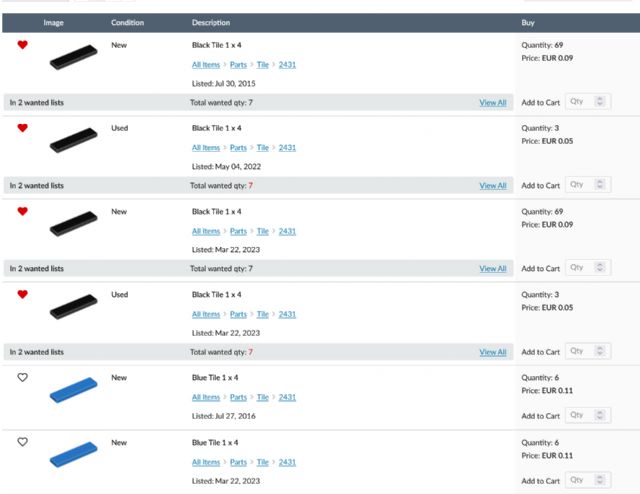


 .
.


)
)
)


)
)
)
 Canada, Ontario