I like to know how I can block a country or more than one country from buying
in my store ?
regards Rohnny
Remove them from the list of countries you ship to
how i need to do that , don`t can find it .
can you post a link ?
in your shipping options here
https://www.bricklink.com/v2/mystore/shipping.page
in some (or all) your shipping methods you selected the Anywhere option. instead
select the international option and simply deselect the all countries don't
want to ship to and select only the countries you want to ship to
I like to know how I can block a country or more than one country from buying
in my store ?
regards Rohnny
Remove them from the list of countries you ship to
how i need to do that , don`t can find it .
can you post a link ?
in your shipping options here
https://www.bricklink.com/v2/mystore/shipping.page
in some (or all) your shipping methods you selected the Anywhere option. instead
select the international option and simply deselect the all countries don't
want to ship to and select only the countries you want to ship to
I like to know how I can block a country or more than one country from buying
in my store ?
regards Rohnny
Remove them from the list of countries you ship to
how i need to do that , don`t can find it .
can you post a link ?
in your shipping options here
https://www.bricklink.com/v2/mystore/shipping.page
in some (or all) your shipping methods you selected the Anywhere option. instead
select the international option and simply deselect the all countries don't
want to ship to and select only the countries you want to ship to
Enabled or Disabled ?
pretty sure you only need to update the enabled ones
I like to know how I can block a country or more than one country from buying
in my store ?
regards Rohnny
Remove them from the list of countries you ship to
how i need to do that , don`t can find it .
can you post a link ?
in your shipping options here
https://www.bricklink.com/v2/mystore/shipping.page
in some (or all) your shipping methods you selected the Anywhere option. instead
select the international option and simply deselect the all countries don't
want to ship to and select only the countries you want to ship to
Enabled or Disabled ?
pretty sure you only need to update the enabled ones
I can choose under Note : enabled or disabled befor I hit save change .
I like to know how I can block a country or more than one country from buying
in my store ?
regards Rohnny
Remove them from the list of countries you ship to
how i need to do that , don`t can find it .
can you post a link ?
in your shipping options here
https://www.bricklink.com/v2/mystore/shipping.page
in some (or all) your shipping methods you selected the Anywhere option. instead
select the international option and simply deselect the all countries don't
want to ship to and select only the countries you want to ship to
Enabled or Disabled ?
pretty sure you only need to update the enabled ones
I can choose under Note : enabled or disabled befor I hit save change .
that is for if you want to enable that shipping option for use or not. if diabled
it wont be an option for buyers and if enabled it will show to applicable buyers
I like to know how I can block a country or more than one country from buying
in my store ?
regards Rohnny
Remove them from the list of countries you ship to
how i need to do that , don`t can find it .
can you post a link ?
in your shipping options here
https://www.bricklink.com/v2/mystore/shipping.page
in some (or all) your shipping methods you selected the Anywhere option. instead
select the international option and simply deselect the all countries don't
want to ship to and select only the countries you want to ship to
Enabled or Disabled ?
pretty sure you only need to update the enabled ones
I can choose under Note : enabled or disabled befor I hit save change .
that is for if you want to enable that shipping option for use or not. if diabled
it wont be an option for buyers and if enabled it will show to applicable buyers
I like to know how I can block a country or more than one country from buying
in my store ?
regards Rohnny
Remove them from the list of countries you ship to
how i need to do that , don`t can find it .
can you post a link ?
in your shipping options here
https://www.bricklink.com/v2/mystore/shipping.page
in some (or all) your shipping methods you selected the Anywhere option. instead
select the international option and simply deselect the all countries don't
want to ship to and select only the countries you want to ship to
Enabled or Disabled ?
pretty sure you only need to update the enabled ones
I can choose under Note : enabled or disabled befor I hit save change .
that is for if you want to enable that shipping option for use or not. if diabled
it wont be an option for buyers and if enabled it will show to applicable buyers
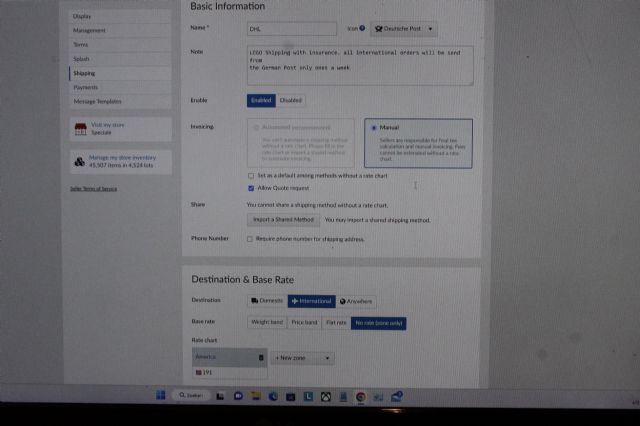
this is what I see on my screen .
i think it looks good.
now take a look at this page
https://store.bricklink.com/Speciale?p=Speciale#/terms
and if in the Store Ships To part of it you no longer see the country that means
it should work now but you may want to confirm it still works as intended
I like to know how I can block a country or more than one country from buying
in my store ?
regards Rohnny
Remove them from the list of countries you ship to
how i need to do that , don`t can find it .
can you post a link ?
in your shipping options here
https://www.bricklink.com/v2/mystore/shipping.page
in some (or all) your shipping methods you selected the Anywhere option. instead
select the international option and simply deselect the all countries don't
want to ship to and select only the countries you want to ship to
Enabled or Disabled ?
pretty sure you only need to update the enabled ones
I can choose under Note : enabled or disabled befor I hit save change .
that is for if you want to enable that shipping option for use or not. if diabled
it wont be an option for buyers and if enabled it will show to applicable buyers
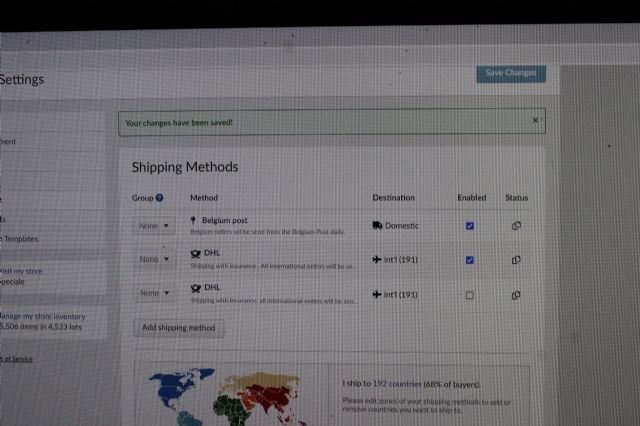
this is what I see on my screen .
Right now you have TWO same shipping methods.
Please make sure you know what you're doing?
Need help, evetually PM me.
Shipping Methods for Buyers Outside of Belgium:
DHL
LEGO Shipping with insurance.all international orders will be send from the
German Post only ones a week.
DHL
LEGO Shipping with insurance. all international orders will be send from
the German Post only ones a week
good eye. I didnt see it was a double. don't forget to deactivate the old
one by selecting disabled on the page for it otherwise you may still be offering
your old method
I like to know how I can block a country or more than one country from buying
in my store ?
regards Rohnny
Remove them from the list of countries you ship to
how i need to do that , don`t can find it .
can you post a link ?
in your shipping options here
https://www.bricklink.com/v2/mystore/shipping.page
in some (or all) your shipping methods you selected the Anywhere option. instead
select the international option and simply deselect the all countries don't
want to ship to and select only the countries you want to ship to
Enabled or Disabled ?
pretty sure you only need to update the enabled ones
I can choose under Note : enabled or disabled befor I hit save change .
that is for if you want to enable that shipping option for use or not. if diabled
it wont be an option for buyers and if enabled it will show to applicable buyers
this is what I see on my screen .
Right now you have TWO same shipping methods.
Please make sure you know what you're doing?
Need help, evetually PM me.
Shipping Methods for Buyers Outside of Belgium:
DHL
LEGO Shipping with insurance.all international orders will be send from the
German Post only ones a week.
DHL
LEGO Shipping with insurance. all international orders will be send from
the German Post only ones a week
In the past I could sometimes send cheaper or for the same price to Belgium
including insurance via the German post . That is no longer possible so I like
to remove that option. I tried to remove 1 shipping Methode but it don't
succeed .
I like to know how I can block a country or more than one country from buying
in my store ?
regards Rohnny
Remove them from the list of countries you ship to
how i need to do that , don`t can find it .
can you post a link ?
in your shipping options here
https://www.bricklink.com/v2/mystore/shipping.page
in some (or all) your shipping methods you selected the Anywhere option. instead
select the international option and simply deselect the all countries don't
want to ship to and select only the countries you want to ship to
Enabled or Disabled ?
pretty sure you only need to update the enabled ones
I can choose under Note : enabled or disabled befor I hit save change .
that is for if you want to enable that shipping option for use or not. if diabled
it wont be an option for buyers and if enabled it will show to applicable buyers
this is what I see on my screen .
Right now you have TWO same shipping methods.
Please make sure you know what you're doing?
Need help, evetually PM me.
Shipping Methods for Buyers Outside of Belgium:
DHL
LEGO Shipping with insurance.all international orders will be send from the
German Post only ones a week.
DHL
LEGO Shipping with insurance. all international orders will be send from
the German Post only ones a week
In the past I could sometimes send cheaper or for the same price to Belgium
including insurance via the German post . That is no longer possible so I like
to remove that option. I tried to remove 1 shipping Methode but it don't
succeed .
In the past I could sometimes send cheaper or for the same price to Belgium
including insurance via the German post . That is no longer possible so I like
to remove that option. I tried to remove 1 shipping Methode but it don't
succeed .
You can't remove a shipping method for 6 months, after the last order using
it has been purged.
You can disable it, it won't appear and won't be in the calculation.
In the past I could sometimes send cheaper or for the same price to Belgium
including insurance via the German post . That is no longer possible so I like
to remove that option. I tried to remove 1 shipping Methode but it don't
succeed .
You can't remove a shipping method for 6 months, after the last order using
it has been purged.
You can disable it, it won't appear and won't be in the calculation.
Huh weird thing but there is probably some technical reason for it
You can't remove a shipping method for 6 months, after the last order using
it has been purged.
You can disable it, it won't appear and won't be in the calculation.
Huh weird thing but there is probably some technical reason for it
It's not weird.
It's because when the order is shown on BrickLink it shows "the old"
shipping method.
In short, they save in the database the reference to the shipping method, and
display it.
So it can't be deleted in case it exists in an order.
A little correction - it's maybe not 6 months, but after the transactions
has been set fully Completed (can't be changed back) OR 6 months.
ah that makes more sense. I was working on some shipping options recently and
saw that
I'm not sure they save the name and description of the method in the order
(database) - which would be a bit silly - instead of its number (it has a number),
but one thing is sure, they won't delete a shipping method as long as a problem
(NSS...) can happen to the order (hence the 'completed' or 'purged'.
In the past I could sometimes send cheaper or for the same price to Belgium
including insurance via the German post . That is no longer possible so I like
to remove that option. I tried to remove 1 shipping Methode but it don't
succeed .
You can't remove a shipping method for 6 months, after the last order using
it has been purged.
You can disable it, it won't appear and won't be in the calculation.
In the past I could sometimes send cheaper or for the same price to Belgium
including insurance via the German post . That is no longer possible so I like
to remove that option. I tried to remove 1 shipping Methode but it don't
succeed .
You can't remove a shipping method for 6 months, after the last order using
it has been purged.
You can disable it, it won't appear and won't be in the calculation.
will this work ?
Apparently yes.
You can see your own active Shipping Methods in your Shop / Terms.
You can take screenshots using Greenshot - it's a free and very useful tool.
[…]
You can take screenshots using Greenshot - it's a free and very useful tool.
Or simply press the Window Logo + PrintScreen (PrtScn or variations thereof)
keys.
(The PrintScreen may be hidden or missing, in that case, Win + Fn + Space should
do it.)
Depending your system version; otherwise it's an image in the Clipboard and
then you've to do extra steps...
Greenshot also allows you to draw arrow, lines, shapes, obfuscate, crop, etc.
thanks for the helping hands ,Nubs_Select , 1001bricks and SylvainLS I speak
Dutch, never learned English at school and I use a German keyboard which is different
from a Belgian one . sometimes it's hard to understand .
thanks for the helping hands ,Nubs_Select , 1001bricks and SylvainLS I speak
Dutch, never learned English at school and I use a German keyboard which is different
from a Belgian one . sometimes it's hard to understand .
That's very fine - be proud to be a real European!
[…]
You can take screenshots using Greenshot - it's a free and very useful tool.
Or simply press the Window Logo + PrintScreen (PrtScn or variations thereof)
keys.
(The PrintScreen may be hidden or missing, in that case, Win + Fn + Space should
do it.)
Depending your system version; otherwise it's an image in the Clipboard and
then you've to do extra steps...
Greenshot also allows you to draw arrow, lines, shapes, obfuscate, crop, etc.
thanks for the helping hands ,Nubs_Select , 1001bricks and SylvainLS I speak
Dutch, never learned English at school and I use a German keyboard which is different
from a Belgian one . sometimes it's hard to understand .


 Belgium


 Canada, Ontario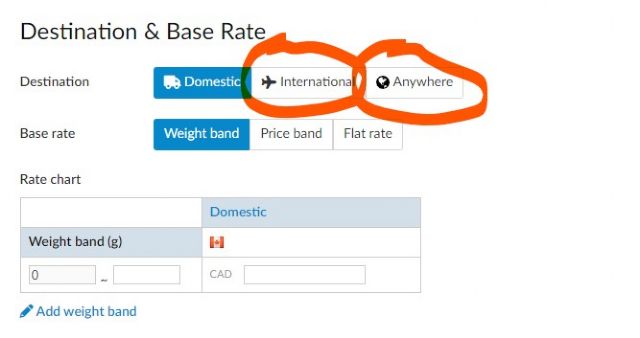
)
)

 France, Provence-Alpes-Côte d'Azur
 .
.


 USA, Texas