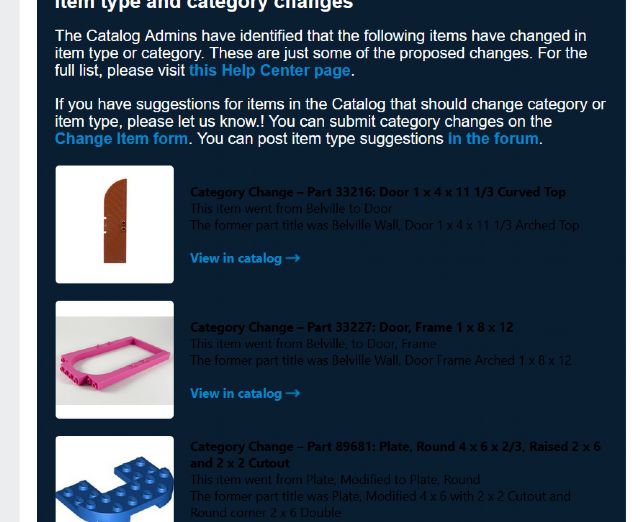
You did a bad job here: black lettering on a dark blue background.
Apparently you don't have graphical designers in your team. Or everyone in
your team is aged below 30.
Text for anyone curious
“ The Catalog Admins have identified that the following items have changed in
item type or category. These are just some of the proposed changes. For the
full list, please visit this Help Center page. If you have suggestions for items
in the Catalog that should change category or item type, please let us know.!
You can submit category changes on the
Change Item form. You can post item type suggestions in the forum. Category Change
- Part 33216; Door 1 x 4 * 11 1/3 Curved Top
This item went from Selville to boor
The former part title was Belville Wall. Door 1 x4 x 11 1/3 Arched Top
View in catalog -
Category Change - Part 33227: Door, Frame 1 x 8 x 12
This item went from Belvile, to Doat. Frame
The former part title was Delville Wall Door Frame Arched 1 × 8 x 12
View in catalog -* Category Change - Part 89681: Plate, Round 4 x 6 x 2/3, Raised
2 x 6
and 2 x 2 Cutout This item went from Plate Modified to Plate, Round
The former part title was Plate, Modified 1 * 6 with 2 & 2 Cutout and Round corner
2 x 6 Double”
Gotta love iOS feature of copying text from images
You did a bad job here: black lettering on a dark blue background.
Apparently you don't have graphical designers in your team. Or everyone in
your team is aged below 30.
My email came through with white lettering
My MUA rendered it with white letters too. Maybe something ambiguous or wrong
in the CSS?
What I find wrong is this sentence: “The Catalog Admins have identified that
the following items have changed in item type or category.”
What? The items have changed on their own? and the admins only observed/noticed
the changes?
You did a bad job here: black lettering on a dark blue background.
Apparently you don't have graphical designers in your team. Or everyone in
your team is aged below 30.
My email came through with white lettering
My MUA rendered it with white letters too. Maybe something ambiguous or wrong
in the CSS?
What I find wrong is this sentence: “The Catalog Admins have identified that
the following items have changed in item type or category.”
What? The items have changed on their own? and the admins only observed/noticed
the changes?
You did a bad job here: black lettering on a dark blue background.
Apparently you don't have graphical designers in your team. Or everyone in
your team is aged below 30.
My email came through with white lettering
My MUA rendered it with white letters too. Maybe something ambiguous or wrong
in the CSS?
The lettering that is rendered as black on the OP's email and white on mine
and others' is in a table cell - looks like it's supposed to inherit
from a div surrounding the table, and isn't in some cases. But surely that's
the fault of Mailchimp's email editor?
You did a bad job here: black lettering on a dark blue background.
Apparently you don't have graphical designers in your team. Or everyone in
your team is aged below 30.
My email came through with white lettering
My MUA rendered it with white letters too. Maybe something ambiguous or wrong
in the CSS?
What I find wrong is this sentence: “The Catalog Admins have identified that
the following items have changed in item type or category.”
What? The items have changed on their own? and the admins only observed/noticed
the changes?
You did a bad job here: black lettering on a dark blue background.
Apparently you don't have graphical designers in your team. Or everyone in
your team is aged below 30.
And I assume that your age must be under 20, since you're so immature as
to insult the newsletter team without checking to see if others' emails look
the same as yours. (Hint: they don't.)
You did a bad job here: black lettering on a dark blue background.
Apparently you don't have graphical designers in your team. Or everyone in
your team is aged below 30.
And I assume that your age must be under 20, since you're so immature as
to insult the newsletter team without checking to see if others' emails look
the same as yours. (Hint: they don't.)
That user is reporting that it looks bad on his side
You know ... the customer side
Rather important when sending out a newsletter. It's entirely up to the newsletter
team to make sure their announcemnts work in all common browsers and (I)OS
So I must assume you're way over 60 since you cannot understand that
Yikes people! Are we really all hurling around insults because some font rendered
in different colors in a newsletter? Did that newsletter affect anyone's
ability to use the site today?
I have got to be in the top 10 of complainers around here so normally I understand,
but geesh! Give it a rest.


 Netherlands, Overijssel



 Canada, Ontario
 USA, Tennessee


 France, Nouvelle-Aquitaine


 Denmark