As part of the release of the Packing Dimensions feature, we are planning to
place a handy link on seller's My Inventory Detail page to submit system
(catalog) packing dimensions for the listed article.
Before implementing any change to that page, however, we decided to retire the
old version of the page. And before we could retire the page, we needed to fix
any bugs or unexpected behavior on the new version of the page.
It took a while, but we identified and fixed 27 issues. Here is the list:
1. Z dimensions being copied from the X dimensions field
2. Additional Search Criteria Specified not showing
3. Missing space after the colon in breadcrumbs
4. Font size is too small in text boxes
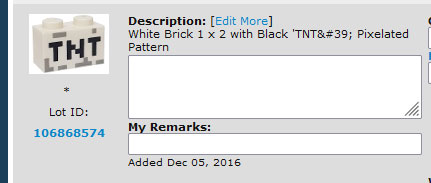
5. Special characters not displaying correctly
6. "Edit More" link still present on extended inventory page
7. Missing space after the colon after "Part ID"
8. Text boxes should completely cover area under the Description
9. Colon out of place for the Z dimension
10. Zero value displayed in weight and packing dimensions fields
11. Min / Max Price and Min / Max Bulk Amount filters not working
12. Price guide link shows detail page, not summary page
13. Loading Inventory Data warning message causes page to jump
15. Navigation tool is removed when there is only one page to display
16. Date Last Sold info is showing even when the store setting is turned off
17. Color drop-down menu is in alphabetical order instead of BrickLink order
18. Can't edit Item Number for Sets or Minifigs
19. Price guide link is active for custom listings
20. Item Type, Color, and Category cannot be changed for custom listings
21. Changing Item Type produces wrong system message
22. System message on new page is not spaced correctly
23. Modulex warning error needs copy correction
24. "As Summary" cookie seems to be independent between the two versions
25. Extended description box appears before Item Type is changed
26. Window too wide for page on Seller My Inventory page
27. Change "Del" to "Delete" on My Inventory page
Many thanks to user Jennnifer for helping compile this list, and also to those
who reported these bugs in the Forum or through the Help Desk.
The time has come to retire the old page, so please take some time if you are
so inclined and compare the old and new versions of the page. They should be
identical at this point. If you notice a discrepancy or bug, please report it
in this thread.
I haven't checked today, but often it will not save changes. I have to click
"Old Page" and then redo the changes to save them. Not every time and I don't
know what triggers it.
In Catalog, Admin_Russell writes:
As part of the release of the Packing Dimensions feature, we are planning to
place a handy link on seller's My Inventory Detail page to submit system
(catalog) packing dimensions for the listed article.
Before implementing any change to that page, however, we decided to retire the
old version of the page. And before we could retire the page, we needed to fix
any bugs or unexpected behavior on the new version of the page.
It took a while, but we identified and fixed 27 issues. Here is the list:
1. Z dimensions being copied from the X dimensions field
2. Additional Search Criteria Specified not showing
3. Missing space after the colon in breadcrumbs
4. Font size is too small in text boxes
5. Special characters not displaying correctly
6. "Edit More" link still present on extended inventory page
7. Missing space after the colon after "Part ID"
8. Text boxes should completely cover area under the Description
9. Colon out of place for the Z dimension
10. Zero value displayed in weight and packing dimensions fields
11. Min / Max Price and Min / Max Bulk Amount filters not working
12. Price guide link shows detail page, not summary page
13. Loading Inventory Data warning message causes page to jump
15. Navigation tool is removed when there is only one page to display
16. Date Last Sold info is showing even when the store setting is turned off
17. Color drop-down menu is in alphabetical order instead of BrickLink order
18. Can't edit Item Number for Sets or Minifigs
19. Price guide link is active for custom listings
20. Item Type, Color, and Category cannot be changed for custom listings
21. Changing Item Type produces wrong system message
22. System message on new page is not spaced correctly
23. Modulex warning error needs copy correction
24. "As Summary" cookie seems to be independent between the two versions
25. Extended description box appears before Item Type is changed
26. Window too wide for page on Seller My Inventory page
27. Change "Del" to "Delete" on My Inventory page
Many thanks to user Jennnifer for helping compile this list, and also to those
who reported these bugs in the Forum or through the Help Desk.
The time has come to retire the old page, so please take some time if you are
so inclined and compare the old and new versions of the page. They should be
identical at this point. If you notice a discrepancy or bug, please report it
in this thread.
I haven't checked today, but often it will not save changes. I have to click
"Old Page" and then redo the changes to save them. Not every time and I don't
know what triggers it.
There were some bugs like this that would cause that:
I haven't checked today, but often it will not save changes. I have to click
"Old Page" and then redo the changes to save them. Not every time and I don't
know what triggers it.
There were some bugs like this that would cause that:
As part of the release of the Packing Dimensions feature, we are planning to
place a handy link on seller's My Inventory Detail page to submit system
(catalog) packing dimensions for the listed article.
Before implementing any change to that page, however, we decided to retire the
old version of the page. And before we could retire the page, we needed to fix
any bugs or unexpected behavior on the new version of the page.
It took a while, but we identified and fixed 27 issues. Here is the list:
1. Z dimensions being copied from the X dimensions field
2. Additional Search Criteria Specified not showing
3. Missing space after the colon in breadcrumbs
4. Font size is too small in text boxes
5. Special characters not displaying correctly
6. "Edit More" link still present on extended inventory page
7. Missing space after the colon after "Part ID"
8. Text boxes should completely cover area under the Description
9. Colon out of place for the Z dimension
10. Zero value displayed in weight and packing dimensions fields
11. Min / Max Price and Min / Max Bulk Amount filters not working
12. Price guide link shows detail page, not summary page
13. Loading Inventory Data warning message causes page to jump
15. Navigation tool is removed when there is only one page to display
16. Date Last Sold info is showing even when the store setting is turned off
17. Color drop-down menu is in alphabetical order instead of BrickLink order
18. Can't edit Item Number for Sets or Minifigs
19. Price guide link is active for custom listings
20. Item Type, Color, and Category cannot be changed for custom listings
21. Changing Item Type produces wrong system message
22. System message on new page is not spaced correctly
23. Modulex warning error needs copy correction
24. "As Summary" cookie seems to be independent between the two versions
25. Extended description box appears before Item Type is changed
26. Window too wide for page on Seller My Inventory page
27. Change "Del" to "Delete" on My Inventory page
Many thanks to user Jennnifer for helping compile this list, and also to those
who reported these bugs in the Forum or through the Help Desk.
The time has come to retire the old page, so please take some time if you are
so inclined and compare the old and new versions of the page. They should be
identical at this point. If you notice a discrepancy or bug, please report it
in this thread.
Russell, there are a number of 3rd party inventory tools out there that have
links to open your inventory in Bricklink they pass the parameters in the url,
for example I use one to search my remarks with the option "Any Part of Field"
because doing it within BL is too many clicks/pages.
So going to that page with a link from somewhere else it yields nothing.
Please implement a way to access to specific inventory links via URL parameters.
Let's say I encounter a list of problematic lots in my store using the new
inventory page, I can't save the link to access that list because it is generic
for all.
I don't know if I expressed myself correctly, so if someone knows what I'm
talking about and can expand this it would be welcome.
Russell, there are a number of 3rd party inventory tools out there that have
links to open your inventory in Bricklink they pass the parameters in the url,
for example I use one to search my remarks with the option "Any Part of Field"
because doing it within BL is too many clicks/pages.
So going to that page with a link from somewhere else it yields nothing.
Please implement a way to access to specific inventory links via URL parameters.
Let's say I encounter a list of problematic lots in my store using the new
inventory page, I can't save the link to access that list because it is generic
for all.
I don't know if I expressed myself correctly, so if someone knows what I'm
talking about and can expand this it would be welcome.
We have already developed a redirect to the new pages that will handle cases
like this and retain all search/filter parameters. It is just waiting to be deployed.
Russell, there are a number of 3rd party inventory tools out there that have
links to open your inventory in Bricklink they pass the parameters in the url,
for example I use one to search my remarks with the option "Any Part of Field"
because doing it within BL is too many clicks/pages.
So going to that page with a link from somewhere else it yields nothing.
Please implement a way to access to specific inventory links via URL parameters.
Let's say I encounter a list of problematic lots in my store using the new
inventory page, I can't save the link to access that list because it is generic
for all.
I don't know if I expressed myself correctly, so if someone knows what I'm
talking about and can expand this it would be welcome.
We have already developed a redirect to the new pages that will handle cases
like this and retain all search/filter parameters. It is just waiting to be deployed.
As part of the release of the Packing Dimensions feature, we are planning to
place a handy link on seller's My Inventory Detail page to submit system
(catalog) packing dimensions for the listed article.
Before implementing any change to that page, however, we decided to retire the
old version of the page. And before we could retire the page, we needed to fix
any bugs or unexpected behavior on the new version of the page.
It took a while, but we identified and fixed 27 issues. Here is the list:
1. Z dimensions being copied from the X dimensions field
2. Additional Search Criteria Specified not showing
3. Missing space after the colon in breadcrumbs
4. Font size is too small in text boxes
5. Special characters not displaying correctly
6. "Edit More" link still present on extended inventory page
7. Missing space after the colon after "Part ID"
8. Text boxes should completely cover area under the Description
9. Colon out of place for the Z dimension
10. Zero value displayed in weight and packing dimensions fields
11. Min / Max Price and Min / Max Bulk Amount filters not working
12. Price guide link shows detail page, not summary page
13. Loading Inventory Data warning message causes page to jump
15. Navigation tool is removed when there is only one page to display
16. Date Last Sold info is showing even when the store setting is turned off
17. Color drop-down menu is in alphabetical order instead of BrickLink order
18. Can't edit Item Number for Sets or Minifigs
19. Price guide link is active for custom listings
20. Item Type, Color, and Category cannot be changed for custom listings
21. Changing Item Type produces wrong system message
22. System message on new page is not spaced correctly
23. Modulex warning error needs copy correction
24. "As Summary" cookie seems to be independent between the two versions
25. Extended description box appears before Item Type is changed
26. Window too wide for page on Seller My Inventory page
27. Change "Del" to "Delete" on My Inventory page
Many thanks to user Jennnifer for helping compile this list, and also to those
who reported these bugs in the Forum or through the Help Desk.
The time has come to retire the old page, so please take some time if you are
so inclined and compare the old and new versions of the page. They should be
identical at this point. If you notice a discrepancy or bug, please report it
in this thread.
Not a bug per se, but the condition could be a Dropdown menu like the Pkg type
one, as the content of that field is very specific.
The time has come to retire the old page, so please take some time if you are
so inclined and compare the old and new versions of the page. They should be
identical at this point. If you notice a discrepancy or bug, please report it
in this thread.
I am assuming that the one with v2 in the URL is the newer version ?
How do I gain access to the older (soon to be retired) version ?
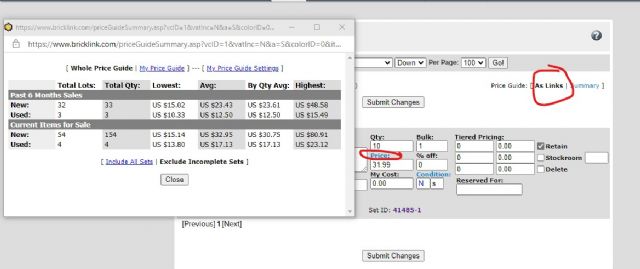
The old Inventory when set for "as links" and then clicking "Price" would produce
the Price Guide page with all it's details. Both versions are now producing
a pop-up summary window.
In Catalog, Admin_Russell writes:
As part of the release of the Packing Dimensions feature, we are planning to
place a handy link on seller's My Inventory Detail page to submit system
(catalog) packing dimensions for the listed article.
Before implementing any change to that page, however, we decided to retire the
old version of the page. And before we could retire the page, we needed to fix
any bugs or unexpected behavior on the new version of the page.
It took a while, but we identified and fixed 27 issues. Here is the list:
1. Z dimensions being copied from the X dimensions field
2. Additional Search Criteria Specified not showing
3. Missing space after the colon in breadcrumbs
4. Font size is too small in text boxes
5. Special characters not displaying correctly
6. "Edit More" link still present on extended inventory page
7. Missing space after the colon after "Part ID"
8. Text boxes should completely cover area under the Description
9. Colon out of place for the Z dimension
10. Zero value displayed in weight and packing dimensions fields
11. Min / Max Price and Min / Max Bulk Amount filters not working
12. Price guide link shows detail page, not summary page
13. Loading Inventory Data warning message causes page to jump
15. Navigation tool is removed when there is only one page to display
16. Date Last Sold info is showing even when the store setting is turned off
17. Color drop-down menu is in alphabetical order instead of BrickLink order
18. Can't edit Item Number for Sets or Minifigs
19. Price guide link is active for custom listings
20. Item Type, Color, and Category cannot be changed for custom listings
21. Changing Item Type produces wrong system message
22. System message on new page is not spaced correctly
23. Modulex warning error needs copy correction
24. "As Summary" cookie seems to be independent between the two versions
25. Extended description box appears before Item Type is changed
26. Window too wide for page on Seller My Inventory page
27. Change "Del" to "Delete" on My Inventory page
Many thanks to user Jennnifer for helping compile this list, and also to those
who reported these bugs in the Forum or through the Help Desk.
The time has come to retire the old page, so please take some time if you are
so inclined and compare the old and new versions of the page. They should be
identical at this point. If you notice a discrepancy or bug, please report it
in this thread.
The old Inventory when set for "as links" and then clicking "Price" would produce
the Price Guide page with all it's details. Both versions are now producing
a pop-up summary window.
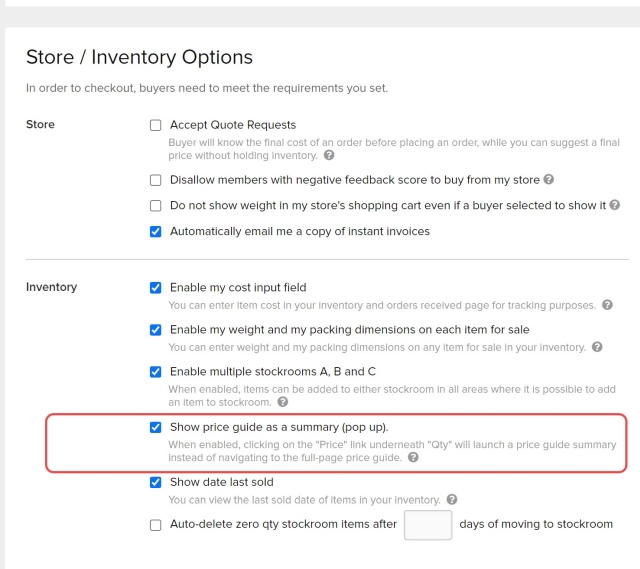
There is a store setting where you can elect to use the pop-up instead of the
full price guide:
Hi Russell, in "My Price Guide Settings" I have selected to only view USA prices.
This usually works but the first time I do it after opening the BL website it
shows all the lots listed worldwide. If I reload the page it fixes back to USA.
Also, do we have an ETA on when the issue will be fixed with stores not displaying
all items for sale? It takes some magic keystrokes to change the amount of items
being displayed. Stores are showing that they are displaying 10 (I'm defaulted
to 100). If you change to 100 within a store, nothing happens. If you hit the
forward / next page it will then switch to displaying 100 items. There are multiple
reports filed with the help desk but this has been an issue now for a roughly
a month and it would be great to have a fix ASAP so buyers are not confused.
First off, thanks for continuing to work on this page. It is very helpful for
sellers like me to have the tools we use every day working as intended!
Okay, so... it's a bit difficult to compare the new and the old when the
link to the old seems to already have disappeared.
I haven't checked everything yet but for certain, this bug still exists:
5. Special characters not displaying correctly
Just checked this with my own store and your are correct, the issue still persists.
I believe the issue was fixed in the text box and but not in the Item Name area.
This will be fixed shortly.
Thank you Russell and the BL development team. A special thank you to Jennifer
and the others of the forum who volunteer their collective time and effort, to
the benefit of so many others like me who haven't.
Added general note: try clearing your browsing data (cookies) and rebooting your
browser before test driving the update. Worked for me.
-popsicle (a grateful seller)
In Catalog, Admin_Russell writes:
As part of the release of the Packing Dimensions feature, we are planning to
place a handy link on seller's My Inventory Detail page to submit system
(catalog) packing dimensions for the listed article.
Before implementing any change to that page, however, we decided to retire the
old version of the page. And before we could retire the page, we needed to fix
any bugs or unexpected behavior on the new version of the page.
It took a while, but we identified and fixed 27 issues. Here is the list:
1. Z dimensions being copied from the X dimensions field
2. Additional Search Criteria Specified not showing
3. Missing space after the colon in breadcrumbs
4. Font size is too small in text boxes
5. Special characters not displaying correctly
6. "Edit More" link still present on extended inventory page
7. Missing space after the colon after "Part ID"
8. Text boxes should completely cover area under the Description
9. Colon out of place for the Z dimension
10. Zero value displayed in weight and packing dimensions fields
11. Min / Max Price and Min / Max Bulk Amount filters not working
12. Price guide link shows detail page, not summary page
13. Loading Inventory Data warning message causes page to jump
15. Navigation tool is removed when there is only one page to display
16. Date Last Sold info is showing even when the store setting is turned off
17. Color drop-down menu is in alphabetical order instead of BrickLink order
18. Can't edit Item Number for Sets or Minifigs
19. Price guide link is active for custom listings
20. Item Type, Color, and Category cannot be changed for custom listings
21. Changing Item Type produces wrong system message
22. System message on new page is not spaced correctly
23. Modulex warning error needs copy correction
24. "As Summary" cookie seems to be independent between the two versions
25. Extended description box appears before Item Type is changed
26. Window too wide for page on Seller My Inventory page
27. Change "Del" to "Delete" on My Inventory page
Many thanks to user Jennnifer for helping compile this list, and also to those
who reported these bugs in the Forum or through the Help Desk.
The time has come to retire the old page, so please take some time if you are
so inclined and compare the old and new versions of the page. They should be
identical at this point. If you notice a discrepancy or bug, please report it
in this thread.
Thank you Russell and the BL development team. A special thank you to Jennifer
and the others of the forum who volunteer their collective time and effort, to
the benefit of so many others like me who haven't.
Added general note: try clearing your browsing data (cookies) and rebooting your
browser before test driving the update. Worked for me.
As part of the release of the Packing Dimensions feature, we are planning to
place a handy link on seller's My Inventory Detail page to submit system
(catalog) packing dimensions for the listed article.
Before implementing any change to that page, however, we decided to retire the
old version of the page. And before we could retire the page, we needed to fix
any bugs or unexpected behavior on the new version of the page.
It took a while, but we identified and fixed 27 issues. Here is the list:
1. Z dimensions being copied from the X dimensions field
2. Additional Search Criteria Specified not showing
3. Missing space after the colon in breadcrumbs
4. Font size is too small in text boxes
5. Special characters not displaying correctly
6. "Edit More" link still present on extended inventory page
7. Missing space after the colon after "Part ID"
8. Text boxes should completely cover area under the Description
9. Colon out of place for the Z dimension
10. Zero value displayed in weight and packing dimensions fields
11. Min / Max Price and Min / Max Bulk Amount filters not working
12. Price guide link shows detail page, not summary page
13. Loading Inventory Data warning message causes page to jump
15. Navigation tool is removed when there is only one page to display
16. Date Last Sold info is showing even when the store setting is turned off
17. Color drop-down menu is in alphabetical order instead of BrickLink order
18. Can't edit Item Number for Sets or Minifigs
19. Price guide link is active for custom listings
20. Item Type, Color, and Category cannot be changed for custom listings
21. Changing Item Type produces wrong system message
22. System message on new page is not spaced correctly
23. Modulex warning error needs copy correction
24. "As Summary" cookie seems to be independent between the two versions
25. Extended description box appears before Item Type is changed
26. Window too wide for page on Seller My Inventory page
27. Change "Del" to "Delete" on My Inventory page
Many thanks to user Jennnifer for helping compile this list, and also to those
who reported these bugs in the Forum or through the Help Desk.
The time has come to retire the old page, so please take some time if you are
so inclined and compare the old and new versions of the page. They should be
identical at this point. If you notice a discrepancy or bug, please report it
in this thread.
Just to mention that there was a deployment to remove the link to the old page
that happened sooner than I anticipated. It has now been reverted so you can
make an easy comparison.
As part of the release of the Packing Dimensions feature, we are planning to
place a handy link on seller's My Inventory Detail page to submit system
(catalog) packing dimensions for the listed article.
Before implementing any change to that page, however, we decided to retire the
old version of the page. And before we could retire the page, we needed to fix
any bugs or unexpected behavior on the new version of the page.
It took a while, but we identified and fixed 27 issues. Here is the list:
1. Z dimensions being copied from the X dimensions field
2. Additional Search Criteria Specified not showing
3. Missing space after the colon in breadcrumbs
4. Font size is too small in text boxes
5. Special characters not displaying correctly
6. "Edit More" link still present on extended inventory page
7. Missing space after the colon after "Part ID"
8. Text boxes should completely cover area under the Description
9. Colon out of place for the Z dimension
10. Zero value displayed in weight and packing dimensions fields
11. Min / Max Price and Min / Max Bulk Amount filters not working
12. Price guide link shows detail page, not summary page
13. Loading Inventory Data warning message causes page to jump
15. Navigation tool is removed when there is only one page to display
16. Date Last Sold info is showing even when the store setting is turned off
17. Color drop-down menu is in alphabetical order instead of BrickLink order
18. Can't edit Item Number for Sets or Minifigs
19. Price guide link is active for custom listings
20. Item Type, Color, and Category cannot be changed for custom listings
21. Changing Item Type produces wrong system message
22. System message on new page is not spaced correctly
23. Modulex warning error needs copy correction
24. "As Summary" cookie seems to be independent between the two versions
25. Extended description box appears before Item Type is changed
26. Window too wide for page on Seller My Inventory page
27. Change "Del" to "Delete" on My Inventory page
Many thanks to user Jennnifer for helping compile this list, and also to those
who reported these bugs in the Forum or through the Help Desk.
The time has come to retire the old page, so please take some time if you are
so inclined and compare the old and new versions of the page. They should be
identical at this point. If you notice a discrepancy or bug, please report it
in this thread.
Just to mention that there was a deployment to remove the link to the old page
that happened sooner than I anticipated. It has now been reverted so you can
make an easy comparison.
As part of the release of the Packing Dimensions feature, we are planning to
place a handy link on seller's My Inventory Detail page to submit system
(catalog) packing dimensions for the listed article.
Before implementing any change to that page, however, we decided to retire the
old version of the page. And before we could retire the page, we needed to fix
any bugs or unexpected behavior on the new version of the page.
It took a while, but we identified and fixed 27 issues. Here is the list:
1. Z dimensions being copied from the X dimensions field
2. Additional Search Criteria Specified not showing
3. Missing space after the colon in breadcrumbs
4. Font size is too small in text boxes
5. Special characters not displaying correctly
6. "Edit More" link still present on extended inventory page
7. Missing space after the colon after "Part ID"
8. Text boxes should completely cover area under the Description
9. Colon out of place for the Z dimension
10. Zero value displayed in weight and packing dimensions fields
11. Min / Max Price and Min / Max Bulk Amount filters not working
12. Price guide link shows detail page, not summary page
13. Loading Inventory Data warning message causes page to jump
15. Navigation tool is removed when there is only one page to display
16. Date Last Sold info is showing even when the store setting is turned off
17. Color drop-down menu is in alphabetical order instead of BrickLink order
18. Can't edit Item Number for Sets or Minifigs
19. Price guide link is active for custom listings
20. Item Type, Color, and Category cannot be changed for custom listings
21. Changing Item Type produces wrong system message
22. System message on new page is not spaced correctly
23. Modulex warning error needs copy correction
24. "As Summary" cookie seems to be independent between the two versions
25. Extended description box appears before Item Type is changed
26. Window too wide for page on Seller My Inventory page
27. Change "Del" to "Delete" on My Inventory page
Many thanks to user Jennnifer for helping compile this list, and also to those
who reported these bugs in the Forum or through the Help Desk.
The time has come to retire the old page, so please take some time if you are
so inclined and compare the old and new versions of the page. They should be
identical at this point. If you notice a discrepancy or bug, please report it
in this thread.
Hopefully there will soon be a system that propagates the dimensions throughout
all printed variants of a part, so there won't be continuous redundant work
for the contrubitors (not that I have a right to complain, but I'm just very
thankful for the work of the regular contributors and don't want them to
lose time on redundant things!)
And yep.... a simple way to make packing dimension contributions... that just
happens to be exactly what I have been trying to push many many years ago when
BL first came up with plans for IC. Had you guys done it back then it would have
saved you a lot of work But ok, whatever floats your boat, IC works well and
the packing dimensions are usually accurate, so I'm happy either way
In Technical Issues, SnarkBricks writes (copied over from there):
When in the Inventory part of BL and in the Stockrooms - I noticed that there
is no longer a selection to switch to Classic View in the upper right corner....I
liked this feature because I could click on the "Price" portion on an item and
then use the back arrow to get back into the stockroom - With the New version,
if you click on price and then try to use the back arrow you get a black screen
error submission notice and any changes made in the stockroom do not save...
I suppose I will have to get used to using the pricing summary in the stockroom...
just curious if anyone else cares about not having the classic view option available
in the stockroom?
The Classic page is gone and you should probably report any bugs on the new page
to the link above.
I have encountered the same issues. It used to be the Back button just brought
you back to page you had previously loaded. The new pages reload the entire page
when you hit Back so if you arrived there from a search query or made any unsaved
changes, you have to start all over.
Huge thanks to Admin Russell and Jennifer of Old Grey Bricks for their amazing
work on compiling that list!!!


 USA, California


 Spain, Comunidad Valenciana


)
)


 Netherlands, Utrecht
 But ok, whatever floats your boat, IC works well and