Comments from Submitter:
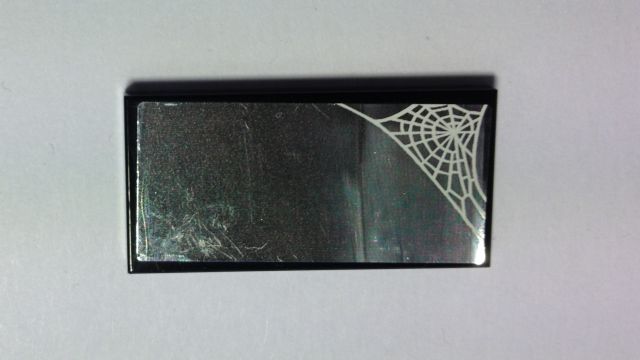
Hello everybody. Set 70133 contains five black tiles 2x4 (87079) four of which have a sticker. Currently the inventory's counterparts section lists only three of these (87079pb492, 87079pb493R, 87079pb493L). The item with the sticker applied on page 25 of the instructions is missing in the counterparts section. To be more precise the sticker can be found in the lower right corner of the set's sticker sheet 70133stk01. Please add the respective item 87079pb### in the counterparts section. As a name I suggest "Black Tile 2 x 4 with White Spider Web on Mirror Background Pattern (Sticker) - Set 70133". I'd like to provide a full HD resolution image of this item: www.drkurt.de/87079pbxxx.jpg Please feel free to use it for the database's catalogue. Best regards, Kurt
Comments from Submitter:
Hello everybody. Set 70133 contains five black tiles 2x4 (87079) four of which have a sticker. Currently the inventory's counterparts section lists only three of these (87079pb492, 87079pb493R, 87079pb493L). The item with the sticker applied on page 25 of the instructions is missing in the counterparts section. To be more precise the sticker can be found in the lower right corner of the set's sticker sheet 70133stk01. Please add the respective item 87079pb### in the counterparts section. As a name I suggest "Black Tile 2 x 4 with White Spider Web on Mirror Background Pattern (Sticker) - Set 70133". I'd like to provide a full HD resolution image of this item: www.drkurt.de/87079pbxxx.jpg Please feel free to use it for the database's catalogue. Best regards, Kurt
This request will not be accepted.
The proper procedure to add a stickered Counterpart to BrickLink and a set inventory
is as follows:
(1) Add the stickered part to the BrickLink catalog:
(3) Fill out an Inventory Change Request to add the stickered part to the set
inventory after it is approved by a Catalog Associate or Catalog Administrator:


 Germany, Niedersachsen



 USA, Ohio
