Please help me! I'm getting this silly error every time I try to change the
"have" pieces count. I looked at the solutions people before me have
had success with but these don't work for me. I deleted all other wanted
lists and this is the only one on my list.
Please help me! I'm getting this silly error every time I try to change the
"have" pieces count. I looked at the solutions people before me have
had success with but these don't work for me. I deleted all other wanted
lists and this is the only one on my list.
ONE of your lists has duplicate items and that blocks ALL your
lists.
There are no wanted lists other than the default and the one I created. Even
before I deleted some ~25 wanted lists, there was no warning marker. Your suggestion
was the solution I was talking about. This has been an issue since last night
after the Bricklink hour maintenance. Before it was working perfectly.
This is a follow up to my previous message. I think I have found a likely culprit.
In my categories list there are 61 items, but across my wanted lists there are
only 55. However, I can only view the first 25 parts on the list; switching pages
to the next 25 or changing the parts per page amount beyond 25 gives me a blank
screen. My working theory is that the problematic pieces are on this list, but
I cannot access the page to delete them.
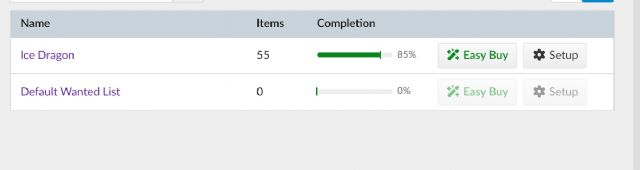
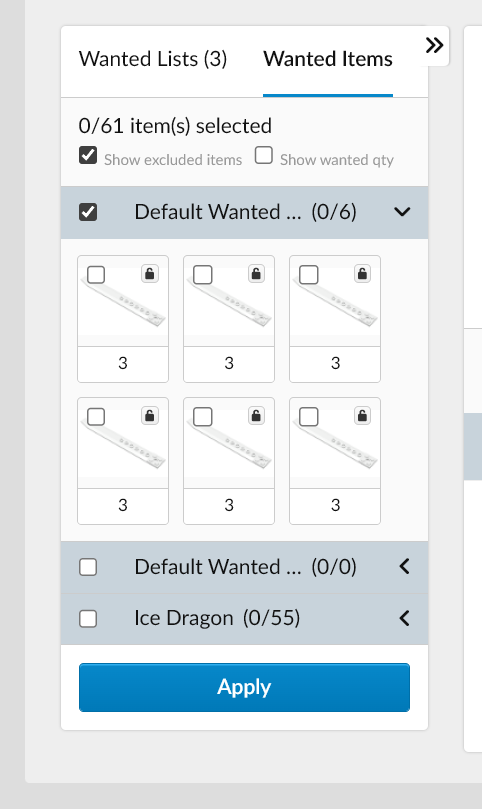
I found the issue. There is a list called "Default Wanted List" that
has SIX of the same piece. I refer this as a list rather than the default wanted
list because, well, this is not my default wanted list! It doesn't appear
in my list of wanted items and I know it exists only because the "Buy"
section shows me it does. Now, how can I go about deleting this? It's not
possible through the traditional method since it doesn't show up on my list
of wanted lists...
Sorry I missed you already tried the usula solution. There’s so many who don’t
search/try that I read your message but the info didn’t register 😅
In Technical Issues, DodecaDonk writes:
I found the issue. There is a list called "Default Wanted List" that
has SIX of the same piece. I refer this as a list rather than the default wanted
list because, well, this is not my default wanted list! It doesn't appear
in my list of wanted items and I know it exists only because the "Buy"
section shows me it does. Now, how can I go about deleting this? It's not
possible through the traditional method since it doesn't show up on my list
of wanted lists...
That’s a weird issue. I don’t seem to have the problem with my WLs.
Posting in Technical Issues is one good idea. You may also try the Help Desk
(bricklink@support.lego.com or https://www.bricklink.com/helpDesk.asp?helpDeskID=114
), making it clear you have a ghost second Default WL (that is, don’t use the
title of your thread so they don’t do as I did ).
I found the issue. There is a list called "Default Wanted List" that
has SIX of the same piece. I refer this as a list rather than the default wanted
list because, well, this is not my default wanted list! It doesn't appear
in my list of wanted items and I know it exists only because the "Buy"
section shows me it does. Now, how can I go about deleting this? It's not
possible through the traditional method since it doesn't show up on my list
of wanted lists...
If you hover over the names of the wanted lists, you can see the URL it links
to. The one ending in &wantedMoreID=0 is THE default wanted list, and you can't
delete that list. You should be able to can edit that one though.
The other one seems to be NAMED "default wanted list" only, but should
be a regular (empty) wanted list that you should be able to delete.


 USA, California


 France, Nouvelle-Aquitaine
)
)
 ).
).

 Netherlands, Groningen