Happy New Year! This is my first post...and it shows.
In the last quarter of 2025 I posted a wanted list and purchased parts for my
first custom lego build. I live in Australia, parts were provided by 3 suppliers.
Parts from 2 of the 3 suppliers were removed from my wanted list. Parts that
were sent from one suppler remained on the list.
In the months since I have received 10,000 notifications of parts becoming available.
I was hesitant to do anything with the wanted list until I gave the parts to
my son when I see him later this month (January 2026). However, after many days
of emails from bricklink I decided to try and manage the wanted list.
It appears the wanted list was my default want list, which cannot be deleted.
So I deleted the parts from the list individually. Now I regret that action.
I would like instead to move the parts to a new want list until I can be certain
that all parts are present.
How can I restore deleted items to a want list?
How can I stop receiving notifications on any given want list?
Happy New Year! This is my first post...and it shows.
Hi and welcome and Happy New Year to you too
[…]
In the months since I have received 10,000 notifications of parts becoming available.
I was hesitant to do anything with the wanted list until I gave the parts to
my son when I see him later this month (January 2026). However, after many days
of emails from bricklink I decided to try and manage the wanted list.
In (profile icon ») Account Settings » My Wanted List Settings (https://www.bricklink.com/wantedSettings.asp?viewFrom=P
), the very first checkbox allows to (de)activate all WL email notifications.
(Don’t forget to click “Save Settings” at the bottom of the page.)
In My Default Add Wanted Item Options (link on the top right corner of the previous
page, https://www.bricklink.com/wantedSettingsAdd.asp ), you can define whether
notifications are on of off by default when you add a new item to your wanted
list.
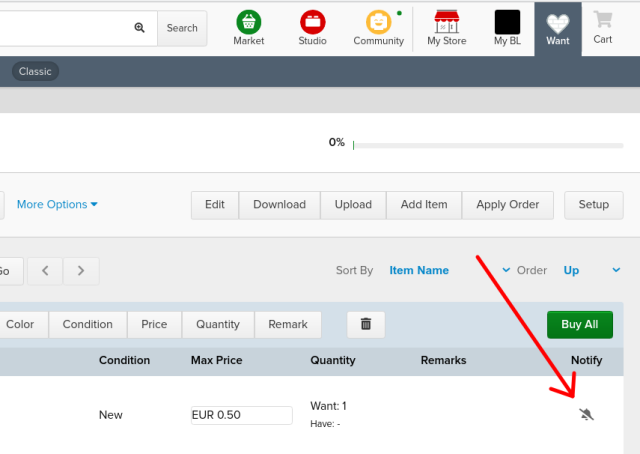
Then in each Wanted List, for each item/line, you can (de)activate notifications
for that item (hand with pen icon on the rightmost column, first pic below).
That setting is overriden by the general option I talked above.
It appears the wanted list was my default want list, which cannot be deleted.
So I deleted the parts from the list individually.
For info, you can select all the items/lines on the current page by checking
the box in the header (second pic). That allows to make changes to several items
together (the buttons in the list header: Move, Copy, Color,… , Delete, and Buy).
Better change the number of items per page first
Now I regret that action.
I would like instead to move the parts to a new want list until I can be certain
that all parts are present.
How can I restore deleted items to a want list?
Unfortunately, I don’t think that’s possible
You can try asking the Help Desk (bricklink@support.lego.com)… but I don’t think
they can/will do anything. They also take a long time to answer….
How can I stop receiving notifications on any given want list?


 Australia, Queensland


 France, Nouvelle-Aquitaine


)
)