Discussion Forum: Thread 373620

 Author: Braydensbricks View Messages Posted By Braydensbricks
 Posted: Oct 31, 2025 15:56
 Subject: I accidentally double added hundreds of lots
 Viewed: 99 times
 Topic: Help
 Report:
Cancel Message
Cancel
Reply to Message
Reply
BrickLink
ID Card

Braydensbricks (192)

Location:  USA, Texas
Member Since Contact Type Status
Jul 12, 2021 Contact Member Seller
Buying Privileges - OKSelling Privileges - OK
Store: Brayden's Bricks
Is there a way to reverse this or do I need to delete and upload from a recent
backup? I feel like that would be a pain to do. Thanks!
 Author: Braydensbricks View Messages Posted By Braydensbricks
 Posted: Oct 31, 2025 15:57
 Subject: Re: I accidentally double added hundreds of lots
 Viewed: 41 times
 Topic: Help
 Report:
Cancel Message
Cancel
Reply to Message
Reply
BrickLink
ID Card

Braydensbricks (192)

Location:  USA, Texas
Member Since Contact Type Status
Jul 12, 2021 Contact Member Seller
Buying Privileges - OKSelling Privileges - OK
Store: Brayden's Bricks
I also immediately closed my store in order to not accidentally sell pieces I
do not have
 Author: Nubs_Select View Messages Posted By Nubs_Select
 Posted: Oct 31, 2025 16:01
 Subject: Re: I accidentally double added hundreds of lots
 Viewed: 47 times
 Topic: Help
 Report:
Cancel Message
Cancel
Reply to Message
Reply
BrickLink
ID Card

Nubs_Select (4831)

Location:  Canada, Ontario
Member Since Contact Type Status
Mar 15, 2016 Contact Member Seller
Buying Privileges - OKSelling Privileges - OK
Store: Nub's Select
BrickLink Inventories Administrator (?)
In Help, Braydensbricks writes:
  Is there a way to reverse this or do I need to delete and upload from a recent
backup? I feel like that would be a pain to do. Thanks!

could you perhaps specify how it happened, for example was it from a set partout,
a file upload, etc.

was it all new lots or did it combine with old lots and info like that can help
also
 Author: Braydensbricks View Messages Posted By Braydensbricks
 Posted: Oct 31, 2025 16:04
 Subject: Re: I accidentally double added hundreds of lots
 Viewed: 48 times
 Topic: Help
 Report:
Cancel Message
Cancel
Reply to Message
Reply
BrickLink
ID Card

Braydensbricks (192)

Location:  USA, Texas
Member Since Contact Type Status
Jul 12, 2021 Contact Member Seller
Buying Privileges - OKSelling Privileges - OK
Store: Brayden's Bricks
In Help, Nubs_Select writes:
  In Help, Braydensbricks writes:
  Is there a way to reverse this or do I need to delete and upload from a recent
backup? I feel like that would be a pain to do. Thanks!

could you perhaps specify how it happened, for example was it from a set partout,
a file upload, etc.

was it all new lots or did it combine with old lots and info like that can help
also

I did it from a few sets I parted out together and I combined with old lots
 Author: Nubs_Select View Messages Posted By Nubs_Select
 Posted: Oct 31, 2025 16:11
 Subject: Re: I accidentally double added hundreds of lots
 Viewed: 34 times
 Topic: Help
 Report:
Cancel Message
Cancel
Reply to Message
Reply
BrickLink
ID Card

Nubs_Select (4831)

Location:  Canada, Ontario
Member Since Contact Type Status
Mar 15, 2016 Contact Member Seller
Buying Privileges - OKSelling Privileges - OK
Store: Nub's Select
BrickLink Inventories Administrator (?)
In Help, Braydensbricks writes:
  In Help, Nubs_Select writes:
  In Help, Braydensbricks writes:
  Is there a way to reverse this or do I need to delete and upload from a recent
backup? I feel like that would be a pain to do. Thanks!

could you perhaps specify how it happened, for example was it from a set partout,
a file upload, etc.

was it all new lots or did it combine with old lots and info like that can help
also

I did it from a few sets I parted out together and I combined with old lots

Perfect! you can part out a negative quantity of sets, on the partout page just
put a - in front of the qty and then complete the form (make sure you back up
your inventory first, and make sure things like remarks arent updated) and then
it should be fixed
 Author: Braydensbricks View Messages Posted By Braydensbricks
 Posted: Oct 31, 2025 16:14
 Subject: Re: I accidentally double added hundreds of lots
 Viewed: 38 times
 Topic: Help
 Report:
Cancel Message
Cancel
Reply to Message
Reply
BrickLink
ID Card

Braydensbricks (192)

Location:  USA, Texas
Member Since Contact Type Status
Jul 12, 2021 Contact Member Seller
Buying Privileges - OKSelling Privileges - OK
Store: Brayden's Bricks
Thank you,

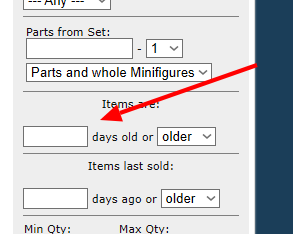
I only did it for part of the file though, is there a way to see the last items
that I uploaded?
 Author: Nubs_Select View Messages Posted By Nubs_Select
 Posted: Oct 31, 2025 16:15
 Subject: Re: I accidentally double added hundreds of lots
 Viewed: 62 times
 Topic: Help
 Report:
Cancel Message
Cancel
Reply to Message
Reply
BrickLink
ID Card

Nubs_Select (4831)

Location:  Canada, Ontario
Member Since Contact Type Status
Mar 15, 2016 Contact Member Seller
Buying Privileges - OKSelling Privileges - OK
Store: Nub's Select
BrickLink Inventories Administrator (?)
In Help, Braydensbricks writes:
  Thank you,

I only did it for part of the file though, is there a way to see the last items
that I uploaded?

https://www.bricklink.com/inventory.asp
 
 Author: TheBrickGuys View Messages Posted By TheBrickGuys
 Posted: Oct 31, 2025 23:57
 Subject: Re: I accidentally double added hundreds of lots
 Viewed: 53 times
 Topic: Help
 Report:
Cancel Message
Cancel
Reply to Message
Reply
BrickLink
ID Card

TheBrickGuys (14993)

Location:  USA, California
Member Since Contact Type Status
Dec 18, 2010 Contact Member Seller
Buying Privileges - OKSelling Privileges - OK
Store: TheBrickGuys
In Help, Nubs_Select writes:
  In Help, Braydensbricks writes:
  Thank you,

I only did it for part of the file though, is there a way to see the last items
that I uploaded?

https://www.bricklink.com/inventory.asp

I never even realized you can do that! Good info Pizza Guy.

Jim
 Author: Nubs_Select View Messages Posted By Nubs_Select
 Posted: Oct 31, 2025 23:59
 Subject: Re: I accidentally double added hundreds of lots
 Viewed: 33 times
 Topic: Help
 Report:
Cancel Message
Cancel
Reply to Message
Reply
BrickLink
ID Card

Nubs_Select (4831)

Location:  Canada, Ontario
Member Since Contact Type Status
Mar 15, 2016 Contact Member Seller
Buying Privileges - OKSelling Privileges - OK
Store: Nub's Select
BrickLink Inventories Administrator (?)
In Help, TheBrickGuys writes:
  In Help, Nubs_Select writes:
  In Help, Braydensbricks writes:
  Thank you,

I only did it for part of the file though, is there a way to see the last items
that I uploaded?

https://www.bricklink.com/inventory.asp

I never even realized you can do that! Good info Pizza Guy.

Jim

Pizza!
 Author: Stellar View Messages Posted By Stellar
 Posted: Nov 1, 2025 04:00
 Subject: Re: I accidentally double added hundreds of lots
 Viewed: 34 times
 Topic: Help
 Report:
Cancel Message
Cancel
Reply to Message
Reply
BrickLink
ID Card

Stellar (4152)

Location:  Spain, Comunidad Valenciana
Member Since Contact Type Status
Sep 24, 2015 Contact Member Seller
Buying Privileges - OKSelling Privileges - OK
Store: Stellar Bricks
BrickLink Inventories Administrator (?)
In Help, Nubs_Select writes:
  In Help, Braydensbricks writes:
  Thank you,

I only did it for part of the file though, is there a way to see the last items
that I uploaded?

https://www.bricklink.com/inventory.asp

Be ware that only shows new lots, not updated lots!
 Author: Nubs_Select View Messages Posted By Nubs_Select
 Posted: Nov 1, 2025 04:26
 Subject: Re: I accidentally double added hundreds of lots
 Viewed: 33 times
 Topic: Help
 Report:
Cancel Message
Cancel
Reply to Message
Reply
BrickLink
ID Card

Nubs_Select (4831)

Location:  Canada, Ontario
Member Since Contact Type Status
Mar 15, 2016 Contact Member Seller
Buying Privileges - OKSelling Privileges - OK
Store: Nub's Select
BrickLink Inventories Administrator (?)
In Help, Stellar writes:
  In Help, Nubs_Select writes:
  In Help, Braydensbricks writes:
  Thank you,

I only did it for part of the file though, is there a way to see the last items
that I uploaded?

https://www.bricklink.com/inventory.asp

Be ware that only shows new lots, not updated lots!

Indeed!