Discussion Forum: All Replies to Message 1528408

 Author: zephyr891 View Messages Posted By zephyr891
 Posted: Oct 10, 2025 06:10
 Subject: How to replace battery p/n 54359
 Viewed: 89 times
 Topic: General
 Report:
Cancel Message
Cancel
Reply to Message
Reply
BrickLink
ID Card

zephyr891 (657)

Location:  USA, Maryland
Member Since Contact Type Status
Feb 20, 2010 Member Does Not Allow Contact Seller
Buying Privileges - OKSelling Privileges - OK
Store Closed Store: Trader-J Bricks
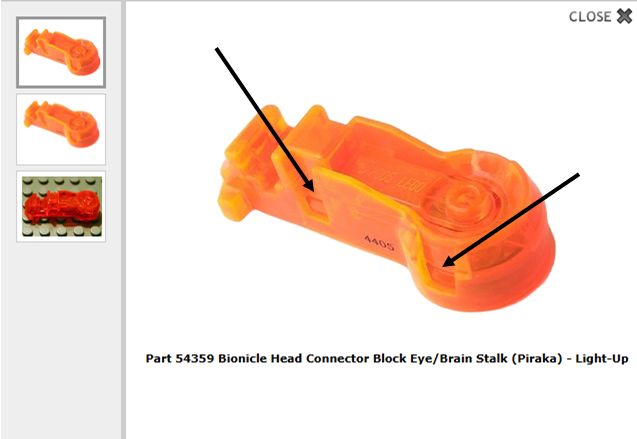
Would someone please explain how to get p/n 54359 apart so I can replace the
battery? Thanks much!
 Author: Nicolasamico37 View Messages Posted By Nicolasamico37
 Posted: Oct 10, 2025 07:08
 Subject: Re: How to replace battery p/n 54359
 Viewed: 42 times
 Topic: General
 Report:
Cancel Message
Cancel
Reply to Message
Reply
BrickLink
ID Card

Nicolasamico37 (1347)

Location:  France, Centre-Val de Loire
Member Since Contact Type Status
Jul 3, 2010 Contact Member Seller
Buying Privileges - OKSelling Privileges - OK
Store: LAPINOU BRICKS
In General, zephyr891 writes:
  Would someone please explain how to get p/n 54359 apart so I can replace the
battery? Thanks much!


Part No: 54359  Name: Bionicle Head Connector Block Eye/Brain Stalk (Piraka) - Light-Up
* 
54359 Bionicle Head Connector Block Eye/Brain Stalk (Piraka) - Light-Up
Parts: BIONICLE {Trans-Neon Orange}

Hi,
Pretty sure you need to delicately push the little parts in the notches. I think
there are also on the other side.

Nicolas
 
 Author: zephyr891 View Messages Posted By zephyr891
 Posted: Oct 10, 2025 07:24
 Subject: Re: How to replace battery p/n 54359
 Viewed: 36 times
 Topic: General
 Report:
Cancel Message
Cancel
Reply to Message
Reply
BrickLink
ID Card

zephyr891 (657)

Location:  USA, Maryland
Member Since Contact Type Status
Feb 20, 2010 Member Does Not Allow Contact Seller
Buying Privileges - OKSelling Privileges - OK
Store Closed Store: Trader-J Bricks
In General, Nicolasamico37 writes:
  In General, zephyr891 writes:
  Would someone please explain how to get p/n 54359 apart so I can replace the
battery? Thanks much!


Part No: 54359  Name: Bionicle Head Connector Block Eye/Brain Stalk (Piraka) - Light-Up
* 
54359 Bionicle Head Connector Block Eye/Brain Stalk (Piraka) - Light-Up
Parts: BIONICLE {Trans-Neon Orange}

Hi,
Pretty sure you need to delicately push the little parts in the notches. I think
there are also on the other side.

Nicolas

Thanks for the reply, Nicolas! Sadly, I have tried pushing, pulling, prying at
those points and it's not working for me. There are also 2 little slots on
the bottom of the part where I tried inserting a knife point and gently prying;
still no success. But I really appreciate your reply!
 Author: Akir View Messages Posted By Akir
 Posted: Oct 12, 2025 12:32
 Subject: Re: How to replace battery p/n 54359
 Viewed: 37 times
 Topic: General
 Report:
Cancel Message
Cancel
Reply to Message
Reply
BrickLink
ID Card

Akir (202)

Location:  Austria, Steiermark
Member Since Contact Type Status
Dec 28, 2020 Contact Member Seller
Buying Privileges - OKSelling Privileges - OK
Store Closed Store: Some Old Bricks
In General, zephyr891 writes:
  In General, Nicolasamico37 writes:
  In General, zephyr891 writes:
  Would someone please explain how to get p/n 54359 apart so I can replace the
battery? Thanks much!


Part No: 54359  Name: Bionicle Head Connector Block Eye/Brain Stalk (Piraka) - Light-Up
* 
54359 Bionicle Head Connector Block Eye/Brain Stalk (Piraka) - Light-Up
Parts: BIONICLE {Trans-Neon Orange}

Hi,
Pretty sure you need to delicately push the little parts in the notches. I think
there are also on the other side.

Nicolas

Thanks for the reply, Nicolas! Sadly, I have tried pushing, pulling, prying at
those points and it's not working for me. There are also 2 little slots on
the bottom of the part where I tried inserting a knife point and gently prying;
still no success. But I really appreciate your reply!

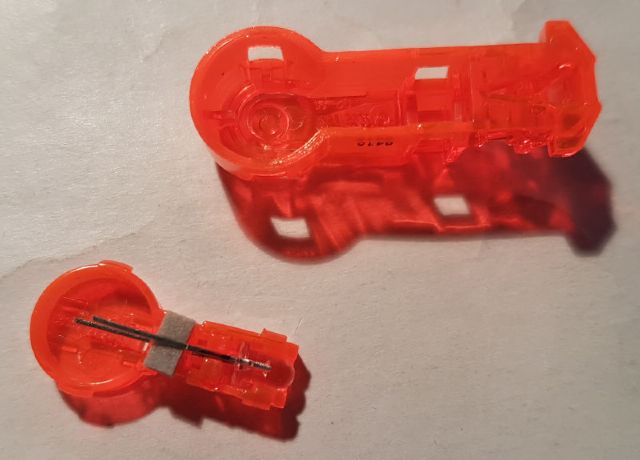
They are rather difficult to take apart - you have to push in the pin with one
blade, pry out the frame with another one, and preferably push out the bottom
with a third. Then repeat with the other pins. And then start from the beginning,
because as soon as you touch the second pin, the first will slip back in. It's
a nightmare, in other words, that involves lots of wiggling. Not sure how better
to explain it. But here's a pic, maybe that helps a bit.
Good luck,
Patrick