Discussion Forum: Thread 372732

 Author: GrandpaChupp View Messages Posted By GrandpaChupp
 Posted: Sep 23, 2025 07:00
 Subject: Can't part out a set into new wanted list
 Viewed: 101 times
 Topic: Help
 Report:
Cancel Message
Cancel
Reply to Message
Reply
BrickLink
ID Card

GrandpaChupp (1)

Location:  USA, Indiana
Member Since Contact Type Status
Sep 23, 2025 Contact Member Buyer
Buying Privileges - OK
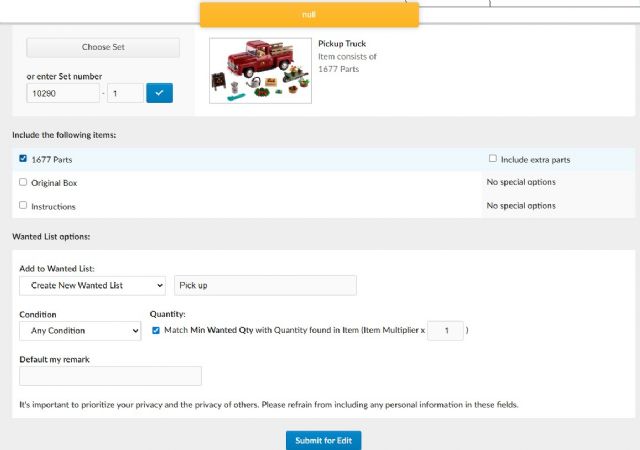
After locating a set and choosing the part out option under "My Wanted List"
the webpage switches to options to choose set, parts, add to default or new list.
No matter what combination of options I choose, when I hit the "Submit for
Edit" button all I get is a yellow pop-up box that says "null".

What am I doing wrong? Is this broken?
 
 Author: Nicolasamico37 View Messages Posted By Nicolasamico37
 Posted: Sep 23, 2025 07:05
 Subject: Re: Can't part out a set into new wanted list
 Viewed: 38 times
 Topic: Help
 Report:
Cancel Message
Cancel
Reply to Message
Reply
BrickLink
ID Card

Nicolasamico37 (1347)

Location:  France, Centre-Val de Loire
Member Since Contact Type Status
Jul 3, 2010 Contact Member Seller
Buying Privileges - OKSelling Privileges - OK
Store: LAPINOU BRICKS
In Help, GrandpaChupp writes:
  After locating a set and choosing the part out option under "My Wanted List"
the webpage switches to options to choose set, parts, add to default or new list.
No matter what combination of options I choose, when I hit the "Submit for
Edit" button all I get is a yellow pop-up box that says "null".

What am I doing wrong? Is this broken?

Hi,

I tried, everything is OK. Try again

Nicolas
 Author: SylvainLS View Messages Posted By SylvainLS
 Posted: Sep 23, 2025 07:17
 Subject: Re: Can't part out a set into new wanted list
 Viewed: 47 times
 Topic: Help
 Report:
Cancel Message
Cancel
Reply to Message
Reply
BrickLink
ID Card

SylvainLS (52)

Location:  France, Nouvelle-Aquitaine
Member Since Contact Type Status
Apr 25, 2014 Contact Member Seller
Buying Privileges - OKSelling Privileges - OK
Store Closed Store: BuyerOnly
BrickLink Discussions Moderator (?)
In Help, GrandpaChupp writes:
  After locating a set and choosing the part out option under "My Wanted List"
the webpage switches to options to choose set, parts, add to default or new list.
No matter what combination of options I choose, when I hit the "Submit for
Edit" button all I get is a yellow pop-up box that says "null".

What am I doing wrong? Is this broken?

You’re the second person having this problem: https://www.bricklink.com/messageThread.asp?ID=372672&nID=1526568

For the rest of us, it works 🤷‍♂️
 Author: jennnifer View Messages Posted By jennnifer
 Posted: Sep 23, 2025 09:53
 Subject: Re: Can't part out a set into new wanted list
 Viewed: 37 times
 Topic: Help
 Report:
Cancel Message
Cancel
Reply to Message
Reply
BrickLink
ID Card

jennnifer (3699)

Location:  USA, Illinois
Member Since Contact Type Status
Sep 8, 2009 Contact Member Seller
Buying Privileges - OKSelling Privileges - OK
Store: Old Grey Bricks
In Help, SylvainLS writes:
  In Help, GrandpaChupp writes:
  After locating a set and choosing the part out option under "My Wanted List"
the webpage switches to options to choose set, parts, add to default or new list.
No matter what combination of options I choose, when I hit the "Submit for
Edit" button all I get is a yellow pop-up box that says "null".

What am I doing wrong? Is this broken?

You’re the second person having this problem: https://www.bricklink.com/messageThread.asp?ID=372672&nID=1526568

For the rest of us, it works 🤷‍♂️

So many details! And a screenshot! I definitely could've helped answer this
one correctly.

~Jen

To the OP, that is frustrating and annoying and I hope they fix it for you quite
soon.
 Author: SylvainLS View Messages Posted By SylvainLS
 Posted: Sep 23, 2025 10:10
 Subject: Re: Can't part out a set into new wanted list
 Viewed: 38 times
 Topic: Help
 Report:
Cancel Message
Cancel
Reply to Message
Reply
BrickLink
ID Card

SylvainLS (52)

Location:  France, Nouvelle-Aquitaine
Member Since Contact Type Status
Apr 25, 2014 Contact Member Seller
Buying Privileges - OKSelling Privileges - OK
Store Closed Store: BuyerOnly
BrickLink Discussions Moderator (?)
In Help, jennnifer writes:
  […]
So many details! And a screenshot! I definitely could've helped answer this
one correctly.

Sorry, I have a Time Zone advantage


  ~Jen

To the OP, that is frustrating and annoying and I hope they fix it for you quite
soon.
 Author: brickman2407 View Messages Posted By brickman2407
 Posted: Sep 23, 2025 15:50
 Subject: Re: Can't part out a set into new wanted list
 Viewed: 51 times
 Topic: Help
 Report:
Cancel Message
Cancel
Reply to Message
Reply
BrickLink
ID Card

brickman2407 (0)

Location:  United Kingdom, England
Member Since Contact Type Status
Sep 22, 2025 Contact Member Buyer
Buying Privileges - OK
In Help, SylvainLS writes:
  In Help, jennnifer writes:
  […]
So many details! And a screenshot! I definitely could've helped answer this
one correctly.

Sorry, I have a Time Zone advantage


  ~Jen

To the OP, that is frustrating and annoying and I hope they fix it for you quite
soon.

I am having the same issue, go through to part out a set into my wanted list,
and get a yellow box with Null written in it as soon as I press submit for edit.
 Author: GrandpaChupp View Messages Posted By GrandpaChupp
 Posted: Sep 27, 2025 09:53
 Subject: Re: Can't part out a set into new wanted list
 Viewed: 57 times
 Topic: Help
 Report:
Cancel Message
Cancel
Reply to Message
Reply
BrickLink
ID Card

GrandpaChupp (1)

Location:  USA, Indiana
Member Since Contact Type Status
Sep 23, 2025 Contact Member Buyer
Buying Privileges - OK
In Help, brickman2407 writes:
  In Help, SylvainLS writes:
  In Help, jennnifer writes:
  […]
So many details! And a screenshot! I definitely could've helped answer this
one correctly.

Sorry, I have a Time Zone advantage


  ~Jen

To the OP, that is frustrating and annoying and I hope they fix it for you quite
soon.

I am having the same issue, go through to part out a set into my wanted list,
and get a yellow box with Null written in it as soon as I press submit for edit.

Well at least I know I'm not going crazy. It still isn't fixed. Just
tried again.