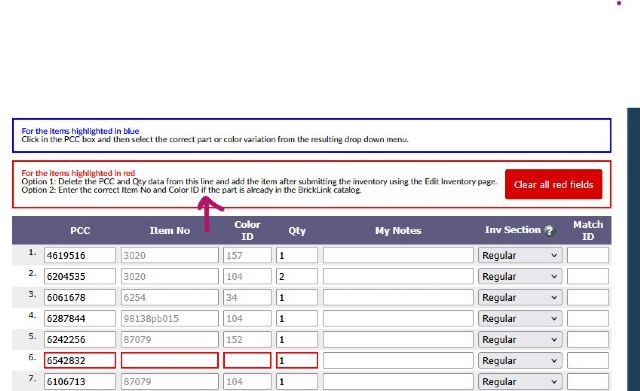
I have reserved set 76784-1 Wednesday, This is my first attempt at cataloging
a simple set. As a newbie I am struggling to understand how to complete the
red field in the add inventory section.
I have read the instructions and am still none the wiser. I and can see the
mini doll legs have an id of 2241 and on Rebrickable shows as 2241c01pr0034.
What data do I enter? Is is as simple as 2241stk01 ?
I have reserved set 76784-1 Wednesday, This is my first attempt at cataloging
a simple set. As a newbie I am struggling to understand how to complete the
red field in the add inventory section.
I have read the instructions and am still none the wiser. I and can see the
mini doll legs have an id of 2241 and on Rebrickable shows as 2241c01pr0034.
What data do I enter? Is is as simple as 2241stk01 ?
Also what data do you add for the sticker sheet.?
Apologies if it is simple .
Many thanks
Darron (GuysCliffe)
It is simple actually. The text in the Red Box says it will only work to add
numbers if the part is already in the BrickLink Catalog. If not, you need to
delete the contents of this line and add the part to the inventory later.
Adding new parts is not simple. LEGO and Rebrickable are not going to help you.
The best bet is to find a similar part here in the BrickLink Catalog and work
from there.
Here's a guide I created on adding stickered parts to the Catalog. Not exactly
what you are attempting, but it at least goes over some of the basics.
I have reserved set 76784-1 Wednesday, This is my first attempt at cataloging
a simple set. As a newbie I am struggling to understand how to complete the
red field in the add inventory section.
I have read the instructions and am still none the wiser. I and can see the
mini doll legs have an id of 2241 and on Rebrickable shows as 2241c01pr0034.
What data do I enter? Is is as simple as 2241stk01 ?
Also what data do you add for the sticker sheet.?
Apologies if it is simple .
Many thanks
Darron (GuysCliffe)
Jen,
I really appreciate you coming back to me. I can see you have entered countless
items/sets so your advice would be highly welcomed.
Using the mini doll legs I referenced when I check other examples on BL the codes
all seem random. Are they generated by BL directly after the fields are completed.
As far as I can see for these legs the item no would be 2241 and the colour 2
(tan). The PCC would be 6566249.
I have reserved set 76784-1 Wednesday, This is my first attempt at cataloging
a simple set. As a newbie I am struggling to understand how to complete the
red field in the add inventory section.
I have read the instructions and am still none the wiser. I and can see the
mini doll legs have an id of 2241 and on Rebrickable shows as 2241c01pr0034.
What data do I enter? Is is as simple as 2241stk01 ?
Also what data do you add for the sticker sheet.?
Apologies if it is simple .
Many thanks
Darron (GuysCliffe)
Jen,
I really appreciate you coming back to me. I can see you have entered countless
items/sets so your advice would be highly welcomed.
Using the mini doll legs I referenced when I check other examples on BL the codes
all seem random. Are they generated by BL directly after the fields are completed.
As far as I can see for these legs the item no would be 2241 and the colour 2
(tan). The PCC would be 6566249.
I have the feeling I am doing this all wrong.
Darron
Ah, don't worry! You are doing fine.
Adding new stuff to our Catalog is complicated. Adding minifig parts is even
more complicated. Adding mini doll parts is a whole other level of obscure parts
knowledge and even more complicated.
Basically, you are starting with the hardest part.
So, first! Go ahead and submit your reserved inventory. It should be sitting
Pending while you add the new parts.
Next, you can work on adding the complete minifigures to the Catalog. These will
be needed including their parts.
Now for that skirt:
The part number you found: 2241 is an alternate number for an existing Catalog
entry 35216. I learned this by searching for 2241* and seeing the other skirts
in the results.
So, your new part is in the base number sequence: 35216ac00
If you search for that number 35216ac00* and sort by Number or Date, you will
find the most recent entry in the Catalog:
*
35216ac00pb032 Mini Doll Hips and Skirt with Molded Light Nougat Legs and Printed Dark Blue Trim, Metallic Light Blue Dots, Medium Lavender Filigree and Strap Sandals Pattern - Thin Hinge Parts: Mini Doll, Legs
Yours will be the next one! 35216ac00pb033 (Probably)
Start with this entry and edit the data to create your submission.
I have reserved set 76784-1 Wednesday, This is my first attempt at cataloging
a simple set. As a newbie I am struggling to understand how to complete the
red field in the add inventory section.
I have read the instructions and am still none the wiser. I and can see the
mini doll legs have an id of 2241 and on Rebrickable shows as 2241c01pr0034.
What data do I enter? Is is as simple as 2241stk01 ?
Also what data do you add for the sticker sheet.?
Apologies if it is simple .
Many thanks
Darron (GuysCliffe)
Jen,
I really appreciate you coming back to me. I can see you have entered countless
items/sets so your advice would be highly welcomed.
Using the mini doll legs I referenced when I check other examples on BL the codes
all seem random. Are they generated by BL directly after the fields are completed.
As far as I can see for these legs the item no would be 2241 and the colour 2
(tan). The PCC would be 6566249.
I have the feeling I am doing this all wrong.
Darron
Ah, don't worry! You are doing fine.
Adding new stuff to our Catalog is complicated. Adding minifig parts is even
more complicated. Adding mini doll parts is a whole other level of obscure parts
knowledge and even more complicated.
Basically, you are starting with the hardest part.
So, first! Go ahead and submit your reserved inventory. It should be sitting
Pending while you add the new parts.
Next, you can work on adding the complete minifigures to the Catalog. These will
be needed including their parts.
Now for that skirt:
The part number you found: 2241 is an alternate number for an existing Catalog
entry 35216. I learned this by searching for 2241* and seeing the other skirts
in the results.
So, your new part is in the base number sequence: 35216ac00
If you search for that number 35216ac00* and sort by Number or Date, you will
find the most recent entry in the Catalog:
*
35216ac00pb032 Mini Doll Hips and Skirt with Molded Light Nougat Legs and Printed Dark Blue Trim, Metallic Light Blue Dots, Medium Lavender Filigree and Strap Sandals Pattern - Thin Hinge Parts: Mini Doll, Legs
Yours will be the next one! 35216ac00pb033 (Probably)
Start with this entry and edit the data to create your submission.
And then ask questions here when you get stuck.
~Jen
Jen,
Many thanks for all that information.
I always seem to take the hard path
I will give that a go tomorrow and as suggested I will ask questions when stuck.


 United Kingdom, England



)
)


 USA, Illinois