New to Bricklink, and can't find an answer to this:
I have my own set, with its Wanted List, all good. But I see no way to specify
multiples of the set to purchase at one time... at least not without manually
updating quantities for every piece.
I read that Parting Out can be used, but I don't see a way to select my own
set under that tab.
Any help?
New to Bricklink, and can't find an answer to this:
I have my own set, with its Wanted List, all good. But I see no way to specify
multiples of the set to purchase at one time... at least not without manually
updating quantities for every piece.
I read that Parting Out can be used, but I don't see a way to select my own
set under that tab.
Any help?
Hi and welcome
The only way what you’re saying makes sense is if by “my own set” you mean “my
MOC / design.”
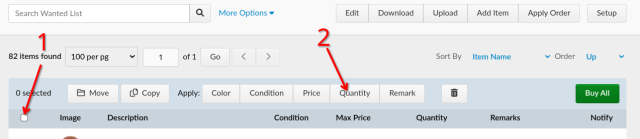
In any case, if you have all the parts you need in a Wanted List, you can increase
(add or multiply) the quantities by clicking the “Quantity” button in the header.
You need to select all the items first; use the checkbox in the header for that
(see pic).
First, make sure you have all the items on one page, so change the dropdown to
show more lines (‘lots’). And if you have more than 100 lines (max in the dropdown
🙄), you can change that number in the URL or you’ll have to do the same thing
for all the pages.
In any case, if you have all the parts you need in a Wanted List, you can increase
(add or multiply) the quantities by clicking the “Quantity” button in the header.
Well, actually not “add,” but set, multiply, or divide. Should have checked
first 😅
And talking about “first,” I embarrassingly used that word twice:
You need to select all the items first; use the checkbox in the header for that
(see pic).
First, make sure you have all the items on one page, so change the dropdown to
This one is the very first
show more lines (‘lots’). And if you have more than 100 lines (max in the dropdown
🙄), you can change that number in the URL or you’ll have to do the same thing
for all the pages.


 USA, California


 France, Nouvelle-Aquitaine