I'm looking to buy multiple quantities of a wanted list I created. I don't
want to manually increase the quantities of each part within the wanted list,
I merely want to buy, for example, 3x of Wanted List A. Is there a way to do
that prior to "Buy All"?
I'm looking to buy multiple quantities of a wanted list I created. I don't
want to manually increase the quantities of each part within the wanted list,
I merely want to buy, for example, 3x of Wanted List A. Is there a way to do
that prior to "Buy All"?
Hi,
On the website:
1. Set the number of items per page to 100.
2. Change the number in the URL to something that’s enough to have all the items
on one page.
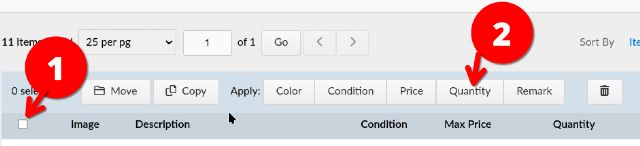
3. Select all the parts.
4. Copy them to a new WL. (Optional, only if you want to keep the original quantities
somewhere.)
5. Use the button Quantity.


 USA, New York


 France, Nouvelle-Aquitaine