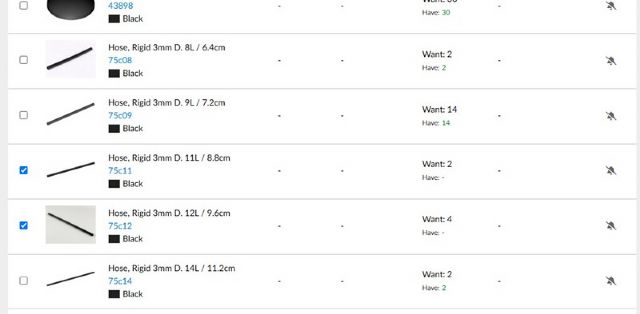
I have a question about wanted listen editing, recently when I want to add numbers
at “have” I keep getting an error message, where before I never saw it.(image
1)
Parts 75c11 and 75c12 I want to have 2 and 4 of them, so there is nothing under
have at the moment. Meanwhile, I have received the parts and so I want to adjust
the “have” status with the numbers: (image 2)
However, I constantly get this message (image 3)
So no matter what I try, adjust numbers to less or 1 by 1, I keep getting this
message. I don't get anything for other items either. I don't quite understand
what it means and what I am doing wrong?
I have a question about wanted listen editing, recently when I want to add numbers
at “have” I keep getting an error message, where before I never saw it.(image
1)
Parts 75c11 and 75c12 I want to have 2 and 4 of them, so there is nothing under
have at the moment. Meanwhile, I have received the parts and so I want to adjust
the “have” status with the numbers: (image 2)
However, I constantly get this message (image 3)
So no matter what I try, adjust numbers to less or 1 by 1, I keep getting this
message. I don't get anything for other items either. I don't quite understand
what it means and what I am doing wrong?
I have a question about wanted listen editing, recently when I want to add numbers
at “have” I keep getting an error message, where before I never saw it.(image
1)
Parts 75c11 and 75c12 I want to have 2 and 4 of them, so there is nothing under
have at the moment. Meanwhile, I have received the parts and so I want to adjust
the “have” status with the numbers: (image 2)
However, I constantly get this message (image 3)
So no matter what I try, adjust numbers to less or 1 by 1, I keep getting this
message. I don't get anything for other items either. I don't quite understand
what it means and what I am doing wrong?
The message does not clearly specify but means that there is a duplicate in ANY
of your wanted lists. You just need to go to your overview of wanted lists, spot
the one(s) with the error and manual merge the duplicate lots.
This question has been posted at least a hundred times over the years, so you
are not alone in finding this confusing and frustrating. Unfortunately, Bricklink
has not taken to clarifying the error message, let alone to mend the underlying
problem when two parts in the catalogue are merged.


 Netherlands, Noord-Brabant

)
)
)


 Canada, Ontario