Thanks in advance for any help. My new store only has a few items in it now,
one of which shows a quantity of 2 in stock. I want to change that number to
1. When I go to manage my inventory, I get a table with dozens of settings to
do a lot of things I don't need. I cannot find a simple way to edit the Qty
for sale. Does it exist?
Thanks in advance for any help. My new store only has a few items in it now,
one of which shows a quantity of 2 in stock. I want to change that number to
1. When I go to manage my inventory, I get a table with dozens of settings to
do a lot of things I don't need. I cannot find a simple way to edit the Qty
for sale. Does it exist?
Cheers!
Jim
if you go to the items page, you can click on what you have in your inventory,
or in the search bar on your inventory page, you can search it up and then adjust
it, and from several other locations
Thanks in advance for any help. My new store only has a few items in it now,
one of which shows a quantity of 2 in stock. I want to change that number to
1. When I go to manage my inventory, I get a table with dozens of settings to
do a lot of things I don't need. I cannot find a simple way to edit the Qty
for sale. Does it exist?
Cheers!
Jim
if you go to the items page, you can click on what you have in your inventory,
or in the search bar on your inventory page, you can search it up and then adjust
it, and from several other locations
"several other locations" as in how to access the page not how to update
the qty tho the qty can be updated by other actions but for 1 off things its
not relevant to this)
Thanks in advance for any help. My new store only has a few items in it now,
one of which shows a quantity of 2 in stock. I want to change that number to
1. When I go to manage my inventory, I get a table with dozens of settings to
do a lot of things I don't need. I cannot find a simple way to edit the Qty
for sale. Does it exist?
Cheers!
Jim
if you go to the items page, you can click on what you have in your inventory,
or in the search bar on your inventory page, you can search it up and then adjust
it, and from several other locations
"several other locations" as in how to access the page not how to update
the qty tho the qty can be updated by other actions but for 1 off things its
not relevant to this)
You know I just realized that the presentation is different in the app than on
Windows. I see what I have seen before where I can select a group of items and
then each item allows me towdit the quantity. I just rarely use apps, but see
the advantage here. Thanks.
Thanks in advance for any help. My new store only has a few items in it now,
one of which shows a quantity of 2 in stock. I want to change that number to
1. When I go to manage my inventory, I get a table with dozens of settings to
do a lot of things I don't need. I cannot find a simple way to edit the Qty
for sale. Does it exist?
Cheers!
Jim
if you go to the items page, you can click on what you have in your inventory,
or in the search bar on your inventory page, you can search it up and then adjust
it, and from several other locations
"several other locations" as in how to access the page not how to update
the qty tho the qty can be updated by other actions but for 1 off things its
not relevant to this)
You know I just realized that the presentation is different in the app than on
Windows. I see what I have seen before where I can select a group of items and
then each item allows me towdit the quantity. I just rarely use apps, but see
the advantage here. Thanks.
bricklink doesn't have an app, perhaps you are referring to the website on
mobile? in which case its mostly the same design aside from a few adjustments
Thanks in advance for any help. My new store only has a few items in it now,
one of which shows a quantity of 2 in stock. I want to change that number to
1. When I go to manage my inventory, I get a table with dozens of settings to
do a lot of things I don't need. I cannot find a simple way to edit the Qty
for sale. Does it exist?
Cheers!
Jim
if you go to the items page, you can click on what you have in your inventory,
or in the search bar on your inventory page, you can search it up and then adjust
it, and from several other locations
"several other locations" as in how to access the page not how to update
the qty tho the qty can be updated by other actions but for 1 off things its
not relevant to this)
You know I just realized that the presentation is different in the app than on
Windows. I see what I have seen before where I can select a group of items and
then each item allows me towdit the quantity. I just rarely use apps, but see
the advantage here. Thanks.
bricklink doesn't have an app, perhaps you are referring to the website on
mobile? in which case its mostly the same design aside from a few adjustments
You are correct, but I see a screen that I have never found on PC mode.
Thanks in advance for any help. My new store only has a few items in it now,
one of which shows a quantity of 2 in stock. I want to change that number to
1. When I go to manage my inventory, I get a table with dozens of settings to
do a lot of things I don't need. I cannot find a simple way to edit the Qty
for sale. Does it exist?
Cheers!
Jim
if you go to the items page, you can click on what you have in your inventory,
or in the search bar on your inventory page, you can search it up and then adjust
it, and from several other locations
"several other locations" as in how to access the page not how to update
the qty tho the qty can be updated by other actions but for 1 off things its
not relevant to this)
You know I just realized that the presentation is different in the app than on
Windows. I see what I have seen before where I can select a group of items and
then each item allows me towdit the quantity. I just rarely use apps, but see
the advantage here. Thanks.
bricklink doesn't have an app, perhaps you are referring to the website on
mobile? in which case its mostly the same design aside from a few adjustments
You are correct, but I see a screen that I have never found on PC mode.
Thanks in advance for any help. My new store only has a few items in it now,
one of which shows a quantity of 2 in stock. I want to change that number to
1. When I go to manage my inventory, I get a table with dozens of settings to
do a lot of things I don't need. I cannot find a simple way to edit the Qty
for sale. Does it exist?
Cheers!
Jim
if you go to the items page, you can click on what you have in your inventory,
or in the search bar on your inventory page, you can search it up and then adjust
it, and from several other locations
"several other locations" as in how to access the page not how to update
the qty tho the qty can be updated by other actions but for 1 off things its
not relevant to this)
You know I just realized that the presentation is different in the app than on
Windows. I see what I have seen before where I can select a group of items and
then each item allows me towdit the quantity. I just rarely use apps, but see
the advantage here. Thanks.
bricklink doesn't have an app, perhaps you are referring to the website on
mobile? in which case its mostly the same design aside from a few adjustments
You are correct, but I see a screen that I have never found on PC mode.
interesting, which one?
The one you posted in your first reply to me. I can only seem to get there when
on my mobile, but I haven't yet found it on my Windows PC. Odd, huh? Thanks
again for your help.
[…]
The one you posted in your first reply to me. I can only seem to get there when
on my mobile, but I haven't yet found it on my Windows PC. Odd, huh? Thanks
again for your help.
[…]
The one you posted in your first reply to me. I can only seem to get there when
on my mobile, but I haven't yet found it on my Windows PC. Odd, huh? Thanks
again for your help.


 USA, Arizona


 Canada, Ontario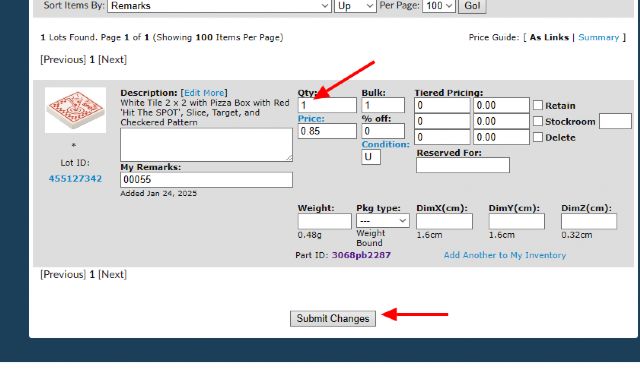
)
)
 France, Nouvelle-Aquitaine