I recently placed an order for about 200 pieces. The seller later notified me
that he was busy and would not be able to fill the order for another week and
gave me the choice of waiting or accepting a refund. If I choose to order again
from a different store, how do I get all the pieces into a new Bricklink wanted
list? There are too many to input them manually one by one.
I recently placed an order for about 200 pieces. The seller later notified me
that he was busy and would not be able to fill the order for another week and
gave me the choice of waiting or accepting a refund. If I choose to order again
from a different store, how do I get all the pieces into a new Bricklink wanted
list? There are too many to input them manually one by one.
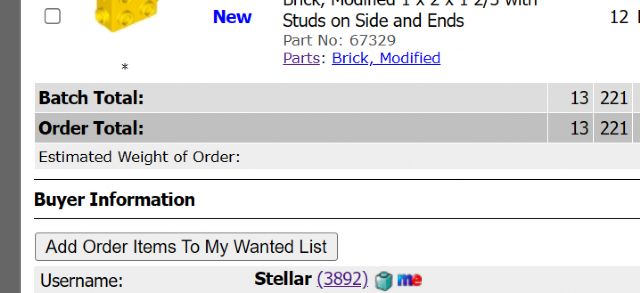
At the bottom of the order details there is a button to add the pieces to a Wanted
List:
I recently placed an order for about 200 pieces. The seller later notified me
that he was busy and would not be able to fill the order for another week and
gave me the choice of waiting or accepting a refund. If I choose to order again
from a different store, how do I get all the pieces into a new Bricklink wanted
list? There are too many to input them manually one by one.
At the bottom of the order details there is a button to add the pieces to a Wanted
List:


 USA, New Jersey


 Spain, Comunidad Valenciana