I've tried several times to update the catalog for set number 7709 and I
think I'm just an idiot. I have tried as hard as I can to get through the
forms and the mods keep rejecting my requests but won't tell me why. Basically,
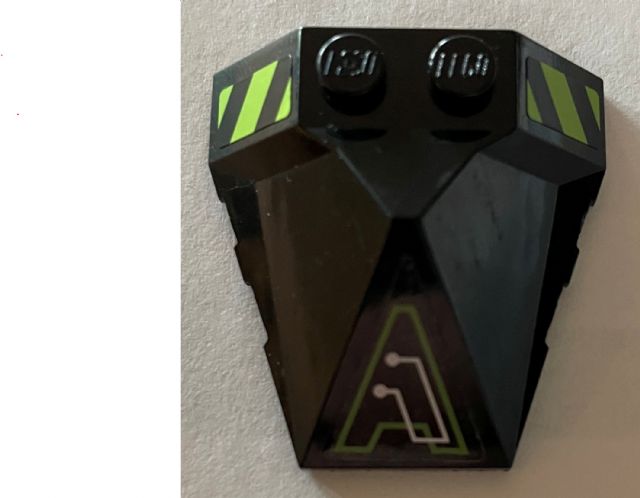
the attached images represent stickered pieces from set 7709 that are not in
the catalog and so they can't be bought or sold. The first image has stickers
48, 38 and 39. The second image has stickers 35, 38 and 39. There are two of
the third image and they each have sticker 26. Any help or advice would be greatly
appreciated.
I've tried several times to update the catalog for set number 7709 and I
think I'm just an idiot. I have tried as hard as I can to get through the
forms and the mods keep rejecting my requests but won't tell me why. Basically,
the attached images represent stickered pieces from set 7709 that are not in
the catalog and so they can't be bought or sold. The first image has stickers
48, 38 and 39. The second image has stickers 35, 38 and 39. There are two of
the third image and they each have sticker 26. Any help or advice would be greatly
appreciated.
looking at your message history it seems you are trying to add the unstickered
variants of the parts to the set but they need to be the stickered variants
I've tried several times to update the catalog for set number 7709 and I
think I'm just an idiot. I have tried as hard as I can to get through the
forms and the mods keep rejecting my requests but won't tell me why. Basically,
the attached images represent stickered pieces from set 7709 that are not in
the catalog and so they can't be bought or sold. The first image has stickers
48, 38 and 39. The second image has stickers 35, 38 and 39. There are two of
the third image and they each have sticker 26. Any help or advice would be greatly
appreciated.
looking at your message history it seems you are trying to add the unstickered
variants of the parts to the set but they need to be the stickered variants
Thanks I guess I was just trying everything. I think I have made an accurate
and correct submission for the first piece now by followng the advice of axaday.
Wish me luck!
I've tried several times to update the catalog for set number 7709 and I
think I'm just an idiot. I have tried as hard as I can to get through the
forms and the mods keep rejecting my requests but won't tell me why. Basically,
the attached images represent stickered pieces from set 7709 that are not in
the catalog and so they can't be bought or sold. The first image has stickers
48, 38 and 39. The second image has stickers 35, 38 and 39. There are two of
the third image and they each have sticker 26. Any help or advice would be greatly
appreciated.
looking at your message history it seems you are trying to add the unstickered
variants of the parts to the set but they need to be the stickered variants
Thanks I guess I was just trying everything. I think I have made an accurate
and correct submission for the first piece now by followng the advice of axaday.
Wish me luck!
I've tried several times to update the catalog for set number 7709 and I
think I'm just an idiot. I have tried as hard as I can to get through the
forms and the mods keep rejecting my requests but won't tell me why. Basically,
the attached images represent stickered pieces from set 7709 that are not in
the catalog and so they can't be bought or sold. The first image has stickers
48, 38 and 39. The second image has stickers 35, 38 and 39. There are two of
the third image and they each have sticker 26. Any help or advice would be greatly
appreciated.
Presuming that you have the stickers on correctly, that first piece would need
to be submitted as 47757pb24. Look at
*
47757pb23 Wedge 4 x 4 x 1 1/3 Pyramid Center with Yellow Circle and Silver Robot Head Facing Out Pattern (Sticker) - Set 8108 Parts: Wedge, Decorated
as a guide. You have to
add the piece itself to the catalog before it can be put in an inventory. You
can use the same picture you put on the forum.
I've tried several times to update the catalog for set number 7709 and I
think I'm just an idiot. I have tried as hard as I can to get through the
forms and the mods keep rejecting my requests but won't tell me why. Basically,
the attached images represent stickered pieces from set 7709 that are not in
the catalog and so they can't be bought or sold. The first image has stickers
48, 38 and 39. The second image has stickers 35, 38 and 39. There are two of
the third image and they each have sticker 26. Any help or advice would be greatly
appreciated.
Presuming that you have the stickers on correctly, that first piece would need
to be submitted as 47757pb24. Look at
*
47757pb23 Wedge 4 x 4 x 1 1/3 Pyramid Center with Yellow Circle and Silver Robot Head Facing Out Pattern (Sticker) - Set 8108 Parts: Wedge, Decorated
as a guide. You have to
add the piece itself to the catalog before it can be put in an inventory. You
can use the same picture you put on the forum.
Thank you I just followed your guide and believe I've successfully made the
submission for the first piece. I have gotten this far before but it looks like
I was using the wrong item number. How did you know that the correct one was
47757pb24? I don't know how you knew to use the pb24 addendum. I really appreciate
you helping me out!
I've tried several times to update the catalog for set number 7709 and I
think I'm just an idiot. I have tried as hard as I can to get through the
forms and the mods keep rejecting my requests but won't tell me why. Basically,
the attached images represent stickered pieces from set 7709 that are not in
the catalog and so they can't be bought or sold. The first image has stickers
48, 38 and 39. The second image has stickers 35, 38 and 39. There are two of
the third image and they each have sticker 26. Any help or advice would be greatly
appreciated.
Presuming that you have the stickers on correctly, that first piece would need
to be submitted as 47757pb24. Look at
*
47757pb23 Wedge 4 x 4 x 1 1/3 Pyramid Center with Yellow Circle and Silver Robot Head Facing Out Pattern (Sticker) - Set 8108 Parts: Wedge, Decorated
as a guide. You have to
add the piece itself to the catalog before it can be put in an inventory. You
can use the same picture you put on the forum.
Thank you I just followed your guide and believe I've successfully made the
submission for the first piece. I have gotten this far before but it looks like
I was using the wrong item number. How did you know that the correct one was
47757pb24? I don't know how you knew to use the pb24 addendum. I really appreciate
you helping me out!
pb stands for “patterned brick” and is the extension for all stickered/printed
bricks, as for how it was next, you can enter in the number of the part with
a * after it to show all that are in the catalog then manually enter numbers
until you’ve narrowed down which is next, then go to the add image page to see
if any are pending approval with that number and if not then it’s the next number
up
pb stands for “patterned brick” and is the extension for all stickered/printed
bricks, as for how it was next, you can enter in the number of the part with
a * after it to show all that are in the catalog then manually enter numbers
until you’ve narrowed down which is next, then go to the add image page to see
if any are pending approval with that number and if not then it’s the next number
up
pb stands for “patterned brick” and is the extension for all stickered/printed
bricks, as for how it was next, you can enter in the number of the part with
a * after it to show all that are in the catalog then manually enter numbers
until you’ve narrowed down which is next, then go to the add image page to see
if any are pending approval with that number and if not then it’s the next number
up
Sorry I dropped off, I had a crazy week at work. Anyway, how long does it take?
My submission shows as pending at this point.
It takes a while for older stickered parts like this to be approved. Be patient
as there is quite a long queue.
It's a good start, but it would take less time if there was more information
and fewer errors, however. If I were you, I would resubmit your image so you
can include a Note. Tell the admin the set number and the page number from the
instruction booklet where the stickers are applied.
I've tried several times to update the catalog for set number 7709 and I
think I'm just an idiot. I have tried as hard as I can to get through the
forms and the mods keep rejecting my requests but won't tell me why. Basically,
the attached images represent stickered pieces from set 7709 that are not in
the catalog and so they can't be bought or sold. The first image has stickers
48, 38 and 39. The second image has stickers 35, 38 and 39. There are two of
the third image and they each have sticker 26. Any help or advice would be greatly
appreciated.
You can start by reading through the guide I created for adding stickered parts.
It'll introduce you to the basics:


 USA, California

)
)
)


 Canada, Ontario

 Spain, Comunidad Valenciana
