I don’t know if im allowed to ask this question but ill ask anyways-
I recently downloaded the app called “Brickstore” to help me with uploading parts
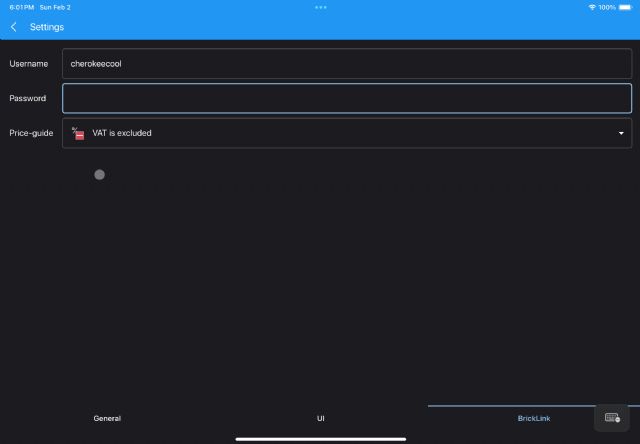
quicker, as many sellers recommended it. I am trying to connect my bricklink
account with the app on tablet, and when i put my information in, theres no “ok”
or “continue” button to press that would indicate my account is linked. Any chance
someone has this app on tablet or mobile and could help me connect my bricklink
account?
I don’t know if im allowed to ask this question but ill ask anyways-
I recently downloaded the app called “Brickstore” to help me with uploading parts
quicker, as many sellers recommended it.
From PC, YES, but I'm sure from a tablet...
Did you enter your password "**************"?
(see I know your password)
I did try entering my password but since theres no button that would make it
************** I did not share obviously. Even when I put all my information
theres no button that would indicate it would save.
On my phone if I change something and click the back arrow or one of the tabs
on the bottom it saves the changes
Maybe its something with a tablet that iPhone has but tablet doesn't have?
I'd think they are similar though since they are both mobile devices that
have no buttons. Any chance there is a different software that helps with uploading
quicker that's free and good on tablet?
I would recommend trying Brick Seller. Brick Seller works on all tablets (and
most phones) as it is cloud/web based (there is nothing to install).
With Brick Seller there is no file management or need for uploading as all data
is input through the web browser and stored on a relational database. All the
data is updated on BL (and optionally BO) using the API's from each marketplace.
You can use Brick Seller so do all your inventory management and order processing.
Brick Seller has a unique set part out feature along with a continuous price
update feature. It will even keep your inventory data in sync as you get orders
on BL and BO. There are charts/graphs showing your historical inventory and sales
data.
You can get a free 45 day trial of Brick Seller. There are several instructional
videos on the home page.
I don’t know if im allowed to ask this question but ill ask anyways-
I recently downloaded the app called “Brickstore” to help me with uploading parts
quicker, as many sellers recommended it. I am trying to connect my bricklink
account with the app on tablet, and when i put my information in, theres no “ok”
or “continue” button to press that would indicate my account is linked. Any chance
someone has this app on tablet or mobile and could help me connect my bricklink
account?
Forgot to mention you can access Brick Seller at WWW.BRICKSELLER.NET
In Related Software, OurBricks writes:
I would recommend trying Brick Seller. Brick Seller works on all tablets (and
most phones) as it is cloud/web based (there is nothing to install).
With Brick Seller there is no file management or need for uploading as all data
is input through the web browser and stored on a relational database. All the
data is updated on BL (and optionally BO) using the API's from each marketplace.
You can use Brick Seller so do all your inventory management and order processing.
Brick Seller has a unique set part out feature along with a continuous price
update feature. It will even keep your inventory data in sync as you get orders
on BL and BO. There are charts/graphs showing your historical inventory and sales
data.
You can get a free 45 day trial of Brick Seller. There are several instructional
videos on the home page.
I don’t know if im allowed to ask this question but ill ask anyways-
I recently downloaded the app called “Brickstore” to help me with uploading parts
quicker, as many sellers recommended it. I am trying to connect my bricklink
account with the app on tablet, and when i put my information in, theres no “ok”
or “continue” button to press that would indicate my account is linked. Any chance
someone has this app on tablet or mobile and could help me connect my bricklink
account?
Forgot to mention you can access Brick Seller at WWW.BRICKSELLER.NET
In Related Software, OurBricks writes:
I would recommend trying Brick Seller. Brick Seller works on all tablets (and
most phones) as it is cloud/web based (there is nothing to install).
With Brick Seller there is no file management or need for uploading as all data
is input through the web browser and stored on a relational database. All the
data is updated on BL (and optionally BO) using the API's from each marketplace.
You can use Brick Seller so do all your inventory management and order processing.
Brick Seller has a unique set part out feature along with a continuous price
update feature. It will even keep your inventory data in sync as you get orders
on BL and BO. There are charts/graphs showing your historical inventory and sales
data.
You can get a free 45 day trial of Brick Seller. There are several instructional
videos on the home page.
I don’t know if im allowed to ask this question but ill ask anyways-
I recently downloaded the app called “Brickstore” to help me with uploading parts
quicker, as many sellers recommended it. I am trying to connect my bricklink
account with the app on tablet, and when i put my information in, theres no “ok”
or “continue” button to press that would indicate my account is linked. Any chance
someone has this app on tablet or mobile and could help me connect my bricklink
account?
Thanks,
It costs money? I'd rather use software that is free as I am already paying
for other applications.


 USA, Arizona



 France, Provence-Alpes-Côte d'Azur
