I have some builds that I'm running through the buy tool but it keeps choosing
stores that have minimum buys that keep raising the part count (and thus the
cost) significantly. I shouldn't have to dislike that certain store just
to keep the price and part count reasonable, because I really don't need
or want a bunch of extra parts. Can we please add an option that only makes inventory
selections that will add up to the exact part quantity, or at least within a
certain threshold, say, no more than 10% for a given part?
I have some builds that I'm running through the buy tool but it keeps choosing
stores that have minimum buys that keep raising the part count (and thus the
cost) significantly. I shouldn't have to dislike that certain store just
to keep the price and part count reasonable, because I really don't need
or want a bunch of extra parts. Can we please add an option that only makes inventory
selections that will add up to the exact part quantity, or at least within a
certain threshold, say, no more than 10% for a given part?
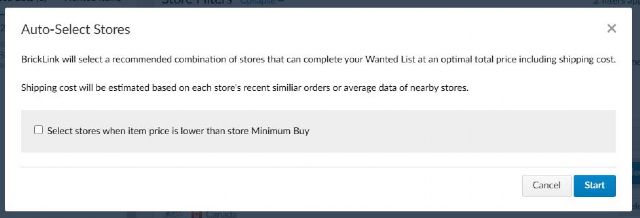
when you click the auto-select you will get this pop up:
uncheck that box and the tool will not select stores with parts lower than the
stores min. buy
I have some builds that I'm running through the buy tool but it keeps choosing
stores that have minimum buys that keep raising the part count (and thus the
cost) significantly. I shouldn't have to dislike that certain store just
to keep the price and part count reasonable, because I really don't need
or want a bunch of extra parts. Can we please add an option that only makes inventory
selections that will add up to the exact part quantity, or at least within a
certain threshold, say, no more than 10% for a given part?
when you click the auto-select you will get this pop up:
uncheck that box and the tool will not select stores with parts lower than the
stores min. buy
Hehe, I knew “minimum buys” would confuse some of us
OP meant bulk lots (there’s a minimum of parts you need to buy
= min buy).
I have some builds that I'm running through the buy tool but it keeps choosing
stores that have minimum buys that keep raising the part count (and thus the
cost) significantly. I shouldn't have to dislike that certain store just
to keep the price and part count reasonable, because I really don't need
or want a bunch of extra parts. Can we please add an option that only makes inventory
selections that will add up to the exact part quantity, or at least within a
certain threshold, say, no more than 10% for a given part?
when you click the auto-select you will get this pop up:
uncheck that box and the tool will not select stores with parts lower than the
stores min. buy
Hehe, I knew “minimum buys” would confuse some of us
OP meant bulk lots (there’s a minimum of parts you need to buy
= min buy).
I have some builds that I'm running through the buy tool but it keeps choosing
stores that have minimum buys that keep raising the part count (and thus the
cost) significantly. I shouldn't have to dislike that certain store just
to keep the price and part count reasonable, because I really don't need
or want a bunch of extra parts. Can we please add an option that only makes inventory
selections that will add up to the exact part quantity, or at least within a
certain threshold, say, no more than 10% for a given part?
when you click the auto-select you will get this pop up:
uncheck that box and the tool will not select stores with parts lower than the
stores min. buy
I was under the impression that checkbox was for total store minimum buy (in
currency amount) and not part minimum buy
I have some builds that I'm running through the buy tool but it keeps choosing
stores that have minimum buys
Just to be clear, the official term is “bulk lots.”
“Min buy” is another limit and there’s already an option for that.
that keep raising the part count (and thus the
cost) significantly.
Theoretically, the cost of the extra parts should be included in the algorithm.
So the cost would be lower than without those bulk lots.
But 1. we aren’t sure of how the algorithm works exactly, 2. the algo cuts corners
/ doesn’t look at all the possibilities, so maybe choosing those stores prevents
it from choosing cheaper stores.
I shouldn't have to dislike that certain store just
to keep the price and part count reasonable, because I really don't need
or want a bunch of extra parts. Can we please add an option that only makes inventory
selections that will add up to the exact part quantity, or at least within a
certain threshold, say, no more than 10% for a given part?
At least yes/no to bulk lots would already help. A threshold might be more complicated
to implement.
I have some builds that I'm running through the buy tool but it keeps choosing
stores that have minimum buys
Just to be clear, the official term is “bulk lots.”
“Min buy” is another limit and there’s already an option for that.
that keep raising the part count (and thus the
cost) significantly.
Theoretically, the cost of the extra parts should be included in the algorithm.
So the cost would be lower than without those bulk lots.
But 1. we aren’t sure of how the algorithm works exactly, 2. the algo cuts corners
/ doesn’t look at all the possibilities, so maybe choosing those stores prevents
it from choosing cheaper stores.
I shouldn't have to dislike that certain store just
to keep the price and part count reasonable, because I really don't need
or want a bunch of extra parts. Can we please add an option that only makes inventory
selections that will add up to the exact part quantity, or at least within a
certain threshold, say, no more than 10% for a given part?
At least yes/no to bulk lots would already help. A threshold might be more complicated
to implement.
Who do we have to talk to for a "no bulk lots" feature to be implemented?
This is frustrating enough that I'm ready to go out and make my own bricklink
search algorithm just to get around this problem (and other frustrations I have
with the official auto-select tool)
I have some builds that I'm running through the buy tool but it keeps choosing
stores that have minimum buys
Just to be clear, the official term is “bulk lots.”
“Min buy” is another limit and there’s already an option for that.
that keep raising the part count (and thus the
cost) significantly.
Theoretically, the cost of the extra parts should be included in the algorithm.
So the cost would be lower than without those bulk lots.
But 1. we aren’t sure of how the algorithm works exactly, 2. the algo cuts corners
/ doesn’t look at all the possibilities, so maybe choosing those stores prevents
it from choosing cheaper stores.
I shouldn't have to dislike that certain store just
to keep the price and part count reasonable, because I really don't need
or want a bunch of extra parts. Can we please add an option that only makes inventory
selections that will add up to the exact part quantity, or at least within a
certain threshold, say, no more than 10% for a given part?
At least yes/no to bulk lots would already help. A threshold might be more complicated
to implement.
Who do we have to talk to for a "no bulk lots" feature to be implemented?
This is frustrating enough that I'm ready to go out and make my own bricklink
search algorithm just to get around this problem (and other frustrations I have
with the official auto-select tool)
You are not unique in this sentiment and others have thought of the same. Unfortunately,
it appears to be impossible to build due to the amount of data needed far exceeding
what you can acquire through the API. If you would use web scraping instead,
that's not only against the ToS, it will definitely trigger a temporary block
on accessing the Bricklink store inventories or more if you access too many store
pages on a day.
What you would need for such a search tool is either:
- per item in your wanted list, all lots for sale including price information
- terms of that particular shop
or:
- preliminary search result matching your wanted list to all shops (such as
the classic wanted list provides, limited to a top 20 of stores for that item)
or:
- a cached database of all store inventories
The first approach might be possible for a small wanted list of rare items only.
The second approach might help you preselect relevant stores for which you can
try to download the entire inventory for - but you'll be limited to around
10 shops before you'll hit the web access limits.
The third approach could work with a distributed network of 'users' on
a global scale - but would be near-impossible to keep synchronized as each store's
inventory will change continuously due to orders being placed.


 USA, California

 Canada, Alberta

 France, Nouvelle-Aquitaine

 Netherlands, Groningen