Discussion Forum: Thread 365882

 Author: jixx47 View Messages Posted By jixx47
 Posted: Jan 1, 2025 08:11
 Subject: Do not show item number and category
 Viewed: 116 times
 Topic: Buying
 Report:
Cancel Message
Cancel
Reply to Message
Reply
BrickLink
ID Card

jixx47 (142)

Location:  Denmark
Member Since Contact Type Status
Sep 25, 2021 Contact Member Buyer
Buying Privileges - OK
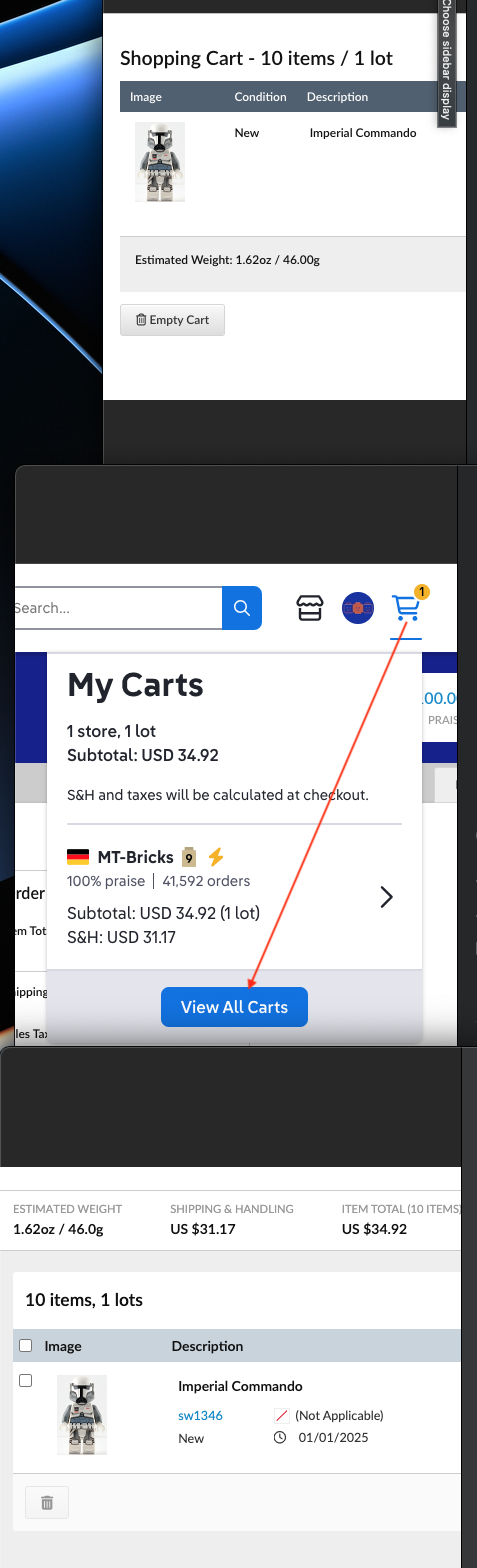
When you have some bricks in your shopping cart and keep the mouse on the item
it do not show the item number as before. And you can not go directly to the
category.

It should be the same as if you have a former order and keep your mouse on the
item picture and it shows the item number. You can also mark and push and go
to the item category.
 Author: 1001bricks View Messages Posted By 1001bricks
 Posted: Jan 1, 2025 10:14
 Subject: Re: Do not show item number and category
 Viewed: 38 times
 Topic: Buying
 Report:
Cancel Message
Cancel
Reply to Message
Reply
BrickLink
ID Card

1001bricks (55907)

Location:  France, Provence-Alpes-Côte d'Azur
Member Since Contact Type Status
Sep 6, 2005 Contact Member Seller
Buying Privileges - OKSelling Privileges - OK
Store: 1001bricks
In Buying, jixx47 writes:
  When you have some bricks in your shopping cart and keep the mouse on the item
it do not show the item number as before.

It never did in the Cart AFAIK

And yes, it's a pain, I wish you could see the ID, or better click and browse
again this item / lot in this shop...
 Author: SylvainLS View Messages Posted By SylvainLS
 Posted: Jan 1, 2025 10:25
 Subject: Re: Do not show item number and category
 Viewed: 44 times
 Topic: Buying
 Report:
Cancel Message
Cancel
Reply to Message
Reply
BrickLink
ID Card

SylvainLS (52)

Location:  France, Nouvelle-Aquitaine
Member Since Contact Type Status
Apr 25, 2014 Contact Member Seller
Buying Privileges - OKSelling Privileges - OK
Store Closed Store: BuyerOnly
BrickLink Discussions Moderator (?)
In Buying, 1001bricks writes:
  In Buying, jixx47 writes:
  When you have some bricks in your shopping cart and keep the mouse on the item
it do not show the item number as before.

It never did in the Cart AFAIK

And yes, it's a pain, I wish you could see the ID, or better click and browse
again this item / lot in this shop...

I can confirm both: 1) it never did, and 2) it’s a pain.
 Author: popsicle View Messages Posted By popsicle
 Posted: Jan 1, 2025 11:05
 Subject: Re: Do not show item number and category
 Viewed: 71 times
 Topic: Buying
 Report:
Cancel Message
Cancel
Reply to Message
Reply
BrickLink
ID Card

popsicle (6773)

Location:  USA, Washington
Member Since Contact Type Status
Feb 21, 2006 Contact Member Seller
Buying Privileges - OKSelling Privileges - OK
Store: ConstrucToys
In Buying, jixx47 writes:
  When you have some bricks in your shopping cart and keep the mouse on the item
it do not show the item number as before. And you can not go directly to the
category.

It should be the same as if you have a former order and keep your mouse on the
item picture and it shows the item number. You can also mark and push and go
to the item category.

You're right, it's no longer offered as an active link within the 'direct'
cart view. Yet it's still in place when using the "View All Carts"
approach. Again, more clicks added

Additionally, the "My Shopping Settings" page is now only available in
"New View" mode with less setting options