Discussion Forum: Thread 365091

 Author: hbendik View Messages Posted By hbendik
 Posted: Dec 9, 2024 10:58
 Subject: Lot ID
 Viewed: 88 times
 Topic: Help
 Report:
Cancel Message
Cancel
Reply to Message
Reply
BrickLink
ID Card

hbendik (68)

Location:  Norway, Akershus
Member Since Contact Type Status
Aug 7, 2014 Contact Member Seller
Buying Privileges - OKSelling Privileges - OK
Store: BrikkePalasset
Hi,
I have just opened a store here at Bricklink and have a problem with Lot ID.
I'm using BrickStore. I have put in a new item in BrickStore and Exported
it to BrickLink as a Mass-Upload. I can find the item in My Store on BrickLink
with all the information, included the Lot ID. But when I now try to change anything
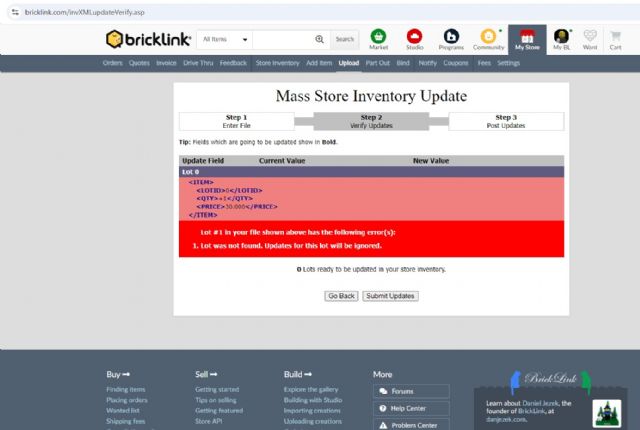
on the item in BrickStore and export it to BrickLink using Mass-Update, I get
an error saying that it does'nt have an Lot ID.

How can I get the Lot ID from BrickLink into my BrickStore?
 
 Author: TempleOfBricks View Messages Posted By TempleOfBricks
 Posted: Dec 9, 2024 11:21
 Subject: Re: Lot ID
 Viewed: 40 times
 Topic: Help
 Report:
Cancel Message
Cancel
Reply to Message
Reply
BrickLink
ID Card

TempleOfBricks (1070)

Location:  Netherlands, Friesland
Member Since Contact Type Status
Feb 22, 2019 Contact Member Seller
Buying Privileges - OKSelling Privileges - OK
Store: Temple of Bricks
Maybe close brickstore first,
Open it and download store inventory, make changes and the do a mass update again.
 Author: 1001bricks View Messages Posted By 1001bricks
 Posted: Dec 9, 2024 12:30
 Subject: Re: Lot ID
 Viewed: 37 times
 Topic: Help
 Report:
Cancel Message
Cancel
Reply to Message
Reply
BrickLink
ID Card

1001bricks (55554)

Location:  France, Provence-Alpes-Côte d'Azur
Member Since Contact Type Status
Sep 6, 2005 Contact Member Seller
Buying Privileges - OKSelling Privileges - OK
Store: 1001bricks
In Help, hbendik writes:
  Hi,
I have just opened a store here at Bricklink and have a problem with Lot ID.
I'm using BrickStore. I have put in a new item in BrickStore and Exported
it to BrickLink as a Mass-Upload. I can find the item in My Store on BrickLink
with all the information, included the Lot ID. But when I now try to change anything
on the item in BrickStore and export it to BrickLink using Mass-Update, I get
an error saying that it does'nt have an Lot ID.

How can I get the Lot ID from BrickLink into my BrickStore?

The LotID is in your shop Inventory (ctrl+I ctrl+S) in BrickStore.
Then if you change something, mass UPDATE (not upload!)
 Author: TempleOfBricks View Messages Posted By TempleOfBricks
 Posted: Dec 9, 2024 12:44
 Subject: Re: Lot ID
 Viewed: 48 times
 Topic: Help
 Report:
Cancel Message
Cancel
Reply to Message
Reply
BrickLink
ID Card

TempleOfBricks (1070)

Location:  Netherlands, Friesland
Member Since Contact Type Status
Feb 22, 2019 Contact Member Seller
Buying Privileges - OKSelling Privileges - OK
Store: Temple of Bricks
In Help, 1001bricks writes:
  In Help, hbendik writes:
  Hi,
I have just opened a store here at Bricklink and have a problem with Lot ID.
I'm using BrickStore. I have put in a new item in BrickStore and Exported
it to BrickLink as a Mass-Upload. I can find the item in My Store on BrickLink
with all the information, included the Lot ID. But when I now try to change anything
on the item in BrickStore and export it to BrickLink using Mass-Update, I get
an error saying that it does'nt have an Lot ID.

How can I get the Lot ID from BrickLink into my BrickStore?

The LotID is in your shop Inventory (ctrl+I ctrl+S) in BrickStore.
Then if you change something, mass UPDATE (not upload!)

INDEED UPDATE! UPLOAD WOULD DOUBLE YOUR SELECTED INVENTORY TO BRICKLINK HAHA
 Author: SylvainLS View Messages Posted By SylvainLS
 Posted: Dec 9, 2024 12:48
 Subject: Re: Lot ID
 Viewed: 42 times
 Topic: Help
 Report:
Cancel Message
Cancel
Reply to Message
Reply
BrickLink
ID Card

SylvainLS (52)

Location:  France, Nouvelle-Aquitaine
Member Since Contact Type Status
Apr 25, 2014 Contact Member Seller
Buying Privileges - OKSelling Privileges - OK
Store Closed Store: BuyerOnly
BrickLink Discussions Moderator (?)
In Help, TempleOfBricks writes:
  […]
  Then if you change something, mass UPDATE (not upload!)

INDEED UPDATE! UPLOAD WOULD DOUBLE YOUR SELECTED INVENTORY TO BRICKLINK HAHA

I notice it’s a frequent remark / pitfall.  Couldn’t the actions be named something
clearer in BrickStore?
(After all, it’s not BrickLink: fast changes are possible )
 Author: TempleOfBricks View Messages Posted By TempleOfBricks
 Posted: Dec 9, 2024 12:52
 Subject: Re: Lot ID
 Viewed: 40 times
 Topic: Help
 Report:
Cancel Message
Cancel
Reply to Message
Reply
BrickLink
ID Card

TempleOfBricks (1070)

Location:  Netherlands, Friesland
Member Since Contact Type Status
Feb 22, 2019 Contact Member Seller
Buying Privileges - OKSelling Privileges - OK
Store: Temple of Bricks
In Help, SylvainLS writes:
  In Help, TempleOfBricks writes:
  […]
  Then if you change something, mass UPDATE (not upload!)

INDEED UPDATE! UPLOAD WOULD DOUBLE YOUR SELECTED INVENTORY TO BRICKLINK HAHA

I notice it’s a frequent remark / pitfall.  Couldn’t the actions be named something
clearer in BrickStore?
(After all, it’s not BrickLink: fast changes are possible )

Luckily you can do a Negative upload
 Author: 1001bricks View Messages Posted By 1001bricks
 Posted: Dec 9, 2024 13:15
 Subject: Re: Lot ID
 Viewed: 49 times
 Topic: Help
 Report:
Cancel Message
Cancel
Reply to Message
Reply
BrickLink
ID Card

1001bricks (55554)

Location:  France, Provence-Alpes-Côte d'Azur
Member Since Contact Type Status
Sep 6, 2005 Contact Member Seller
Buying Privileges - OKSelling Privileges - OK
Store: 1001bricks
In Help, SylvainLS writes:
  In Help, TempleOfBricks writes:
  […]
  Then if you change something, mass UPDATE (not upload!)

INDEED UPDATE! UPLOAD WOULD DOUBLE YOUR SELECTED INVENTORY TO BRICKLINK HAHA

I notice it’s a frequent remark / pitfall.  Couldn’t the actions be named something
clearer in BrickStore?
(After all, it’s not BrickLink: fast changes are possible )

Agreed, it should show what's on BrickLink:
https://www.bricklink.com/invXML.asp

As:
* Add many items at once to your store inventory
* Update many items in your store inventory at once

So it could be:
* BrickLink Mass-Add XML to clipboard
* BrickLink Mass-Update XML to clipboard

One could open an Issue on github, Robert may change it; even if sometimes he's
a blockhead and won't... for reasons