Discussion Forum: Thread 364952

 Author: AlphanEngineer View Messages Posted By AlphanEngineer
 Posted: Dec 5, 2024 09:20
 Subject: 28192  Slope 45 Loads incorrectly
 Viewed: 89 times
 Topic: Related Software
 Report:
Cancel Message
Cancel
Reply to Message
Reply
BrickLink
ID Card

AlphanEngineer (0)

Location:  Netherlands, Overijssel
Member Since Contact Type Status
Dec 5, 2024 Contact Member Buyer
Buying Privileges - OK
Greetings all!
My first post here. Ive been using Bricklink since February this year (2024).

Im running an i7- chipped gaming laptop with GeForce RTX graphics card, Windows
11. Neither the older version, or the latest Window update seem to affect this
issue.

Using Studio v2.24.9(2)

Ive hit a problem.
I have used the following brick a lot in my 50-plus models-
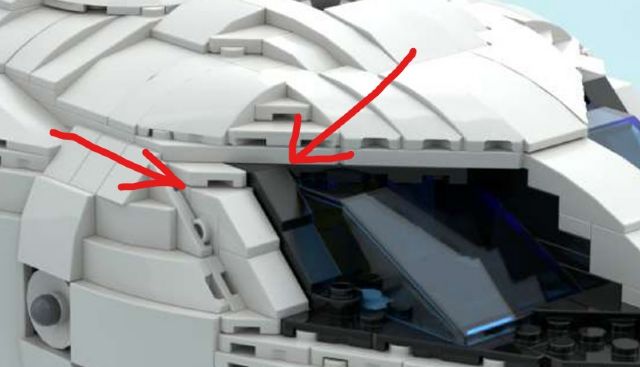
28192  Slope 45 2 x 1 with Cutout without Stud

Since 3 december, Bricklink will not load this item correctly in any models saved
before 3 december.
Any time I re-load an older, saved model, the 28192s have all lost their position
and orientation, creating collision errors throughout the models.

The only way I have been able to re-position the bricks is to cut and re-paste
them back in the correct space. They then seem to save ok.

New models created after 3 december dont seem to be affected. They save and re-load
ok.

The size of the model doesnt seem to have any bearing on the issue- I have models
from 100 bricks to 40,000 bricks and they are all affected.

What is also very strange is if I copy an older model and try to paste it in
a new- post 3 december file, it initially shows the model complete and unaltered,
but when the mouse is clicked a second time to set the position of the model...
all the 28192 sloped bricks lose their orientation! Its only the one brick that
has this problem- no other brick is affected?!

Has anyone else had this issue?
Is there a fix- or am I doomed to manually seek and re-position a couple of hundred
of these bricks over 50+ models?

Thanks for your help!


 Author: SylvainLS View Messages Posted By SylvainLS
 Posted: Dec 5, 2024 09:24
 Subject: Re: 28192  Slope 45 Loads incorrectly
 Viewed: 46 times
 Topic: Related Software
 Report:
Cancel Message
Cancel
Reply to Message
Reply
BrickLink
ID Card

SylvainLS (52)

Location:  France, Nouvelle-Aquitaine
Member Since Contact Type Status
Apr 25, 2014 Contact Member Seller
Buying Privileges - OKSelling Privileges - OK
Store Closed Store: BuyerOnly
BrickLink Discussions Moderator (?)
In Related Software, AlphaEngineer99 writes:
  Greetings all!

Hi,

  My first post here. Ive been using Bricklink since February this year (2024).
[…]
28192  Slope 45 2 x 1 with Cutout without Stud […]

See this thread for an explanation: https://forum.bricklink.com/viewtopic.php?t=11756


It’s on the dedicated forum for Studio and PartDesigner, https://forum.bricklink.com/
(hover over the red Studio icon on every page, then click “Studio Forum”).

Please search the forum for your question before posting a new one (the search
box is in the very dark grey banner).
There’s indexes of known bugs and suggestions that you can browse first:
Studio: https://forum.bricklink.com/viewtopic.php?f=4&t=5579
PartDesigner: https://forum.bricklink.com/viewtopic.php?f=10&t=5589
And there’s suggestions you can vote for: https://forum.bricklink.com/viewforum.php?f=15
 Author: AlphanEngineer View Messages Posted By AlphanEngineer
 Posted: Dec 5, 2024 10:48
 Subject: Re: 28192  Slope 45 Loads incorrectly
 Viewed: 47 times
 Topic: Related Software
 Report:
Cancel Message
Cancel
Reply to Message
Reply
BrickLink
ID Card

AlphanEngineer (0)

Location:  Netherlands, Overijssel
Member Since Contact Type Status
Dec 5, 2024 Contact Member Buyer
Buying Privileges - OK
In Related Software, SylvainLS writes:
  In Related Software, AlphaEngineer99 writes:
  Greetings all!

Hi,

  My first post here. Ive been using Bricklink since February this year (2024).
[…]
28192  Slope 45 2 x 1 with Cutout without Stud […]

See this thread for an explanation: https://forum.bricklink.com/viewtopic.php?t=11756


It’s on the dedicated forum for Studio and PartDesigner, https://forum.bricklink.com/
(hover over the red Studio icon on every page, then click “Studio Forum”).

Please search the forum for your question before posting a new one (the search
box is in the very dark grey banner).


Thanks SylvainLS.
I also see that if I get the orientation of the bricks right in studio, then
the Renders come out wrong?!

Can you cut a long story short for me, please?
Is there a fix? How do I proceed using this brick further?
And sorry for posting in the wrong topic- did not realise it was in the wrong
category. (maybe it could be moved to the correct one, if possible?)

Thank you!
 Author: SylvainLS View Messages Posted By SylvainLS
 Posted: Dec 5, 2024 11:19
 Subject: Re: 28192  Slope 45 Loads incorrectly
 Viewed: 46 times
 Topic: Related Software
 Report:
Cancel Message
Cancel
Reply to Message
Reply
BrickLink
ID Card

SylvainLS (52)

Location:  France, Nouvelle-Aquitaine
Member Since Contact Type Status
Apr 25, 2014 Contact Member Seller
Buying Privileges - OKSelling Privileges - OK
Store Closed Store: BuyerOnly
BrickLink Discussions Moderator (?)
In Related Software, AlphaEngineer99 writes:
  […]
Can you cut a long story short for me, please?
Is there a fix? How do I proceed using this brick further?

Why: https://forum.bricklink.com/viewtopic.php?p=39721#p39721

Temporary workaround (mind the warnings!): https://forum.bricklink.com/viewtopic.php?p=39737#p39737
complement to the workaround: https://forum.bricklink.com/viewtopic.php?p=39739#p39739


  And sorry for posting in the wrong topic- did not realise it was in the wrong
category.

No biggie, it’s mostly because the answers are there and not here.


   (maybe it could be moved to the correct one, if possible?)

It’s a separate forum entirely.
I already have qualms moving post inside one forum because I fear new users won’t
find their post back, so between forums…